


Most call dropouts, robotic voices, and frustrating line delays aren’t caused by faulty software; they happen when businesses treat voice deployment as a quick DIY plug-and-play task. Executing a reliable voip phone system setup Australia wide requires a structured approach to your local network, call queues, and underlying carrier connections. If you’re anxious about voice jitter, confusing NBN bandwidth rules, or losing vital customer enquiries during number porting, your hesitation makes complete commercial sense.
The good news is that modernising your communications doesn’t require operational chaos or days of disrupted trade. This guide provides a clear, practical roadmap to plan, configure, and deploy a resilient cloud phone platform across your business with zero downtime. We’ll walk you through essential voice network baselines, intelligent call routing design, and the exact rollout steps needed to keep your desk phones, desktop apps, and mobile teams working in total unison.
Key Takeaways
- Allocate at least 100 kbps symmetrical bandwidth per active call and evaluate network stability to eliminate jitter, audio lag, and dropped calls before go-live.
- Select the ideal blend of IP desk phones, computer softphones, and mobile apps to keep office and remote teams operating through a single business identity.
- Follow a proven cutover process for your voip phone system setup australia wide, ensuring existing business numbers remain fully active until porting completes.
- Structure clean call routing rules and streamlined auto-attendant menus that connect customers to the right team members without unnecessary friction.
- Evaluate the hidden operational downtime of self-managed installations against turnkey deployments backed by local Australian engineering support.
Assessing Network Readiness and Bandwidth for Australian Business VoIP
A dependable cloud communications platform requires a stable local network before a single handset is plugged in. In a commercial setting, voice packets cannot wait behind large file syncs or high-definition video streaming. Preparing your infrastructure ensures your voip phone system setup Australia wide operates with clear voice fidelity from day one.
Calculating Concurrent Call Volumes and Bandwidth Headroom
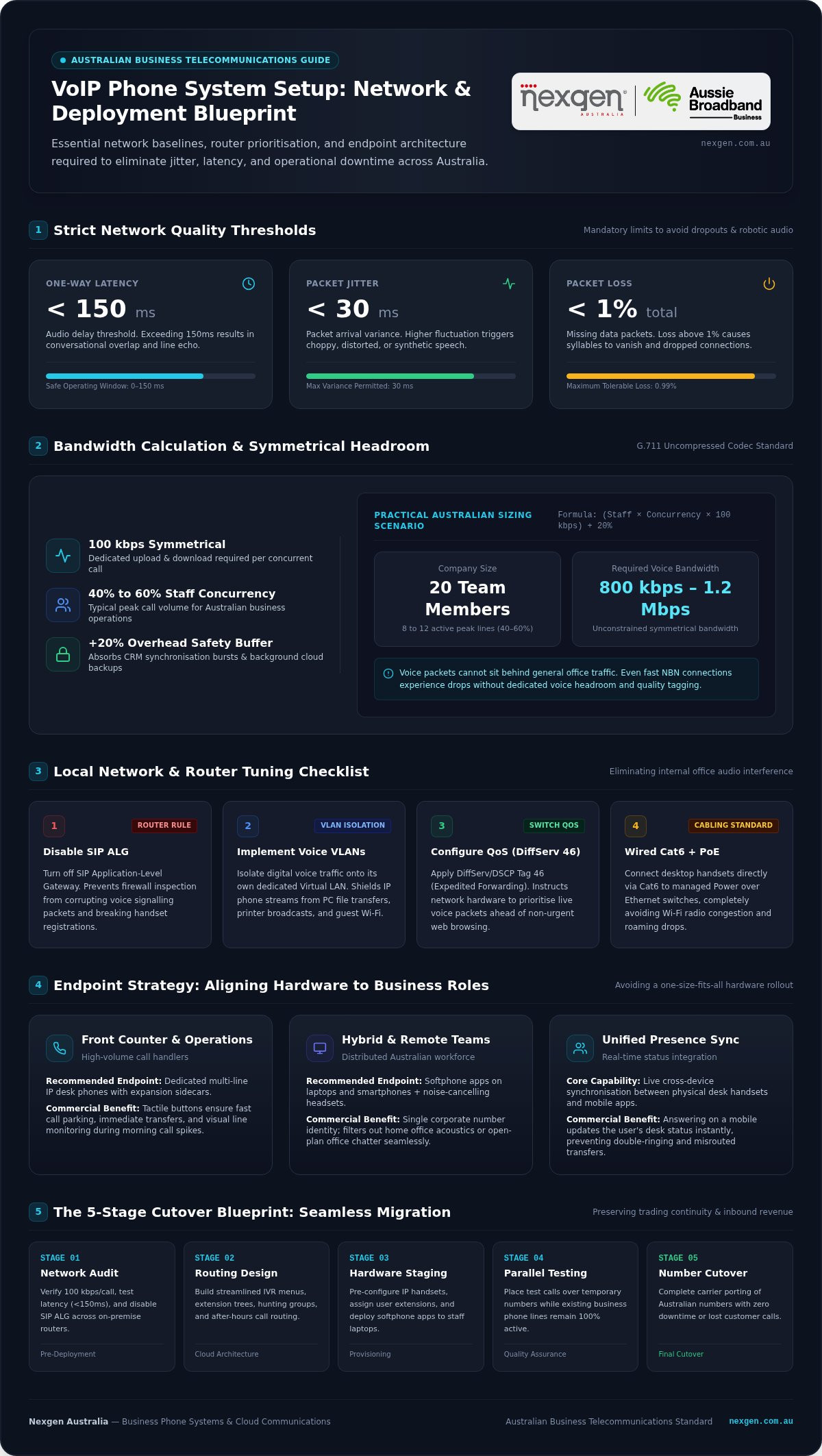
To calculate voice bandwidth accurately, allocate 100 kbps symmetrical speed (both upload and download) for every concurrent call when using standard G.711 uncompressed audio codecs. Most Australian businesses experience peak call volumes where 40% to 60% of their staff are on the phone simultaneously. For example, a business with 20 team members typically needs 800 kbps to 1.2 Mbps of dedicated, unconstrained symmetrical bandwidth.
Always add a 20% overhead buffer above your peak calculated call volume. This buffer absorbs momentary data bursts and maintains packet continuity when cloud backups, CRM syncs, or video conferences run concurrently during busy trading hours. Fundamental Voice over Internet Protocol technology depends on strict network metrics to deliver clear audio: one-way latency must sit under 150 milliseconds, jitter should remain below 30 milliseconds, and packet loss must stay below 1%.
Tuning Routers, Switches, and Voice VLANs
Even fast broadband connections will experience dropped calls or one-way audio if your router mishandles voice packets. Resolving these issues involves three key adjustments to your local office hardware:
- Disable SIP ALG: Turn off SIP Application-Level Gateway inside your commercial router. While originally intended to help packets pass through firewalls, it frequently inspects and corrupts voice signalling packets, causing failed handset registrations and random call drops.
- Implement Voice VLANs: Isolate all digital voice traffic onto a dedicated Voice Virtual Local Area Network (Voice VLAN). This separates IP phones from office PCs, printers, and guest devices, shielding voice packets from local broadcast traffic.
- Configure Quality of Service (QoS): Apply DiffServ/DSCP tags (Expedited Forwarding or tag 46) on your managed switches. This instructs your hardware to process voice data packets ahead of general web traffic.
- Prioritise Wired Cat6 Cabling: Connect desktop phones and workstations directly to managed Power over Ethernet (PoE) switches via structured Cat6 cabling. While Wi-Fi handles general web tasks well, office wireless spectrum is prone to radio interference and roaming drops that compromise voice stability.
Properly audited local networks give your cloud phone system a solid foundation, eliminating the common causes of audio jitter before migration begins.
Selecting Hardware, Softphones, and Cloud Phone System Architecture
Modernising your office communications does not mean forcing every employee onto a single device type. A well-designed voip phone system setup Australia wide aligns hardware endpoints directly with how your staff actually work. Balancing physical desktop hardware with mobile flexibility ensures that call quality stays consistent across both on-site and remote environments.
Comparing Dedicated IP Desk Phones and Softphone Apps
Different business roles demand distinct tools. While computer apps offer exceptional versatility, high-volume call handlers still need tactile controls:
- Receptionists and Operations Staff: Front-counter staff and practice managers benefit from dedicated multi-line IP desk phones with expansion sidecars. Physical buttons make active call transfers, parking calls, and monitoring colleague extensions quick and foolproof during busy morning rushes.
- Hybrid and Remote Workers: Hybrid personnel typically perform best using softphone apps installed on work laptops and mobile devices. Equipping these team members with commercial noise-cancelling headsets ensures open-plan background chatter or home noise stays off client calls.
- Unified Presence: Cloud platforms sync status indicators across desk phones and apps instantly. When a staff member answers a call on their mobile handset, their desk phone and desktop software immediately reflect an active status, preventing missed calls and accidental transfers.
Modernising Operations with Cloud PBX and Unified Communications
Ditching an on-premise PBX eliminates depreciating hardware racks, physical line rentals, and costly technician callout fees. Routing voice through enterprise cloud platforms moves full system control to secure Australian data centres. Administrators can deploy firmware updates, assign new extension numbers, and change user permissions in minutes via centralised web portals.
Modern cloud calling platforms connect directly to your customer relationship management (CRM) software. Inbound calls trigger automatic contact records on screen, and staff can click-to-dial straight from business records without keying numbers manually. Because outbound caller display settings must comply with ACMA phone numbering and porting rules, your cloud platform lets remote staff present your main corporate number from mobile apps, protecting their personal mobile details while presenting an established brand presence.
If you want to modernise your voice infrastructure without the complexity of self-management, you can explore enterprise-grade cloud phone systems pre-configured to your operational workflow by Nexgen Australia.
The 5-Stage Step-by-Step Blueprint for a Seamless VoIP Setup
Deploying cloud telephony without disruption requires a methodical rollout strategy. A successful voip phone system setup Australia wide follows a disciplined five-stage framework:
- Stage 1 (Audit): Cataloguing all advertised numbers, Direct Inward Dialling (DID) ranges, fax lines, and inbound caller pathways.
- Stage 2 (Configuration): Building users, digital extensions, ring groups, and voicemail boxes in the cloud administrative portal.
- Stage 3 (Number Porting): Lodging carrier transfer requests while setting up interim forwarding safeguards.
- Stage 4 (Testing): Verifying audio quality, device stability, and emergency routing protocols across all endpoints.
- Stage 5 (Cutover and Training): Switching live traffic during an off-peak window and onboarding staff on their physical and softphone apps.
Managing Australian Number Porting and Regulatory Standards
Porting failures usually occur when paperwork does not match carrier records precisely. To transfer numbers without rejection, extract a recent invoice from your current telecommunications provider showing the exact legal account name, account number, and service address. Most importantly, keep your existing services active; cancelling an account before the transfer completes releases your numbers back into the carrier pool, risking permanent loss.
Simple single-number transfers (Category A) generally settle within 1 to 5 business days. In contrast, complex transfers (Category C) involving 100-number DID ranges, multi-site accounts, or ISDN services require 3 to 6 weeks. Establishing temporary call forwarding from your legacy service during the final porting window ensures inbound customer calls never bounce or disconnect while carrier routing updates.
Executing Pre-Deployment Testing and Verification Protocols
Before pointing customer traffic to the new system, conduct exhaustive end-to-end testing across your network. Following structured NIST VoIP network and security considerations, test firewall traversal, registration persistence, and packet prioritisation under simulated peak-hour conditions. Verify that internal extension dialling, warm call transfers, and hunt groups operate consistently between desktop software, mobile apps, and physical handsets.
Legislation also requires Australian providers to support uninterrupted access to Triple Zero (000). Carry out a verified test call to ensure outbound emergency routing works, and confirm your exact physical site address appears correctly in the Integrated Public Number Database (IPND). Completing these checks gives leadership complete certainty before decommissioning old lines.
Designing Intuitive Call Routing, IVR Menus, and Automated Attendants
An intelligent call architecture turns your phone system into a streamlined front door for your business. Setting up physical hardware and checking network capacity solves only half the equation. Delivering an exceptional customer experience during your voip phone system setup Australia wide relies on routing callers to the right specialist with minimal friction.
Structuring Clear and Engaging Interactive Voice Response Menus
Nothing drives prospective clients away faster than a labyrinth of automated phone prompts. Limit your top-level Interactive Voice Response (IVR) menu to three or four clear choices, such as sales enquiries, account support, or general administration. Keep menu wording action-oriented by stating the department first and the keypad number second, for example: “For accounts and billing, press two.”
Always upload professionally voiced recordings rather than generic robotic audio files. A polished, warm tone immediately establishes commercial credibility. In addition, provide an immediate escape option, such as pressing zero, so callers facing time-sensitive issues can speak directly to a live operator without listening to repeating prompts.
Configuring Team Ring Groups, Queues, and Redundancy Routing
Distributing call traffic effectively prevents staff burnout while slashing customer hold times. Cloud platforms provide versatile ring strategies to balance daily workloads across your team:
- Ring Strategies: Choose simultaneous ringing for urgent inbound sales lines, or use round-robin and skills-based routing for support desks to spread call volume evenly across active operators.
- Automated Schedules: Program clear time-based schedules that switch your routing automatically between standard trading hours, public holidays, and weekend coverage.
- Voicemail-to-Email: Convert missed caller audio messages into MP3 attachments and automated text transcripts sent straight to team inboxes. This lets on-call managers triage customer requests instantly from their smartphones.
- Failover Continuity: Build automatic emergency diversion rules that instantly reroute incoming calls to designated mobile devices if your local office encounters a power outage or broadband interruption.
- Queue Callbacks: During sudden call spikes, activate callback options that hold the caller’s place in line, allowing them to hang up without losing their queue priority.
Carefully mapping your call trees ensures your business never misses a valuable enquiry. To design a tailored caller journey that fits your operational requirements, speak with an experienced voice specialist today.
Managed Deployment vs Self-Setup: Choosing the Right Path for Your Business
While self-service portals tempt business owners with promises of simple DIY savings, managing your own voice deployment often introduces unexpected operational friction. Deciding how to approach your voip phone system setup Australia wide comes down to whether your team has the time and technical capacity to audit firewalls, troubleshoot packet paths, and coordinate carrier porting schedules.
The Operational Risks of Self-Managed VoIP Deployments
Unmanaged voice rollouts regularly pull operations managers and key personnel away from their core commercial responsibilities. Tracking down blocked UDP ports, resolving rejected carrier transfer paperwork, and troubleshooting intermittent one-way audio demands hours of trial and error. When internal staff spend days fixing phone glitches, initial hardware savings evaporate quickly.
Self-managed setups also carry serious compliance and continuity risks. Overlooking router security settings can expose endpoints to unmonitored toll fraud, while failing to register emergency location data correctly breaches mandatory Australian standards. If an unexpected cutover glitch knocks your lines offline, your business absorbs the full financial impact of missed client enquiries.
Why Australian Organisations Partner with Nexgen Australia
A professionally managed deployment eliminates technical risk through turnkey staging and pre-provisioned hardware. Desk phones arrive fully configured to your users, extension numbers, and custom dialling rules, connecting straight to secure Australian cloud voice infrastructure as soon as they are plugged into your network switches.
Partnering with Nexgen Australia gives your organisation access to an established telecommunications specialist with a national footprint built since 2009. Backed by Aussie Broadband Limited, Nexgen Australia delivers resilient office phone systems and authorised Cisco Webex Calling deployments engineered around your specific operational workflows. Your staff get unified access across desk phones, computer apps, and mobile devices without complicated manual setups.
You also gain the ongoing backing of local Australian engineering support rather than navigating overseas call centres or waiting on hourly break-fix technicians. As your company grows, updating call routes, adding new user licences, or equipping new office branches requires only a brief call to your dedicated support team, keeping your business communications stable, compliant, and ready for long-term expansion.
Taking the Next Step Toward Resilient Business Calling
Moving away from legacy phone lines gives your organisation genuine operational flexibility, but lasting call quality always starts with proper planning. By calculating bandwidth headroom, safeguarding numbers during porting, and structuring clean call flows, you eliminate the common pitfalls of unmanaged rollouts. A well-executed voip phone system setup Australia wide ensures your remote, mobile, and desk-based teams stay reachable without missing a single customer enquiry.
You don’t have to manage this technical shift alone. Supporting thousands of Australian business phone systems nationwide since 2009, Nexgen pairs practical local engineering with enterprise-grade telephony. As an authorised Cisco Webex Calling specialist partner backed by Aussie Broadband Limited (ASX: ABB), we handle every detail from hardware pre-configuration to carrier cutover. Upgrade your business communications with a managed VoIP setup from Nexgen Australia and equip your staff with a reliable, future-proof voice platform today.
Frequently Asked Questions
How long does a business VoIP phone system setup typically take in Australia?
A business VoIP deployment typically takes between one and six weeks depending on your carrier porting requirements. Simple installations using new digital numbers or single-line transfers take roughly 1 to 5 business days. In contrast, migrating complex 100-number DID ranges or legacy ISDN services generally requires 3 to 6 weeks under Australian carrier porting guidelines. Hardware pre-configuration and cloud call routing design usually run parallel to this porting window to eliminate operational delays.
Can our business keep our existing Australian phone numbers when switching to VoIP?
Yes, Australian businesses hold a statutory right to keep their existing numbers under ACMA Local Number Portability rules. You can port your local geographic numbers, 1300 numbers, and multi-line DID blocks to your new provider. To ensure a smooth transfer, keep your current phone account fully active until porting finishes. Losing carriers cannot block transfers due to commercial disputes, making number retention completely standard during a voip phone system setup australia wide.
What internet speed and bandwidth do we need to operate business VoIP reliably?
Your network requires approximately 100 kbps of symmetrical bandwidth per simultaneous phone call, plus a 20% safety buffer. For an office where 10 employees frequently talk on the phone at the same time, you need around 1.2 Mbps of unconstrained upload and download speed dedicated solely to voice traffic. Standard NBN connections easily cover these speeds, provided your router has Quality of Service rules configured to prioritise voice packets over heavy office downloads.
What happens to our business phone calls if our office internet connection drops out?
Inbound calls continue flowing uninterrupted because modern cloud phone platforms do not host call logic on your physical premises. If an office internet outage occurs, cloud systems instantly activate automated disaster recovery rules. Inbound customer calls redirect immediately to employee mobile apps, alternative branch queues, or external numbers. Your team can continue answering calls and managing customer enquiries over mobile cellular connections without clients ever sensing a local office problem.
Do we have to buy new desk phones, or can our team use existing computers and mobiles?
You do not need to purchase physical desk phones for every team member. Cloud platforms operate across desktop softphones, laptop headsets, and mobile smartphone apps in unison. Many businesses provide physical IP desk phones only to receptionists and front-counter staff who manage high call volumes, while giving hybrid or mobile workers app-based access on their laptops and smartphones. This blended approach keeps hardware expenses low without compromising team accessibility.
Is VoIP setup complicated for staff working remotely or across hybrid arrangements?
Remote and hybrid onboarding is straightforward because cloud voice applications require only an active internet connection. Staff simply download the enterprise communication app, such as Cisco Webex Calling, onto their work computer or mobile device and sign in with their credentials. Their extension, internal speed dials, and business caller identity appear immediately. Remote employees make and receive calls showing your primary business number without having to configure complex home network hardware or firewalls.
What is the main difference between setting up a hosted cloud PBX and on-premise VoIP?
A cloud PBX hosts all call routing, voicemail, and system intelligence in secure off-site data centres, whereas on-premise VoIP requires physical server hardware in your office. Cloud systems eliminate expensive on-site maintenance contracts, physical line rentals, and rack equipment. They also allow administrators to make instant user changes online. On-premise setups demand manual internal management and technician callouts, which makes cloud telephony far more practical for small and mid-sized Australian commercial operations.