


What if your business phone system could do more than carry calls over the internet? For Australian businesses, b2b voip solutions australia can help manage how calls are routed, how staff stay connected across work locations and how customers reach the right person. The value depends on how well the system fits your operations, not simply on replacing one type of phone line with another.
It’s reasonable to have questions before changing phone services. VoIP systems can include features such as call routing, voicemail and calling from desktop or mobile devices, but the options vary. A well-planned transition should also account for how staff and customers will reach your business during implementation.
This guide explains business VoIP in plain English and clarifies how it differs from related phone systems. You’ll learn how it can support office, remote and growing teams, and what to assess before speaking with a provider. Consider your internet connection, calling needs, existing handsets, essential features and the steps needed to reduce disruption when changing services.
Key Takeaways
- Business VoIP describes how calls travel. B2B describes the business context in which the phone system is used.
- Understand the separate roles of your internet connection and the system that manages calls before comparing options.
- Match features such as call routing and voicemail-to-email to the tasks your team needs to handle.
- Before planning a change, map your users, devices, call flows and existing phone arrangements.
- Explore b2b voip solutions australia that fit your requirements, including tailored VoIP and cloud phone systems from providers such as Nexgen.
Australian B2B VoIP Solutions: What’s Included?
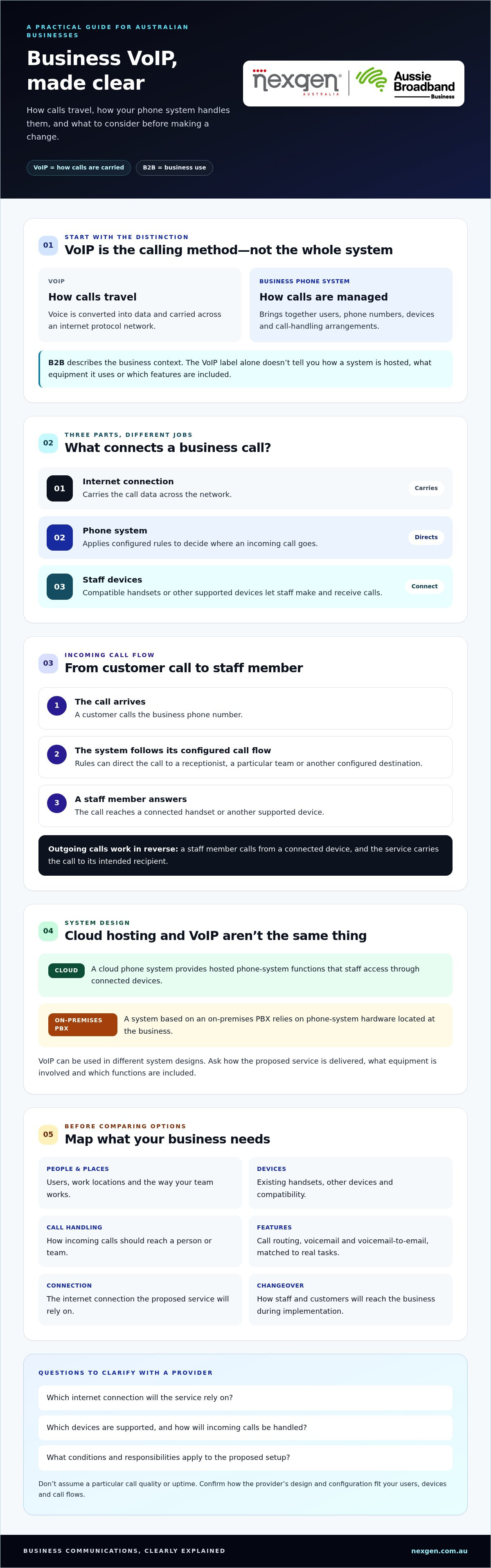
Business VoIP carries voice calls over an internet protocol network. “B2B” describes the business use of the service, while “VoIP” describes how calls are carried. This is the starting point for understanding b2b voip solutions australia: VoIP is the calling method, while a complete business phone system also brings together users, phone numbers, devices and call handling.
That distinction matters when comparing providers. An internet-based calling service on its own doesn’t explain how calls reach your team, which devices staff can use or how incoming calls are managed. System design and included features depend on the provider and the option your business selects. For a neutral technical overview, see Voice over Internet Protocol (VoIP).
How is business VoIP different from a traditional phone service?
A traditional phone service carries calls through conventional telephone network connections. VoIP converts voice into data and sends it across an internet protocol network. That changes how calls are transported, but it doesn’t mean every VoIP setup is hosted in the cloud or uses the same infrastructure. The provider’s design determines how the service is delivered and which phone-system functions are included.
When comparing options, look beyond the label. Ask how calls will be carried, what equipment or applications staff will use, and which call-handling features are part of the proposed system. Two services described as VoIP may be configured differently.
What does a B2B VoIP solution typically connect?
A business VoIP deployment can connect staff accounts and business phone numbers with compatible calling devices and agreed call-handling arrangements. These may include desktop handsets, which let employees make and receive calls using a physical desk phone. Depending on the configuration, the system can also determine where an incoming call goes.
For example, a business might want calls to reach a receptionist first, then be passed to the relevant team member. A remote employee may need a compatible device to make business calls away from the office. The right setup depends on your users, work patterns and preferred call flows, so confirm device compatibility and functionality with the provider.
If you’re mapping those needs, the small business phone systems guide can help you consider how the wider phone system should fit your team. Assess the complete service, not just the underlying calling technology.
How B2B VoIP solutions connect staff, devices and business calls
A business VoIP call travels from a staff member’s compatible device, through the phone service, to its destination. The internet connection carries the call data. The phone system manages what happens to the call, such as which person or team should receive it. These parts work together, but they do different jobs.
Here’s a simplified example of an incoming customer call:
- 1. The call arrives. A customer calls a business phone number.
- 2. The phone system applies the call flow. Its configured rules direct the call, for example to a receptionist or a particular team.
- 3. A staff member answers. The call reaches a connected handset or other supported device, and the conversation is carried over the service’s network.
For an outgoing call, the process works in reverse: a staff member calls from a connected device, and the service carries the call to the intended recipient. The exact call path depends on how the provider has designed and configured the system.
What happens when a staff member makes or receives a VoIP call?
Call routing is the phone system’s way of directing incoming calls to a destination. Depending on the setup, that might mean sending a call to a nominated person, a team or another configured destination. The internet connection provides the path for call data, while routing rules determine where the call goes.
Keeping those roles distinct helps you assess what a proposal covers. Ask which internet connection the service relies on, what devices are supported, and how incoming calls will be handled. Don’t assume a particular call quality or uptime. Ask the provider what conditions and responsibilities apply to your proposed setup.
How do cloud phone systems fit into business VoIP?
A cloud phone system provides hosted phone-system functions that staff access through connected devices. By contrast, a system based on an on-premises PBX relies on phone-system hardware located at the business. VoIP can be used in different system designs, so the term alone doesn’t tell you where the system is hosted or what equipment is involved.
Providers can differ in architecture, included features, deployment approach and responsibility for different parts of the service. Compare the features and support arrangements that matter to your team. A business VoIP services overview can offer another perspective on features to compare. An Australian provider can explain how its proposed design fits your business. For example, Nexgen’s VoIP and cloud phone systems may be worth exploring as you assess your requirements.
What can B2B VoIP solutions help Australian business teams do?
B2B VoIP can help organise business calls around how your people work, whether they share an office, split time between home and the workplace, or handle calls across several teams. The useful question isn’t how many features a system has. It’s whether its call handling and devices suit your actual workflows. The right setup varies between businesses.
Communication need: Calls should reach the right person or team.
Relevant capability: Call routing.
Ask the provider: How can incoming calls be directed, and what can be changed if team responsibilities shift?
Communication need: Staff need to check messages when they can’t answer.
Relevant capability: Voicemail-to-email, where available.
Ask the provider: How are voicemail messages delivered, and who can access them?
Communication need: Staff work across office and remote settings.
Relevant capability: Calling through supported devices.
Ask the provider: Which handsets, computers or mobile devices are supported by this platform and deployment?
Communication need: Calling requirements change as the team grows.
Relevant capability: Scalable line capacity.
Ask the provider: How can capacity be adjusted, and what changes would that involve?
How can VoIP support office, hybrid and remote teams?
An office-based team may prefer desktop handsets, while hybrid staff might need to make business calls from the office or another work location. A remote team member may use a computer or mobile device if the chosen platform supports it. Device options aren’t universal, so confirm compatibility and how each device fits the deployment. Start with where staff work and how they need to handle calls, rather than assuming everyone needs the same setup.
Which call-handling features may matter to a business?
Call routing can direct a customer to the appropriate person or team, while voicemail-to-email can help staff review messages from their inbox. These capabilities are useful only if they suit your workflow and are included in the proposed service. Check how each feature is configured and managed, and confirm any other functions you need with the provider.
Nexgen’s business offering categories include flexible call handling and scalable line capacity. For businesses comparing b2b voip solutions australia, these are useful starting points for a practical conversation: what happens to calls when a team member is unavailable, and how might calling capacity need to change as the business grows?
How should a business assess its readiness for VoIP?
Start by documenting how your phone service works today and what your team needs from it. This gives you a practical brief to discuss with a provider, without committing to a particular system or migration plan. For businesses considering b2b voip solutions australia, readiness is less about technical expertise and more about understanding users, call flows, devices and existing arrangements.
What should you review before exploring a VoIP system?
Build a simple picture of your current phone use. Include the details that could affect call handling or how a change is introduced:
- Users and numbers: Record who needs to make or receive business calls, which numbers the business uses and who is responsible for them.
- Call flows: Note where customer calls go, who answers first, which teams receive transfers and what should happen when someone is unavailable.
- Devices and dependencies: List the desk handsets and other devices staff use, along with any existing phone-system equipment or processes that depend on the current service.
- Work patterns: Identify which roles work in the office, remotely or across both, and what devices they need in each setting.
- Expected changes: Consider planned staffing, team or call-capacity changes that could affect the system’s requirements.
For example, if customers currently call a main number before speaking to a particular team, document that route and what staff do when the team is busy or unavailable. This keeps customer-facing needs in view while you compare options.
What questions should you ask a VoIP provider?
Use your notes to clarify what a proposed service includes and how responsibilities are shared. Ask the provider:
- How will deployment be planned, and what will staff need to do as the new service is introduced?
- How will existing numbers be handled, and what steps or dependencies could affect the change?
- Which features, devices and any required integrations are included in the proposal?
- How will you assess whether the business’s internet connection is suitable for the proposed service?
- Who is responsible for each part of the service, and what support arrangements apply?
- How are possible service interruptions considered and communicated during a transition?
Ask for the proposed approach and responsibilities to be explained clearly. Migration requirements depend on your existing arrangements and the provider’s design. Don’t assume the change will be disruption-free or that every number, device or feature transfers in the same way.
Once you’ve mapped your requirements, discuss your business phone system needs with Nexgen to explore suitable VoIP and cloud phone system options.
How Nexgen can help businesses explore B2B VoIP solutions
Once you’ve mapped your users, devices and call flows, compare phone systems against your actual requirements. Nexgen Australia provides tailored VoIP and cloud phone systems for Australian businesses, including Cisco Webex Calling phone systems. An initial discussion can explore how your business handles calls and which options may suit, without assuming one platform is right for every organisation.
What can Nexgen support during a business VoIP deployment?
Nexgen provides setup and deployment support for Cisco Webex Calling. Its business offering categories also include flexible call handling, desktop handset integration and scalable line capacity. These can be relevant if you want calls directed according to your workflows, prefer physical desk phones for some staff, or need to consider how calling capacity may change over time.
The right configuration depends on your existing phone arrangements and the way your team works. Before selecting a system, clarify which users need access, which devices are suitable, how calls should be handled and what capacity your business requires. Cisco Webex Calling is one option to consider, but it may not suit every business. Compare it with other suitable VoIP or cloud phone system options against your requirements.
What is a sensible next step for your business?
Prepare a short summary of your current setup before speaking with a provider. Include the business numbers you use, who answers calls, where calls need to go, the devices staff rely on and any changes you anticipate. Note questions about connectivity, number handling and how staff would move to a new system.
That preparation gives a provider a clearer basis for discussing suitable b2b voip solutions australia options. Ask them to explain what’s included, how their proposed system would handle your call flows and which deployment responsibilities sit with each party. You can then assess the proposal against your priorities without making assumptions about features or implementation outcomes.
If you’re ready to explore the options, talk with Nexgen about your business VoIP requirements. A discussion about your users, call flows and phone arrangements can help clarify which VoIP or cloud phone system options may be worth considering.
Make your next phone system decision with confidence
Business VoIP carries calls over an internet protocol network, while a complete phone system also brings together users, devices and call handling. Before comparing b2b voip solutions australia, use the needs you’ve mapped to assess which system design and features suit your team.
Nexgen provides tailored business VoIP and cloud phone system solutions, including Cisco Webex Calling phone systems. Assess Webex Calling against your requirements rather than assuming it will suit every organisation. Compare any proposal with your users, call flows, devices and deployment needs.
With your priorities clear, you can have a focused conversation about suitable options. Talk to Nexgen about a phone system for your business when you’re ready to explore what may work for your team.
Frequently Asked Questions
What are B2B VoIP solutions?
B2B VoIP solutions are business calling services that carry voice calls over an internet protocol network. “B2B” refers to business use, while “VoIP” describes how calls are carried. A complete business phone system may also bring together users, phone numbers, devices and call handling. Options vary by provider, so check what the proposed service includes rather than assuming every VoIP solution works the same way.
How does VoIP work for a business?
VoIP turns a caller’s voice into data and carries it across an internet protocol network to the other person. A staff member makes or answers a call using a compatible handset or other supported device. The business phone system can apply configured call-handling rules, such as directing an incoming call to a particular person or team. The specific call path depends on the service design and provider.
Can a business use existing desk phones with VoIP?
Possibly, but compatibility depends on the desk phone model, VoIP platform and deployment. Don’t assume an existing handset will work simply because it’s a business phone. Before switching, give the provider a list of your handsets and ask which can be used, whether any configuration or additional equipment is required, and what alternatives are available if a device isn’t compatible. This helps clarify equipment needs early.
Is business VoIP suitable for a small Australian business?
Business VoIP can suit a small Australian business if the service fits its call flows, team, devices and connectivity. A small team with a shared main number may have different needs from a team with remote staff or separate customer-facing groups. Start by listing who needs to make and receive calls and how customers should reach them, then ask a provider to assess suitable options.
What happens to business calls if the internet connection is interrupted?
If a VoIP service depends on the affected internet connection, calls using that connection may be interrupted or unavailable until connectivity is restored. The impact and any alternatives depend on the system design and provider arrangements. Ask how the service behaves during an interruption, whether calls can be directed elsewhere, and what steps your staff should follow. Don’t assume a particular continuity option is included without confirming it.
How is a cloud phone system different from VoIP?
VoIP describes how voice calls are carried over an internet protocol network. A cloud phone system describes where phone-system functions are hosted and accessed. Cloud phone systems use hosted functions with connected devices, while some VoIP deployments may rely on phone-system equipment at the business. The terms are related, but they aren’t interchangeable. Ask a provider to explain the proposed architecture, included functions and responsibilities.
Does Nexgen provide Cisco Webex Calling phone systems?
Yes. Nexgen supplies and integrates Cisco Webex Calling phone systems for Australian businesses, with setup and deployment support. Nexgen also provides tailored business VoIP and cloud phone system solutions. Webex Calling is one option to consider, not an automatic fit for every organisation. Share your users, call flows, devices and priorities with a provider to discuss whether it suits your requirements and what the proposed deployment includes.