


What if staff could answer business calls on a mobile without relying on ordinary mobile calls? That’s the practical appeal of mobile VoIP, but the app works best as part of a clear plan for handling calls. If you’re researching mobile voip business australia options, it helps to understand how app-based calling differs from a mobile carrier call and what your team needs to make calls away from the office.
Call quality and a consistent caller experience are common considerations for teams working across different locations. Mobile VoIP uses an internet connection to connect calls through a business phone system, so performance depends on the connection and the system setup. The app can help staff stay connected to business calling, but you’ll also need to decide how calls are routed, who is available to answer and what happens when someone can’t pick up.
This guide explains how mobile VoIP works, what devices and connections your team needs, and what to check before choosing a setup. It also covers a practical configuration process and when a mobile app should be part of a broader business phone system rather than a standalone calling tool.
Key Takeaways
- Understand how mobile VoIP differs from ordinary mobile carrier calls and what that means for your business number.
- Assess staff needs, devices, call flows and connection availability before setup.
- Follow a setup process that separates provider or administrator tasks from what staff do on their devices.
- Check what can affect call quality and which device settings to review when staff work away from the office.
- Decide when mobile VoIP in Australia needs a broader phone system to provide consistent call handling for your team.
What is mobile VoIP for business, and how does it work in Australia?
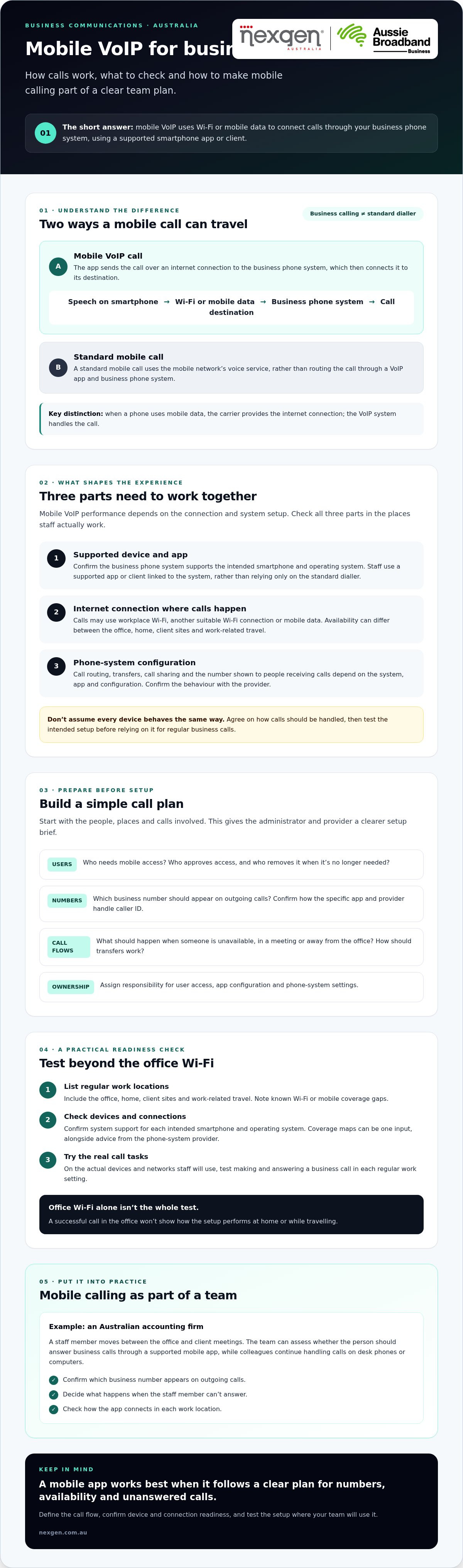
Mobile VoIP for business means making voice calls through a business phone system over the internet, using a supported smartphone and app or client. Unlike a standard mobile call, which uses a mobile network’s voice service, a VoIP app sends calls over an internet connection such as Wi-Fi or mobile data. When a phone uses mobile data, the carrier provides the internet connection, while the VoIP system handles the call.
This distinction affects call management as well as how calls travel. Depending on the phone system and its configuration, staff may be able to use a business number and follow the organisation’s call-handling arrangements. Features and the number shown to the person receiving a call can vary between apps and providers. Confirm how they work with the specific system you’re considering. This is an important check when choosing mobile VoIP for your Australian business.
How a mobile VoIP call travels
During a VoIP call, the smartphone converts speech into digital data and sends it over Wi-Fi or mobile data to the business phone system. The system then connects the call to its destination. Staff need a supported app or client linked to that system, rather than relying only on the phone’s standard dialler. For a foundational overview, see Mobile VoIP (mVoIP).
A call might use workplace Wi-Fi when staff are in the office, or another suitable Wi-Fi connection or mobile data when they’re elsewhere. The app, phone settings and network connection all affect the experience. Test the intended setup before relying on it for regular business calls.
What staff can use mobile VoIP for
Mobile VoIP can let staff answer business calls when they’re away from a desk, without making a personal mobile number the main point of contact. Depending on the configuration, mobile users may also work alongside colleagues using desk phones or computers. Call sharing, transfers and routing depend on the business phone system, so define the call flow instead of assuming every device behaves the same way.
For example, a small Australian accounting firm might have a staff member moving between the office and client meetings. The team could assess whether that person should answer calls through a supported mobile app while colleagues continue handling calls from desk phones or computers. The firm would need to confirm which business number appears on outgoing calls, what happens when the staff member can’t answer, and how the app connects in each location. Planning these details makes mobile calling part of an organised phone setup rather than a separate channel staff must manage themselves.
How to prepare your Australian business for mobile VoIP
Start by identifying who needs access, which devices and locations they’ll use, and how business calls should be handled. Check that the phone system supports the staff devices and that Wi-Fi or mobile data is suitable where calls are likely to happen. Call quality depends on the connection and system configuration, so test the setup rather than relying on assumptions.
Bring together the people responsible for the phone system and day-to-day call handling. Agree who will manage user access, app configuration and phone settings, and decide what staff should do if they can’t answer a call.
Check connectivity and device readiness
List the places where staff regularly make or receive business calls, such as the office, home, client sites and work-related travel. Check Wi-Fi and mobile data availability in those locations, including known coverage gaps. Use standard telecommunications coverage maps as one input, alongside advice from your phone-system provider.
Confirm that the system supports each intended smartphone and operating system. Then test on the actual devices and networks staff will use. Check basic tasks, such as making and answering a business call in each regular work setting. A successful test on office Wi-Fi alone won’t show how the service performs at home or while travelling.
Map numbers, users and call handling
List the staff who need mobile access, the calls they handle and the business numbers they need to use. Record how calls should be directed when someone is unavailable, in a meeting or away from the office. This gives the administrator and provider a clear setup brief.
- Users: Identify who needs access and who approves or removes it.
- Numbers: Confirm which number should appear on outgoing calls.
- Call flows: Agree what happens to unanswered calls and how transfers should work.
- Administration: Assign responsibility for app configuration and phone-system settings.
Ask the provider to confirm number presentation, transfers and routing behaviour before rollout. Nexgen Australia can help businesses assess business VoIP and cloud phone systems as part of a broader mobile calling setup for mobile voip business australia.
How to set up mobile VoIP for your business, step by step
Set up mobile VoIP by agreeing how calls should work, confirming that the phone system and devices are suitable, configuring access, then testing with a small group of staff. Settings and app steps vary by phone system and mobile client, so follow the provider’s instructions instead of assuming every setup works the same way.
- Define what your team needs. List the staff who need mobile calling, the business numbers they’ll use and the calls they handle. Agree how calls should be routed, what should happen when someone can’t answer, and whether mobile users need to work alongside colleagues on desk phones or computers.
- Confirm the system and device requirements. Choose a business VoIP or cloud phone system that supports the mobile use you’ve identified. Check supported devices and operating systems with the provider or administrator before asking staff to install anything.
- Configure users and call handling. The provider or administrator should set up the relevant users and access, then apply the agreed numbers and call flows. Confirm how business numbers appear on outgoing calls and how transfers, voicemail and unanswered calls should work.
- Install and sign in. Staff should install the approved mobile client using the provider’s instructions and sign in with the access details supplied by the business. Keep login details private and ask staff to report sign-in or permission issues to the nominated administrator.
- Run a small pilot and gather feedback. Start with a limited group whose work reflects the team’s normal calling needs. Test the agreed workflows, collect feedback and resolve configuration or connectivity issues before extending access to more staff.
Configure the business phone system and mobile access
Set out responsibilities clearly. The provider or administrator handles system configuration, including user access, numbers and call flows. Staff install and sign in to the approved app, check relevant device permissions and learn the agreed way to make and answer business calls. The administrator should check the setup against the requirements before staff use it for regular calls.
For mobile voip business australia deployments, app installation is only one part of the setup. The phone system needs to reflect how your business wants calls handled, and the app must be supported by the chosen service.
Test calls before rolling mobile VoIP out
During the pilot, test incoming and outgoing business calls over office Wi-Fi and mobile data. Check number presentation, transfers and voicemail against the agreed call flow. Ask staff to note where calls are unclear, fail to connect or behave unexpectedly, including the network and location they were using.
Use these observations to work out whether an issue may relate to connectivity, device settings or system configuration. Make adjustments with the provider or administrator, then retest before expanding access. A staged rollout gives your business a chance to address practical issues before they affect more staff.
How to manage mobile business VoIP calls, quality, and security
Mobile VoIP can help staff handle business calls away from a desk, but call quality depends on the connection, device and system configuration. Clear team processes matter too. Staff need to know how to access the app, who to contact when something goes wrong, and what to do if a device is lost or their role changes.
Don’t assume every dropped or unclear call points to a phone-system fault. First identify where the issue occurs, then compare results across devices, locations and connection types. This gives your administrator or provider useful details to investigate.
Respond to call quality and connectivity issues
When someone reports a problem, gather a few details before escalating it. Ask whether it happened on Wi-Fi or mobile data, where the staff member was calling from, and whether the issue affects one device or several users. Record what the caller experienced, such as poor audio, delay or a call that wouldn’t connect.
Where practical, compare calls across networks and locations. If an issue affects just one device, its settings or the mobile client may need checking. If several users report similar problems on the same network, share that pattern with the relevant internet or phone-system provider. Avoid changing several settings at once, as it can make the cause harder to identify.
For recurring issues, give the provider the test details and explain what you’ve already checked. A clear record helps distinguish a local connection problem from a wider configuration issue and gives your business a useful basis for deciding what to test next.
Set sensible mobile access practices
Agree who may use business calling and assign responsibility for managing access. When someone changes roles or leaves the organisation, include their mobile VoIP access in the usual account-change process. Ask the phone-system provider to explain the account controls and security settings available for the specific system, as these can vary.
- App access: Tell staff which approved client to use and where to get help with sign-in issues.
- Device changes: Ask staff to notify the nominated administrator before moving access to another device.
- Lost devices: Provide a clear reporting contact and explain what staff should do promptly if a device with business access goes missing.
- Unexpected access: Make sure staff know how to report activity they don’t recognise so the administrator can follow up.
These steps help your business manage mobile calling consistently without assuming every system offers the same controls. For details on how mobile access can fit into a wider setup, see Nexgen Australia’s business VoIP systems.
When mobile VoIP belongs in a broader business phone system
Mobile VoIP is often a better fit within a broader business phone system when staff need to share business numbers, follow coordinated call flows or work across mobile devices, desk phones and computers. A standalone mobile calling option may suit simpler needs. The right choice depends on who handles calls, how they should be routed, which devices staff use and the quality of their connections.
| Consideration | Standalone mobile calling | Mobile access within a business phone system |
|---|---|---|
| Business number handling | Calls may be tied to an individual mobile service or number. Confirm what number recipients see. | Business-number presentation can be configured as part of the phone system. Confirm how it works for your chosen setup. |
| Call routing | Call handling may be limited to the options available through the mobile service. | Calls can follow the system’s configured call flows. Check how unanswered calls and transfers are handled. |
| Administration | Access and settings may need to be managed across individual mobile accounts or devices. | User access and phone settings can be managed through the broader system, depending on its capabilities. |
| Team workflows | May suit staff who mainly need an individual calling option. | May suit teams coordinating calls across mobile users, desk phones and computers. |
Choose the setup that matches your team
Start with the simplest option that meets your call-handling needs. If staff make occasional business calls and don’t need shared routing, standalone mobile calling may be enough. If several people need to answer the same business number, coordinate transfers or follow consistent workflows, assess mobile access as part of a business phone system.
Consider whether staff also need desk phones or computer calling. A cloud phone system may be worth assessing if your team works across different locations and devices. Don’t assume every system supports the same app features or call behaviour. Confirm the details with the provider before choosing.
Plan a practical next step with a provider
Prepare a short brief for your provider discussion. Include who needs access, which devices they use, what numbers they handle, where they’ll make calls and how calls should flow. Note any connectivity concerns and explain how mobile calling needs to work with desk phones or computers. This gives the provider a useful basis for assessing a suitable configuration for mobile voip business australia.
For more help comparing options, read the Small Business Phone Systems Australia buyer guide. Nexgen Australia supplies business VoIP and cloud phone systems, offering seamless calling across mobile devices, computers and desk phones. Explore Nexgen’s business phone systems.
Build a mobile calling setup your team can rely on
Mobile VoIP can help staff stay connected to business calls away from their desks, but it works best when it supports a planned approach to call handling. Start by confirming which staff, devices and business numbers need support, then agree how calls should be routed and managed.
Before a wider rollout, test the setup on the Wi-Fi and mobile data connections your team will actually use. Call quality can vary with connection conditions, so a small pilot gives you a chance to spot issues and refine the configuration. For mobile voip business australia, the key decision is whether staff need simple mobile calling or coordinated access within a broader business phone system.
Nexgen provides business VoIP and cloud phone systems for Australian organisations, including Cisco Webex Calling, with communication across mobile devices, computers and desk phones. Talk to Nexgen about business phone systems to discuss an approach for your team.
Frequently Asked Questions
What is mobile VoIP for business?
Mobile VoIP for business lets staff make and receive business calls over the internet using a supported smartphone and app or client connected to a business phone system. It can help employees handle calls away from a desk, depending on the system setup and available connection. If you’re comparing mobile voip business australia options, check how the system handles business numbers, call routing and access across staff devices.
Can I use my existing business number with mobile VoIP?
In many cases, a business number can be used with mobile VoIP, but availability depends on the phone system, provider and configuration. Ask whether your number can be connected or transferred, what people will see when staff make outgoing calls, and how incoming calls will reach mobile users. Confirm these details before rollout, especially if the number is already used on signage, websites or customer records.
Does mobile VoIP work over mobile data?
Yes. A mobile VoIP app can carry calls over mobile data as well as Wi-Fi, if the chosen system and device support it. The call uses an internet connection, so coverage and connection conditions can affect whether it connects and how clear the audio sounds. Test the app on the mobile network staff expect to use, including in their regular work locations, before making it part of everyday call handling.
Is mobile VoIP reliable for a small business?
Mobile VoIP can suit a small business, but reliability depends on the internet connection, device and phone-system configuration. Calls may be affected by weak Wi-Fi or mobile data, network changes or device settings. Test incoming and outgoing calls in the places staff work, then trial transfers and voicemail if they’re part of your call flow. A small pilot can reveal practical issues before you extend access across the team.
How do I set up mobile VoIP for my business?
Start by identifying who needs access, which devices they’ll use and how business calls should be handled. Confirm that the selected phone system supports those devices, then ask the provider or administrator to configure users, numbers and call flows. Staff can install and sign in to the approved mobile client using the supplied instructions. Test calls over Wi-Fi and mobile data with a small group, gather feedback and resolve issues before a wider rollout.
Is mobile VoIP different from calling through a mobile carrier?
Yes. A standard mobile call uses your mobile provider’s voice service. A mobile VoIP call uses an app or supported client to send voice over an internet connection, which may be Wi-Fi or mobile data. If it uses mobile data, the carrier supplies the data connection, but the business phone system handles the VoIP call. Features, business-number display and call handling depend on the system and its configuration.