


Replacing an office PBX is a business migration, not simply a hardware swap. If you’re searching “replace office PBX Australia”, the key concern is likely how to move your calls and numbers without disrupting the business or missing something your team relies on.
That concern is well founded. Australia’s legacy copper and ISDN networks are being progressively shut down, and a phone system can also be connected to devices such as EFTPOS machines, alarms or lift phones. Replacing the PBX means checking the wider setup, not just choosing new handsets.
This guide explains how to assess your existing system, compare options such as SIP trunking, hosted cloud PBX and on-premise replacements, and plan a controlled transition. You’ll learn what to check before choosing, how to prepare for number porting, and how to assign migration tasks and test call continuity. With a clear plan, your business can choose a system that fits its infrastructure and workflows while supporting the way your team works now and as it changes.
Key Takeaways
- Review your PBX when it no longer fits your operational needs or future plans, and work out whether you need a simple equipment refresh or a broader change.
- Compare retaining a compatible PBX with VoIP, hosted PBX and cloud calling to find an option that suits your call handling, team locations and management needs.
- If you’re researching “replace office pbx australia”, use a migration plan to clarify requirements, responsibilities and the checks needed before switching.
- Check your existing endpoints, integrations and call flows early so the replacement supports the way your staff work.
- Prepare your requirements before discussing business VoIP, cloud phone systems or hosted solutions with a potential provider like Nexgen Australia.
When should an Australian business replace its office PBX?
Review or replace your office PBX when it no longer meets your business’s operational needs or future plans. That may call for a targeted equipment refresh, or a broader change to call handling, connectivity and the way your team works. The right response depends on what’s not working and what your business needs next, not simply how old the equipment is.
A PBX manages calls within an organisation and connects them to external phone services. For background on its role in a business telephone system, see this overview. Use the term as a starting point, then assess your own setup and requirements.
What signs suggest your office PBX needs attention?
Look for practical problems. Are staff able to handle current call volumes, transfer calls and reach colleagues as expected? Do new starters, changing call flows or staff working across locations create difficulty? Frequent workarounds or changes that take longer than your team can reasonably manage may indicate a mismatch between the system and the business.
Also check whether staff know who manages maintenance, how to request changes and where to get supplier support. Separate issues you can observe from assumptions: ageing hardware may deserve attention, but age alone doesn’t show whether replacement is necessary. Record specific examples, such as missed handovers or a call flow that no longer suits the team.
What should you confirm before planning a replacement?
Build a reliable picture of the existing setup before comparing options. Record the PBX and connected handsets, business numbers, call-handling requirements and any equipment or services that rely on phone connections. Include how calls are answered, transferred and routed, and note any processes staff depend on each day.
Ask your current provider and any prospective provider to check the dependencies that could affect a change, including internet connectivity, NBN services and any legacy network connections. Australian network transition arrangements can depend on the service and location, so verify current details with the relevant provider and consult ACMA or NBN Co information where applicable. Don’t assume that replacing the PBX automatically updates every connected service.
Use your findings to define the scope:
- Equipment refresh: the existing call setup still fits, but some hardware needs review.
- Wider replacement: call handling, connectivity or team workflows also need to change.
If you’ve searched “replace office pbx australia”, use these findings to assess your options based on actual business needs rather than assumptions. A trigger for review doesn’t automatically mean one particular replacement path is right.
What can replace an office PBX in Australia?
Your options include keeping a compatible on-site PBX and changing how it connects to phone services, replacing it with a hosted PBX, or moving to cloud calling. The best fit depends on your call-handling needs, equipment compatibility, internet connectivity and who you want to manage the system.
How do the main options work?
- On-premise PBX: The phone system hardware is located at your business. Your organisation or provider manages it, depending on your support arrangement. This may suit businesses that need to retain existing equipment or control particular parts of the setup, but it leaves the business reliant on that hardware.
- SIP trunking: A SIP trunk connects a compatible PBX to a VoIP service, which carries calls over an internet connection. It may let you retain existing equipment and workflows, but compatibility, support status and connection requirements need to be checked first.
- Hosted PBX: The provider hosts the phone system rather than relying on a PBX at your premises. Your business still needs suitable connectivity and endpoints, and the provider’s design determines how the service is managed and delivered.
- Cloud calling: Calls are handled through a cloud-based service. The term can overlap with hosted PBX, so ask providers to explain where the system is hosted, what they manage and what your business remains responsible for.
When might you retain the PBX and change its connection?
Keeping the PBX may be worth assessing if it still supports your call flows and staff workflows. Ask a provider to check its age, available interfaces, ongoing support status and SIP compatibility before assuming it can connect to a VoIP service.
This route may preserve familiar processes, but it also keeps the existing hardware in place. Confirm what happens if the equipment needs maintenance or a future change, and compare that responsibility with the alternative of replacing it.
When might hosted PBX or cloud calling fit better?
A hosted service can reduce reliance on an on-site PBX, depending on the provider’s design. Staff may be able to use desk phones, computers or mobile devices, but check which endpoints and functions the specific service supports. Also confirm internet requirements and how the proposed setup will handle your call flows.
The Australian Government’s overview of the National Broadband Network (NBN) can help with general background on the network. For system choices, see the published Small Business Phone Systems Australia: 2026 Buyer Guide.
If you’re searching “replace office pbx australia”, treat each option as a path to assess, not a universal recommendation. Nexgen provides business VoIP and cloud phone systems, including Cisco Webex Calling, with setup and deployment across desk phones, computers and mobile devices. You can explore business phone system options and compare them with your requirements.
How do you compare office PBX replacement options?
Compare each option against how your business handles calls, where staff work and what your team can manage. Ask providers to confirm compatibility, connectivity needs and included capabilities in writing. A long feature list won’t help if the system can’t support a key workflow or leaves important responsibilities unclear.
| Option | Call handling and user locations | Endpoints and integrations | Management and dependencies |
|---|---|---|---|
| Retained PBX with VoIP | May preserve existing call flows, subject to the PBX’s capabilities. | Existing handsets or integrations may remain usable, but compatibility must be checked. | On-site equipment remains. Confirm who maintains it, whether it’s supported and what internet or SIP connection it requires. |
| Hosted PBX | The provider hosts the phone system. Ask how it supports your call flows and staff at different locations. | Confirm support for required desk phones, computers, mobiles and integrations. | Less reliance on an on-site PBX may be possible, depending on design. Clarify provider and business responsibilities, connectivity requirements and support arrangements. |
| Cloud calling | Calls are handled through a cloud service. Check that it suits your team’s locations and call-handling needs. | Available devices and integrations depend on the service. Verify each requirement with the provider. | Confirm what the provider manages, what your business administers and how the service depends on internet connectivity. |
Which requirements matter most to your team?
Map the call flows people rely on before comparing proposals. Include routing, voicemail, auto attendants and any handovers between staff. List the desk phones, computers, mobiles and integrations you need, then ask providers to verify compatibility. Treat administration, reporting and call recording as separate requirements: don’t assume they’re included or work the same way across systems.
Separate essentials from useful extras. For example, a particular call-routing workflow may be essential, while an additional reporting feature may be optional. This helps you assess fit rather than choosing by feature count.
How should you weigh continuity, connectivity and support?
Ask what happens to calls if the internet connection is interrupted, and what alternatives are available for your proposed setup. Confirm how faults are reported and escalated, who can make system changes, and what support is covered. These details affect day-to-day operations as much as the platform itself.
Also ask the prospective provider to explain the number porting process, responsibilities and timing for your specific services. Don’t assume existing numbers will transfer automatically or disconnect the current service before the new arrangement is active. If you’re researching “replace office pbx australia”, use these questions to compare proposals on practical fit, not promises.
How do you plan an office PBX replacement without missing key steps?
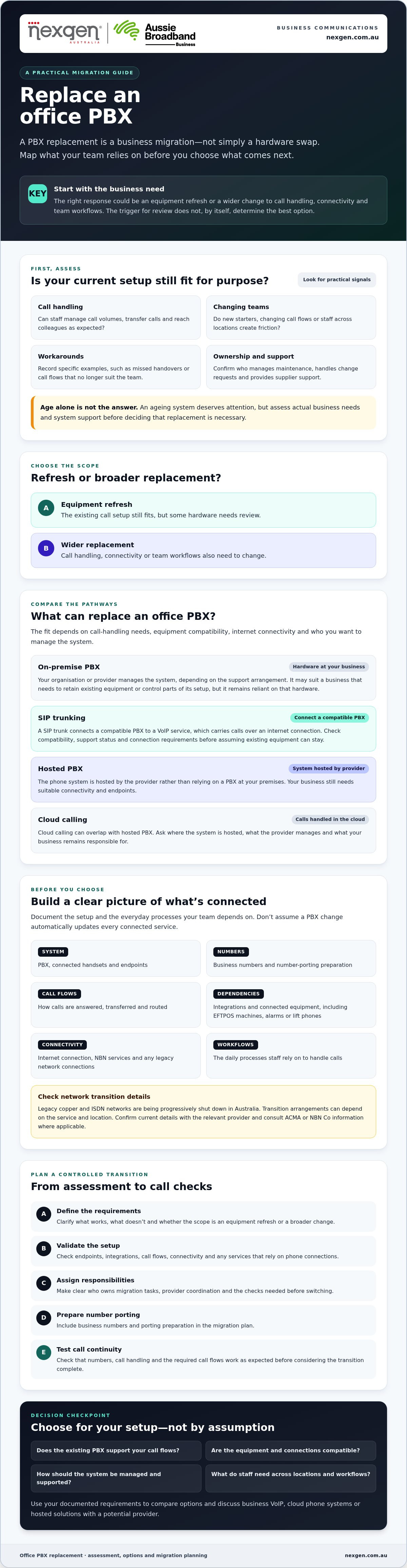
A controlled PBX replacement starts with a clear inventory, agreed requirements and named owners. Use this sequence to coordinate the change, check dependencies and confirm the new system works before handover.
- Document the current setup. List users, business numbers, handsets, call groups, voicemail, integrations and business-critical call flows. Include connected equipment such as alarms, lift phones, fax machines or payment terminals only if your business uses it.
- Agree requirements. Decide which call functions and workflows must be retained, what needs to change and who will approve the proposed call flows. Mark each audit item as essential, replaceable or requiring technical confirmation.
- Assess options and dependencies. Ask providers to review the inventory, confirm compatibility and identify any internet, NBN or legacy network dependencies. Check relevant transition impacts and timing with your carrier, providers and official sources.
- Assign responsibilities. Name an owner for provider coordination, staff communications, device checks and call-flow approval. Confirm who will manage number porting and who can make decisions if an issue arises.
- Schedule and communicate. Agree a transition window with the provider and affected teams. Tell staff what will change, when it will happen and where to report problems. Confirm the provider’s escalation contacts and the steps for raising a fault.
- Test, approve and review. Before handover, test inbound and outbound calls, routing, voicemail, each agreed device type and any required integrations. Record issues, assign owners and resolve critical problems before the authorised decision-maker approves the change. Review the system with staff after the transition.
What should your PBX audit include?
Capture how the system is used, not just what equipment is installed. Record each number, handset, call group, voicemail setup, integration and key call flow, along with relevant contracts and current support contacts. Note anything that needs a provider’s technical assessment, such as a connected device or an interface whose compatibility is unclear.
How can you prepare staff and test the new system?
Set expectations before the change. Share practical instructions with the people who answer calls, transfer them or manage voicemail, and make sure they know the agreed escalation contact. During testing, use realistic call scenarios and check that approved call flows behave as intended. Keep an issue log and a documented approval point so unresolved items are visible rather than assumed complete.
For businesses planning to replace office PBX Australia-wide, transition dates and impacts can depend on the services in use. Confirm them with the relevant carrier and provider rather than relying on a generic schedule. Nexgen supplies business VoIP and cloud phone systems, including Cisco Webex Calling, and handles setup and deployment for its Webex Calling solutions. Discuss your phone system requirements as part of your planning.
How can Nexgen help with your office PBX replacement?
Once you’ve documented your requirements and compared replacement paths, a provider conversation can help clarify what may suit your business. Take your notes along so the discussion starts with your users, call flows and constraints, rather than a feature list. If you’re researching how to replace office PBX Australia businesses rely on, clear responsibilities and confirmed capabilities are as important as the system choice.
Nexgen Australia provides business VoIP and cloud phone systems, including Cisco Webex Calling. Nexgen Australia handles setup and deployment for its Cisco Webex Calling solutions across desk phones, computers and mobile devices. Ask how a proposed system would meet your requirements, and confirm the scope of any migration tasks before making a decision.
What information should you bring to a provider conversation?
A concise checklist helps providers understand your current setup and identify what needs further review. Include:
- Users and numbers: approximate user numbers, business numbers to retain and general information about where staff work.
- Devices and workflows: handsets, computers or mobiles in use, plus essential call flows such as call groups, transfers, voicemail and call routing.
- Connectivity and integrations: known internet or NBN service details, integrations, and any connected equipment or services that may need technical checking.
- Priorities and constraints: must-have requirements, preferred transition timing, and questions your internal team hasn’t resolved.
Flag anything uncertain rather than guessing. For example, note a connected device or integration that needs confirmation so the provider can advise whether it affects the proposed setup.
What should you ask before choosing a replacement partner?
Ask the provider to explain which migration tasks they handle and which remain your responsibility. Clarify how they’ll assess system and device compatibility, number transfer steps, call testing and any dependencies on existing services. Confirm how support works after deployment, including how to report an issue and who to contact.
Request a clear description of what will be tested before the change is approved. This might include incoming and outgoing calls, agreed call flows, voicemail, the devices your team will use and any required integrations. Don’t assume a task is included unless the provider confirms it.
Use the conversation to compare the proposed approach with your requirements, not to commit before you’re ready. When you’ve reviewed your options, talk to Nexgen Australia about a business phone system and discuss whether its business VoIP, cloud phone systems or Cisco Webex Calling offerings may fit your needs.
Make your PBX replacement a planned step forward
A reliable replacement starts with understanding what your current system supports and where it falls short. Compare retaining your PBX with VoIP, hosted PBX and cloud calling against your team’s needs, then document responsibilities, dependencies and continuity checks before setting a transition date.
If you’re planning to replace an office PBX in Australia, a clear inventory and a provider-confirmed migration plan can help you make the change with confidence. Nexgen provides business VoIP and cloud phone systems, supplies and integrates Cisco Webex Calling phone systems, and handles setup and deployment for its Cisco Webex Calling solutions.
Bring your requirements and questions to the conversation. Talk to Nexgen about the right phone system for your business and take the next step towards a system that fits your team and future plans.
Frequently Asked Questions
Can you replace an office PBX without changing your business phone numbers?
Yes, you can usually request to keep eligible business numbers when changing phone services through a process called number porting. The gaining provider must arrange the port with your permission, and the transfer needs to be coordinated with your current provider. Confirm which numbers are eligible, the required steps and timing before scheduling the change. Don’t disconnect your existing service until the new service is active and the numbers have been checked.
What is the difference between replacing a PBX and moving to hosted PBX?
Replacing a PBX means changing the existing phone system, which could involve refreshing equipment or moving to a different type of service. With hosted PBX, the phone system is provided from outside your premises rather than relying on an on-site PBX. The terms can be used differently by providers, so ask what equipment stays at your business, what the provider hosts and manages, and which responsibilities remain with your team.
Can an existing office PBX work with VoIP?
Possibly. Some PBX systems can connect to a VoIP service using SIP trunking, which carries calls over an internet connection. Compatibility depends on the PBX’s interfaces, configuration and support status, so don’t assume an older system will work. Ask a provider to assess the specific equipment and connection requirements. Retaining a compatible PBX may preserve familiar call flows, but it also means keeping the existing hardware and its associated maintenance responsibilities.
Will replacing an office PBX disrupt business calls?
There can be disruption if the change is poorly coordinated, but a planned transition can reduce the risk. Agree a change window with your provider, confirm the number transfer sequence and test incoming and outgoing calls before approving handover. Check call routing, voicemail, staff devices and important integrations against real business scenarios. Keep the current service active until the replacement is working, and make sure staff know how to report issues.
What should an Australian business check before moving its PBX to the cloud?
Before a cloud move, document your users, numbers, call flows, devices, integrations and any connected services that could depend on phone lines. Ask the provider to confirm internet requirements, endpoint compatibility, number porting steps, support responsibilities and what happens if connectivity is interrupted. Australian businesses planning to replace an office PBX should also check any NBN or legacy-service impacts with their carrier and relevant providers.
How long does it take to replace an office PBX?
There’s no single timeframe. It depends on the system’s complexity, the number of services and devices involved, provider scheduling, number porting and any dependencies that need technical checks. Number transfers can require several weeks or, in more complex cases, months, so ask providers for a timeline based on your inventory and circumstances. Start planning early, agree milestones and avoid setting a cutover date before key dependencies are confirmed.