

What could a business phone system change about how your team handles calls, beyond where the phones sit? For Australian businesses researching cloud phone systems Australia, the practical questions are how cloud calling differs from a traditional office setup, whether calls will work reliably, and which features staff will use. Those are sensible concerns when calls are central to serving customers and keeping work moving.
A cloud phone system runs business calls over an internet connection, so staff may be able to make and receive calls on supported desk phones, computers or mobile devices. This flexibility can support people working in the office or elsewhere, but the experience depends on suitable connectivity, power and a setup that fits your needs. Cloud calling can also change how calls are routed, answered and managed.
This guide explains how cloud phone systems work, where they can help, and what to check before choosing one. You’ll find practical ways to assess connectivity and features, compare cloud and on-premise systems, and prepare useful information for a conversation with a provider.
Key Takeaways
- Map how business numbers, users, devices and call-handling rules need to work together before comparing providers.
- Assess cloud phone systems australia by considering connectivity, power, equipment and the way your team works, not just the feature list.
- Compare cloud and on-premise systems across hosting, hardware, administration and how staff access calls.
- Document current numbers, essential call paths and equipment connected to your phone lines before speaking with a provider.
- Compare provider options, including Cisco Webex Calling through Nexgen, against your business requirements.
Cloud phone systems in Australia: how do they work?
A cloud phone system is a business phone service hosted on a provider’s platform and delivered to users over an internet connection. It brings together business numbers, staff, devices and call-handling settings. The provider hosts the calling platform away from your office, while staff use supported desk phones, computers or mobile devices to make and receive calls.
For businesses researching “cloud phone systems australia”, the important distinction is that this is a way to run business calling, not simply a phone moved online. Unlike a mobile-only calling app, a cloud system can connect calls to shared business numbers and configured call flows. It also differs from an on-premise PBX, which relies on phone-system equipment installed at the business. Cloud services reduce reliance on traditional PBX hardware, although compatible devices and network equipment may still be needed. For background, see this overview of the business telephone system, including hosted PBX systems.
How does a cloud business phone system handle a call?
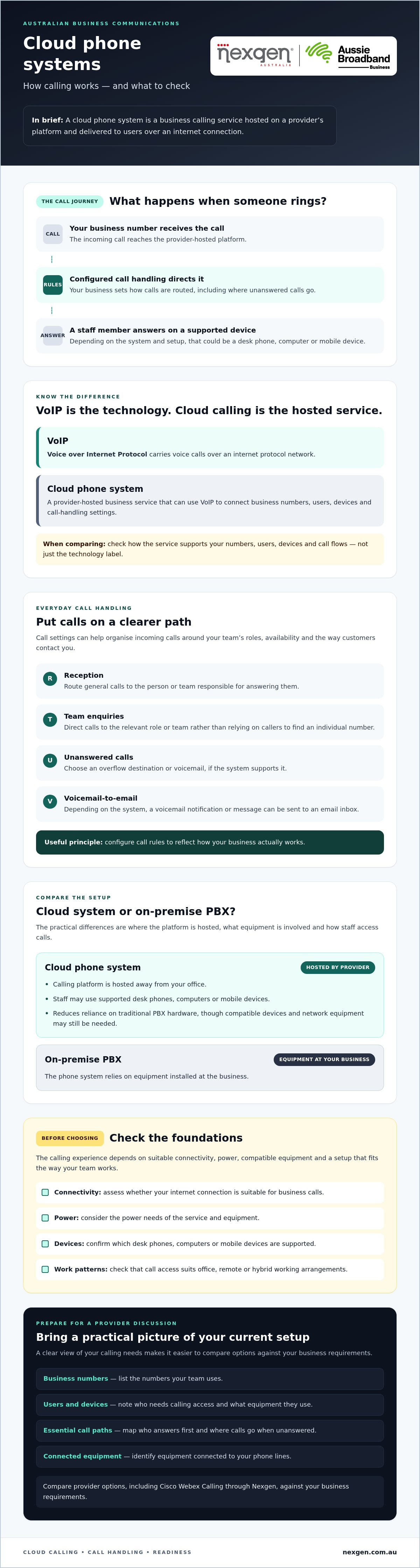
When someone calls your business number, the provider-hosted platform receives the call and applies the rules your business has configured. For example, the call could ring a reception group first, then go to another team member if nobody answers. The recipient can answer on a supported desk phone, computer or mobile device, depending on the system and setup.
The platform manages calling functions such as routing and connecting users. Your business decides how calls should be handled, while the provider hosts the service. Staff are not limited to a phone physically connected to an office PBX, but calls still depend on the internet connection and the devices being used.
What do cloud calling and VoIP mean?
VoIP, or Voice over Internet Protocol, is a technology that carries voice calls over an internet protocol network. In plain terms, it lets people speak over an internet connection rather than relying on a traditional phone line for the call itself.
VoIP describes the calling technology; a cloud phone system is a hosted business service that can use VoIP to connect calls, users, numbers and call-handling settings. A VoIP service is not automatically a complete business phone system. When comparing options, check how each service supports your business numbers, users, devices and call flows, rather than focusing on the technology label alone.
What can a cloud phone system change in everyday business communications?
A cloud phone system can help organise incoming calls and give staff access to business calling across different work locations. The practical difference comes down to how your team handles calls: who answers first, where unanswered calls go, and how staff can check messages when they are away from a desk.
How do cloud phone features support callers and staff?
Call routing directs incoming calls according to rules set for your business. For example, general enquiries could go to reception, accounts calls could reach the relevant team, or an unanswered call could follow an overflow path. The right arrangement depends on staff roles, availability and the way customers contact you.
Voicemail-to-email can send a voicemail notification or message to an email inbox, depending on the system. This gives staff another way to review a message when they are away from their desk and decide how to respond. Before choosing a system, ask which call-routing and voicemail features are available and how they can be configured for your workflow.
- Reception: Route general calls to the person or team responsible for answering them.
- Team enquiries: Direct calls to the right role rather than relying on callers to find an individual number.
- Unanswered calls: Decide what should happen when a user or team cannot answer, such as sending the call to another destination or voicemail, if supported.
These settings can make call handling more consistent, but they need to reflect how your business actually works. Review the small business phone systems guide for broader context on choosing a system.
Can staff use a cloud phone system across different devices?
Depending on the platform and setup, staff may be able to make and receive business calls using supported desk phones, computers or mobile devices. This can help a team access business calling in the office, remotely or across a hybrid arrangement, without relying on one office handset for every call.
Device compatibility and calling functions vary. Confirm which devices are supported, what staff need to use the service, and whether the same features are available on each device. Cloud calling still relies on internet connectivity, so access across locations does not guarantee uninterrupted service. Ask the provider about connection quality and what happens during an outage.
If you’re comparing cloud phone systems in Australia, Nexgen provides business phone, VoIP and cloud phone systems nationally. You can explore Nexgen’s business phone systems while assessing which features and setup suit your team.
Cloud phone system or on-premise PBX: what are the practical differences?
A cloud phone system hosts core calling functions on a provider’s platform, while an on-premise PBX uses phone-system equipment installed at your workplace. The choice affects where the system runs, what equipment you maintain and how staff access calls. Neither model is automatically right for every business.
| Consideration | Cloud phone system | On-premise PBX |
|---|---|---|
| Hosting | Calling functions are hosted by the provider and accessed over an internet connection. | Core phone-system functions run on equipment installed at the business. |
| Office hardware | Less reliance on a traditional PBX on site, but compatible phones, network equipment and other devices may still be required. | Requires PBX equipment at the workplace, alongside the phones and supporting network equipment. |
| Administration | Some system management or updates may be handled through the provider’s platform. Confirm who is responsible for configuration, changes and support. | Equipment and system changes are managed locally or through an appointed service provider, depending on the arrangement. |
| Access to calls | Users may be able to call on supported desk phones, computers or mobile devices, subject to the platform and setup. | Access is often centred on phones connected to the office system, though the exact setup varies. |
What changes when phone system infrastructure is hosted?
With a cloud system, the provider hosts the core calling platform away from your premises. Your business may still need desk phones, computers, mobile devices and network equipment to connect users. Cloud hosting changes where system functions run, but it does not automatically determine who handles day-to-day administration.
Ask who configures call flows, manages user changes and applies updates. The answer depends on the service arrangement. Hosting and management are separate questions, so clarify what your team will look after and what the provider is responsible for.
What are the trade-offs of cloud calling?
Cloud calling can reduce reliance on on-site PBX hardware and support staff using the system from different work locations. In return, calls depend on a suitable internet connection, and the service needs to fit your business requirements. Check connectivity, device compatibility, support arrangements, and how existing numbers and call flows will be handled during migration.
Cloud calling is a good fit when its flexibility, connectivity requirements and management arrangements align with your business needs and readiness. For a closer look at the underlying technology, read the VoIP solutions for small business guide.
To discuss cloud and VoIP phone system options for your organisation, explore Nexgen’s business phone systems.
How should an Australian business assess cloud phone system readiness?
Assess readiness by documenting who needs calling access, how calls should flow, which devices staff use and whether the business’s internet connection is suitable. This gives you a practical brief for comparing cloud phone systems australia and discussing setup, support and migration with providers.
What should you check before planning a move?
Work through this checklist before requesting recommendations. Keep the details together so providers can assess your actual requirements rather than make assumptions.
- 1. List users and work arrangements. Record who needs to make or receive business calls, where they work, and whether they use a desk phone, computer or mobile device.
- 2. Document numbers and call paths. Note your current business numbers and map essential routes, such as how customer calls reach reception or a particular team. Include voicemail needs and important customer contact workflows.
- 3. Inventory equipment and integrations. List existing handsets and systems connected to your phone service. Ask the proposed provider to check compatibility with the platform and identify anything that may need replacing or reconfiguring.
- 4. Check connectivity. Describe how and where staff connect to the internet, including any locations where calls are business-critical. Ask your internet provider or a qualified communications specialist to assess suitability for your intended use. Avoid relying on a generic speed figure without considering your setup.
- 5. Define support expectations. Decide what help you’ll need with configuration, user changes and troubleshooting. Confirm with each provider what support is included and who will handle each task.
How can a business plan a lower-disruption transition?
Before agreeing to a changeover, ask providers how they would manage setup, number handling and user configuration. Clarify what staff guidance is available, who coordinates each step and how you’ll confirm the new system is ready to use.
Plan for connectivity interruptions as well. Ask what continuity arrangements are available and check that any options suit the proposed platform and your business requirements. Agree on internal responsibilities, testing steps and a staff communication plan. Testing should cover the call paths your team relies on, the devices they’ll use and what callers experience if a call goes unanswered.
A clear readiness brief makes provider conversations more productive and can surface gaps before a change is scheduled. To discuss business phone system options for your organisation, talk to Nexgen about your requirements.
How can Nexgen help businesses explore cloud phone systems?
Nexgen is an Australian provider of business phone, VoIP and cloud phone systems. Its offerings include Cisco Webex Calling, which businesses can consider when assessing cloud calling. The right platform depends on your users, call flows, devices and business requirements, so compare what each proposed system can support.
Nexgen handles setup and deployment across supported desk phones, computers and mobile devices. Before discussing options, prepare an overview of how your team handles calls today and what you want to improve. This gives the conversation a practical starting point without assuming a particular platform or feature suits every organisation.
What can a provider help assess?
A provider discussion can help you examine current calling workflows, user needs, devices and plans for business growth. Consider how calls should be routed, whether voicemail-to-email would suit your staff, and how people working remotely or in different locations need to access business calls.
Bring specific questions to the conversation. For example:
- Can the proposed setup support our users, work locations and preferred devices?
- How could call routing reflect our teams and customer contact processes?
- Is voicemail-to-email available, and how would it work for our users?
- Will our current handsets and relevant integrations be compatible?
- What features, setup tasks and support arrangements are included?
Confirm the answers for the configuration being proposed. Feature availability, device compatibility and support responsibilities can vary by platform and service arrangement, so ask for clear details before making a decision.
What should you ask Nexgen about Cisco Webex Calling?
Ask how a Cisco Webex Calling deployment could be arranged for your users, locations, devices and call flows. Explain which calls matter most to your business, how staff are expected to work, and what you need callers to experience when a call is answered or redirected.
Then confirm which platform capabilities and integrations are available for your proposed configuration. Ask how setup and user configuration would be handled, what your team would need to do, and what support is available after deployment. These questions help you assess the specific fit rather than relying on general feature descriptions.
If you’re considering cloud phone systems australia, Nexgen can help you explore business phone and VoIP options, including Cisco Webex Calling. Talk to Nexgen about cloud phone systems and discuss your requirements and suitable next steps.
Make your next phone system decision with confidence
Cloud phone systems work best for Australian businesses when the service fits the way their teams handle calls. Look beyond the technology: clarify your call flows, users and devices, then assess connectivity, support arrangements and migration requirements before choosing.
Cloud calling can reduce reliance on traditional on-premise PBX equipment and give staff more ways to access business calls. It also depends on a suitable internet connection and a setup that matches your needs. Compare the trade-offs with your current system rather than assuming one approach suits every business.
Nexgen provides business telecommunications services nationally across Australia and supplies and integrates Cisco Webex Calling phone systems. Depending on the proposed setup, deployment can support calls across desk phones, computers and mobile devices.
Bring your requirements and questions into the conversation, then explore which options may suit your organisation. Talk to Nexgen about cloud phone systems for your business to discuss your needs and next steps.
Frequently Asked Questions
What is a cloud phone system?
A cloud phone system is a business calling service hosted on a provider’s platform and accessed over an internet connection. It connects business numbers, users, devices and call-handling settings, such as where incoming calls should ring. Staff may use supported desk phones, computers or mobile devices. Unlike an on-premise PBX, the core phone platform is not hosted on equipment at your office, though local devices and network equipment may still be needed.
How does a cloud phone system work in Australia?
A cloud phone system connects your business number to a provider-hosted calling platform over an internet connection. When a customer calls, configured rules can direct the call to a person, team or other destination. Staff answer using supported devices and a suitable connection. Check that internet connectivity and power arrangements at each workplace suit the planned use, and ask the provider how numbers, call flows and support will be handled.
Is a cloud phone system the same as VoIP?
No. VoIP is the technology that carries voice calls over an internet protocol network, while a cloud phone system is a hosted business service that can use VoIP. The service may bring together business numbers, users, supported devices and call-handling settings. A VoIP connection alone does not necessarily provide the complete calling setup your organisation needs. Ask providers what features and management arrangements are included in the proposed service.
Can staff use a cloud phone system when working remotely?
Staff may be able to make and receive business calls remotely using supported computers, mobile devices or desk phones, depending on the platform and setup. This can help employees access business calling away from the office, provided they have a suitable internet connection and compatible device. Before choosing a system, confirm which functions are available on each device and how remote users will access the service.
What happens to cloud phone calls if the internet connection fails?
If the connection needed for calling is unavailable, staff using that connection may not be able to make or receive calls through the cloud phone system. What callers experience next depends on the provider, platform and any continuity options configured for your service. Ask about available arrangements, such as alternative connections or call redirection, and check which local power and network equipment need to remain operational.
Can a cloud phone system work with existing office phones?
Possibly, but compatibility depends on the phone models, proposed platform and configuration. Do not assume existing handsets will work just because they are already used for business calls. Give the provider an inventory of your phones and other connected equipment, then ask which devices can be retained, whether setup changes are required, and what may need replacing. Confirm compatibility before planning a changeover.