


The phone system in your office doesn’t automatically give your business more control. A cloud pbx australia option hosts the core phone-system functions with a provider, changing who manages the service, how your team connects and what happens if your internet connection or provider has an outage.
Those are practical considerations, not reasons to rule out cloud. A hosted system may suit a team working across offices or remotely, while an on-premise PBX may appeal if you want equipment and more of its management on-site. In either case, call continuity depends on planning, clear responsibilities and support that meets your operating needs.
This guide compares cloud and on-premise phone systems, covering setup, day-to-day management, flexibility and ongoing cost considerations. It also explains what to assess before switching, from connectivity and backup options to provider support and feature requirements. Use the checklists to compare options against your needs and identify the questions to ask before committing.
Key Takeaways
- A PBX manages your organisation’s calls and extensions. With cloud PBX, a provider hosts the phone-system functions rather than relying only on equipment at your premises.
- Compare cloud and on-premise systems by who manages maintenance, how changes are made and what support your business or provider is responsible for.
- When assessing cloud pbx australia options, consider where your staff work, how they handle calls and which devices they need to use.
- Before switching, document your call requirements, check connectivity and ask providers to confirm features, device compatibility, support and transition steps in writing.
- Nexgen Australia provides Australian businesses with cloud phone systems, VoIP and advanced calling solutions. Assess whether a provider-hosted option fits your requirements before choosing a system.
What is cloud PBX in Australia, and how does it differ from an on-premise PBX?
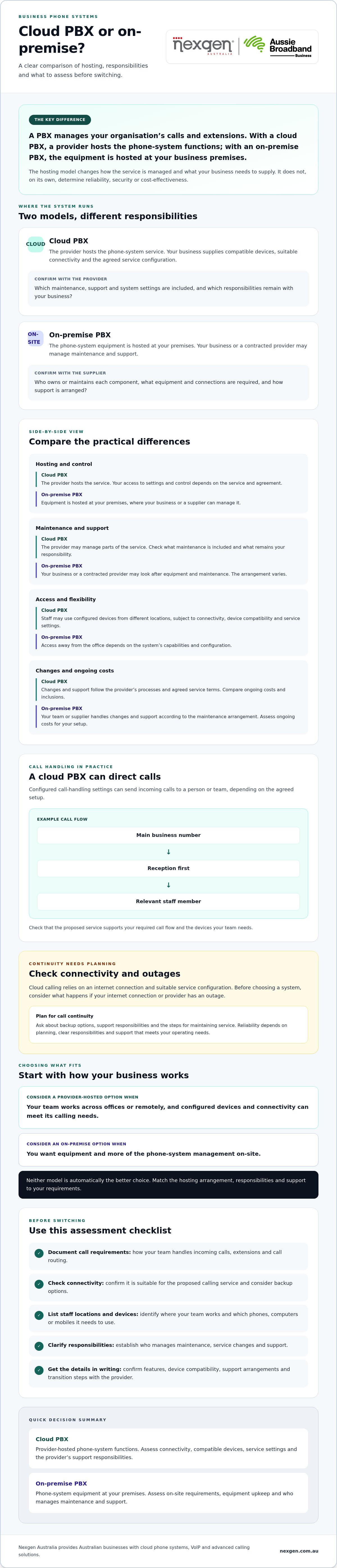
A cloud PBX runs its phone-system functions through a provider-hosted service rather than relying only on PBX hardware at your premises. A PBX, or private branch exchange, manages an organisation’s calls and extensions, such as connecting callers to the right employee or team.
Cloud PBX, hosted PBX and cloud phone system can describe related services, but provider terminology and inclusions vary. Ask what the provider hosts, what your business needs to supply and which responsibilities sit with each party. Cloud calling commonly uses Voice over IP (VoIP) technology to carry calls over an internet connection. It still depends on compatible devices, connectivity and service configuration.
| Consideration | Cloud PBX | On-premise PBX |
|---|---|---|
| Where it’s hosted | Phone-system functions are hosted by a provider. | PBX equipment is hosted at your business premises. |
| Who manages it | The provider manages the hosted service; responsibilities vary by agreement. | Your business or a contracted provider may manage maintenance and support. |
| What your business supplies | Compatible devices, suitable connectivity and agreed service configuration. | On-site space and the equipment and connections required by the system. |
What does a cloud PBX do for a business?
A cloud PBX can let staff make and receive business calls using configured desk phones, computers or mobiles. Call-handling settings can direct incoming calls to a person or team, depending on the agreed setup. For example, a small business could route its main number to reception first, then direct callers to the relevant staff member. Confirm that the proposed service supports the call flow and devices your team needs.
What stays on-site with an on-premise PBX?
With an on-premise PBX, the business hosts the phone-system equipment at its premises. That doesn’t automatically mean the business owns every component or handles every repair. Ownership, maintenance and support arrangements vary, so confirm them with the supplier. Hardware, connectivity and support needs also depend on the particular system, rather than being identical across all on-premise setups.
For a cloud pbx australia comparison, focus on where the system’s core functions run and who is accountable for keeping each part working. The hosting model alone doesn’t tell you how calls will be configured, which devices are supported or what happens if connectivity is interrupted. Confirm those details against your business’s requirements before choosing.
Cloud PBX vs on-premise PBX: compare control, continuity and flexibility
Neither architecture is automatically more reliable, secure or cost-effective. The practical difference is where key system functions sit and how responsibilities are divided. A cloud service depends on connectivity, while on-premise equipment may give your business more direct local control alongside responsibility for upkeep.
| Consideration | Cloud PBX | On-premise PBX |
|---|---|---|
| Hosting and control | The provider hosts the phone-system service. Your access to settings and control depends on the service and agreement. | Equipment is hosted at your premises, giving the business a local system to manage or have a supplier manage. |
| Maintenance | The provider may manage parts of the service, but confirm what maintenance is included and what remains your responsibility. | Your business or a contracted provider may look after equipment and maintenance. The arrangement varies. |
| Access | Staff may be able to use configured devices from different locations, subject to connectivity, device compatibility and service settings. | Access away from the office depends on the system’s capabilities and configuration. |
| Changes and support | Changes and support follow the provider’s processes and agreed service terms. | Your team or supplier handles changes and support according to the maintenance arrangement. |
How does internet connectivity affect cloud PBX calls?
Cloud PBX calls rely on a connection between your devices and the provider-hosted service. If your office internet is disrupted, calling may be affected. The outcome depends on the system’s configuration and available alternatives. Ask providers whether your setup can use an alternative connection, what call handling is available during an outage and who is responsible for arranging or managing continuity options. Get answers for your specific service in writing.
Who manages changes, maintenance and support?
Don’t assume that “hosted” means every task is handled by the provider, or that an on-premise system must be managed entirely in-house. Confirm responsibility for:
- Changing call flows, users and other settings.
- Maintaining and troubleshooting the system and compatible devices.
- Providing service support, including how to report and escalate faults.
- Applying service updates and explaining any relevant conditions.
Compare written inclusions, service levels and responsibilities, not just the architecture label. If you’re weighing up cloud PBX Australia options, discuss your cloud phone system requirements with a provider and check how its proposed responsibilities match your continuity needs.
Which PBX model suits your Australian business and working style?
The right PBX model depends on how your team works, what your calls need to do and who can manage the system. Business size alone isn’t enough to decide. Map your work locations, call flows, preferred devices and internal IT capacity before comparing options.
- Team location: Do staff work from one office, several sites or remotely?
- Call flows: Do callers need to reach specific people, teams or locations?
- Devices: Will staff use desk phones, computers, mobiles or a mix?
- IT capacity: Can your team maintain phone-system infrastructure, or would you prefer provider-hosted services?
When might cloud PBX be a better fit?
Cloud PBX may suit a team spread across offices or working remotely, particularly if staff need business calling on supported devices in different locations. It can also fit businesses that prefer provider-hosted infrastructure. Before deciding, confirm which support tasks the provider handles and what remains with your team.
Check that the proposed service supports your required call flows, devices and integrations. For example, if staff regularly work away from the office, confirm how they can access business calls from each location and what connectivity and configuration that requires. The label “cloud” alone doesn’t confirm these details.
When might an on-premise PBX remain suitable?
An on-premise PBX may merit consideration if your business prioritises local infrastructure, has existing equipment that still meets its needs, or has the technical capacity to manage an on-site system. Don’t assume familiar equipment remains fit for purpose. Check its current supportability, compatibility with your devices and ability to handle the call flows your business relies on.
Include maintenance, upgrades and continuity planning in the assessment. Existing infrastructure may be useful, but it can also bring ongoing responsibilities. Establish who maintains the system and what options are available if equipment or connectivity is disrupted.
For cloud pbx australia decisions, weigh the operating model against your actual requirements rather than treating either option as the default. A provider-hosted system may suit distributed access, while on-premise equipment may fit a business with a clear need and capacity for local infrastructure. For a broader checklist covering phone-system selection, see the Australian small business phone systems buyer guide.
How to assess an Australian cloud PBX provider before switching
Assess a cloud PBX provider by matching its proposal to your calling needs, connectivity, devices and support expectations. Take stock of your current setup before comparing plans, so you can identify what needs to carry across and what needs to change.
- Document current use. List your phone numbers, users, devices, call flows and business-critical calling requirements. Include how calls are answered, transferred and directed to teams.
- Check connectivity. Ask whether your internet connection and any proposed alternatives are suitable for the service. Confirm what happens to calls if connectivity is interrupted.
- Confirm features and compatibility. Check that the proposed call functions, devices and any required integrations are supported for your setup.
- Clarify responsibilities. Establish who handles configuration, user setup, device issues, service support and changes to call routing.
- Review the transition plan. Discuss number porting, sequencing, testing, staff communication and how issues will be addressed during the change.
What should a cloud PBX quote or proposal clarify?
Ask the provider to set out what’s included and excluded, including service components, devices, setup work and support. Request clear explanations of contract terms, billing structure and any usage-related charges. Check for conditions that could affect how your business uses the service.
Compare proposals against the same requirements, not just headline claims. Confirm that each covers the same users, devices, call flows, setup tasks and support expectations. This makes differences in scope easier to identify before you commit.
What should a PBX transition plan cover?
A transition plan should reflect your current setup and explain the steps for moving numbers, setting up users and configuring call routing. Confirm who is responsible for each task, what testing will take place and how staff will be informed. Ask the provider how it will manage and communicate issues during the transition, without assuming a particular outcome or timeframe.
Get important inclusions, responsibilities and conditions in writing. This gives your team a practical basis for comparing cloud pbx australia providers and reviewing the proposed change. For more context on hosted phone services, read the cloud phone systems guide for Australian businesses.
Ready to discuss your requirements? Talk to Nexgen about cloud phone systems and the setup and deployment considerations for your business.
Cloud PBX Australia: how Nexgen can help you assess your options
Choosing a phone system is easier when you can explain how your business handles calls today and what needs to change. Nexgen Australia provides business phone systems, VoIP and cloud phone systems for Australian organisations. A provider discussion can help you compare your requirements with the proposed system’s scope, setup and responsibilities before deciding.
What information should you prepare for a provider conversation?
Bring a practical snapshot of your current setup and the way your team works. Include:
- People and locations: user numbers, where staff work and whether they need remote access.
- Devices: current desk phones, computers and mobiles, plus any equipment you want to retain.
- Calling needs: important numbers, call flows and business-critical workflows, such as how incoming calls reach the right team.
- Other requirements: integrations you rely on and questions about continuity, support, migration responsibilities and proposal terms.
This information gives a provider a clearer basis for discussing fit and identifying details that need checking. If you’re still comparing VoIP and cloud options, read the small business VoIP solutions in Australia overview.
How can Nexgen support a cloud phone system discussion?
Nexgen provides business phone systems, VoIP and cloud phone systems, including Cisco Webex Calling phone systems. Nexgen also handles setup and deployment for its Webex Calling solutions. This is an option to discuss, not a recommendation for every business. Suitability depends on your users, call flows, devices, connectivity and support expectations.
Use your requirements to guide the conversation. Ask what the proposed system covers, what setup involves, which responsibilities remain with your business and how the provider will address questions about continuity and migration. For cloud pbx australia planning, a useful discussion connects the proposed scope to your operating needs rather than relying on generic feature claims.
Talk to Nexgen about your requirements, the potential fit of a cloud phone system and the next steps for assessing scope and deployment.
Choose a phone system that fits how your business works
The right choice isn’t determined by the label on the system. Compare where your team works, how calls are handled, which devices staff use and who will manage support and continuity. Cloud PBX may suit businesses seeking provider-hosted services and access across locations, while an on-premise system may remain relevant where local infrastructure and internal capacity are priorities.
Before switching, document your current numbers, devices and call flows. Then ask providers to clarify connectivity needs, service inclusions, responsibilities and transition steps in writing. These checks make it easier to compare cloud pbx australia options against your operating requirements rather than relying on broad promises.
Nexgen provides business phone systems, VoIP and cloud communications nationally across Australia, and delivers and deploys Cisco Webex Calling phone systems. The right fit depends on your needs, so bring your requirements and questions to the discussion.
Talk to Nexgen about the right phone system for your business and take a considered next step towards a system that supports the way your team works.
Frequently Asked Questions
What is a cloud PBX phone system?
A cloud PBX is a business phone system whose core calling functions are hosted by a provider rather than only on equipment at your premises. PBX stands for private branch exchange, the system that manages an organisation’s calls and extensions. Staff can make and receive calls using configured, compatible devices, such as desk phones, computers or mobiles. The service relies on connectivity, and you should confirm the provider’s terminology and inclusions.
Is cloud PBX better than an on-premise PBX?
Neither option is automatically better for every Australian business. A cloud PBX may suit teams that want provider-hosted infrastructure and calling access across locations, while an on-premise PBX may suit businesses that prioritise local equipment and have capacity to manage it. Compare control, connectivity, maintenance, support and required features. The best fit depends on your working arrangements, call flows and responsibilities, not business size alone.
Does cloud PBX work if the internet goes down?
Cloud PBX calls rely on connectivity between your devices and the provider-hosted service, so an internet outage may affect calling. The outcome depends on your service configuration and any continuity options arranged for your business. Ask the provider whether an alternative connection is available, how calls are handled during an outage and who manages those arrangements. Confirm the exact behaviour for your proposed system rather than assuming calls will automatically fail over.
Can a cloud PBX use desk phones and mobile devices?
A cloud PBX may support configured desk phones, computers and mobile devices, depending on the service and setup. Check that the specific devices your staff plan to use are compatible, and ask whether configuration is required. For example, confirm how a team member working away from the office would access business calling on a supported device. Don’t assume every handset or mobile setup works with every provider’s service.
How do I choose a cloud PBX provider in Australia?
For cloud pbx australia options, compare providers against your documented calling needs rather than headline claims. List users, locations, numbers, devices, call flows and required integrations. Ask each provider to explain connectivity requirements, included features, device compatibility, support responsibilities, contract terms and billing structure in writing. Review number porting, user setup, testing and staff communication in the proposed transition plan, and check that proposals cover equivalent requirements.
Can I move an existing business phone system to cloud PBX?
Moving an existing phone system to cloud PBX may be possible, but the approach depends on your current numbers, equipment, call flows and the proposed service. Start by listing what must be retained, including important numbers, devices and business-critical calling workflows. Ask the provider to confirm number-porting requirements, compatibility, user setup, call routing, testing and the responsibilities involved. Agree on transition steps and how issues will be handled before scheduling a change.