


For Australian businesses, a small business phone system can cost from about A$10 to over A$100 per user, per month, depending on the type of service and what the plan includes. That gives you a starting point, not a complete budget: the final comparison also depends on the setup your business needs.
A monthly figure is easy to compare, but it can hide differences in what each plan includes. Before choosing a system, decide what your business needs: calls reaching the right people, staff able to work from different locations, or a setup that can adapt as your team changes.
This guide explains how subscriptions compare with upfront and ongoing expenses, and why existing infrastructure and call capacity matter. It also shows how features and configuration affect the system’s fit. Use these points to build a clear brief, compare options on consistent terms and focus your budget on communications that support the way your business operates.
Key Takeaways
- Compare hosted PBX, SIP trunks and single-line VoIP by how your team makes and receives calls, not by the label alone.
- Separate recurring subscriptions from setup, hardware and maintenance to understand the full cost over time.
- Match call capacity to busy periods: a single-line VoIP connection can’t handle two calls at once.
- Assess your internet connection and existing phone equipment before deciding what infrastructure a new system needs.
- Prioritise the calling features and configuration your team will actually use, such as call routing and an auto attendant.
Quick summary: How much does a business phone system or line cost?
In Australia, VoIP plans typically cost A$10 to over A$100 per user, per month, while cloud VoIP commonly costs A$15 to A$40 per user, per month. On-premise costs depend on equipment and setup; according to the Reserve Bank of Australia, some small businesses report contract terms can prevent price renegotiation until expiry, so also review number-porting fees and emergency-calling arrangements.
VoIP system costs and ranges
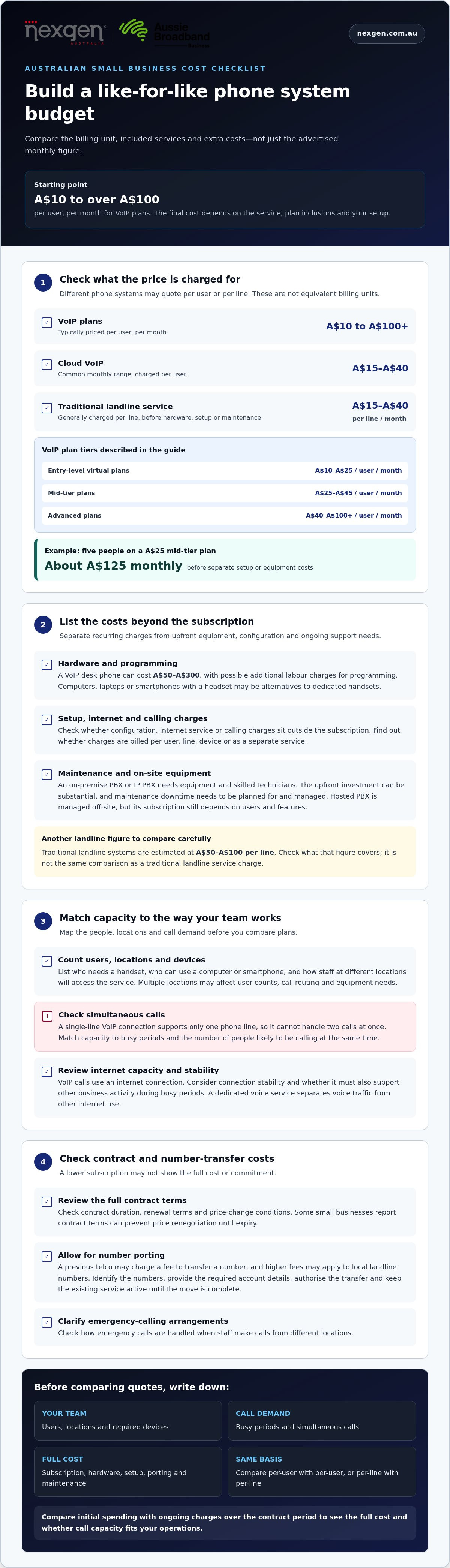
VoIP carries calls over an internet connection, with pricing shaped by plan tier, users and system design. Entry-level virtual plans typically cost A$10 to A$25 per user, per month; mid-tier plans cost A$25 to A$45, while advanced plans can reach A$40 to A$100+. A five-person team on a A$25 mid-tier plan would pay about A$125 monthly, before any separate setup or equipment costs.
Hosted PBX is a cloud-managed phone system: the provider hosts the call-management platform, and employees connect through phones or supported devices. It avoids the need to build the complete phone system on-site, though the subscription still depends on user numbers and features. A traditional landline service generally costs A$15 to A$40 per line, per month, before hardware, setup or maintenance.
SIP trunks connect a business phone system to telephone networks using an internet connection. SIP means Session Internet Protocol and supports sharing multimedia content through a phone system. It can suit a business retaining on-site equipment while connecting calls through VoIP. A single-line VoIP connection supports only one phone line, so it cannot handle two calls at once.
These models price different things: hosted PBX is commonly priced per user, while traditional arrangements may charge per line. Traditional landline systems are estimated at A$50 to A$100 per line. Compare what each figure covers, including the number of users or lines, hardware, setup and maintenance, rather than treating unlike billing units as equivalent.
Internet needs and cost risks
VoIP relies on an internet connection to carry calls, so connection stability affects everyday calling. Check whether the connection must also support other business activity during busy periods, and consider how staff at different locations will access the service. Employees can use a computer, laptop or smartphone with a headset instead of dedicated VoIP handsets.
Check the total commitment, not just the advertised subscription. A previous telco may charge a fee to port a number, and higher fees may apply to local landline numbers. Review contract duration, renewal terms and price-change conditions; some businesses report limited scope to renegotiate before a contract expires. Clarify how emergency calls are handled when staff call from different locations.
A hosted system moves much of the phone platform off-site, while an on-premise PBX or IP PBX requires equipment and skilled technicians. The upfront investment can be substantial, and the business must plan for and manage maintenance downtime. Compare initial spending with ongoing charges over the contract period to understand the trade-off.
For a useful estimate, first map users, locations, simultaneous calls and required devices. Then compare per-user subscriptions with per-line charges, and include hardware, setup, number porting and maintenance where relevant. This gives Australian small businesses a clearer view of total costs and whether call capacity suits their operations.
Cloud phone system costs and subscriptions
Cloud phone costs combine recurring subscriptions with any setup, internet, hardware and calling charges. To estimate number-porting costs in Australia, identify the numbers to transfer, provide the required account details, authorise the transfer and keep the existing service active until the move is complete. The previous telco may charge a fee, with higher fees possible for local landline numbers.
Subscriptions and service charges
A cloud subscription pays for access to the hosted phone platform and its included services. Your ongoing bill depends on the plan, number of users, calling needs and selected features, so compare what is included rather than relying on subscription labels alone.
Separate recurring charges from initial configuration and equipment. A VoIP desk phone can cost A$50 to A$300, with possible additional labour charges for programming. A team using computers and headsets instead of desk phones may have different upfront hardware needs.
Find out how each charge is billed: per user, per line, per device or as a separate service. For a business with multiple locations, check whether staff share one central system or need separate configurations. This affects user counts, call routing and the equipment required at each location.
Internet and voice service costs
VoIP carries calls over an internet connection, while a dedicated voice service separates voice traffic from other internet use. This distinction matters when calls are business-critical or several employees make calls while using online applications.
Include internet service in your comparison, even when it isn’t bundled with the phone subscription. A stable connection supports consistent VoIP calling; usage demands, existing capacity and any dedicated voice service all affect the overall setup.
Traditional landlines and VoIP incur costs in different ways. Landline service is commonly charged per line, while cloud VoIP is often charged per user. Traditional equipment may also need maintenance, whereas cloud services are managed off-site. Compare total ongoing charges alongside hardware, setup and support needs, not just the call plan.
For example, a business with a reception desk and staff across two locations should list who needs a handset, who can use a computer or smartphone, and which numbers each location needs. This shows whether additional desk phones or configuration are required, without assuming every employee needs a dedicated device.
Before transferring numbers, document each number, its current service details and where calls should go after the move. Review the transfer fee, contract terms, bundled voice or internet charges, and whether ending the old service affects anything else. This makes setup costs and ongoing commitments easier to compare.
Compare internet, voice, handsets and configuration as separate line items. This makes it easier to see which costs come from the phone platform, which relate to connectivity, and which arise from supporting employees across locations.
Choosing a phone system for existing infrastructure and call capacity
Your existing phone equipment and busiest calling periods help determine the right system configuration. Start by listing the phone numbers, devices, locations and call flows already in use. Then compare them with how employees answer, transfer and return calls. This shows what the new setup must preserve and where capacity or routing needs to change.
Call capacity is about overlapping conversations, not simply the number of staff. For example, a reception team may handle incoming customer calls while other employees make outgoing calls. Map a busy period and record which calls need to connect simultaneously. A single-line VoIP connection supports one phone line, so it cannot handle two calls at once.
Review the infrastructure at each location. Record existing handsets, any on-site phone equipment and the internet connection staff use. A business keeping an on-site PBX may need a different configuration from a team moving calls to a cloud-hosted system. Hybrid arrangements also need a clear plan for how office and remote employees use extensions.
Internet performance can affect call quality when VoIP shares a connection with video conferencing, cloud applications and file transfers. Review call quality during the periods when those tools are busiest. If a remote employee reports poor audio while the office connection performs well, compare the connection and devices at both ends before changing phone capacity.
Call routing should reflect actual caller journeys. For example, a business with separate sales and service teams can map which number or menu option directs callers to each group. A 1300 number can route calls across a team and present a national brand; an 1800 number can offer customers free inbound calls. Include intended destinations when reviewing how those numbers fit your setup.
Voicemail to email and call recording also shape how employees manage missed and completed calls. A manager who reviews messages away from the office may value email delivery; a team reviewing conversations may need recording access. Identify which roles need each function, then include those requirements when comparing configurations and plan inclusions.
Before deciding, create a call-capacity and infrastructure map for every location. Include current numbers, peak simultaneous calls, existing equipment, internet connection, remote users and routing destinations. Then identify any local, national or mobile calling requirements. This provides a practical basis for comparing systems against real workflows, rather than choosing capacity based only on employee headcount.
Calling features and system configuration
Features influence both the plan you choose and the way calls move through your business. Start with the caller experience: what happens when someone rings, who answers, and where the call goes if that person is unavailable. These decisions help separate essential functions from attractive extras.
Optional features and software savings
Optional features add functions beyond basic calling, so assess each against a specific task. A simple two-option IVR menu, for example, can direct callers to sales or accounts. That may suit a small team better than a complex menu with options staff rarely use.
Consider how features fit with your existing communications software. If your team already uses a tool for a particular task, overlapping functionality may add expense without improving the workflow. Compare what each feature does, which employees need it, and whether it is included in the chosen plan or charged separately.
Assess AI features practically, too. Identify the work you want to support, such as handling routine enquiries or helping staff manage calls, then compare that need with the functions offered in each plan. Don’t assume plans with similar AI labels offer the same capabilities; for businesses exploring AI-driven automation across voice and messaging channels, platforms like GraiaCX illustrate how agentic contact features can be integrated into everyday communications.
Hosted PBX pricing and features
A hosted PBX is a phone platform managed in the cloud, with call-management features accessed through a subscription. Costs depend on the plan tier, number of users and selected functions, so compare inclusions and charges rather than treating every hosted plan as equivalent.
Cloud PBX systems can offer call-management capabilities that many small businesses could not afford with traditional PBX systems five years ago. Consider which functions support your actual call flows, such as distributing incoming calls between teams or setting different handling rules for business hours.
Configuration turns features into a working system. For instance, a business could direct its main number to reception, then route unanswered calls to a team mailbox. A separate path for accounts enquiries may be useful only if staff can maintain it and callers can understand the menu.
Plan around roles rather than assigning every feature to every user. A receptionist may need transfer controls, while a manager may need visibility of team call activity. A remote employee may need an extension outside the office. Matching access to each role can help avoid paying for features staff won’t use.
Support requirements also depend on the way your business operates. Australian small businesses operating around the clock may need access to 24/7 phone-system support. For other organisations, prioritise support for the changes they’re likely to make, such as adjusting call routes, updating greetings or setting up a new team member.
Before choosing a plan, document caller paths, user roles, required features and support expectations. That brief helps you compare a hosted PBX subscription and configuration with the way employees handle calls, rather than choosing based on the feature list alone.
Factors affecting small business phone system cost
Total costs depend on more than the number of employees. System type, call capacity, devices, configuration and ongoing support all affect the budget. A useful comparison separates recurring charges from upfront investment, then measures each against how your team handles calls and communications.
System infrastructure: An on-site PBX or IP PBX can require substantial upfront spending on equipment and skilled technicians. A cloud system moves the phone platform off-site and generally has a lower service charge than a fully featured PBX system. Compare the initial outlay with ongoing costs over the period you expect to use the system.
Call capacity: The number of employees is only part of the calculation. A single-line VoIP connection supports one phone line, so it cannot handle two calls at once. Consider peak demand, such as a reception team receiving several customer enquiries while staff make outgoing calls. Capacity should reflect simultaneous calls, not just the total number of users.
Devices and work patterns: Dedicated desk phones add hardware requirements, while VoIP can also work through a computer, laptop or smartphone with a headset. A business with remote staff may need employees to access the same calling setup away from the office. List who needs a handset, who can use another device and where each person works.
Features and integrations: Call routing, voicemail to email, call recording, conferencing and CRM integrations can affect the plan or configuration required. For example, a business routing enquiries to separate teams has different needs from one where every call goes to a shared reception desk. Prioritise features that support real workflows before adding optional tools.
Configuration and growth: A simple greeting and extension plan requires less call-flow design than a system with multiple departments, locations and routing rules. Map where each call should go, including overflow destinations and voicemail. Then consider how the setup will change when employees join, leave or move between locations.
Contracts and maintenance: An on-site system makes the business responsible for planning and managing maintenance downtime. The Reserve Bank of Australia reports that some small businesses find contract terms prevent price renegotiation until expiry. Include renewal timing and maintenance responsibilities in your cost comparison, rather than judging a system by its initial quote alone.
The clearest budgeting approach is to document users, peak simultaneous calls, devices, features, locations and support needs. Compare those requirements with upfront infrastructure and ongoing service charges. This reveals which factors drive your small business phone system cost and helps separate essential capacity from optional extras.
Nexgen Australia: Small Business Phone Systems
Nexgen Australia provides small business phone systems, small business VoIP solutions, office phone systems and VoIP phone systems. These options can help if you’re comparing cloud calling with your existing phone setup or planning capacity for employees, devices and call flows.
Before choosing a system, bring together expected user numbers, busiest calling periods, required features and existing infrastructure. This gives you a practical basis for discussing which system type and configuration suit your business, beyond the subscription alone.
If you’re ready to discuss your business phone requirements, contact Nexgen Australia.
Build a phone setup around your next stage of growth
Your next step is to decide how your communications should support the way your business operates, not just how calls work today. Small business phone system cost is easier to assess when the setup can also accommodate changes in staffing, customer call flows and working locations.
Nexgen Australia provides small business phone systems, small business VoIP solutions and office phone systems. These give you a starting point for discussing a setup that fits your business requirements, whether you’re reviewing your current system or planning a change.
Bring your priorities into the conversation: how your team answers calls, which features matter and how you expect the business to change. A clear brief helps focus the discussion on a practical fit. Contact Nexgen Australia about phone systems to discuss your requirements and plan a confident next step.
Frequently Asked Questions
Are VoIP licence prices in Australian dollars?
Yes, the prices in this guide are in Australian dollars, shown as A$. For example, the indicative VoIP ranges are A$10 to A$25 per user, per month for entry-level plans, A$25 to A$45 for mid-tier plans, and A$40 to A$100+ for advanced plans. Compare the same billing basis across quotes, such as per user versus per line, and check whether figures include hardware or setup.
Do I have to buy new desk phones?
No, a dedicated desk phone isn’t essential for every VoIP user. Staff may be able to make calls using a computer, laptop or smartphone with a headset instead. For example, a receptionist who handles calls at a fixed desk may prefer a handset, while a remote team member may use a computer. Decide on devices by role, work location and call-handling tasks.
What is a simultaneous call licence?
A simultaneous call licence sets how many calls a phone system can handle at once. It differs from the employee count: a team may have several users but only a smaller number of active calls during quieter periods. A single-line VoIP connection supports one phone line, so it cannot handle a second call on that connection while the first is active. Base capacity on peak overlap.
What does a small business phone system cost in Australia per user per month?
Indicative Australian VoIP and virtual phone plans range from A$10 to over A$100 per user, per month, depending on tier, features and provider. Entry-level plans are typically A$10 to A$25, mid-tier plans A$25 to A$45, and advanced plans A$40 to A$100+. For a five-person business on a A$25 plan, the subscription would be about A$125 per month, before separate charges.
What are typical upfront setup costs for an Australian small business phone system?
Upfront costs depend on what the business already has and what the new setup requires. An on-site PBX can involve equipment and skilled technician work; a cloud system may instead involve configuration, number transfer and any required devices. Build a setup estimate by listing installation or programming, hardware, number porting and changes needed at each location. Keep these separate from ongoing subscription charges.
What are the costs of business phone handsets, headsets, and other hardware in Australia?
A VoIP desk phone can cost A$50 to A$300 per phone, with possible additional labour charges for programming. Headset and other device costs depend on the equipment selected, so include them as separate items in your budget. You may not need a handset for every employee: a staff member using a computer or smartphone with a headset may not require a dedicated desk phone.
Which features are included in Australian business phone plans, and which cost extra?
Inclusions vary by plan. Call routing, voicemail, auto-attendant menus, recording, conferencing and integrations may be bundled, restricted to particular tiers or charged separately. For example, a business may need basic call routing for its reception team, while call recording may be relevant only to particular roles. Compare feature access, user limits and add-on charges with actual work tasks before choosing a plan.
What extra charges apply for Australian business phone calls, mobile calls, and international calls?
Extra call charges depend on the plan’s included allowances and the destinations staff dial. Check how local, national, Australian mobile and international calls are billed, and whether charges apply after an allowance is used. VoIP call transfers are often included at no cost, while landline transfers incur standard-rate charges. Number porting may also involve a fee from the previous telco.