


A slick video conferencing tool rarely translates into a dependable office phone system. If your team has wrestled with choppy audio, dropped customer calls, or confusion over whether existing desk handsets will actually work, you already know the pain of unmanaged VoIP. Evaluating Cisco Webex Calling vs Zoom Phone for small business requires looking well beyond surface-level feature lists to examine carrier-grade voice architecture, device compatibility, and day-to-day operational stability.
You shouldn’t have to decipher complex licence tiers or risk disruptive number porting just to modernise your workplace communications. In this 2026 comparison, you will gain a clear, commercially grounded breakdown of how both platforms stack up for Australian organisations. We explore their core calling features, hardware ecosystems, and deployment models, giving you the practical insights needed to invest in the right cloud phone system with absolute confidence.
Key Takeaways
- Understand the architectural differences between dedicated carrier-grade telephony and video-first software to protect your everyday voice reliability.
- Compare core call handling features, softphone interfaces, and mobile applications to see how your team will manage client enquiries day to day.
- Review hardware compatibility across desk handsets, conference units, and headsets to prevent premature obsolescence and protect your physical office investment.
- Uncover total cost of ownership factors when weighing up Cisco Webex Calling vs Zoom Phone for small business, including local call plans, licencing tiers, and onboarding requirements.
- Apply a practical five-step decision framework to select the cloud phone platform best aligned with your operational priorities and commercial goals.
Cisco Webex Calling vs Zoom Phone: Voice Architecture and Reliability
Most software reviews evaluate call platforms purely by their desktop interfaces, ignoring the underlying network path that carries your voice. That is a mistake. When assessing cisco webex calling vs zoom phone for small business operations, the engineering behind call transport matters far more than onscreen button design. Telephony platforms require low-latency routing, continuous packet prioritisation, and carrier-grade infrastructure to stop audio dropouts during peak business hours.
Voice traffic differs fundamentally from asynchronous collaboration tools. Within broader Unified Communications (UC) frameworks, systems handle voice either via dedicated telecommunications cores or over generic public cloud networks. Cisco Webex Calling operates on an enterprise PBX architecture developed over decades, whereas Zoom Phone emerged as a voice extension added to a video platform.
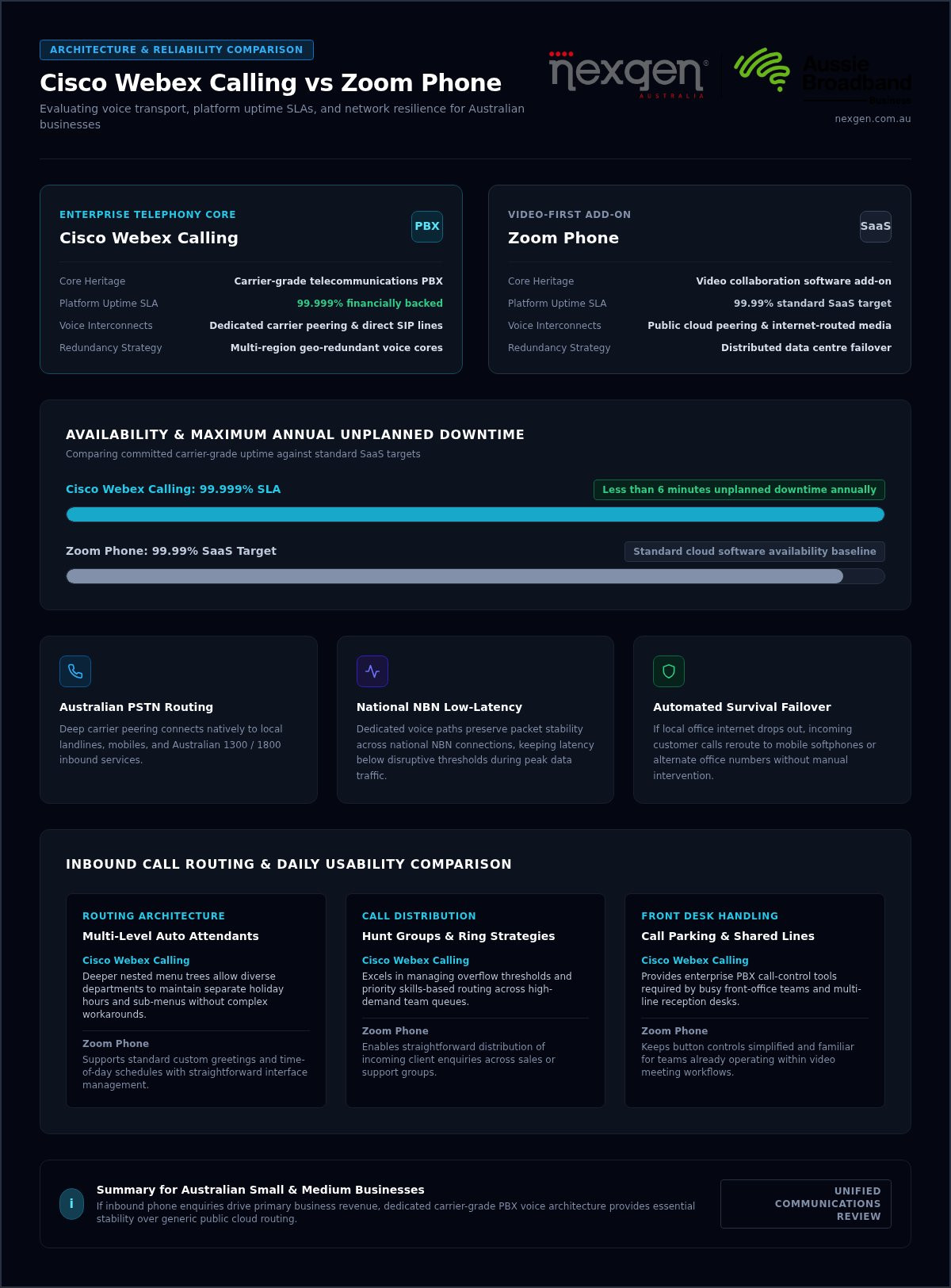
| Architecture Element | Cisco Webex Calling | Zoom Phone |
|---|---|---|
| Core Heritage | Carrier-grade telecommunications PBX | Video collaboration software add-on |
| Platform Uptime SLA | 99.999% financially backed availability | 99.99% standard SaaS target |
| Voice Interconnects | Dedicated carrier peering and direct SIP lines | Public cloud peering and internet-routed media |
| Redundancy Strategy | Multi-region geo-redundant voice cores | Distributed data centre failover |
Carrier Infrastructure and Australian PSTN Connectivity
Connecting to local landlines, mobiles, and Australian 1300 or 1800 numbers requires access to the Public Switched Telephone Network (PSTN). Cisco achieves this through deeply integrated carrier peering, partnering with established telecommunications providers to deliver dedicated voice paths. This structure preserves packet stability across national NBN connections, keeping voice latency below disruptive thresholds even when local data traffic spikes.
Service Level Agreements, Uptime, and Redundancy
Cisco backs Webex Calling with a 99.999% uptime Service Level Agreement, equating to less than six minutes of unplanned downtime annually. Zoom Phone targets standard SaaS availability at 99.99%. For small operations handling critical enquiries, that architectural margin counts.
Webex integrates automated survival failover. If your local office internet drops out, incoming customer calls reroute to mobile softphones or alternate office numbers without manual intervention.
Does a growing team need enterprise-level resilience? If inbound phone calls drive your primary revenue, dependable voice architecture is essential protection against lost commercial opportunities.
Core Calling Features and Daily Usability for Small Teams
Daily phone handling directly shapes customer perceptions of your brand. When a client rings, they expect immediate routing, clear audio, and prompt assistance. Evaluating cisco webex calling vs zoom phone for small business requirements means assessing whether your team can transfer calls effortlessly, manage busy reception queues, and work flexibly away from physical desks.
Both platforms sit comfortably among global leaders in the Gartner® Magic Quadrant™ for UCaaS, yet their design priorities diverge in daily operation. Zoom Phone keeps interface elements straightforward, making it intuitive for employees who already spend hours in video sessions. Webex Calling mirrors traditional enterprise PBX capabilities, delivering deeper call-control tools that busy front-office teams often require.
Inbound Call Routing, Auto Attendants, and Queue Management
Inbound call workflows differ noticeably once your call volumes expand beyond basic transfers:
- Multi-Level Auto Attendants: Both systems support custom greetings and time-of-day schedules. Webex offers deeper nested menu trees, allowing diverse departments to maintain separate holiday hours and sub-menus without complex workarounds.
- Hunt Groups and Ring Strategies: Distributing incoming enquiries across sales or support teams is straightforward on both. Webex excels in managing overflow thresholds and priority skills-based routing.
- Call Parking and Shared Line Appearance: Front-desk staff managing multiple incoming calls benefit from Webex’s robust call parking bays, allowing team members to retrieve held calls from any office handset.
App Experience, Messaging, and Meeting Capabilities
Hybrid staff depend on responsive softphones. Zoom provides a unified desktop and mobile client that feels lightweight, integrating chat channels alongside dialling pads. Webex delivers a comprehensive workspace combining calling, dedicated spaces, and native content sharing across Windows, macOS, iOS, and Android.
Background noise remains a common frustration for remote employees. Webex integrates advanced native voice intelligence that automatically removes barking dogs, keyboard clatter, and office chatter from live calls without third-party plugins. Zoom relies on standard software suppression and its AI Companion to generate post-call summaries.
To avoid navigating complex dial plans on your own, exploring professional small business phone systems ensures your auto attendants and staff extensions are tailored correctly from day one.
Hardware Ecosystem: Desk Phones, Conference Units, and Headsets
Physical handsets remain vital for Australian medical practices, legal chambers, trade counters, and busy reception desks. Softphones are convenient, but physical desk phones ensure immediate pickup without waiting for computer monitors to wake or apps to launch. Comparing cisco webex calling vs zoom phone for small business environments requires reviewing hardware lifecycles, build durability, and how easily devices provision across your office network.
Cisco builds its own unified ecosystem, pairing proprietary cloud software directly with native hardware. Zoom relies primarily on third-party hardware manufacturers, creating a broader vendor catalogue that can introduce support friction when managing firmware across different hardware brands.
Native Cisco IP Phones vs Open SIP Hardware
Cisco Webex Calling pairs natively with Cisco Multiplatform Phone (MPP) models across the 6800, 7800, and 8800 series. These devices feature enterprise-grade acoustic components, ergonomic handsets, and dedicated physical line keys for rapid call handling. Because Cisco develops the underlying hardware and the calling platform together, firmware patches deploy automatically from the cloud without manual engineering oversight.
Zoom Phone certifies a diverse range of open SIP hardware, including selected Poly, Yealink, and AudioCodes units, alongside Cisco MPP models. While this offers flexibility if you already own compatible handsets, managing mixed-brand fleets can lead to uneven user experiences. Handset manufacturers maintain independent end-of-life schedules, meaning certain desk phones may stop receiving vital firmware updates sooner than expected. If you are reviewing physical office equipment, our guide to small business phone systems australia details how handset lifecycles impact commercial value over time.
Meeting Room Hardware, Paging Systems, and Door Intercoms
Workplace communications extend beyond individual desks into conference spaces, warehouses, and front entryways:
- Conference and Boardroom Devices: Cisco supports native conference units like the 7832 and 8832, along with its integrated Room and Board series. Zoom Phone integrates with certified hardware video bars from Poly, Neat, and Logitech.
- Analogue and Warehouse Paging: Cisco easily integrates traditional warehouse horns and physical fax machines via dedicated Analog Telephone Adapters such as the ATA191 and ATA192. Zoom Phone supports similar analogue integration, though it relies on third-party gateway hardware.
- Access Intercoms: Both systems support SIP-compliant door stations and intercoms, enabling staff to answer front entrance buzzers and release doors directly from their desk handsets.
Pairing cloud software with purpose-built handsets eliminates manual configuration, ensuring every desk phone remains secure and operational over years of heavy daily use.
Total Cost of Ownership: Licences, Add-ons, and Implementation
Headline software subscription fees rarely reflect the final figure on your monthly invoice. Evaluating the real expenditure behind cisco webex calling vs zoom phone for small business requires accounting for local call plan structures, phone number hosting, storage quotas, and deployment labor. What looks economical on a digital pricing page can quickly inflate once external call routing and hardware provisioning enter the calculation.
A true commercial comparison looks beyond software seats to assess the entire operating footprint of your communications stack.
Licensing Tiers, Inbound Numbers, and Australian Calling Plans
Cloud telephony platforms typically segment their software licences into basic calling tiers and unified suites that include comprehensive video conferencing. The real divergence happens with external voice connectivity. Zoom Phone often presents metered pay-as-you-go calling plans alongside unlimited packages, requiring companies to monitor monthly outbound usage to prevent bill shock. For Australian organisations, untimed national call bundles deliver predictable operational expenditure, eliminating minute-by-minute calculations for local, national, and mobile outbound traffic.
Direct Inward Dialling (DID) numbers, including local regional numbers, 1300 inbound lines, and 1800 numbers, carry recurring monthly hosting charges. Call recording features can also alter monthly costs. While baseline licences may provide limited local storage, retaining customer call recordings for regulatory compliance often requires premium cloud storage upgrades or third-party archiving subscriptions.
Setup Overheads, Configuration, and Number Porting Realities
Attempting to configure a digital PBX internally places heavy friction on office managers and internal IT staff. Mapping complex multi-tier auto attendants, setting up user ring groups, and programming physical hardware buttons demand specialised knowledge. If done incorrectly, callers encounter dead ends or dropped transfers, directly damaging your customer service reputation.
Number porting represents another critical operational hurdle. Transferring your existing Australian business phone numbers from legacy carriers to a cloud platform requires meticulous regulatory coordination. Rejection errors can trigger weeks of administrative delays or unexpected phone downtime. Opting for a structured, professionally guided deployment eliminates these internal friction points. Specialist onboarding ensures your network readiness is verified, routing rules are tested, and staff receive practical training before cutting over.
To bypass licensing confusion and protect your operational continuity during migration, contact Nexgen Australia to plan your cloud phone deployment with local engineering support.
Decision Framework: Which System Fits Your Small Business?
Choosing between cisco webex calling vs zoom phone for small business requirements comes down to your operational workflows and how heavily your business depends on inbound phone traffic. Use this five-step framework to evaluate your workplace:
- Assess call intensity: Does inbound voice traffic drive your primary revenue and daily customer service?
- Audit your hardware: Do your staff require dedicated physical desk phones, or do they work entirely via laptop headsets?
- Review internal IT capacity: Does your team have time to configure dial plans, or do you need fully supported deployment?
- Examine workflow tools: Is your team already committed to video meeting software, or do you require a dedicated telecommunications platform?
- Evaluate regulatory governance: Do you handle sensitive client conversations requiring carrier-grade uptime and compliant call recording?
When Zoom Phone Makes Sense for Your Operation
Zoom Phone works well for agile businesses that already run their daily collaboration inside the Zoom ecosystem. It fits distributed teams operating almost exclusively on laptops and mobile devices rather than physical desk handsets. If your team handles moderate calling volumes and straightforward call forwarding satisfies your customer service requirements, it serves as a lightweight, accessible tool.
When Cisco Webex Calling Is the Superior Commercial Choice
Cisco Webex Calling is the stronger commercial choice for organisations where phone communications remain mission critical. If your workplace requires durable desk phones with physical line keys, multi-department hunt groups, and robust reception workflows, Cisco’s native hardware ecosystem delivers dependable performance. It provides carrier-grade voice architecture, strict administrative security, and proven stability for operations that cannot risk missed customer calls.
The Advantage of a Fully Managed Australian Telco Deployment
Selecting software licences is only the first step; proper deployment determines your ongoing call quality. Self-configuring complex auto attendants, SIP settings, and routing rules internally often creates unnecessary downtime and administrative headaches.
As an authorised Cisco provider and a wholly owned B2B telecommunications subsidiary within Aussie Broadband Limited (ASX: ABB), Nexgen Australia has supported Australian organisations since 2009. Our specialists manage your cloud phone rollout from start to finish, conducting pre-deployment network readiness checks, executing carrier number porting, and providing dedicated ongoing support.
Talk to Nexgen about the right phone system for your business to upgrade your communications with complete commercial confidence.
Modernise Your Business Communications with Certainty
Selecting the right communications platform directly impacts your staff productivity and client satisfaction. While Zoom Phone provides an accessible pathway for teams centred around desktop video collaboration, Cisco Webex Calling delivers the carrier-grade uptime, dedicated physical handsets, and advanced call routing essential for phone-reliant operations. Weighing up cisco webex calling vs zoom phone for small business ultimately requires matching platform architecture to your everyday operational demands.
You don’t have to tackle network readiness audits, complex call flows, or Australian number porting on your own. As an authorised Cisco provider and the dedicated B2B telecommunications subsidiary within Aussie Broadband Limited (ASX: ABB), Nexgen Australia combines enterprise technology with hands-on local engineering. We manage your transition end to end, eliminating migration friction and keeping your staff connected from day one.
Speak with the Nexgen team about the ideal cloud phone system for your business to secure a resilient, future-ready voice platform tailored to your operational goals.
Frequently Asked Questions
Can our business keep our existing Australian phone numbers when switching?
Yes, your business can retain all existing local landlines, 1300 numbers, and 1800 numbers through the standard Australian telecommunications porting process. When evaluating cisco webex calling vs zoom phone for small business migrations, your service provider submits a formal port request to your current carrier. The transfer executes during a scheduled cutover window, preventing inbound downtime and ensuring clients reach your team without interruption.
Do we need brand new desk phones to use Cisco Webex Calling or Zoom Phone?
Not necessarily, provided your current desk handsets support open Session Initiation Protocol (SIP) standards or multiplatform firmware. Cisco Webex Calling natively integrates with Cisco Multiplatform (MPP) hardware, while Zoom Phone certifies selected third-party models from vendors like Poly and Yealink. If your existing phones run proprietary legacy firmware, upgrading to modern IP handsets ensures full access to advanced line keys, shared parking, and visual directories.
How do Cisco Webex Calling and Zoom Phone perform over standard NBN connections?
Both platforms perform reliably over business-grade NBN connections, provided your network router implements Quality of Service (QoS) rules. QoS prioritises voice packets ahead of large file downloads and general web browsing. Because voice calls consume minimal bandwidth, latency and packet jitter matter far more than raw download speed. A pre-deployment network audit ensures your local broadband link delivers consistent voice clarity across all active extensions.
Can staff make and receive office calls on their mobile phones using their business number?
Yes, both systems provide dedicated mobile applications for iOS and Android that mirror your office desk extension. When team members dial out from the app, the client’s caller ID displays your main business number rather than their private mobile line. Staff can transfer live calls, access visual voicemail, and update their availability status, allowing remote team members to stay fully reachable wherever they work.
What is the primary difference between a cloud phone system and video meeting software?
A cloud phone system is an enterprise PBX replacing physical telephone wires with internet-routed calling to the public phone network. Video meeting software focuses primarily on screen sharing, scheduled group video conferences, and internal messaging. While modern collaboration suites combine both functions, assessing cisco webex calling vs zoom phone for small business requirements highlights whether you are adopting a carrier-grade telephony core or a collaboration add-on.
Is Cisco Webex Calling suitable for a small business with fewer than ten staff?
Yes, Webex Calling scales efficiently down to micro-teams and branch offices with just a few users. Small teams gain immediate access to enterprise features, including professional multi-tier auto attendants, hunt groups, and automated disaster failover, without purchasing costly on-site PBX hardware. When paired with a managed deployment, smaller organisations receive enterprise-calibre call reliability alongside predictable monthly operating costs.