


The lowest-friction choice isn’t always the one with the simplest sales pitch. In the cisco webex calling vs vonage business communications comparison, Australian SMEs need to weigh more than features: migration from a legacy phone system, compatible handsets, NBN call quality and costs beyond a headline plan.
It’s reasonable to want predictable costs and a phone service your team can rely on. Neither platform can overcome a poor internet connection, and the best fit depends on how your staff work, what hardware you already own and which features you’ll use. Vonage stands out for API flexibility and a bring-your-own-device approach. Cisco Webex Calling offers a more integrated Cisco hardware and collaboration ecosystem, with security controls that may suit businesses handling sensitive conversations.
This 2026 Australian comparison covers practical differences, including PSTN connectivity, device compatibility, pricing factors, migration planning and local support considerations. Use it to assess which platform better fits your operational needs, including whether Cisco Webex Calling’s hardware ecosystem and collaboration features suit your business.
Key Takeaways
- Compare how Cisco’s unified platform and Vonage’s API-led approach suit different business priorities.
- Use the cisco webex calling vs vonage business communications comparison to identify the integrations and security controls your organisation needs.
- Check what is included in a quote so add-ons, connectivity and other charges don’t catch you by surprise.
- Assess whether your current handsets and broadband setup are ready for a cloud phone system.
- Use a practical decision framework to match each platform to your team’s needs and growth plans.
Cisco Webex Calling vs Vonage Business Communications: High-Level Comparison
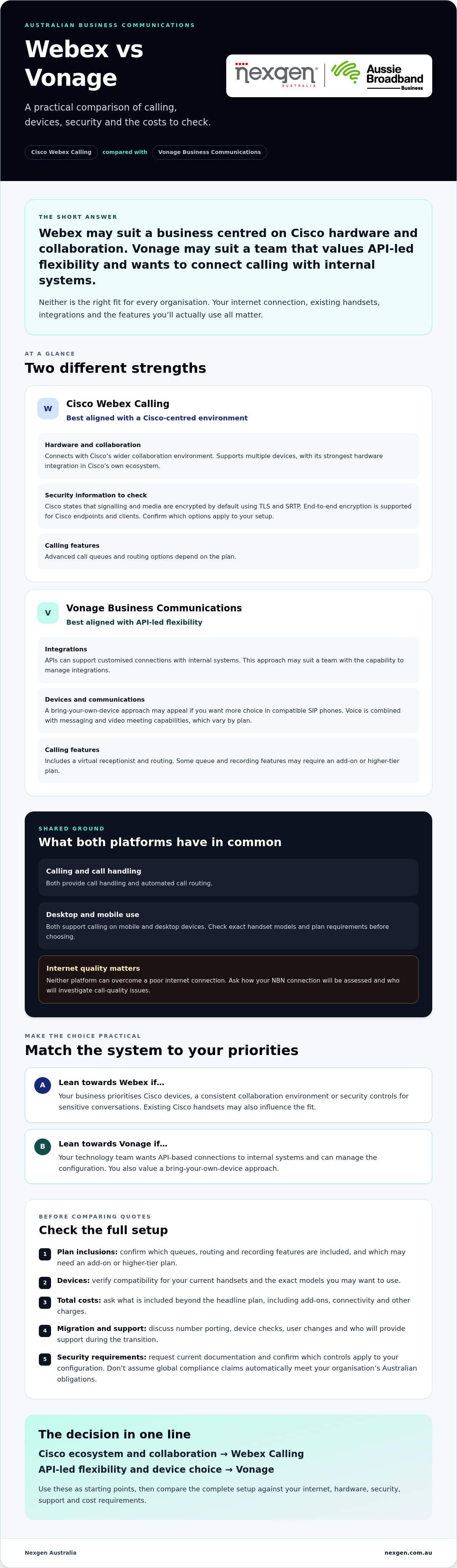
Webex Calling may suit security-conscious businesses seeking a closely integrated Cisco environment, while Vonage Business Communications may suit teams that value API-led flexibility. In the cisco webex calling vs vonage business communications decision, the practical difference is how each platform brings calling together with other tools. Cisco centres its offer on a broader hardware and collaboration ecosystem. Vonage takes a more app-centric approach, with APIs that can support customised integrations.
Both sit within Unified Communications (UC), the category of tools that brings business calling together with services such as messaging and video meetings. For Australian SMEs, assess each platform against three operational needs: call quality on your internet connection, compatibility with the software and devices your team already uses, and access to suitable support. Cloud calling performance depends partly on your network, so neither platform can compensate for an unsuitable NBN connection.
At a Glance: Feature Comparison
- Calling features: Both platforms provide call handling and automated call routing. Webex options such as advanced call queues and routing depend on the plan. Vonage includes a virtual receptionist and routing, while some queue and recording features may require an add-on or higher-tier plan.
- Meetings and messaging: Webex Calling connects with Cisco’s wider collaboration environment. Vonage combines voice with messaging and video meeting capabilities, with features varying by plan.
- Devices and remote work: Both support mobile and desktop calling. Webex supports multiple devices, with its strongest integration in Cisco’s own hardware ecosystem. Vonage’s bring-your-own-device approach may appeal if you want more choice in compatible SIP phones. Check exact models and plan requirements before committing.
Don’t judge reliability by the platform name alone. Ask how the service will connect to the Australian phone network, how your internet connection will be assessed, and who will investigate call-quality issues.
Ideal Use Cases for Australian Businesses
Consider Webex Calling if your professional services firm, healthcare organisation or growing SME prioritises security controls, Cisco devices and a consistent collaboration environment. Cisco states that Webex Calling encrypts signalling and media by default. Confirm which security settings apply to your configuration and what your organisation requires. A managed provider can also help plan number porting, device checks and user changes during a complex transition. Nexgen Australia is an authorised VoIP provider and supplies Cisco Webex Calling systems, including setup and deployment.
Consider Vonage if your technology team wants to connect calling with internal systems through APIs and has the capability to manage those integrations. Its flexibility can be useful, but confirm what needs configuration, which features cost extra and who supports the setup.
There’s no universal Australian-market winner. Businesses with existing Cisco handsets or a preference for an established hardware ecosystem may favour Webex. Teams prioritising custom integrations may lean towards Vonage. Compare the complete setup, not just the app or headline feature list.
Feature Deep Dive: Security, Hardware, and Integration
In the cisco webex calling vs vonage business communications comparison, security, hardware and integrations matter as much as the feature list. The best fit depends on how each platform protects calls, works with your existing devices and connects to the software your team relies on.
Cisco says Webex Calling encrypts signalling and media by default using TLS and SRTP, and supports end-to-end encryption for Cisco endpoints and clients. If your organisation handles confidential client conversations, ask which encryption options apply to your configuration and request current security and compliance documentation. Don’t assume a platform’s global compliance claims automatically meet your organisation’s Australian obligations.
Vonage offers security controls for its cloud communications service, but assess these against your own requirements rather than relying on a broad assurance. Cloud architecture alone doesn’t establish that every Australian communications obligation is covered. Check the provider’s responsibilities, number arrangements and support processes, and seek advice if your organisation has specific compliance needs.
The 2026 Gartner Magic Quadrant for UCaaS offers broader market context, but an industry position is not a substitute for evaluating the security and support terms in your own proposal.
Hardware and Desk Phone Integration
Cisco’s strength is its connected hardware ecosystem. Webex Calling supports a broad range of Cisco desk and conference phones, alongside Webex room and desk devices. This can simplify management when your office already uses Cisco equipment. Confirm the exact model, feature support and configuration before reusing handsets, as compatibility can vary.
Vonage takes a more flexible bring-your-own-device approach, supporting selected SIP phones from brands including Poly, Yealink, Grandstream and Panasonic. That choice may help you retain suitable handsets, but check model compatibility and who will handle configuration and troubleshooting. For either platform, assess sound quality and handset build in your actual office environment rather than assuming all compatible devices perform alike.
Integrations: Depth Over Quantity
Vonage’s API-led approach can suit businesses that want to connect calling with internal systems or build customised workflows. Webex’s advantage is closer integration within Cisco’s calling, device and collaboration environment. A long integrations list doesn’t tell you whether a connection is native, straightforward to administer or capable of supporting the workflow you need.
- Check the workflow: Can staff access the information they need during a call?
- Confirm ownership: Who maintains the integration if an app or system changes?
- Test the hardware: Does your handset support the calling features your team expects?
If you’re considering Cisco and want help planning a transition or checking handset compatibility, explore Cisco Webex Calling phone systems from Nexgen, an authorised VoIP provider that supplies and deploys Cisco Webex Calling solutions.
The Australian Context: NBN, Support, and Billing
For Australian businesses, choosing a cloud phone system involves more than comparing software. Your NBN connection, how calls reach the Australian phone network, the currency and terms of your quote, and the support available when something goes wrong all affect day-to-day experience. In the cisco webex calling vs vonage business communications comparison, check these local requirements before focusing on feature lists.
NBN Readiness and Voice Quality
Call quality depends on the whole connection between your office, the cloud calling service and the person you’re speaking with. Available NBN speed matters, but so do latency, the time data takes to travel, and jitter, variation in that travel time. Congestion, Wi-Fi coverage and other internet use can also affect voice. Ask each provider how it assesses your connection and where call traffic is routed. Don’t assume either platform will improve a weak or heavily shared connection.
Before deployment, review your typical call volumes, internet performance and any planned backup arrangements. Nexgen provides VoIP and cloud phone systems for SMEs. You can discuss connection readiness and setup requirements as part of planning a changeover.
Local Support and Billing Clarity
A self-service cloud platform may suit a business with the time and technical capability to manage setup and troubleshooting. Smaller teams may prefer a clear escalation path, especially during number porting or a changeover from a legacy phone system. Ask who will manage the transition, where support is based, what issues the support team handles and how you’ll contact them. Confirm the support arrangements that apply to your proposed service.
Compare written quotes in the same currency and on the same billing basis. If a subscription is quoted in a foreign currency, exchange-rate movements may affect the amount your business pays. Ask whether the quote is in AUD, how taxes and fees are treated, and whether PSTN connectivity, handsets, call recording or other add-ons are included. A per-user figure alone may not show the full ongoing cost.
Australian Numbers and Telecommunications Requirements
Confirm how the service connects to the public phone network and who supplies that connection. For Webex Calling, the Australian PSTN arrangement can affect carrier pricing, number portability and setup, so identify it clearly in the proposal. Ask both providers how they handle your existing business numbers, including any 1300 numbers, and who coordinates a port.
Australian VoIP services sit within a local telecommunications framework. Rather than assuming a cloud provider’s global compliance claims settle every local requirement, ask for clear information about the Australian service provider, number allocation and responsibilities. This helps your business assess the arrangement against its operational and compliance needs.
Scalability and Cost Factors for Growing Teams
The lowest monthly seat price doesn’t always produce the lowest total cost of ownership (TCO). For cisco webex calling vs vonage business communications, compare the full cost of running the service: licences, Australian phone network connectivity, handsets, optional features, implementation and support. Then check how easily you can add users, change plans or leave the agreement as your business evolves.
Both services can scale as teams grow, but adding a user is only one part of the change. You may also need a compatible device, a licence with the right features, updated call routing and a clear process for setting up new starters. Ask for the cost and steps involved in adding or removing users, and whether contract terms change when your requirements do.
Compare the Complete Pricing Model
Webex Calling costs depend on the licence selected and how the service connects to the public phone network. In Australia, ask whether your quote uses a Cisco calling plan, a cloud-connected provider or a local gateway, and what connectivity charges sit outside the licence.
Vonage uses plan tiers, with some features and add-ons depending on the selected plan. A lower entry tier may not include everything your team needs, such as desk phone support or advanced call recording. Compare equivalent configurations rather than headline rates.
- List required features: Separate essentials from optional tools, such as call recording, queues or integrations.
- Check every charge: Confirm billing currency, contract length, taxes, fees, connectivity, hardware and implementation costs.
- Model team changes: Ask how billing works when users join, leave or need a different level of access.
- Review the exit terms: Check number portability, equipment ownership and any conditions for ending or changing the service.
This comparison helps prevent feature creep, where optional functions accumulate without a clear business need. Review the agreement and renewal terms before signing. A managed arrangement may provide a clearer support and transition path, but the scope and flexibility depend on the contract.
Choose for the Future, Not a Ten-Year Guess
Both platforms continue to develop their capabilities, including AI-related tools. Webex’s current feature set includes options such as an AI Receptionist with a configurable knowledge base and Caller Intent analysis. Confirm availability, licensing, privacy settings and suitability for your Australian operation before including these in your business case. Don’t assume a feature is included in your base plan.
Vonage’s API-led approach may appeal if your business plans to connect calling with its own systems. That flexibility can bring value, but consider who will manage the integration and its ongoing maintenance. Cisco’s investment in its wider ecosystem may be relevant to long-term planning, but no provider can guarantee a platform will suit your business for a decade. Assess current needs, upgrade paths and exit options instead.
For a like-for-like quote and to discuss setup, talk to Nexgen about Cisco Webex Calling and the options that fit your team’s growth plans.
Decision Framework: Which System Wins for You?
Webex Calling may suit Australian SMEs prioritising Cisco hardware, security controls and an integrated collaboration environment. Vonage may suit businesses that need API-led customisation and have the technical capability to manage integrations. There’s no universal winner in the cisco webex calling vs vonage business communications decision. Choose against your operational requirements, not a feature count or headline price.
Use this checklist to narrow your options:
- Security: What controls and documentation does your organisation require for business calls and client information?
- Hardware: Which existing handsets can be retained, and which models are confirmed compatible?
- Integration: Which specific workflows must connect to your CRM or other business systems? Confirm how each integration works and who maintains it.
- Australian operations: How will the service connect to the public phone network, and what local support and escalation arrangements are included?
- Commercial terms: Does the full quote cover licences, connectivity, devices, optional features and contract conditions?
The Case for Cisco Webex Calling
Webex is worth shortlisting if your professional services firm or growing SME values Cisco’s integrated calling and hardware environment, alongside security controls suited to its needs. Cisco handsets may also appeal to offices seeking consistent desk phone deployments. Nexgen Australia is an authorised VoIP provider and supplies Cisco Webex Calling systems. Assess the specific service, support and commercial commitments in your proposal to ensure they align with your business goals. For broader buying criteria, see the Small Business Phone Systems Australia: 2026 Buyer Guide.
Plan the Change Before You Port Numbers
A managed transition can reduce the workload on your team, but it still needs careful sequencing. Start by documenting numbers, call flows, users, devices and essential integrations. Agree on responsibilities and a cutover plan, test the setup with representative users, then confirm how staff will get help during the change. Ask how number porting, legacy-system overlap and rollback options will be handled. Don’t assume these are automatic.
Nexgen Australia supplies Cisco Webex Calling systems and tailored VoIP solutions for Australian businesses. Discuss your team’s requirements and proposed setup with Nexgen Australia about Cisco Webex Calling today.
Choose a phone system that can grow with your business
The cisco webex calling vs vonage business communications decision comes down to what your team needs most. Webex Calling is an option for businesses that value Cisco hardware, security controls and an integrated platform. Vonage may suit teams that prioritise API flexibility and custom integrations.
Before choosing, compare the full cost, check handset compatibility and assess how each service will perform on your NBN connection. Also confirm who will manage number porting, setup and support. A clear transition plan can make moving from a legacy phone system easier to manage.
Nexgen supplies Cisco Webex Calling phone systems and tailored VoIP solutions for Australian SMEs. If you’re weighing up Webex Calling for your business, get a tailored Cisco Webex Calling quote from Nexgen.
With the right platform and a well-planned changeover, your team can move to cloud calling with greater confidence and a clearer path for future growth.
Frequently Asked Questions
Is Cisco Webex Calling better than Vonage for Australian businesses?
Not for every business. Webex Calling may be a better fit if you value Cisco hardware, an integrated collaboration environment and documented security controls. Vonage may suit a technically capable team that prioritises API flexibility and custom integrations. In the cisco webex calling vs vonage business communications comparison, weigh your required features, compatible devices, Australian phone network arrangements, support and full contract costs before deciding.
Can I use my existing NBN connection for Webex Calling?
Usually, provided the connection can support your team’s calls reliably. The NBN plan’s advertised speed alone doesn’t confirm call quality. Congestion, latency, jitter, Wi-Fi coverage and other internet use can also affect voice. Before switching, ask for an assessment of your connection and expected call traffic. Confirm how the service will connect to the Australian phone network and what backup arrangements are available if your internet connection fails.
Do I need special handsets for Cisco Webex Calling?
No, but any desk phone you plan to use must be compatible with your Webex Calling configuration. Cisco phones are supported within the Cisco ecosystem, and Webex also supports selected third-party devices. Compatibility and available features can vary by model. Before retaining existing handsets or purchasing new ones, ask the provider to confirm the exact model, required configuration and whether it supports the calling functions your staff rely on.
How does the security of Webex compare to Vonage?
Cisco states that Webex Calling encrypts signalling and media by default using TLS and SRTP. The right comparison depends on each platform’s current configuration, features and contractual security commitments, so request current documentation from both providers. Check how encryption applies to your chosen devices and clients, what data is handled, and which responsibilities remain with your organisation. Don’t assume a global compliance statement automatically addresses your specific Australian requirements.
Can Nexgen help migrate my current numbers to Webex?
Nexgen supplies Cisco Webex Calling phone systems and VoIP solutions. Discuss your existing numbers and migration requirements with Nexgen as part of planning the move. Number portability and timing depend on the relevant provider and service arrangements, so confirm feasibility, responsibilities and the proposed porting schedule before agreeing to a cutover. A migration plan should also account for call flows, handsets and staff setup.
Is Vonage Business Communications available in Australia with local support?
Confirm current Australian availability and support arrangements directly with Vonage or its authorised provider before proceeding. Ask whether the quoted service supports your required Australian numbers and phone network connection, where support is based, and how issues are escalated. Availability of a cloud platform doesn’t by itself confirm that local support is included. Request these details in writing so you can compare them fairly with the support offered by other providers.
What are the main benefits of a managed Cisco Webex deployment?
A managed deployment can give your business help coordinating setup, device checks and the transition from a legacy phone system. It also gives you an opportunity to confirm call routing, number arrangements, user requirements and support responsibilities before the changeover. Nexgen provides Cisco Webex Calling deployments and tailored VoIP solutions. Confirm the proposed scope, migration steps and ongoing support arrangements for your specific business.