


Choosing between Cisco Webex Calling and Uniden Voice over Cloud depends less on brand recognition and more on how each system supports your team’s day-to-day work. In the cisco webex calling vs uniden voice over cloud comparison, the most capable phone system isn’t automatically the best fit for your business.
The decision can be difficult because product information may describe features differently, while handset compatibility, integrations, Australian calling arrangements and support all affect practical fit. Uniden Voice over Cloud is presented as a hosted phone system for Australian businesses, while Cisco Webex Calling sits within the broader Webex collaboration environment.
This comparison will help you assess both platforms against your workflows, existing tools and growth plans. It also highlights what to confirm about devices, service continuity, migration and ongoing support, so you can shortlist options and plan a considered transition before committing.
Key Takeaways
- The best choice in cisco webex calling vs uniden voice over cloud comes down to documented business needs, not brand recognition or feature counts.
- Compare everyday calling, administration, integrations, compatible devices and support using current information from each provider.
- Assess your team’s roles, call patterns and capacity to manage the system before deciding which platform to trial.
- Ask providers to confirm Australian number availability, number porting, emergency calling and service continuity for your business.
- Build a transition checklist covering users, devices, integrations, migration steps and who will manage the system after deployment.
Cisco Webex Calling vs Uniden Voice over Cloud: What Is Being Compared?
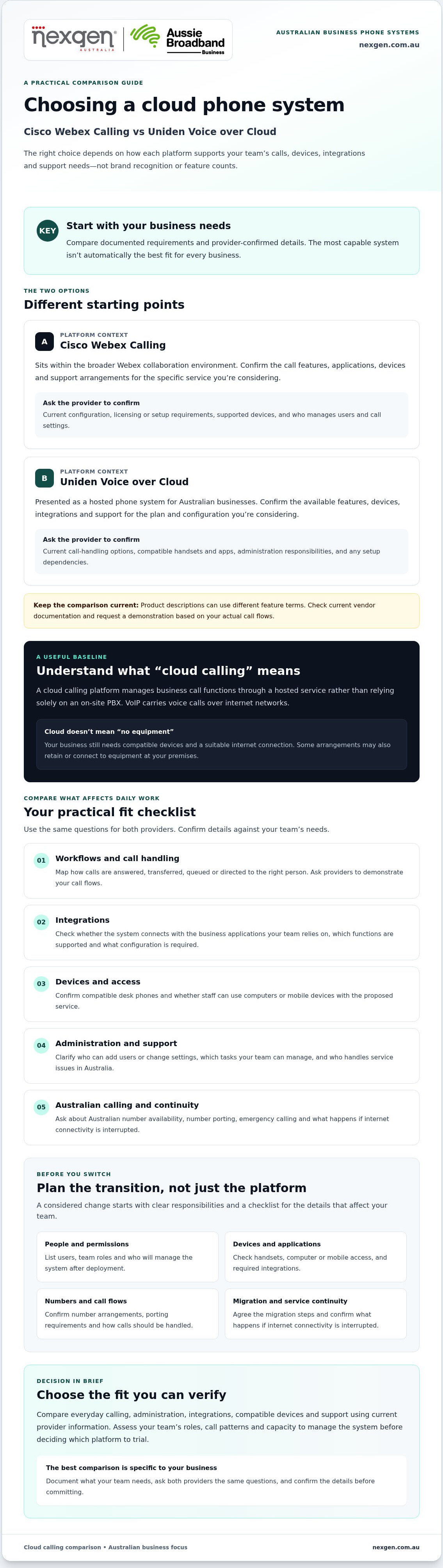
The best fit depends on your verified business requirements, not brand recognition alone. This comparison looks at Cisco Webex Calling and Uniden Voice over Cloud as cloud calling options. The right choice depends on how each service handles your team’s calls, devices, integrations and support needs in Australia.
Cloud calling moves much of a phone system’s call management from equipment at your premises to a service hosted by a provider. An on-premises phone system, often called a PBX, relies more heavily on local hardware to manage calls. Cloud services can reduce reliance on that equipment, although your business still needs compatible devices and a suitable internet connection. Some arrangements may also retain or connect to on-site equipment.
What does a cloud calling platform do?
A cloud calling platform manages business call functions through a hosted service rather than relying solely on a PBX in your office. Depending on the platform, configuration and supported devices, staff may make and receive calls on desk phones, computers or mobile devices. Confirm the available options for each product and the devices your team already uses.
Both services sit within the broader category of Voice over Internet Protocol (VoIP), which carries voice calls over internet networks. The platform is only one part of the arrangement. Internet connectivity, call routing, user access and any connection to the public phone network also shape how the system works for your business.
What should you compare before choosing?
For a fair cisco webex calling vs uniden voice over cloud assessment, separate details confirmed in current product documentation from those you still need each provider to verify. Product pages may describe similar capabilities differently, so ask for a demonstration based on your call flows rather than relying on feature names alone.
- Workflows and call handling: Map how calls are answered, transferred, queued or directed to the right person.
- Integrations: Check whether the system connects with the business applications your team relies on, and what configuration is required.
- Devices and administration: Confirm compatible handsets and apps, and understand who can add users, change settings and manage the service.
- Support and Australian conditions: Ask who handles service issues, how Australian numbers and calling are provided, and what happens if internet connectivity is interrupted.
These checks keep the comparison grounded in operational fit. Neither platform is automatically better for every Australian business. A small team with straightforward call needs may prioritise simple administration, while an organisation with established workflows or specific integration requirements may need to examine those needs in greater detail.
How Webex Calling and Uniden Voice over Cloud Differ in Everyday Use
Available product information points to different areas to investigate, but it isn’t a substitute for current vendor documentation. Use the table as a comparison checklist. Ask Cisco or its Australian service provider, and Uniden, to confirm each detail for the specific plan and configuration you’re considering.
| Area | Cisco Webex Calling | Uniden Voice over Cloud |
|---|---|---|
| Calling | Confirm current call-handling features, such as voicemail, call routing and auto attendants, and whether they’re included in your proposed configuration. | Confirm which call-handling features are currently available, included in your proposed plan and suitable for your call flows. |
| Administration | Ask Cisco or your provider to clarify user-management controls, setup responsibilities and who can change call settings. | Ask Uniden which administration tasks your team can manage and which require provider assistance. |
| Integrations | Check Cisco’s current documentation for the specific applications and functions your team needs, including any licensing or configuration requirements. | Check Uniden’s current documentation for supported applications, available integration functions and any setup dependencies. |
| Devices | Confirm supported desk phone models and access from computers or mobile devices for your proposed service. | Confirm compatible handsets and any computer or mobile access options, including device limits or requirements. |
| Support | Confirm who provides support in Australia, how issues are escalated and who is responsible for the phone network connection. | Confirm support channels, service responsibilities and applicable terms directly with Uniden. |
Compare call handling, collaboration and integrations
Ask each provider to demonstrate the same customer enquiry from start to finish: how the call is answered, transferred, directed if the first person is unavailable and followed up. Check whether recording, voicemail and collaboration functions are included, optional or dependent on a plan. If staff need caller details to appear in a customer system, ask the provider to demonstrate that workflow and confirm it in current product documentation.
Compare devices, administration and team access
Give each provider an inventory of your handsets and the computers and mobiles staff use. Request written confirmation of compatibility for your proposed setup. Establish who can add or remove users, update call routing and manage settings, and whether any licences or configuration work are required. Don’t assume a feature or device supported in one configuration is available in another.
The key practical difference can’t be confirmed from general product descriptions alone. Webex Calling is associated with the broader Webex environment, while Uniden Voice over Cloud is presented as a hosted phone service. Validate the details against current official documentation before comparing proposed services. For a discussion about Webex Calling setup and deployment, explore Cisco Webex Calling phone systems from Nexgen Australia.
Which Platform Fits Your Australian Business Requirements?
The better fit depends on your team’s call patterns, tools and capacity to manage the system. In the cisco webex calling vs uniden voice over cloud comparison, start by documenting how many people make and receive calls, when customer enquiries peak, how calls should be routed and which business applications staff need to use.
For example, a business that handles frequent enquiries may need call queues and clear overflow arrangements. A team already assessing Webex for collaboration may want to test how calling fits its existing environment. In both cases, confirm relevant features, licensing, devices and Australian service conditions against current provider documentation before deciding.
When might Webex Calling suit your requirements?
Webex Calling may merit closer evaluation if your business is considering calling within the broader Webex environment. The supplied product information describes integration with Webex tools and identifies third-party applications such as Microsoft 365, Salesforce and Slack. Check Cisco’s current documentation to confirm the specific integration, device compatibility and plan requirements your workflows depend on.
When might Uniden Voice over Cloud suit your requirements?
Uniden’s product information describes a hosted PBX with call queues, interactive voice menus, voicemail-to-email and listed integrations including Salesforce, Zoho, HubSpot and Xero. If those functions match your needs, ask Uniden to demonstrate them using your call scenarios. Confirm supported devices, administration arrangements, Australian number and service conditions, and the support available under your proposed agreement.
The table summarises potential trade-offs based on the product information available for this comparison. Treat each point as a prompt for verification, not a substitute for a current proposal or demonstration.
| Platform | Potential advantages to investigate | Limitations or questions to verify |
|---|---|---|
| Cisco Webex Calling | Its place within the Webex environment may be relevant if your business is evaluating calling alongside Webex collaboration tools. Product information also identifies integrations with Microsoft 365, Salesforce and Slack. | Confirm which tools and functions are included in your proposed configuration, along with Australian calling connectivity, compatible devices, licensing and who manages administration. |
| Uniden Voice over Cloud | Product information lists call-handling features such as queues and interactive voice menus, plus integrations with several business applications. These may be worth testing against everyday enquiry workflows. | Confirm that your required applications and specific integration actions are supported. Check device compatibility, service conditions, support arrangements and any limitations relevant to your call volumes. |
Use a small business phone systems buyer guide to organise your requirements before requesting demonstrations. A clear shortlist makes it easier to compare each provider against the same workflows and identify unanswered questions.
What Should You Check Before Switching to Either Cloud Phone System?
Before choosing between Cisco Webex Calling and Uniden Voice over Cloud, document how your current phone system works and ask each provider how a proposed service would meet those needs. A clear checklist helps you compare answers fairly and plan migration without overlooking users, devices or business-critical calls.
Build a fair evaluation and demonstration checklist
Ask both providers to demonstrate the same call scenarios based on your requirements. Record what’s confirmed, what depends on a particular plan or configuration, and what still needs an answer. Request written confirmation of inclusions, exclusions and Australian service conditions before proceeding.
- Document your requirements: List users and roles, current phone numbers, typical call volumes, busy periods, call flows and the devices staff rely on.
- Test key workflows: Ask each provider to show how a customer call is answered, transferred, routed if a staff member is unavailable and managed outside normal office hours, if required.
- Check applications and devices: Identify the integrations and handsets your team needs. Ask the provider to confirm compatibility and any licensing, configuration or replacement requirements.
- Confirm Australian calling arrangements: Ask about local number availability, number porting and emergency calling. Confirm what happens to your service if internet connectivity or another part of the arrangement is disrupted.
- Review the commercial terms: Check contract length, any applicable charges, service dependencies, support channels and the process for raising and escalating faults.
Plan migration, continuity and ongoing support
Agree who will coordinate number porting, configure call flows, prepare devices, set up users and explain the new system to staff. Ask the provider how continuity is managed during the transition, what could interrupt service and what fallback arrangements are available. Don’t assume a particular outcome until the provider has explained the plan for your business.
Before setting a migration date, identify who will test calls, check integrations and resolve issues after deployment. Confirm which responsibilities sit with your business, the platform provider and any deployment partner. Get the support contact, escalation path and applicable service terms in writing so your team knows where to go for help.
This preparation makes the cisco webex calling vs uniden voice over cloud decision more practical: compare each provider’s written answers against the same requirements, rather than relying on a feature list alone. To discuss Webex Calling requirements, setup and deployment for your business, speak with Nexgen about Webex Calling.
Make Your Webex Calling Decision and Plan the Next Step
Choose a cloud phone system only when it meets your documented workflows, device and integration needs, and support expectations. The cisco webex calling vs uniden voice over cloud comparison can help you identify what to test, but the information available here isn’t enough to make a definitive recommendation for every Australian business. Product capabilities, plan inclusions and local service conditions can change, so confirm details with the relevant provider before signing.
Turn the comparison into a clear recommendation
Use your must-have requirements as a decision filter. If a platform meets them in a realistic demonstration, its provider confirms the required capabilities and terms in writing, and your team understands who will manage the service, it may be ready for closer evaluation. If essential questions remain about compatibility, Australian calling arrangements or support ownership, pause and get clear answers first.
Continue evaluating Uniden Voice over Cloud if its documented service and demonstrated workflows appear to match your requirements. Ask Uniden to confirm outstanding details, including the devices, integrations and service arrangements your business depends on. This keeps the assessment fair without assuming the listed features will suit every team or configuration.
Consider a Webex Calling deployment discussion if your business is assessing calling within the broader Webex environment or wants to understand how a Webex phone system could fit its users, devices and workflows. Confirm the relevant configuration and Australian calling arrangements before treating any capability as included.
Explore a Webex Calling fit discussion with Nexgen
Nexgen supplies and integrates Cisco Webex Calling phone systems and handles setup and deployment across desk phones, computers and mobile devices. That makes Nexgen a relevant contact for discussing Webex Calling fit and deployment requirements for your business. Nexgen does not provide Uniden Voice over Cloud, so direct questions about that service to Uniden.
Before making a final commitment, compare the written proposal with your requirements list. Check that each must-have is addressed, unresolved items have an owner, and migration and post-deployment responsibilities are understood. A decision grounded in confirmed requirements is more useful than choosing on brand familiarity alone.
Talk to Nexgen about Webex Calling for your business.
Choose with confidence, then plan the transition
The right decision in cisco webex calling vs uniden voice over cloud comes down to evidence: choose the platform that meets your documented workflows, device and integration needs, and support expectations. A feature list is only a starting point. Confirm the proposed capabilities, Australian service conditions and responsibilities with the provider before committing.
If Uniden’s verified service details match your requirements, continue that evaluation directly with Uniden. If you’re considering calling within the Webex environment, Nexgen supplies and integrates Cisco Webex Calling phone systems, with setup and deployment across supported desk phones, computers and mobile devices. Turn any outstanding requirements into clear questions and agree how the transition will be managed.
Talk to Nexgen about Webex Calling for your business and discuss how it could fit your phone system requirements. With the right checks in place, you can move forward with a clearer decision and a considered transition plan.
Frequently Asked Questions
Is Cisco Webex Calling better than Uniden Voice over Cloud?
No, neither platform is better for every Australian business. The right fit depends on verified requirements. For cisco webex calling vs uniden voice over cloud, compare your call flows, required integrations, supported devices, administration needs and Australian service conditions. Ask each provider to confirm inclusions and support arrangements in writing, then request demonstrations of the same customer-call scenario before deciding.
What is the difference between Webex Calling and Uniden Voice over Cloud?
They’re distinct cloud calling services, but a definitive feature-by-feature comparison should be based on current provider documentation. Check each service’s call features, integrations, compatible devices, administration arrangements and Australian service conditions. Compare like with like, including whether a capability is included, optional or dependent on a particular configuration. General platform descriptions can help you shortlist questions, but they aren’t a substitute for confirming the proposed service.
Can Webex Calling and Uniden Voice over Cloud work with existing business phones?
Possibly, but compatibility depends on the handset model, software and service configuration. Prepare an inventory of your desk phones and other devices, including model details, and give it to each provider. Ask for written confirmation of which devices are supported, whether settings need to change and whether replacements are required. Don’t assume a handset that works with one platform will work with the other.
How should an Australian business compare cloud phone systems?
Start by documenting your call flows, user roles, integrations, devices and administration needs. Ask each provider to confirm Australian number availability, number porting, emergency calling, service continuity and support arrangements for the proposed service. Request demonstrations of the same everyday scenarios, such as routing a customer enquiry when a staff member is unavailable. Record confirmed inclusions, exclusions and dependencies so your decision reflects how the system will work in practice.
Can Nexgen help a business assess Cisco Webex Calling?
Yes. Nexgen supplies and integrates Cisco Webex Calling phone systems, and handles setup and deployment across supported desk phones, computers and mobile devices. If you’re considering Webex Calling, discuss your business phone system requirements and deployment needs with Nexgen. Nexgen’s confirmed offering is Cisco Webex Calling. Contact Uniden directly for information about its Voice over Cloud service, support or terms.
What should we confirm before moving business calls to the cloud?
Confirm device compatibility, required integrations, number porting, call-flow changes, user and administrator responsibilities, service conditions and support arrangements. Document your current numbers and call handling, then ask the provider how service continuity will be managed during the transition. Clarify who coordinates each migration task and who handles issues after deployment. Have the provider confirm applicable contract terms and charges for your proposed service before agreeing to move.