


The fastest internet plan isn’t automatically the best choice for clear VoIP calls. Your business VoIP internet requirements depend on how many people call at once and how reliably your connection carries voice traffic, especially when staff are also using video meetings, cloud apps and file backups.
Download speed is only part of the picture. Upload capacity, latency, jitter, packet loss and congestion can also affect call quality. This guide explains how to assess those factors, estimate demand for simultaneous calls and compare connection options in Australia. It also covers the router, cabling and Wi-Fi conditions that can contribute to call problems, and how to plan for interruptions.
Key Takeaways
- Assess business VoIP internet requirements by estimating how many staff are likely to call at the same time, not just counting total users.
- Compare Australian connection options by their capacity, consistency and availability at your premises, as well as their fit for your operations.
- Review internet performance alongside router, cabling and Wi-Fi conditions to help identify the source of call issues.
- Consider how video meetings, cloud apps and other shared traffic may affect calls during busy periods.
- Match your phone system to your team’s call handling, devices and work arrangements before deciding whether to change your connection.
What internet does a business VoIP phone system need?
A business VoIP phone system needs enough internet capacity for the calls your team makes at the same time, with reliable performance while other work is happening online. VoIP carries business calls over an internet connection. The term is short for Voice over Internet Protocol (VoIP), which describes voice communication delivered using internet protocol networks.
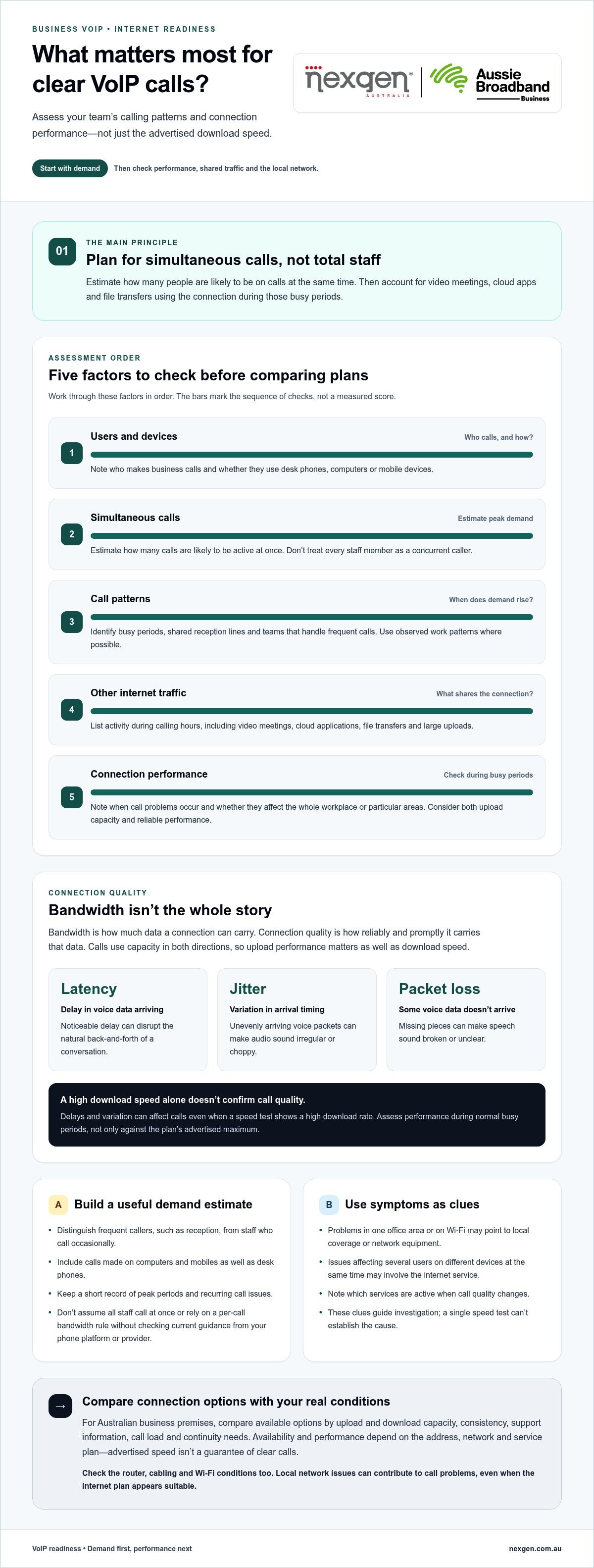
Bandwidth is how much data a connection can carry; connection quality is how reliably and promptly it carries that data. Both affect your workplace’s business VoIP internet requirements. A plan’s advertised download speed won’t tell you on its own whether calls will be clear. Voice data also travels from your office to the other person, so upload capacity and consistent performance matter too.
How bandwidth relates to concurrent business calls
Bandwidth is the capacity available to carry data across your connection. Calls use capacity in both directions, and the connection is shared with other activity such as video meetings, cloud applications and large file uploads. As more people call at once, the combined demand increases.
Total staff numbers don’t tell the whole story. Estimate how many people are likely to be on calls at the same time, then consider what else the team does during those busy periods. A connection that handles calls during a quiet morning may perform differently when a video meeting or file backup is also using it.
Which connection-quality factors affect VoIP calls?
Even when there appears to be enough bandwidth, delays or variation in how data travels can affect conversations. Three useful terms to understand are:
- Latency: the delay before voice data reaches its destination. Noticeable delay can disrupt the natural back-and-forth of a conversation.
- Jitter: variation in the timing of arriving voice data. If voice packets arrive unevenly, audio can sound irregular or choppy.
- Packet loss: when some voice data fails to reach its destination. Missing pieces can make speech sound broken or unclear.
These issues can vary with network load and affect calls even when a speed test shows a high download rate. Assess call performance during normal busy periods, not just against the maximum speed advertised for a plan. If problems appear when other services are in use, congestion or the local network may be contributing factors.
How to assess business VoIP internet requirements before comparing plans
Start with how your team works, then compare that demand with connection performance. This gives you a more useful basis for assessing business VoIP internet requirements than choosing a plan by its advertised download speed alone. Consider the capacity and performance available at your business premises, as well as how your team uses the internet during calling hours.
Work through these factors in order:
- Users and devices: Note who makes business calls and whether they use desk phones, computers or mobile devices.
- Simultaneous calls: Estimate how many calls are likely to be active at once, rather than treating every staff member as a concurrent caller.
- Call patterns: Identify busy periods, shared reception lines and teams that handle frequent calls. Use observed work patterns where possible.
- Other traffic: List activities that use the connection during calling hours, including video meetings, file transfers and cloud applications.
- Connection performance: Review how the connection behaves during busy periods. Note call problems and whether they affect the whole workplace or particular areas.
Estimate your business’s simultaneous call demand
Build your estimate around actual call activity. A receptionist handling frequent calls and a staff member who makes occasional calls place different demands on the system, even though each counts as one user. Consider busy periods and shared reception lines, and include staff who take calls on computers or mobiles as well as desk phones.
Keep a short record of peak periods and recurring call issues to clarify the pattern. Don’t assume all staff will call at once, or rely on a numerical per-call bandwidth rule without checking current guidance from your phone platform or provider. Requirements can vary by platform and setup.
Check how other internet activity affects calls
Map the services your team uses during calling hours. Video conferencing, large file uploads and cloud applications can compete for connection capacity. Remote staff may also rely on separate home connections. Note when call quality changes and which services are active at the time.
Record where problems occur, too. If calls struggle only in one part of the office or on Wi-Fi, local coverage or network equipment may be involved. If several users on different devices experience issues at the same time, the internet service could be a factor. These clues help guide investigation, but a single speed test can’t establish the cause. Compare conditions during the issue and use current provider or platform documentation for any numerical performance thresholds. Nexgen can help align business VoIP requirements with your users, devices and call patterns.
Compare Australian internet options for business VoIP
There’s no single connection type that suits every Australian business. Compare options available at your premises by upload and download capacity, consistency, support information and fit for your call load and continuity needs. A plan’s advertised speed doesn’t guarantee clear calls at every site or during every busy period.
The table outlines common options. Availability and performance depend on the address, network and service plan, so treat these as general considerations rather than guarantees.
| Connection type | Potential strengths | Limitations to consider | Questions to verify |
|---|---|---|---|
| NBN fixed line, including FTTP, HFC, FTTC and FTTN | A wired connection may suit offices needing a stable link for calls and other business services. Performance differs by access technology. | Availability and upload performance vary. FTTN and FTTC use copper for part of the connection, which can affect performance. | Which NBN technology serves the premises? What upload and download performance is stated for the plan? |
| NBN Fixed Wireless | May provide a fixed connection where a wired NBN service isn’t available. | Performance can depend on local coverage and conditions. | What service performance is available at the site, including during busy periods? |
| 5G fixed wireless | Can be an alternative where suitable mobile network coverage is available. | Performance depends on coverage and conditions at the premises. | Is reception suitable at the intended equipment location, and what performance does the service describe? |
| Dedicated fibre, such as Enterprise Ethernet | May suit organisations with higher capacity or continuity requirements. | Availability and service arrangements vary by location and offering. | What upload and download performance, support information and service commitments apply? |
| Satellite | Can be relevant for regional or remote premises where other access options are limited. | Performance and latency depend on the service and location. | Does the service’s stated performance suit real-time business calls? |
What to compare in a business internet plan
Compare upload and download performance with your expected calls and other online activity. Look for service information that explains expected performance during busy periods, not just a headline speed. Review the provider’s support arrangements and service information to understand what’s included, without assuming a particular response time or service level.
Check availability for your exact business address. Even premises in the same suburb can have different access technologies or service options. The best fit for your business VoIP internet requirements is a connection that can support your actual use with dependable performance.
When should you consider a dedicated or prioritised connection?
A dedicated connection may be worth considering if call volumes are high or an interruption would have a material impact on business operations. The decision depends on call demand, continuity needs, site availability and network design.
Quality of Service (QoS) is a network method that can prioritise selected traffic, such as voice, over less time-sensitive activity when the equipment supports it. Cisco’s guide to Quality of Service (QoS) metrics explains relevant voice-network considerations. QoS can help manage traffic on your local network, but it can’t address every cause of poor calls, including weak Wi-Fi, an overloaded connection or an issue elsewhere in the provider’s network.
Use this VoIP internet readiness checklist before you switch
Before changing plans or equipment, gather evidence about how your connection performs during normal work. This helps you assess your business VoIP internet requirements and distinguish an internet service issue from a local network problem.
What to record during a connection assessment
Test during representative work periods, including times when call demand and online activity are typically high. For each issue, note when it happened, who was affected, what they were doing and whether other calls or internet services were in use. Record your connection type and the equipment and device connection involved. Use current phone-platform or internet-provider guidance to interpret technical measurements.
- Call demand: Note typical and peak simultaneous calls, busy periods and teams or reception lines with regular call activity.
- Shared internet use: Record whether video meetings, large file transfers or cloud applications were active when calls became unclear.
- Internet service: Write down the connection type and plan’s stated upload and download performance. Check for recurring slowdowns or dropouts across the workplace.
- Router and network equipment: Record the router or other relevant equipment in use, and whether any traffic-prioritisation settings are configured.
- Cabling and Wi-Fi: Note whether affected devices connect by cable or Wi-Fi, and whether issues occur in particular rooms or areas.
- Call symptoms: Describe what staff experience, such as delayed, choppy or interrupted audio, and whether the problem affects one person or several.
Which internet or network problems need attention first?
Start with recurring call disruption that affects customers or daily operations, rather than treating one speed-test result as a diagnosis. Look for patterns. Problems that coincide with heavy internet use may point to shared congestion, while issues limited to a particular area or Wi-Fi device may suggest local coverage or equipment needs attention.
Keep internet service checks separate from local network checks. Compare service performance and interruptions across users, then assess router configuration, cabling and Wi-Fi coverage. If you collect latency, jitter or packet-loss measurements, interpret them using current documentation from your phone platform or provider. Don’t assume the cause or make a change before the evidence points to the service or local network.
Once you’ve recorded your call patterns and network conditions, discuss your business phone requirements with Nexgen to consider how your phone system, devices and connectivity fit together.
How Nexgen can help align your VoIP system with business connectivity
A suitable phone system should reflect how your team handles calls, where staff work and which devices they use. Nexgen Australia supplies and integrates business VoIP and cloud phone systems for Australian organisations, tailoring deployments to business requirements. Planning the phone system alongside internet readiness helps clarify what your users and call handling need. Internet performance also depends on the connection and local network.
Match business calling needs to a phone system
Start with the day-to-day details: which staff answer incoming calls, how calls need to be directed, and whether people use desk phones, computers or mobiles. A team based in one office may have different device and call-handling needs from staff working across multiple locations or from home. Mapping these patterns helps define your phone system requirements and gives you a clearer basis for reviewing connectivity.
If you’re weighing options for a smaller organisation, the small business phone systems buyer guide can help you consider users, devices and calling needs together.
Plan VoIP and cloud communications with the right context
Nexgen Australia supplies and integrates tailored business VoIP and cloud phone systems. Consider your business VoIP internet requirements alongside the selected phone system, expected call activity and whether staff connect through desk phones, computers or mobile devices. For teams working across locations, a cloud phone system can be part of planning how business calls fit into different work arrangements.
Explore VoIP solutions for small business and cloud phone systems for Australian businesses to learn more about these approaches.
Once you’ve mapped your users, call handling and devices, talk to Nexgen Australia about your business phone system. A clear picture of your requirements can guide a phone-system decision alongside a realistic assessment of your internet connection.
Make your next phone system decision with confidence
Reliable VoIP starts with a connection that suits your real call demand and performs consistently during busy work periods. When assessing business voip internet requirements, consider how many people call at once, what else shares the connection and whether call issues stem from the internet service or the local network.
Choosing a phone system is part of the same planning process. Nexgen supplies and integrates business VoIP and cloud phone systems, including Cisco Webex Calling. Deployments can be tailored for staff using desk phones, computers and mobile devices, helping align the system with your call handling and working arrangements.
You don’t need to guess your way through the decision. Talk to Nexgen about the right phone system for your business and take a practical next step towards a setup that fits how your team works. With your call patterns and connectivity needs clearly understood, you can move forward with greater confidence.
Frequently Asked Questions
How much internet speed does business VoIP need?
Business VoIP needs enough upload and download capacity for simultaneous calls, as well as other online work. There isn’t one speed that suits every business: call volume, the phone platform and shared activities such as video meetings all affect demand. Estimate how many calls happen at once, then use current guidance from your VoIP provider or platform to assess bandwidth and call-quality targets for your setup.
Is NBN internet suitable for business VoIP?
Yes, an NBN connection can support business VoIP if its performance suits your call demand and remains stable during busy periods. Available NBN technology and plan performance vary by premises, so consider upload as well as download capacity. Account for other internet use and recurring call issues, too. An advertised speed alone can’t confirm that calls will be clear at your site and at peak times.
Can VoIP work over Wi-Fi?
Yes, VoIP can work over Wi-Fi if the wireless network offers reliable coverage and capacity where staff make calls. Distance from the access point, walls, interference and other connected devices can affect performance. If calls are poor only in certain rooms or on Wi-Fi devices, compare them with a wired connection where practical. This can help distinguish a wireless coverage issue from a wider internet service problem.
Does VoIP use internet bandwidth when nobody is speaking?
VoIP may use some bandwidth even when staff aren’t speaking. Phones or apps can exchange background signalling with the phone system, and an active call may continue sending voice data during pauses. The amount depends on the platform and configuration. For planning, focus on the number of simultaneous calls and the system’s current technical guidance rather than assuming silence means no network activity.
What causes poor VoIP call quality even with fast internet?
Fast advertised speeds don’t rule out congestion or inconsistent performance. High latency can delay speech, jitter can make audio uneven, and packet loss can interrupt parts of a conversation. Busy uploads, Wi-Fi coverage, router settings, cabling or other local network issues may also contribute. Record when problems happen and which users or devices are affected, then compare service and local network conditions before deciding what needs attention.
What should a business check before switching to VoIP?
Before switching, estimate peak simultaneous calls and note who uses desk phones, computers or mobiles. Identify busy periods and other internet activity, such as video meetings or large file transfers. Check the connection type and stated upload and download performance, then assess routers, cabling and Wi-Fi coverage. Test during representative work periods and record call issues. Use current platform or provider guidance to interpret technical measurements.