


A hosted phone system moves business call management from equipment at your workplace to a provider’s cloud, while your team can still use desk phones, computers or mobiles. The key difference is where the calling platform runs, not necessarily which phones sit on your desks. If you’re considering a change, it’s worth understanding what stays on site and how your team would handle calls if the internet connection drops.
A hosted system is an operating model for business calls, not just a set of phone features. This guide explains how calls travel through the system, how hosted phone services relate to VoIP and cloud PBX, and how they compare with traditional on-premise phone systems. You’ll also learn what affects call reliability and what to assess before making a change, including your internet connection, devices, call flows and continuity needs.
Key Takeaways
- A hosted phone system moves call management to a provider’s platform, while your team uses connected workplace or mobile devices.
- Map how calls should reach your team, including the destinations and handling rules your business needs.
- Weigh the flexibility of cloud calling against its reliance on suitable internet connectivity and compatible devices.
- Assess call volumes, staff locations, preferred devices and essential call flows before deciding if hosted calling suits your business.
- Nexgen Australia tailors and deploys business VoIP and cloud phone systems around an organisation’s calling requirements.
What is a hosted phone system? A clear definition for Australian businesses
A hosted phone system is a business calling platform run in a provider’s cloud. It manages call control, such as deciding where incoming calls go, while staff use connected devices to make and receive calls. Your business doesn’t need to operate a traditional PBX system on site.
Think of the platform as the control centre for business calls. It applies call-handling instructions and directs calls to the right users or devices. For an organisation with staff in different locations, it can provide a central way to manage calling, with staff connecting from the workplace or elsewhere using supported devices.
The provider hosts the calling platform. Your business still needs a suitable internet connection and compatible devices for staff to make and receive calls.
Several related terms describe parts of this setup. “Hosted PBX” usually refers to a PBX, or private branch exchange, run by a provider rather than installed and managed at the business premises. “Cloud phone system” is often used for a similar arrangement. The terms can overlap, although providers may use them differently. This Business telephone system overview puts hosted PBX in context alongside other business calling models.
What does the provider host, and what stays at your workplace?
The provider hosts the platform that controls how calls are handled. Your business doesn’t need to run that traditional PBX platform on site, but staff still need a way to connect to it. Depending on the service, they might use a compatible desk phone, computer or mobile device. Hardware, apps and available features vary, so a hosted service doesn’t mean every workplace has the same setup.
How is hosted telephony different from VoIP?
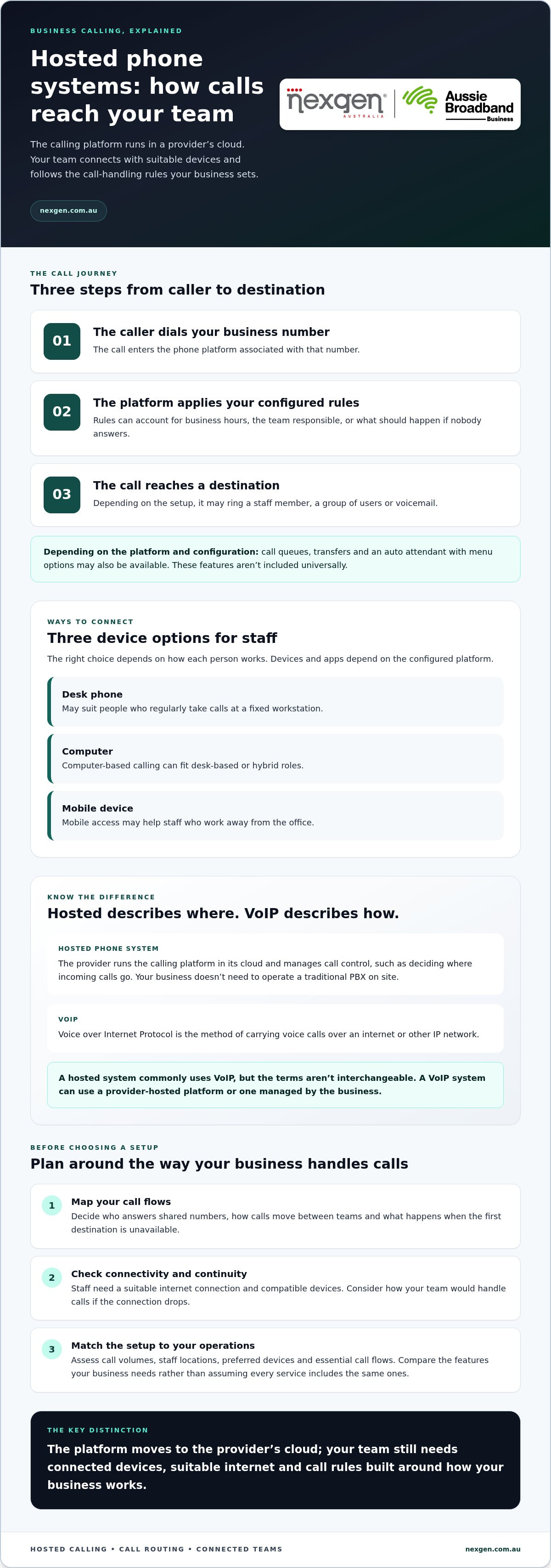
VoIP, or Voice over Internet Protocol, is the method of carrying voice calls over an internet or other IP network. “Hosted” describes where the calling platform runs and how it’s supplied. A hosted system commonly uses VoIP, but the terms aren’t interchangeable: VoIP describes the call technology, while hosted describes the platform model. A VoIP system, for example, could use a platform hosted by a provider or one managed by the business itself.
How a hosted phone system routes calls from caller to team
A hosted phone system directs incoming calls according to rules set up for your business, then sends each call to a suitable person, group or other destination. Call routing is the set of rules that directs incoming calls to the right destination.
For example, a customer calls your shared business number to ask about an order. The system applies the configured instructions, such as routing the call to the relevant team during business hours or directing it elsewhere when the team is unavailable. The call then reaches a staff member or device that can answer it.
How do hosted systems direct incoming business calls?
The call journey is straightforward:
- The caller dials your business number. The call enters the phone platform associated with that number.
- The platform applies the configured rules. These may account for business hours, the team responsible for the call or what should happen if no one answers.
- The call reaches a destination. Depending on the setup, it may ring a team member, a group of users or voicemail.
Some platforms also support call queues, transfers or an auto attendant, which gives callers menu options. These features aren’t universal inclusions. Available call flows depend on the platform and its configuration. This overview of cloud telephony explains how cloud-based calling fits into business communications.
For an organisation with staff in different locations, mapping the call journey clarifies who should answer shared numbers, how calls should move between teams and what should happen when the first destination is unavailable. Build routing rules around your actual processes, not just the structure of the phone system.
Which devices can staff use for hosted business calls?
Staff need a suitable device and a working connection to handle a routed call. A desk phone may suit people who regularly take calls at a fixed workstation. Computer-based calling can fit desk-based or hybrid roles, while mobile access may help staff who work away from the office. Available devices and apps depend on the configured platform, so check compatibility as part of planning.
Consider how your teams work across locations before deciding which devices to use. Mapping likely call destinations alongside staff locations can show where device access or call-handling rules need more planning.
Hosted phone system benefits and limitations: flexibility, features and internet reliance
A hosted phone system can make business calling easier to manage across different workplaces, but it also depends on the internet connection and devices staff use. Its value comes down to how well its flexibility and features match your operations, and whether you’ve planned for interruptions.
What can a hosted phone system make easier?
Some platforms offer features such as voicemail-to-email, call routing and collaboration tools. These can help staff keep track of messages and work across locations, but they aren’t universal inclusions. Compare the capabilities your business needs rather than assuming every hosted service has the same features. This Voice over Internet Protocol (VoIP) guide explains the internet-based calling technology commonly used by hosted services.
What should businesses plan for before relying on hosted calls?
Internet performance matters. Call quality can be affected by the stability and capacity of your connection, how the workplace network is configured and other activity competing for network resources. A connection that handles everyday browsing may behave differently when staff make calls alongside video meetings, file transfers or other demanding online tasks. Assess network use during busy periods rather than relying on a single speed figure.
Plan for local disruptions, too. If the internet connection or power fails at a workplace, desk phones and other devices relying on that connection may not be able to make or receive calls there. Decide what staff should do if a key location loses connectivity and what alternative contact arrangements could keep urgent calls moving. The right contingency depends on your locations, devices and operational needs.
If your business relies on incoming calls, include service continuity and emergency calling arrangements in your operational planning. Understand how these apply to your users and locations, and document the steps staff should follow during an interruption.
Hosted calling isn’t automatically cheaper, more reliable or simpler than every alternative. Weigh its central management and flexible access against internet dependence, device requirements and the preparation needed to keep communications running through an interruption.
Is a hosted phone system right for your business? A practical readiness check
A hosted phone system may suit your business if its call flows, devices and connectivity support the way your teams work. Before deciding, map your current calling needs and dependencies, especially if you operate across multiple locations or rely on an on-site phone system.
Use this checklist to identify what a system needs to support:
- Call volumes: Note when calls peak and which teams handle them.
- Team locations: Record where staff work, including offices and remote locations.
- Devices: Decide whether staff need desk phones, computer-based calling, mobile access or a mix.
- Call flows: Map how calls should be answered, transferred or handled outside business hours.
- Shared identity: Consider whether staff need to use the same business number across desk phones, computers and mobile devices.
- Dependencies: List existing phone numbers, systems and processes that could be affected by a change.
What should you map before moving business calls?
Start with the numbers customers call, the teams that answer them and the routes calls take during and outside business hours. Record current devices, voicemail processes and call-handling steps staff rely on. For example, note whether calls are routinely transferred between teams or messages are checked through a specific process.
Also identify equipment connected to your current phone system, such as door phones or other linked systems. These may need a separate technical review during migration planning. If your business uses an on-site PBX or relies on a specialist workflow, allow time to assess how it could be carried over or adapted.
How can you assess connectivity and continuity needs?
List the internet connections staff use for business calls at each workplace, and consider how calling performs when the network is busy. Then document what the team should do if its usual connection or local power is unavailable. The right contingency depends on where staff work, which calls are business-critical and what alternative contact methods are available.
These details can help you compare hosted and on-site phone system architectures and assess broader business phone system requirements. For a discussion of how hosted calling could fit your organisation, explore Nexgen’s business phone system solutions.
How Nexgen helps Australian businesses put hosted calling into practice
Hosted describes where the phone platform runs. VoIP describes how voice travels over an internet or other IP network. Keeping those ideas separate makes it easier to assess the system your organisation needs, the devices staff will use and the call-handling processes it must support.
Nexgen tailors and deploys business VoIP and cloud phone systems around an organisation’s calling requirements. This includes Cisco Webex Calling deployments for businesses considering a cloud calling platform. The right fit depends on your users, workflows, devices and operating requirements, rather than the platform name alone.
What does a practical hosted phone system deployment consider?
Start with how your organisation handles calls. User needs, call flows, workplace patterns and device preferences all shape the practical design. A team that works across offices and remotely may have different requirements from one where most staff answer calls from a fixed desk.
Nexgen handles setup and deployment for Cisco Webex Calling solutions, supporting desk phones, computers and mobile devices to suit the team’s working model. The focus is on connecting the chosen platform to the organisation’s calling needs, not assuming every business requires the same configuration or features.
Before planning a deployment, bring together the information gathered during your readiness assessment:
- Who needs to make and receive business calls?
- Which business numbers should callers use, and where should those calls go?
- Which devices suit staff at each workplace or working remotely?
- What call flows and continuity arrangements need to be considered?
This gives the deployment discussion a practical starting point. It also helps separate essential requirements from features that may not be relevant to your team.
What is a useful next step for your business?
Document your users, business numbers, call routes and continuity requirements before comparing options. If you’re weighing up how a cloud platform differs from an on-site phone system, Nexgen’s cloud phone systems guide provides more context on related architecture and terminology.
A hosted phone system should support the way your people answer calls, wherever they work, while accounting for the connections and devices they rely on. To discuss how hosted calling could fit your organisation’s requirements, talk to Nexgen about a hosted phone system.
Make your next phone system decision with confidence
A hosted phone system moves call management to a provider’s platform, while VoIP carries voice calls over an internet connection. The right setup depends on how your business routes calls, where staff work, which devices they use and how you’ll manage connectivity interruptions.
Before making a change, map your key numbers, users, call flows and continuity needs. That practical groundwork helps you assess whether hosted calling fits your operations, rather than choosing on features alone.
Nexgen specialises in Australian business phone systems and VoIP solutions, and supplies and integrates Cisco Webex Calling phone systems. Deployment can support desk phones, computers and mobile devices to suit your team’s working model.
Ready to explore an option shaped around your organisation’s calling requirements? Talk to Nexgen about a hosted phone system. A clear understanding of your needs is a strong starting point for choosing a system your team can use with confidence.
Frequently Asked Questions
What is a hosted phone system?
A hosted phone system is a business calling platform run by a provider, rather than a traditional PBX platform operated at your workplace. It manages call control and routing, while staff use connected devices to make and receive calls. Those devices may include compatible desk phones, computers or mobiles, depending on the service. Your business still needs suitable connectivity and devices for staff to handle calls.
How does a hosted phone system work?
A hosted phone system receives calls to your business number and applies the call-handling rules configured for your organisation. For example, a rule might send a call to a team member or group, or direct it to voicemail if no one answers. Depending on the platform, settings may also reflect business hours or other instructions. The call reaches staff through compatible devices and a working connection.
Is a hosted phone system the same as VoIP?
No. Hosted describes where the phone platform runs and how it’s supplied, while VoIP describes how voice calls travel over an internet or other IP network. A hosted system commonly uses VoIP, but the terms refer to different parts of the service. A VoIP system can use a provider-hosted platform or one managed by the business itself, so the terms aren’t interchangeable in every context.
Can a hosted phone system work with desk phones and mobiles?
Yes, a hosted system may support calls through compatible desk phones, computers and mobile devices. The available options depend on the platform, service configuration and device compatibility. A desk phone may suit staff who work at a fixed workstation, while computer or mobile access may better fit hybrid or remote roles. Map how your team works before choosing devices, and don’t assume every service supports every handset or app.
What happens if the internet goes down?
If the connection used by a workplace fails, devices relying on it may be unable to make or receive calls at that location. What happens next depends on the service configuration, available connections and devices, and your continuity arrangements. Calls can be redirected only if an alternative destination and connection are set up. Document how staff should respond to an outage and include service-specific emergency calling arrangements in your planning.
Is a hosted phone system suitable for a small business?
It can suit a small business if the system’s call handling, devices and connectivity match the way the team works. Consider how many people need to answer calls, whether staff work across locations and which features are essential. Also assess internet performance and what the team would do during an interruption. Reviewing current numbers, call routes and workflows can help clarify whether hosted calling fits.