


Replacing a business phone system can also be a decision about how your whole team communicates. For Australian businesses, a cloud communication platform can extend beyond internet-based calling to bring video, messaging and work tools into a more connected experience.
Call quality, reliability and keeping familiar numbers are practical priorities. But adding apps can also create extra administration and fragmented workflows if the tools don’t work well together. The goal isn’t to adopt every new feature. It’s to identify what your team needs and how each part of the platform supports it.
This article explains how cloud telephony relates to broader communications platforms and what’s changing for Australian businesses in 2026. You’ll learn what to consider around integrations, security, connectivity and staff transition, then use those questions to shape a practical communications roadmap.
Key Takeaways
- Understand how cloud telephony fits within a broader communications platform, and where connected voice and collaboration tools may help your team.
- Explore the cloud communication platform Australia businesses are considering in 2026, distinguishing established capabilities from emerging AI applications.
- Compare connected platforms with separate tools by weighing workflow continuity, administration, integration flexibility and change effort.
- Map users, call flows, locations, devices and business applications before deciding what your communications system needs to support.
- Turn technology developments into a practical roadmap by defining requirements, evaluating options and planning a manageable transition.
What is a cloud communication platform for Australian businesses?
A cloud communication platform delivers communication tools over the internet, with the underlying service hosted by a provider rather than relying entirely on equipment installed and managed at your premises. Staff access the service through supported devices and applications. The Cloud communications concept covers telecommunications applications and infrastructure hosted this way.
For Australian businesses, a cloud communication platform may include business calling and connect voice with collaboration tools or other business applications. The mix varies by platform. A cloud service doesn’t automatically mean every tool is included, connected or managed through one interface.
How is a cloud communication platform different from a cloud phone system?
A cloud phone system focuses on business calls. It moves calling to a hosted service rather than relying on a phone system maintained on-site. Depending on the system and setup, staff may use compatible desk phones, computers or mobile devices.
A broader platform may connect calling with collaboration tools or business applications, such as a customer relationship management system. These connections can support related workflows, but features and integrations depend on the solution. Assess a cloud communication platform against your workflows, existing systems and requirements, not just its feature list.
Who may benefit from a connected communications platform?
A small Australian business with staff split between an office and remote work may want calls handled consistently, even when the person answering isn’t at a desk. A growing team may also benefit from a consistent approach to business calling across devices, so staff can work from different locations without creating separate processes.
Not every business needs a broader platform. If your team mainly needs business calls and has little reason to connect other tools, a cloud phone system may be a more straightforward fit. Consolidating applications also takes change and administration, so added complexity should solve a real operational need.
What should you consider before choosing?
Start with how your team communicates today. Map call handling, staff locations and devices, then note which business applications need to work alongside calling. Consider how a new service would fit with existing systems and what would change for staff. Choose an option that supports your workflows without adding unnecessary tools or management overhead.
Cloud communication platform trends shaping Australian businesses in 2026
In 2026, the practical question is less about moving calls online and more about how calling fits with the rest of your business. Developments shaping that decision include closer links between voice and collaboration, interest in AI-enabled features, and support for staff using different devices. These are evaluation themes, not a guarantee that every cloud communication platform australia includes the same tools or delivers the same results.
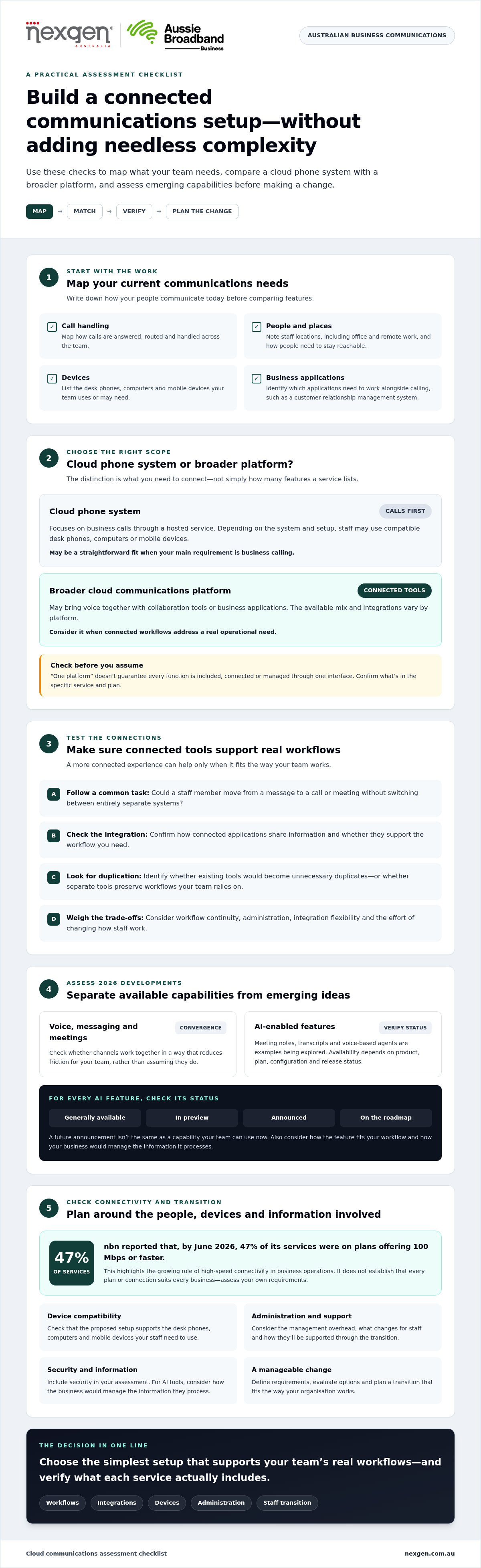
2026 trend: nbn reported that, by June 2026, 47% of its services were on plans offering 100 Mbps or faster, highlighting the growing role of high-speed connectivity in business operations.
Are voice, messaging and meetings converging?
Convergence means bringing communication channels into a more connected experience. A staff member might move from a message to a call or meeting without switching between entirely separate systems. This may reduce friction between channels, provided the tools suit the way people work and the integrations support the required workflows.
Don’t assume “one platform” means every function is included or works together automatically. Check what’s available in the specific service and plan, how connected applications share information, and whether existing tools would become duplicates. Australian Government guidance, including its Data and Digital Government Strategy, offers broader context for planning digital services. Your communications requirements will depend on your organisation.
What role could AI play in business communications?
AI is being explored across communications, including tools that assist with meeting notes or transcripts and voice-based agents. These shouldn’t be treated as standard platform features. Availability depends on the product, plan, configuration and release status. A capability announced for the future isn’t the same as one your team can use now.
For each AI feature, establish whether it’s generally available, in preview, announced or only on a roadmap. Then consider how it would fit your workflows and how the business would manage the information it processes. Don’t rely on claimed productivity or accuracy benefits unless they’re supported by evidence relevant to your use case.
Access across desk phones, computers and mobile devices can matter for teams working between an office and other locations. Nexgen Australia handles setup and deployment across these device types for its cloud and office phone solutions. Before adopting connected tools, assess compatibility with existing applications, administration requirements and how staff will be supported through changes. A cloud phone system for your business can be a practical starting point when voice is the main requirement.
Cloud communication platforms versus disconnected tools: benefits and trade-offs
Connected platforms can bring some communications into a more coordinated environment, while separate tools may offer flexibility and preserve familiar workflows. Neither approach is automatically better. The right fit depends on what your team needs to do, how existing systems work together and how much change your business can manage.
| Consideration | Connected platform | Separate tools |
|---|---|---|
| Workflow continuity | Staff may move between supported communication channels in a more connected workflow. | People may need to switch applications or repeat steps between tools. |
| Administration | Fewer separate systems may simplify some routine administration, depending on the setup. | Each tool may have its own settings, access management and support processes. |
| Integrations | Connections between applications may support shared workflows when the relevant integration is available and configured. | Tools can remain independent, but information may need to be handled across systems. |
| Flexibility | A consolidated environment can mean greater reliance on one platform’s available options. | Businesses can retain different tools for specific needs, while managing the resulting complexity. |
| Change effort | Consolidation may involve migration, configuration and staff training. | Existing processes can continue, though maintaining separate tools also takes effort. |
When can a broader platform simplify everyday work?
A connected setup may help when staff need to coordinate calls with other communication channels. For example, office, hybrid and remote team members could use supported devices and applications to access business communications according to their roles. The result depends on available integrations, configuration and staff adoption. A unified interface alone won’t fix unclear call-handling responsibilities or poorly designed workflows.
When might separate communications tools remain practical?
Before consolidating, map which tools people rely on and what each one does. Identify overlaps, essential integrations and the effort involved in moving data or changing routines. Assess a cloud communication platform against those practical needs, rather than assuming that one provider or interface will remove every source of complexity.
How should Australian businesses assess cloud communications readiness?
Start with how your business communicates, not with a product shortlist. Map users, call flows, locations, devices and existing applications, then assess requirements for reliability, security, support, integration and continuity. This gives you a practical basis for deciding whether to change systems, connect existing tools or keep your current setup.
What should a business map before considering a platform?
Build a simple picture of who communicates with whom, through which channels, and where calls need to go. Include staff working in the office, remotely or across multiple sites, along with the devices and applications they rely on.
- Users and call flows: Record who answers incoming calls, how calls are transferred or escalated, and what should happen when someone is unavailable.
- Locations and devices: List offices and work locations, plus the desk phones, computers and mobile devices staff use.
- Current systems and applications: Note the existing phone system, communication tools and business applications, including connections staff depend on.
- Continuity and constraints: Identify which calls or workflows are critical, what interruptions the business can accommodate, and any practical limits on changing staff routines.
How can a business reduce transition risk?
Use your map to plan a staged readiness sequence. A cloud communication platform Australia businesses consider should meet defined needs rather than add tools without a clear purpose.
- 1. Define requirements: Separate essential calling and workflow needs from optional features.
- 2. Assess fit: Review reliability, security, support arrangements, device compatibility and required integrations against your documented needs.
- 3. Check Australian dependencies: Before planning a change, verify current network arrangements and relevant telecommunications requirements using authoritative sources such as the NBN and ACMA. Requirements and network conditions can change, so avoid relying on outdated assumptions.
- 4. Plan responsibilities: Document who will oversee decisions, configuration, staff communication and support during the transition.
- 5. Prepare and test: Agree how the system and important call flows will be tested, and how staff can raise issues. Set out a staged change plan that reflects your operational constraints.
- 6. Review after the change: Check whether the new arrangement supports the intended workflows and identify any follow-up adjustments.
A plan can expose dependencies before they disrupt day-to-day work, but it can’t guarantee uninterrupted service. Nexgen tailors cloud and VoIP phone solutions for Australian businesses and handles deployment across desk phones, computers and mobile devices. Discuss your business phone system requirements with Nexgen.
Turning cloud communication trends into a practical business roadmap
Trends are useful when they help solve a real business need. Turn them into a roadmap by moving from desired outcomes to requirements, evaluation, transition planning and ongoing review. This keeps decisions grounded in how your team works, rather than in features that may not suit your operations.
What belongs in a future-ready communications roadmap?
Start by documenting what the business needs communications to support. For example, you may want a consistent way to handle customer calls across office and remote staff, or to connect calling with an existing business application. Then record what you have now and what a new arrangement must do.
- Business outcomes: Describe the practical improvements you’re seeking, such as clearer call handling or simpler administration.
- User needs: Identify how different roles communicate, where staff work and which devices they use.
- Current systems: Note existing phone services, applications, workflows and dependencies that a change could affect.
- Integration priorities: Separate essential connections from optional ones, and document what information needs to move between systems.
- Ownership and change: Assign responsibility for decisions, staff communication, training, testing and support.
- Future options: Assess AI and other emerging features only if they address a defined need. Check their availability and suitability rather than assuming they’re included or ready for your team.
Use these requirements to compare options, then review the chosen approach against your original goals after implementation. A cloud communication platform australia should fit its users, systems and change capacity, as well as its technical requirements.
How can Nexgen Australia support a cloud communications discussion?
A communications provider can help translate business needs into practical cloud phone and VoIP requirements, including the devices staff use, call flows and relevant system connections. Nexgen Australia provides cloud phone systems and tailored VoIP solutions for Australian businesses. It also supplies and integrates advanced cloud calling platforms, with setup and deployment across desk phones, computers and mobile devices.
The right roadmap doesn’t need to include every available tool. It needs to give your team a clear basis for deciding what to keep, connect or change, and how to manage that change. If you’re considering your next step, talk to Nexgen Australia about the right communications approach for your business.
Build your communications roadmap around what your team needs
A cloud communication platform can extend beyond business calling, but a broader setup only makes sense when it supports your workflows. When assessing a cloud communication platform in Australia in 2026, focus on how voice, collaboration tools and existing applications fit together, rather than assuming consolidation is always the answer.
Start with your users, call flows, devices and current systems. Define the outcomes you want, check integration and reliability requirements, and plan for staff adoption and ongoing support. Consider AI and other emerging features where they meet a clear business need, not simply because they’re available.
Nexgen provides tailored VoIP and cloud phone solutions for Australian businesses, and supplies and integrates Cisco Webex Calling phone systems. Its team also handles setup and deployment across desk phones, computers and mobile devices. Talk to Nexgen about cloud communications for your business and explore an approach suited to your team. With clear requirements and a practical plan, you can make your next communications decision with confidence.
Frequently Asked Questions
What is a cloud communication platform?
A cloud communication platform delivers business communication services through systems hosted by a provider and accessed over the internet. It may include business calling and, depending on the solution, connect voice with collaboration tools or business applications. Features vary, so the term doesn’t guarantee a particular combination. For an Australian business, the right fit depends on how staff communicate, which applications they use and what workflows the platform needs to support.
Can a cloud communication platform support office and remote teams?
Yes, a cloud communications service can support staff working in the office and remotely, subject to its features, configuration, devices and internet connectivity. Depending on the system, users may access business calls through desk phones, computers or mobile devices. Before choosing, map how calls should reach different staff and locations, and consider how the setup will work when people change devices or work away from the office.
Is a cloud communication platform suitable for a small Australian business?
It can be suitable when it meets the business’s communication needs without adding unnecessary complexity. A small team that needs internet-based business calling may find a cloud phone system is sufficient, while a business that would benefit from links between calling and other applications may assess a broader platform. Consider staff workflows, existing systems, integration needs and the effort required to manage change.
What should a business check before moving communications to the cloud?
Document users, call flows, locations, devices and the applications staff rely on. Then assess connectivity, call reliability, security, integration requirements, support arrangements and continuity needs. Plan who will manage the change, how staff will be informed, and how call flows and devices will be tested. Australian network conditions and telecommunications requirements can change, so check current information with authoritative sources such as the NBN and ACMA.
How is AI changing cloud business communications in 2026?
AI is an area of change in business communications, with potential uses including assistance with voice interactions or meeting information. Specific features vary by product and release, so distinguish tools available for general use from previews, announcements or future plans. Before adopting an AI feature, assess whether it solves a real workflow need, how it handles business information and what staff oversight it requires. Avoid assuming benefits without evidence relevant to your use case.