


The lowest monthly figure isn’t necessarily the lowest-cost move. To budget a business cloud telephony migration, separate one-off transition costs from ongoing licensing and subscription charges, then account for hardware replacement and additional services. The total depends on what your business can retain, which features it needs and the support required to move calls and users across.
Look beyond the headline price. A system that suits your team, supports the way you work and includes features you’ll use may be a better fit than one chosen on monthly cost alone. A clear budget also shows where migration spending will go before you commit.
Use this checklist to assess whether cloud telephony fits your business, compare systems and review features before estimating costs. It also covers planning the transition, accounting for number transfers, testing and training, and assessing the migration support needed to keep the change organised.
Key Takeaways
- Build your budget around the full transition, including subscriptions, equipment changes and any additional services.
- Compare cloud and on-premises systems by looking at how they’re hosted, maintained and scaled, as well as your internet connection needs.
- Separate features your team pays for from those it actively uses, then identify what it needs in the new system.
- Plan migration responsibilities, number transfers, testing and staff training to keep the change organised.
- Set measurable goals before moving, then review system performance and outcomes after the rollout.
Cloud telephony costs and budgeting
Compare Australian business phone systems by included features, licensing structure and migration support. Providers differ in what subscriptions cover, which functions cost extra and how much transition work is included in the quoted scope.
Build a migration budget before committing. Separate ongoing charges from one-off transition expenses to compare the cost of operating each system, not just its advertised subscription. Include licensing, hardware replacement and additional services in your estimate.
Use these checks to make the comparison practical:
- List recurring licences. Record the users, calling features and service components included in each subscription, because a lower starting fee may exclude functions your team relies on.
- Identify add-on charges. Mark features priced separately, such as extra call handling or conferencing, because optional items can change the total cost of your chosen configuration.
- Estimate hardware needs. Count existing handsets that may remain in use and devices requiring replacement, because equipment decisions affect upfront spending and staff setup.
- Include migration services. Note charges for configuration, number transfers, testing and training where they appear in a proposal, because these activities support the move beyond the subscription itself.
- Compare support scope. Check what assistance covers during setup and after deployment, because a quote with less transition support may leave more work with your internal team.
- Separate one-off and ongoing costs. Put implementation and equipment beside recurring subscription expenses, because the distinction makes cash-flow planning and longer-term comparisons clearer.
Replacing a fleet of handsets at once can create a substantial upfront cost. Renting handsets can ease that initial expense by spreading equipment costs through an ongoing arrangement. Compare renting with purchasing, considering how many devices you need, the intended system lifespan and the effect on recurring expenditure. A business with compatible existing IP phones may need less new equipment than one replacing older devices.
A subscription model may simplify commercial arrangements by bringing recurring system charges together. But that depends on understanding what the subscription includes. When comparing proposals, for example, map each required feature to the included package, then list additional licences, handsets and services separately.
Request a cost breakdown by user licensing, hardware, migration work and other services. Use the same user numbers and feature requirements for every proposal. This makes differences easier to spot without assuming a lower monthly amount means a lower total cost.
Set aside a budget for the transition itself. A business cloud telephony migration involves decisions about equipment, service configuration and staff readiness, not just a switch to monthly licensing. Record the assumptions behind each estimate, then revisit them when the final design and rollout plan are clear.
Compare providers by mapping each subscription’s features and services, then listing separately priced functions, licences, handsets and migration work. Assess ongoing charges alongside one-off equipment and implementation costs. Compare setup and post-deployment support too, so you can see what work will remain with your team.
External migration and management support
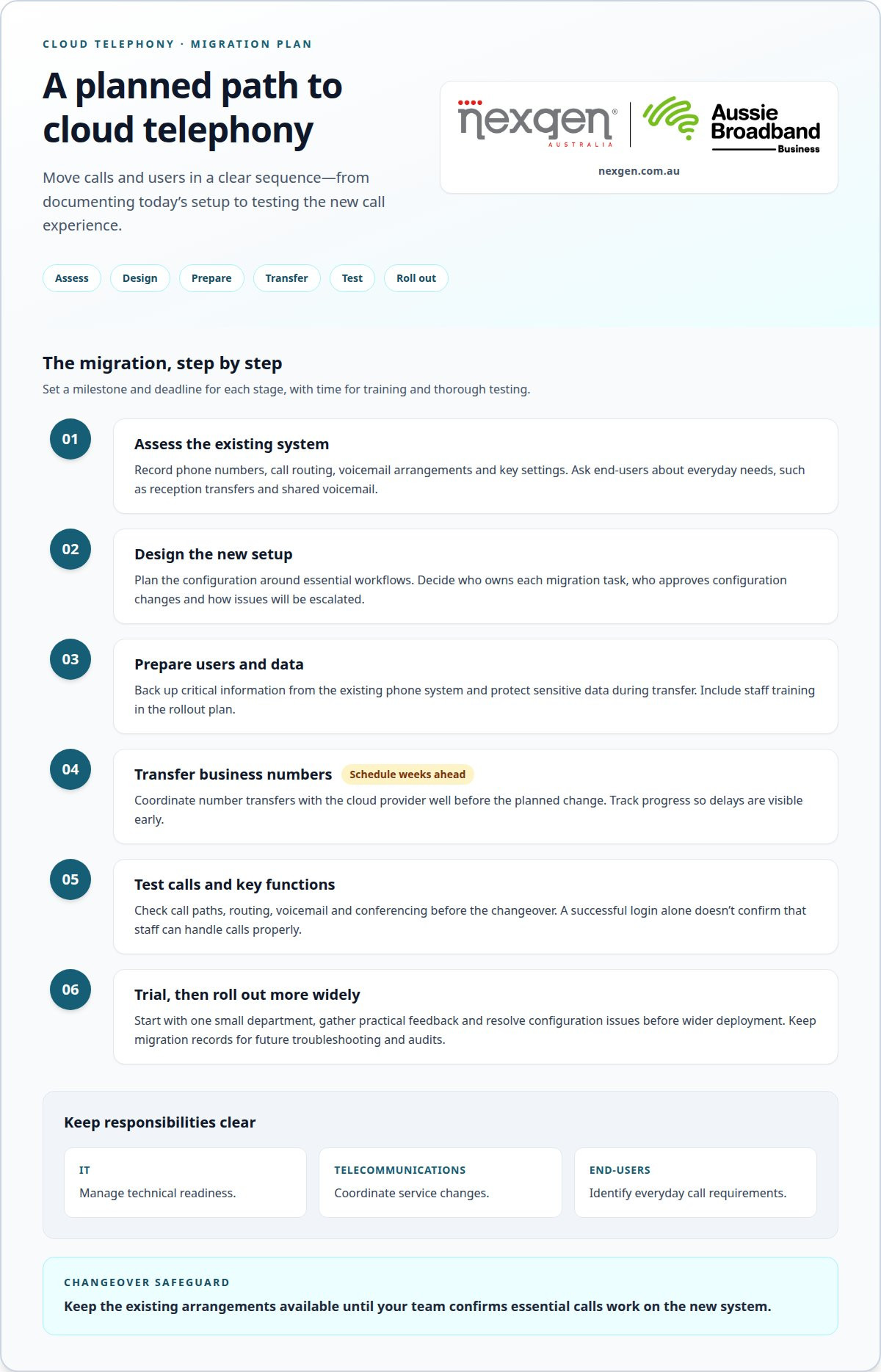
A cloud phone migration follows a planned sequence: assess the existing system, design the new setup, prepare users and data, transfer numbers, test and roll out. Set milestones and deadlines for each stage, allowing time for staff training and thorough testing before retiring the old arrangement.
To reduce downtime, coordinate number transfers with the cloud phone provider well before migration and monitor their progress. Test the new call paths before changeover, then keep the existing arrangements available until your team confirms that essential calls work.
Use a project checklist to keep ownership visible:
- Document the current setup. Record phone numbers, call routing, voicemail arrangements and key settings so the new configuration reflects essential workflows.
- Back up critical data. Preserve information from the on-premises phone system and protect sensitive information during transfer, because migration work can involve access to business records and settings.
- Schedule number transfers early. Coordinate the transfer with the cloud provider weeks before the planned change and track each number’s progress to identify delays.
- Test key functions. Check call routing, voicemail and conferencing before completion, because a successful login alone doesn’t confirm that staff can handle calls properly.
- Trial a small department. Roll out the system to one team first, gather practical feedback and resolve configuration issues before wider deployment.
- Keep migration records. Document the process, configurations and settings so future troubleshooting and audits have a clear reference.
After launch, confirm that users can make routine changes without unnecessary delays. A cloud phone system may provide a self-service portal for provisioning users, adding feature packs or ordering handsets. Give authorised staff appropriate access, document the steps and establish an approval process for changes that affect call handling or expenditure.
Close the project with a performance review. Compare results with the migration objectives, gather user feedback and address call-quality or routing issues promptly. Keep the final configuration record with the project documentation so future changes build on an accurate account of the system.
On-premises and cloud phone system differences
Australian businesses should include telecommunications, number portability, emergency calling and privacy in their VoIP migration review. Requirements depend on the service and business context, so assess how the proposed system handles each area before changing the existing setup.
An on-premises phone system runs on equipment at your business location. A cloud phone system is hosted on a provider’s servers and accessed over the internet. The provider manages maintenance, upgrades and scalability for the cloud service, but your business still needs a stable, consistent internet connection for calls.
Start with an inventory of infrastructure and numbers. Record the equipment, locations, users and call paths tied to the current system. A Sydney office, for example, may have reception calls, direct staff numbers and shared lines that need different treatment in the new design.
- List each phone number. Note its purpose and current destination so the new system can preserve essential customer and staff call paths.
- Map call routing. Record where calls go during business hours and after hours, because a number alone doesn’t show how the business handles incoming calls.
- Document network dependencies. Identify the internet connection and network equipment used for calling, because cloud phones depend on internet access.
- Record equipment details. Capture handset models and how they connect, because this helps assess reuse or replacement requirements.
Existing IP phones may work with a cloud system, but compatibility depends on the device and proposed setup. Record each model and its configuration, then test representative handsets before planning a wider rollout. For example, test a reception phone and a staff handset to confirm essential calling functions work as intended.
Phone number porting transfers existing numbers to the new phone service. Coordinate the transfer with the cloud provider and monitor progress. Keep a clear number list so each transfer can be checked against its intended destination. Schedule the change around your business’s call patterns, rather than treating every number as interchangeable.
These differences shape both migration planning and ongoing responsibilities. With an on-premises system, your business manages local equipment and upgrades. With a cloud system, the provider manages maintenance, while your team depends on internet connectivity and accurate configuration. Compare hosting, maintenance, internet readiness, handset compatibility and number handling, not just the feature list.
Before approving a design, check the inventory against the proposed configuration. Confirm that each business number has a destination, each call flow has an owner and each handset has a clear reuse or replacement decision. This final cross-check helps uncover gaps before staff start using the new system.
Review how the proposed service handles telecommunications, number portability, emergency calling and privacy, taking the service and business context into account. For number portability, coordinate transfers with the provider and confirm that each number reaches its intended destination.
Reviewing current and desired features
Start with a feature audit of your existing phone system. Compare what your business pays for with what staff actually use, then identify the capabilities they need in a cloud system. This separates essential workflows from features that go unused or no longer suit the way your team handles calls.
Ask staff in reception, sales and customer service how they manage calls each day. A receptionist may rely on call transfers, while a salesperson may need voicemail access away from the office. Examples like these turn general requests into clear feature requirements.
Use a feature checklist to make the comparison practical:
- Record current functions. List call routing, voicemail, conferencing and call recording, then note which teams use each function.
- Confirm the reason for each feature. Connect each requirement to a task, such as routing customer calls to the right team.
- Separate essentials from preferences. Mark features that support daily call handling separately from options that would improve convenience.
- Consider different work patterns. Compare the needs of office-based staff with those of hybrid employees who handle calls away from the workplace.
- Check how features are packaged. Establish whether each required function comes with the selected package or is an add-on.
- Document the decision. Keep a record of selected features and their intended use, so configuration and staff training follow the same plan.
Assess usability alongside the feature list. A system may have the right call-routing options, but staff still need to understand how calls reach the right destination. For example, test whether a caller can go from the main number to reception, then reach a team member or voicemail when appropriate.
Review emerging requirements as well as current workflows. In 2026, AI features such as call summaries and customer follow-up flags are described as a new standard. Assess whether these functions support a defined business task, rather than selecting them simply because they are available.
After migration, compare actual use with the objectives set before the change. Check whether staff use the selected features and whether call routing, voicemail and conferencing work as expected. Ask each team to report problems with specific examples, such as missed transfers or unclear voicemail access.
Monitor performance and address issues promptly. Review feedback, usage patterns and reported call problems, then adjust settings or provide targeted guidance. Regular reviews can also reveal features that need refinement as roles, teams or work arrangements change.
Close the review by recording outcomes and improvements. If a call flow causes delays, update its routing and test the revised path. This makes feature selection an ongoing management process, rather than a decision made only during migration.
Assessing whether to migrate to cloud telephony
Cloud telephony can suit an Australian business expecting changes to staffing, locations or work patterns. It may be less compelling when an existing system meets stable needs and can continue operating effectively. Assess the business case against measurable goals, not the appeal of newer technology alone.
Before comparing options, write down the operational change you want. A clear goal gives you a test for the migration decision and helps distinguish business needs from features that merely sound attractive.
- Set measurable goals. Define the change you want, such as easier user changes or more consistent call handling, so you can assess the outcome after migration.
- Map expected business changes. Note planned hiring, office moves or hybrid work, because a cloud system can scale users or feature packs up or down as needs change.
- Identify current pain points. Record specific examples, such as delays when adding a staff member, so the proposed system addresses a real operational issue.
- Review the existing investment. A legacy phone system may represent A$50,000 invested ten years ago, making its remaining usefulness part of the decision.
- Consider staff work patterns. Identify which employees need to make and receive calls away from the office, because cloud telephony can better support hybrid work.
- Compare ongoing responsibilities. Identify the maintenance, upgrades and user changes your team currently manages, then assess how a cloud arrangement would change those tasks.
- Test readiness. Review internet consistency, handset compatibility and call workflows, because these affect how well a cloud system fits daily operations.
- Define a review point. Decide how you’ll measure progress against the original goals, so the migration can be evaluated using business outcomes.
For example, a business adding staff across different locations may value being able to adjust users as its structure changes. A single-site business with steady staffing and a well-functioning system may give more weight to the cost and effort of changing. Neither situation makes migration automatic. The deciding factor is whether the new arrangement solves defined problems or supports planned change.
Use a simple decision record: list each goal, the current limitation, the expected improvement and how you’ll assess it. Include the assumptions behind your decision, such as anticipated team changes or feature requirements. This helps owners and staff understand why the organisation is moving and gives the post-migration review a clear reference.
Proceed when the benefits match documented needs and your business can prepare its people, processes and connectivity. Pause if goals remain unclear or key workflows haven’t been mapped. A considered decision links the migration to operational priorities, rather than treating cloud telephony as an upgrade for its own sake.
Nexgen Australia: Small Business Phone Systems
Nexgen Australia helps businesses assess phone system options through its Small Business Phone Systems and Small Business VoIP Solutions. If your review points towards cloud calling, these services provide a practical starting point for matching system requirements to your team’s call flows, work patterns and growth plans.
Bring your priorities to the discussion: which features staff rely on, how existing numbers should be handled and what support will keep the transition organised. This gives you a clearer basis for choosing a system that fits your operation, rather than deciding on subscription cost alone.
Contact Nexgen Australia to discuss a phone system suited to your business requirements.
Turn your migration decision into a practical plan
Prepare a concise decision brief for the people who will approve and deliver the change. Set out the business case, preferred approach and decisions that still need an owner. This gives your business a shared reference point as the business cloud telephony migration moves from evaluation into planning.
Use the brief to agree how you’ll report progress and who can approve project changes. A clear decision path helps keep planning on track when priorities or requirements shift.
Once your internal direction is clear, carry it into the next planning conversation. A considered start gives your team a stronger basis for moving forward.
Frequently Asked Questions
What is business cloud telephony and how does migration work?
Business cloud telephony delivers calls through a phone system hosted online, rather than equipment managed entirely at your premises. Migration moves call handling, users and selected phone numbers into that system. For example, a business might configure its main reception number and team call groups first, then bring other departments across after validating the setup. The sequence depends on current call workflows and system design.
What are the benefits and drawbacks of cloud phone systems for Australian businesses?
Cloud phone systems can accommodate changing user numbers and flexible work arrangements without relying solely on equipment at one office. The trade-off is internet dependence: disruption to the connection can affect calls, so connectivity resilience matters. Businesses also rely on the provider to manage the hosted platform. Consider whether this operating model suits your internal capabilities, work patterns and tolerance for service dependencies.
How much does business cloud telephony cost in Australia, including setup and ongoing fees?
There isn’t one standard total for every Australian business. Costs depend on the number of users, selected features, handset choices, setup work and separately charged services. Compare proposals using the same user count, call requirements and equipment assumptions. For example, assess the ongoing subscription separately from configuration and handset expenses, then compare each system over the same period to understand its overall budget impact.
What internet bandwidth, network quality and hardware are needed for a cloud telephony migration?
Plan internet capacity around simultaneous calls and other activity using the connection. A busy video meeting or large file transfer can compete with voice traffic if the network is poorly managed. Check connection consistency, router and network settings, and the condition of existing IP phones. Test calls during normal business activity, since a quiet-period test may not reveal congestion or device issues.
How can a business port existing Australian phone numbers to a cloud telephony provider?
Give the incoming provider an accurate list of numbers and the account details associated with the current service, then follow its porting process. Check that number records and authorisation details match the existing account to reduce avoidable delays. Keep the current service active until the transfer is complete, then test inbound and outbound calls. Confirm that every number reaches its intended team or destination.
What security, reliability and compliance risks should businesses assess when choosing cloud telephony?
Assess who can access call recordings, voicemail and system administration, and how access is controlled. Review the provider’s security information, incident handling, data management practices and service continuity arrangements. Consider where business information is stored and how long it is retained. Also assess emergency calling behaviour and any privacy or record-keeping obligations relevant to your organisation’s use of the system.
How should businesses test, train staff and troubleshoot after a cloud telephony migration?
Give staff brief, role-specific guidance and let them practise common tasks, such as transferring a caller or retrieving voicemail. Use a test checklist covering reception, direct numbers, external calls and team call groups. If a problem occurs, record the affected user, device, time and call type, then compare it with other reports. These details help determine whether the issue relates to one handset, a user setting or broader connectivity.
How do leading Australian business cloud telephony providers compare on features, pricing and support?
Compare what each subscription includes, which features or services cost extra, hardware and migration charges, and support during setup and after deployment. Use the same user numbers and feature requirements across proposals to compare ongoing and one-off costs fairly.