


Your phone system shouldn’t dictate where your team can work. A cloud PBX is a business phone system hosted online rather than managed entirely on equipment at your premises. Staff in different locations can make and receive business calls over the internet. To upgrade a traditional PBX to cloud calling, first assess how your team handles calls, then plan the migration around your operational needs.
It’s understandable to focus on the technology, but a successful transition starts with how your business works today. Your call flows, users, remote-work needs, integrations and internet connection all shape the solution and migration plan.
This guide explains cloud PBX in practical terms and helps you assess your phone requirements before making changes. You’ll learn how to plan a phased migration, consider security and continuity, test key call functions, and prepare staff to use the new system. A clear view of your needs now and as the business grows can help you make the move with fewer surprises.
Key Takeaways
- Map how your team handles calls, where staff work and which integrations matter before choosing a cloud phone system.
- Review call routing, auto-attendant and voicemail needs to shape a system around the way customers reach your business.
- Assess internet capacity, continuity options and security controls as part of migration planning.
- Plan a phased rollout, test call flows and integrations, and prepare staff for the change.
- Match the system to your current operations and future requirements to make the transition more practical.
Call routing, auto-attendant and voicemail features
Call-handling features determine how customers reach the right person and how staff manage conversations. Before migrating to the cloud, map each existing number, queue and voicemail destination so you can rebuild the call flows accurately.
Trace a typical customer call from the first ring to its final destination. This practical review can reveal missed hand-offs and features your team relies on.
Call routing and auto-attendant
Call routing directs incoming calls to a person, team or queue. An auto-attendant uses recorded menu options to guide callers. Together, these features help customers reach the right team without relying on a receptionist to transfer every call. For example, callers might select sales or accounts and then reach the relevant group. Map opening-hours messages, overflow routes and unanswered-call destinations before configuring them.
Voicemail and cloud calling
Voicemail records a message when someone cannot answer, while cloud calling lets staff make and receive calls through an internet-based phone system. Both matter when employees work between the office and other locations. Define who receives each voicemail, how messages are retrieved, and where unanswered calls go. Cloud PBX can also connect colleagues using three-or-four digit extensions.
Transfers, conferencing and collaboration
Call transfers let staff redirect an active call to a colleague or another team. Decide whether callers should hear a brief explanation before the transfer, and choose an alternative destination if the intended person is unavailable. Clear rules give staff a consistent way to handle enquiries and help customers understand where their call is going.
Cloud PBX conference bridging can support employees ranging from 10 to 10,000 in conference calls. That range may suit organisations with different collaboration needs, but it doesn’t mean every business needs a large conference setup. Consider who joins calls, how often teams collaborate across locations, and whether existing meeting tools should connect with the phone system.
Features, integrations and hardware
List the functions your team uses before choosing features for a new system. A medical practice, for example, might prioritise clear routing to reception and voicemail for missed patient calls. A business with staff across locations may value extension dialling and conference calling. Cloud PBX can also support integrations with third-party solutions, so identify the software your team needs to connect.
Compare existing handsets and other hardware with the setup you want. Decide which equipment still suits staff workflows and which functions should move to the cloud system. Separating essential requirements from occasional-use features keeps configuration focused.
Pricing and support considerations
Pricing depends on the selected features, users, calling requirements and hardware needs. Compare what each proposal includes, such as call-routing configuration, integrations and ongoing support, rather than relying on the headline amount. No single feature set suits every business.
Support matters when everyday call flows change, too. Clarify how administrators can update a menu when a team changes, and how staff can get help with transfers or voicemail. A practical migration plan links each feature to a caller need, a staff workflow or a defined management task.
Phased rollout, pre-migration testing and staff onboarding
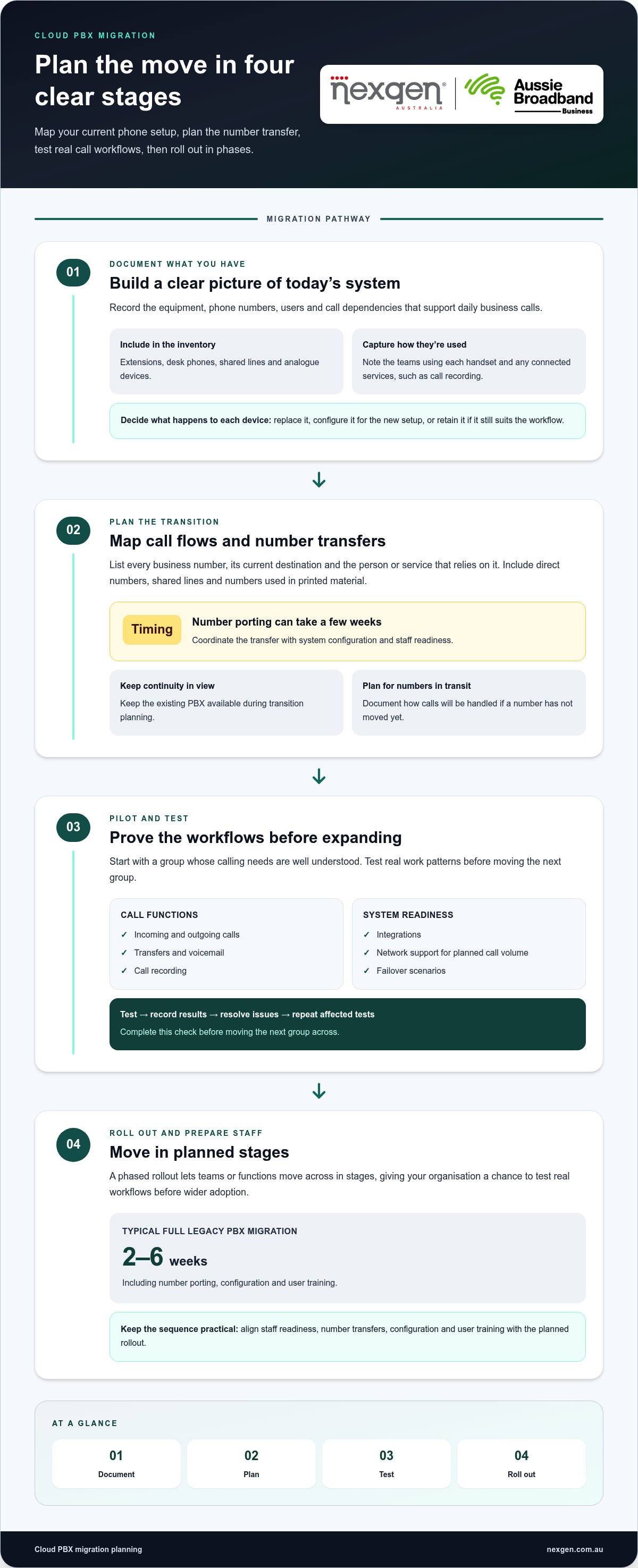
Before changing systems, document existing equipment, phone numbers, users and call dependencies. This inventory helps you plan number porting, test the network and choose a rollout sequence that keeps essential teams connected.
Assessing existing PBX equipment
An equipment assessment records how the current PBX, handsets and connected services support daily calling. This matters because older hardware may not work with the planned cloud setup, while some existing devices may still be useful.
Start with a register of extensions, desk phones, shared lines and analogue devices. Note which teams use each handset and whether they depend on call recording or other connected services. For example, reception may need a physical phone, while a travelling employee may prefer a softphone on a computer. The inventory shows what to replace, configure or retain.
Number porting and migration planning
Number porting transfers existing business phone numbers to the new phone service. Plan it carefully so customer-facing numbers continue reaching the right teams during the change.
List each number, its current destination and the staff member or service that relies on it. Include direct numbers, shared lines and numbers used in printed material. Number porting for a cloud VoIP migration can take a few weeks, so coordinate the transfer with system configuration and staff readiness. Keep the existing PBX available during transition planning, and document how to handle calls if a number has not moved yet.
Phased rollout and testing
A phased rollout moves teams or functions to the new system in planned stages instead of changing everything at once. This gives your organisation a chance to test real workflows before wider adoption.
Choose a group whose calling needs are well understood, then test incoming and outgoing calls, transfers, voicemail and call recording. Check integrations and confirm the network can support the planned call volume. Test call flows, integrations and failover scenarios before the cloud phone system goes live. Record the results, resolve issues and repeat any affected tests before moving the next group.
Migration timelines and staff onboarding
A full legacy PBX migration, including number porting, configuration and user training, typically takes 2-6 weeks. The schedule depends on the work involved, including number transfers, system setup and staff preparation.
Give each team practical onboarding for daily tasks, such as signing in to a softphone, transferring a call or accessing voicemail. Use brief demonstrations based on real work scenarios, then provide a simple reference guide. A staged go-live gives managers time to address questions and gather feedback before the remaining teams move across.
Traditional PBX systems tie calling to on-site equipment, and changes may depend on that setup. Moving to a cloud phone system shifts management to an online service and can support staff working across locations. A phased plan helps preserve familiar processes while teams learn the new system.
Security, access controls and compliance
Cloud phone security requires clear rules for who can access call data, change settings and manage user accounts. Australian businesses should consider privacy and emergency-call arrangements alongside the system’s security controls.
Distinguish legal obligations from operational safeguards. Your organisation’s privacy responsibilities depend on the information it handles and the laws that apply to its activities.
Cloud telephony security
Cloud telephony security means protecting system access, communications data and administrative settings. This matters because a compromised account or inappropriate access could expose information or disrupt call handling.
If your organisation is covered by the Privacy Act 1988, Australian Privacy Principle 11 requires reasonable steps to protect personal information from misuse, interference, loss and unauthorised access, modification or disclosure, according to the Office of the Australian Information Commissioner. Treat call records and voicemail as information requiring defined access and handling procedures, rather than assuming the phone system alone addresses privacy risks.
Set a process for granting, reviewing and removing access. Assign permissions according to job responsibilities, and separate system administration from everyday calling where the system allows. A staff member who handles customer calls, for example, may not need permission to change user accounts or system-wide settings. Record who approves changes and how access is removed when roles change.
Decide how long your organisation needs to retain call records and voicemail, and document how authorised staff can retrieve or delete them. Retention should reflect your business purpose and applicable obligations. A written process gives managers a consistent basis for handling requests, staff departures and routine account reviews.
Access controls and compliance
Access controls determine which phone-system features users can use and what stored information they can view. Set permissions according to work duties and relevant privacy responsibilities.
For emergency calls, distinguish provider obligations from your organisation’s operating procedures. The Telecommunications (Emergency Call Service) Determination 2019 sets requirements for emergency call service providers, according to the Australian Communications and Media Authority. It does not, by itself, establish a general business-user rule that remote employees must communicate their location in a particular way.
Document how staff can make an emergency call through the system, and explain the relevant process during onboarding. Confirm the service’s emergency-call arrangements and any limits affecting users outside the office. Keep instructions accessible to employees, including remote workers, and assign responsibility for maintaining them when settings or work arrangements change.
Keep a record of security decisions, access approvals and incident-handling responsibilities. A concise register can identify the system owner, authorised administrators and steps for reporting suspected account misuse. Review it when responsibilities change so safeguards remain aligned with how your organisation uses its phone system.
VoIP and cloud PBX fundamentals
VoIP carries voice calls over an internet connection, while a cloud PBX manages business calling through hosted infrastructure. Understanding the difference helps you assess what changes when you move from equipment at your premises to an online phone system.
A traditional PBX can work with VoIP, so migration doesn’t always mean replacing every part of your calling setup. The key difference is where the phone system is managed. An on-premise PBX uses equipment at your business, while a cloud PBX is hosted online. That affects how staff connect, how changes are managed and how the system adapts as your organisation changes.
Cloud PBX can support employees working in different locations. Staff can use the same business phone system from the office or elsewhere, helping teams stay connected. Extension dialling can connect colleagues using three-or-four digit extensions, making internal calls straightforward whether someone is at a desk or away from the main premises.
Cloud PBX can provide a flexible, scalable solution as your business needs change. You can add users or adjust call routing without relying solely on on-site PBX equipment. Cloud calling can also simplify maintenance and help businesses manage capital expenses by reducing reliance on a large upfront investment in premises-based infrastructure.
When choosing a cloud VoIP provider, compare how the service fits your current and future needs. Consider user experience, system management and the calling features your teams rely on. Check whether the platform can integrate with your external software. For example, a team handling customer enquiries may need its calling process to work alongside existing customer records.
Review how call routing, an attendant, voicemail and recording work together in the proposed system. A receptionist may need to direct callers to the right team, while managers may need access to recorded calls for business purposes. Focus on the tasks staff perform rather than selecting features simply because they appear in a package.
Network readiness also shapes the experience of cloud calling. Assess internet bandwidth, quality of service (QoS), which prioritises voice traffic, and failover options before deployment. KMTech recommends assessing these factors before deploying cloud voice services. For example, consider what happens to calling if the primary internet connection is disrupted.
Finally, compare how the provider handles routine changes and supports administrators. Find out how your business can update users, adjust call routing and manage integrations. A clear understanding of these responsibilities helps you assess whether hosted calling suits your operations, staff and management approach.
Assessing existing phone-system needs
Assess your current PBX by documenting how people, phone numbers, devices and call flows support daily work. Can existing desk phones, extensions, fax machines and alarms work with a cloud PBX? Extensions can be recreated in the cloud configuration, but physical phones, fax machines and alarms need their connection requirements assessed before migration.
Start with a map of users and locations. Record which teams use the phone system, where staff work and how callers reach them. Include reception, sales, service teams and any contact centre. If staff work across several locations, note which calls need to move between offices and which users work remotely.
Next, review how the existing PBX handles demand. Check peak concurrent calls, queues, shared lines and call transfers. Peak concurrent calls means the number of calls taking place at the same time, not the total number of staff. A busy reception team, for example, may need a queue, while a small accounts team may mainly need direct extensions.
List the functions your organisation depends on, including e-fax, conference calling, integrations and call recording. One organisation evaluating a cloud PBX migration required e-fax and conference functionality. That example shows why a feature inventory matters: a system may appear suitable while still missing a task staff rely on.
Compare your current setup with future operating needs. An on-premise PBX may suit an on-site workforce and let a business use its initial equipment investment. A cloud assessment should also consider remote users, contact-centre requirements, integrations, locations and peak concurrent calls. A growing organisation with remote staff, for example, may weigh location flexibility differently from a single-site team.
Use the assessment to create a requirements list, not just an equipment list. Identify which call flows must remain familiar, which processes need to change and which capabilities matter as the business grows. This gives decision-makers a practical basis for comparing system options and setting priorities.
To prepare, group requirements into essential functions, device considerations and future needs. Record who owns each decision, such as the operations manager for queues or the office manager for shared phones. A clear inventory helps translate everyday calling into a system design. Discuss your business phone-system requirements as you assess the right approach.
Nexgen Australia: Small Business Phone Systems
Nexgen Australia helps businesses assess a move from an on-premise PBX to cloud calling. Its Small Business Phone Systems, Office Phone Systems and VoIP Phone Systems are options for organisations whose requirements include staff across locations, updated call handling or a more flexible setup.
Bring your phone-system assessment to the conversation: user needs, current phone numbers, essential call flows, handset requirements and integrations. These details help identify the system type that suits your business and supports everyday calling. If you’re ready to discuss your requirements, contact Nexgen Australia or visit nexgen.com.au.
Make your next phone-system decision with purpose
Upgrading a traditional PBX to the cloud is an opportunity to shape how your business communicates as its needs evolve. Set a clear goal for the change, such as supporting distributed teams more easily or giving staff a phone system that can adapt as roles and workflows change. That goal can guide decisions beyond the initial migration and keep future system changes focused on how your organisation operates.
Nexgen Australia offers Small Business Phone Systems, Small Business VoIP Solutions and Office Phone Systems for businesses considering their next communications setup. If you’re ready to discuss your requirements and possible options, contact Nexgen Australia to discuss your upgrade.
A considered next step can turn a phone-system change into a practical foundation for how your team works. Start a conversation with Nexgen when you’re ready to move forward.
Frequently Asked Questions
What is a Cloud PBX?
A cloud PBX is a hosted business calling system, with administration and call-handling functions managed through an online service. Distinguish the service from the devices employees use to access it. Before choosing a system, identify who will administer users and settings, which teams need access, and how it should fit your organisation’s working arrangements.
Can I keep my existing business phone numbers when switching to cloud PBX?
In many migrations, existing business numbers can be retained, subject to the porting process and the details of each number. Alongside the main reception number, consider how your business presents its outbound caller ID and whether different teams use distinct numbers. For example, if a customer regularly calls a direct staff number, consider how that number should remain associated with the same role when an employee changes position.
So, where’s the hardware?
The central PBX appliance may no longer sit in your office, but a cloud setup can still include equipment at users’ desks. Consider what your team needs at each workstation. Reception may benefit from a physical handset, while another employee may prefer calling through a computer. Check device compatibility, headsets and how staff use each workspace before deciding what equipment to retain.
What Is a Modern Business Phone System?
A modern business phone system combines business calling with tools for managing how employees handle conversations. Its value depends on the work it supports, not the age or appearance of the handsets. A professional services firm, for example, might prioritise direct contact with staff, while a service team may need calls assigned consistently across members. Define those needs before comparing systems.
What is a PBX?
A PBX, or private branch exchange, manages internal extensions and connections to outside callers. Think of it as the organisation’s call-control function: it determines how calls reach users and teams. This distinction helps when planning a migration, because changing the PBX model does not mean every handset or staff calling process must change at once.
What is a Traditional PBX?
A traditional PBX is a system whose call-control equipment is installed at the business premises. To identify one in your organisation, look for a dedicated phone-system unit or cabinet connected to office phone infrastructure. Knowing which equipment performs that role helps distinguish PBX hardware from network equipment, handsets and other devices, each of which may have a separate workplace purpose.
What are the benefits and drawbacks of upgrading a traditional PBX to a cloud phone system?
The main decision is whether the flexibility of a cloud setup outweighs your reliance on local equipment and internet access. Consider how often staff work away from the office, how phone-system changes are managed and what continuity arrangements your organisation needs. A single-site team with stable routines may value its existing setup differently from a business planning to change locations or working arrangements.
How much does it cost to migrate a business PBX to cloud telephony in Australia?
There isn’t one migration cost that applies to every Australian business. Build an estimate based on the scope of work: system configuration, number-transfer requirements, compatible equipment, integrations, user preparation and ongoing service charges. Ask for costs to be separated by category so decision-makers can distinguish transition work from continuing expenses. This also makes it easier to compare proposals with your documented requirements.