

The handset you already own may not work with a cloud system. For desk phones for cloud VoIP, compatibility is key: a SIP desk phone can connect to a cloud phone service, but other phones may not. Cloud VoIP carries calls over the internet, and staff can use compatible desk phones, computers or mobile devices.
It’s reasonable to want a simple changeover that keeps familiar equipment in use. First assess each phone model and how your team works, then decide what to retain or replace. A compatible SIP phone gives staff a physical handset at their desk, while computer and mobile calling can suit people who work across locations.
This guide explains how cloud VoIP works, what to consider when connecting existing phones, and how to compare SIP desk phones for an Australian office. You’ll also find a decision guide for matching handset features to different roles, from reception and call handling to everyday office use.
Key Takeaways
- Assess whether your current handsets support SIP before deciding which phones to keep or replace.
- Match calling options to how staff work, using desk phones, computers or mobile devices as needed.
- Understand how features such as call routing and auto attendants can shape the way customers reach your team.
- Include both handset and network hardware needs when comparing the costs of a cloud phone setup.
- Choose a desk phone around each role’s call volume, preferred features and workplace setup.
Can I use my existing desk phones or portable handset equipment?
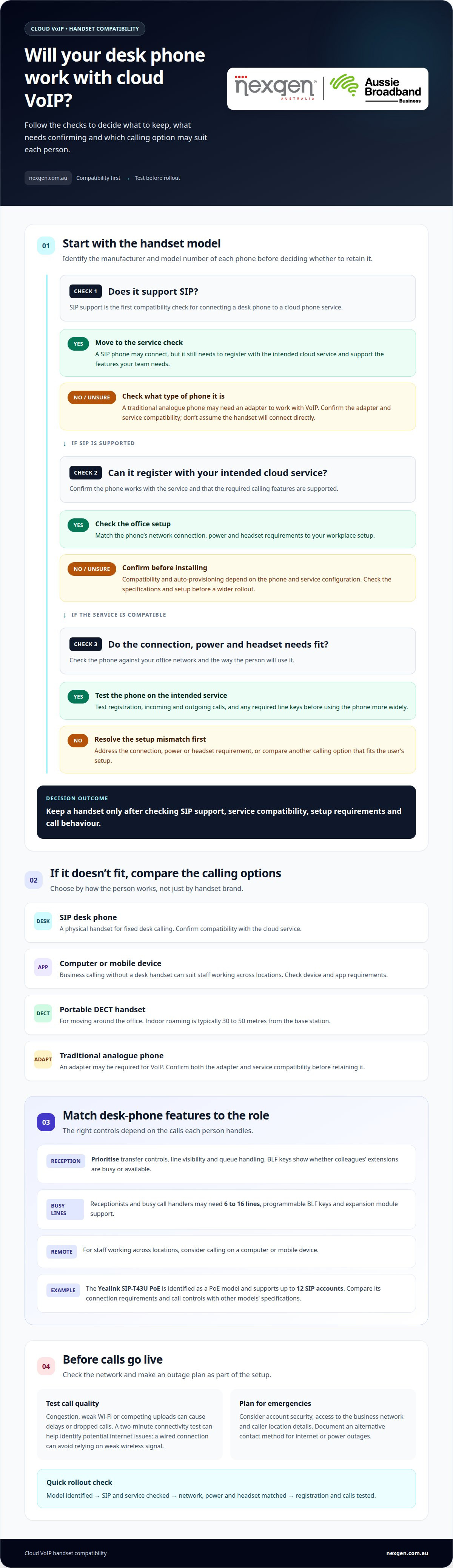
Often, yes. A cloud phone system can connect compatible SIP desk phones, computers and mobile devices. The deciding factor is whether each device can register with the service and support the features your team needs.
What are the best desk phones for cloud VoIP in Australia? Choose a SIP phone that works with your hosted service and suits each user’s calling needs. The Yealink SIP-T43U PoE is one example, supporting up to 12 SIP accounts.
Which desk phones support PoE, Wi-Fi, Bluetooth and headsets? The Yealink SIP-T43U is identified as a PoE model; support for Wi-Fi, Bluetooth and headsets varies by phone. Compare each model’s specifications with your office network and staff requirements.
What security and emergency-calling issues should Australian businesses consider with VoIP desk phones? Consider account security, access to the business network, caller location details and what staff should do during an internet or power outage. Document an alternative contact method for emergencies.
Compatible Existing Devices
Compatible SIP desk phones connect directly to a cloud service, while computers and mobile devices let staff make business calls without a desk handset. A traditional analogue phone may need an adapter to work with VoIP, so it isn’t automatically compatible. Business DECT handsets typically roam 30 to 50 metres indoors from their base station.
Yealink Desk Phones
Yealink SIP models provide a physical handset option for staff who prefer desk-based calling. The Yealink SIP-T43U PoE supports up to 12 SIP accounts, which can suit users managing multiple lines or accounts. Compare its connection requirements and call controls with a Grandstream SIP phone’s specifications, rather than choosing by brand alone.
Auto-Provisioning and Provider Compatibility
Before installing existing equipment, use this compatibility check:
- Identify each handset’s manufacturer and model number.
- Confirm it supports SIP and the intended cloud service.
- Match its network connection, power and headset needs to the office setup.
- Test registration, incoming and outgoing calls, and any required line keys.
| Option | Connection | Best fit | Key consideration |
|---|---|---|---|
| SIP desk phone | Office network | Fixed desk calling | Confirm service compatibility |
| Computer or mobile | Internet connection | Flexible work locations | Check device and app requirements |
| DECT handset | Handset and base station | Moving around the office | Indoor range depends on the base station |
| Traditional analogue phone | Adapter may be required | Retaining existing equipment | Confirm adapter and service compatibility |
Choose devices to suit each person’s work, then test them on the intended service before a wider rollout.
VoIP phone systems – what’s the deal?
VoIP sends calls over the internet, and cloud features route them to the right person. Call routing, auto attendants and voicemail settings can be managed online, helping teams handle calls across the office, on mobile devices and from remote locations.
An auto attendant greets callers and offers options, such as pressing a key for sales or accounts. Call routing directs each caller to the right extension or destination. For example, someone selecting “accounts” could reach that team, while an unanswered call forwards to voicemail or another team member.
Call queues place callers in line when staff are busy. A queue can play a recorded message and connect the next caller when someone is available. Some systems also offer callbacks, so callers can request a return call instead of waiting. Reception features such as transfer, hold and presence indicators help staff see who is available.
Receptionists and busy call handlers may need 6 to 16 lines, programmable busy lamp field (BLF) keys and expansion module support. BLF keys show whether colleagues’ extensions are busy or available.
- Reception: prioritise transfer controls, line visibility and queue handling.
- High call volumes: consider additional line keys and expansion support.
- Remote staff: choose calling options that work on a computer or mobile device.
- Team meetings: look for conference calling if staff need group conversations.
AI receptionist tools can handle defined call interactions, while call transcription turns spoken conversations into text. These are different functions: one responds to callers, while the other creates a written record. Before enabling either, consider how it fits your call flows, privacy practices and staff workflows.
Call quality depends on the internet connection and the network carrying voice traffic. Congestion, weak Wi-Fi or competing uploads can cause delays or dropped calls. A two-minute connectivity test can help identify potential internet issues before they affect calls. For desk phones, a wired network connection can avoid relying on a weak wireless signal.
To compare systems, map a typical caller journey first: greeting, menu choice, queue, transfer and voicemail. Then match each step to the features your receptionist and other staff need. This helps you choose a phone setup that supports real call handling, rather than focusing only on handset appearance.
What Is a Cloud-Based Phone System in Australia?
A cloud phone system is hosted in a service provider’s data centres and accessed through internet-connected devices. Unlike an on-site PBX, it doesn’t rely on a phone server in your office. Cloud phone systems are also called cloud VoIP phone systems.
For Australian businesses, compare the ongoing service costs separately from handset and network hardware. Entry-level SIP desk phones cost A$70-A$120 including GST, while high-end executive SIP phones cost A$250-A$450. These broad bands help frame a hardware budget, but the required features and user roles determine which handset makes sense.
Cloud platforms can include call routing, voicemail-to-email, call recording and analytics. Compare the features in each phone system with how your team handles calls. For example, if your business needs recorded calls, consider recording controls, access and storage alongside handset requirements.
Cloud hosting and call-recording storage are related, but they aren’t necessarily the same. The provider hosts the platform in data centres; your business should also establish where recordings and related data are stored, how long they’re retained, and who can access them. An Australian-facing service doesn’t, by itself, indicate where its data centres are located.
Australian Consumer Law may provide remedies for an eligible business purchaser who buys a phone advertised as compatible with their provider but finds it isn’t. Keep the product description and purchase records, including the compatibility claim, to help explain the issue. The law’s application depends on the purchaser and the circumstances of the transaction.
Use this checklist to compare the cost and setup implications of a cloud phone system:
- Separate service charges from the cost of SIP phones and network hardware.
- Compare handset features with each user’s call-handling needs.
- Include PoE requirements when planning switches and desk connections.
- Ask how call recording is managed, stored and accessed.
- Keep compatibility descriptions and purchase records for eligible business purchases.
For example, an office replacing several handsets should budget for the phones and any PoE switch needed, then assess platform features and data storage separately. This helps clarify the total setup without assuming every cloud phone system includes the same things.
Desk phone support for physical offices
A physical office can use desk phones at fixed workstations, while softphones support staff working remotely. Plan the network, power and mix of devices around how each team communicates.
Physical Office Desk Phones
A desk phone gives reception, accounts or customer service staff a dedicated handset at their workstation. Unlike a softphone on a computer, it doesn’t depend on that computer being available for calls. Map desks, shared areas and reception before installing devices, so each handset has a suitable network connection and a clear purpose.
For an existing office, list each phone’s location, user and call pattern before deciding what to keep. A reception desk may need visible line keys and quick transfers, while a quiet office may need only a handset for direct calls. This location-based inventory can reveal gaps without replacing compatible equipment unnecessarily.
PoE Support
Power over Ethernet (PoE) lets a compatible desk phone receive power through its network cable from a PoE-enabled switch. This can reduce the need for separate power adaptors at desks and simplify cable management. A phone connected to a standard switch port without PoE still needs another suitable power source.
Before connecting phones, identify which switch ports provide PoE and whether the planned devices support it. Connect voice devices to the intended network ports, and label cables at both ends. For example, a labelled reception connection is easier to trace when staff move desks or equipment changes.
PoE makes the switch part of the phone setup, not just background hardware. If a switch is replaced or reconfigured, check that connected phones still receive power and network access. Keep a simple record of phone models, desk locations and switch ports to help staff diagnose connection or power issues.
For remote and hybrid teams, pair office handsets with a softphone on a computer or mobile device. A staff member can use a desk phone in the office, then switch to the configured softphone while working remotely. The same business communications setup can support both locations, provided each device has internet access and is configured for the user.
Separate the needs of office-based and mobile staff during planning:
- Reception and call-handling desks need equipment suited to frequent transfers.
- Shared workstations need clear sign-in and handover processes.
- Remote staff need a configured softphone and a suitable internet connection.
- Office handsets need the correct network port and power arrangement.
Before rollout, test a desk phone and softphone with a real call, transfer and voicemail task. This practical check can reveal whether the physical setup and remote workflow meet staff needs.
Choosing a SIP desk phone for a cloud phone provider
What is the difference between SIP phones and proprietary cloud VoIP phones? SIP phones use a common calling protocol, while proprietary cloud phones are designed for a specific platform. SIP can offer more choice across systems, but compatibility still depends on the phone model and provider. Choosing desk phones for cloud VoIP starts with matching the handset to your provider, network and calling requirements.
SIP Desk Phones
A SIP desk phone uses Session Initiation Protocol to set up and manage calls over an IP network. It can suit businesses that value flexibility across hosted services or may change platforms later. Before buying, match the phone’s SIP support, network connection, power needs and required calling features to the provider’s requirements.
Choose a handset based on each user’s work, not just its protocol. A receptionist who transfers calls may need different controls from a staff member who makes occasional calls. If your team also uses mobile phones, decide how desk and mobile calling should work together, including which device receives incoming calls and where staff answer them.
Proprietary Cloud VoIP Phones
A proprietary cloud VoIP phone is designed for a particular platform or service environment. Its setup may be more closely tied to that system than a general SIP handset. This can suit a business committed to one platform, but may limit reuse if the business later changes provider or communications system.
Compare the options against your priorities:
- Provider flexibility: SIP uses a common protocol, but check the exact model’s compatibility.
- Platform-specific features: proprietary handsets may be designed around one platform’s calling controls.
- Future changes: consider whether your phones could be reused after changing provider.
- Network and power: match the handset’s connection and power requirements to your office setup.
- Staff workflow: decide how desk calling should work alongside computer or mobile phone use.
Before ordering, identify the cloud platform and the phone models it supports. Map users’ calling tasks, such as reception transfers, direct calls or shared lines. Compare handset controls and connection requirements, then test a representative phone on the intended network. Include incoming calls, outgoing calls and transfers in the test to reflect everyday use.
A SIP label alone doesn’t guarantee that every function will work with every service. Compatibility can vary by handset model, provider configuration and platform support. A phone might register for calls yet lack a feature your team relies on, or need manual setup rather than automatic provisioning. Assess the exact phone and platform combination before rollout. That’s the practical distinction that matters when selecting desk phones for cloud VoIP.
For help matching a phone setup to your calling needs, talk to Nexgen about business phone systems.
Nexgen Australia: Small Business Phone Systems
Nexgen Australia provides Small Business Phone Systems and Small Business VoIP Solutions for Australian businesses reviewing their calling setup. If you’re deciding whether to keep compatible desk phones, add new SIP handsets or support staff across office and remote locations, a tailored system can bring those requirements into one plan.
Nexgen’s Office Phone Systems and VoIP Phone Systems help align handset choices with call handling, user needs and your cloud platform. Share how your team handles calls, which devices it uses and what you want to retain. This gives you a practical starting point for planning a suitable setup.
Contact Nexgen Australia to discuss your business phone requirements, or visit nexgen.com.au.
Plan a phone setup that fits your next stage
Choose handsets to support how your team will work next, not just the desks you have today. Before you commit, decide which roles need a dedicated phone, where staff need flexible calling, and what you want to keep from your current setup. This gives your business a clear brief for comparing systems and planning a practical transition.
Choosing desk phones for cloud VoIP is easier when you consider the provider, platform and handset together. Nexgen Australia provides Small Business Phone Systems, Small Business VoIP Solutions and Office Phone Systems, helping businesses plan phone requirements as part of a broader setup.
If you’re ready to turn your requirements into a practical next step, contact Nexgen Australia to discuss your business phone system. A well-planned approach can help your team move forward with confidence.
Frequently Asked Questions
Need Help Choosing Your Desk Phones?
Involve the people who’ll use the handsets. Ask staff to assess practical details such as display readability, button layout, handset comfort and how easily they can adjust call volume. A short trial at reception or a shared workstation can reveal usability issues a specification sheet won’t. Record feedback by role, then use it to prioritise features across the rollout.
Can I just plug a VoIP phone into my router?
Not by itself. A router provides a network connection, but it doesn’t automatically assign the phone an extension or business identity. Each handset needs its own user or extension configuration so calls reach the right person. In a shared office, label phones and their assigned extensions clearly. This makes moves, replacements and troubleshooting easier for staff managing the system.
Can I use my existing number with a cloud phone?
In most cases, an existing business number can be transferred to a cloud phone service. Keep the current service active until the transfer is complete, and ensure the account holder details match the number’s service records. If your business uses several numbers, identify which one customers call first and how the others are used. This helps preserve the intended call flow after the move.
Do I need a SIP phone or can I use a softphone?
You can use a desk handset, a softphone or both. For a mixed setup, decide which device should ring first and whether staff need the same business caller identity across devices. For example, someone who splits time between the office and client visits may want a consistent calling profile. Clear rules help colleagues know how to reach one another.
Which desk phones are compatible with cloud VoIP services in Australia?
Compatibility depends on the phone model and cloud platform. Before reusing a handset, record its full model name and software version, then compare them with the service’s supported-device requirements. Identify any platform-specific keys or functions your team relies on, too. A short test of those functions can reveal practical limitations before a wider deployment.
What features should I look for in a cloud VoIP desk phone?
Prioritise features that make a normal workday easier. A readable display, clearly labelled controls and straightforward mute or hold functions can matter more than advanced options staff rarely use. Consider whether users need a searchable directory or do-not-disturb controls. Ask staff to demonstrate common tasks on the handset instead of choosing from a feature list alone.
How much do cloud VoIP desk phones cost in Australia?
There isn’t one price for every setup. The handset model, required features and accessories affect the equipment budget, while the cloud service may have separate ongoing charges. Compare the total arrangement over the period you expect to use it, including replacement needs and additional hardware. This gives you a more useful basis for comparing options than handset price alone.
Do Australian VoIP providers supply or support desk phones?
Provider arrangements differ. Some providers supply compatible handsets, while others support equipment selected by the business. Clarify what support covers, including initial configuration, changes to user settings and troubleshooting device faults. Establish who handles warranty issues and replacement equipment, too. Clear responsibilities help your team know where to turn when a handset stops working or needs to be reassigned.