


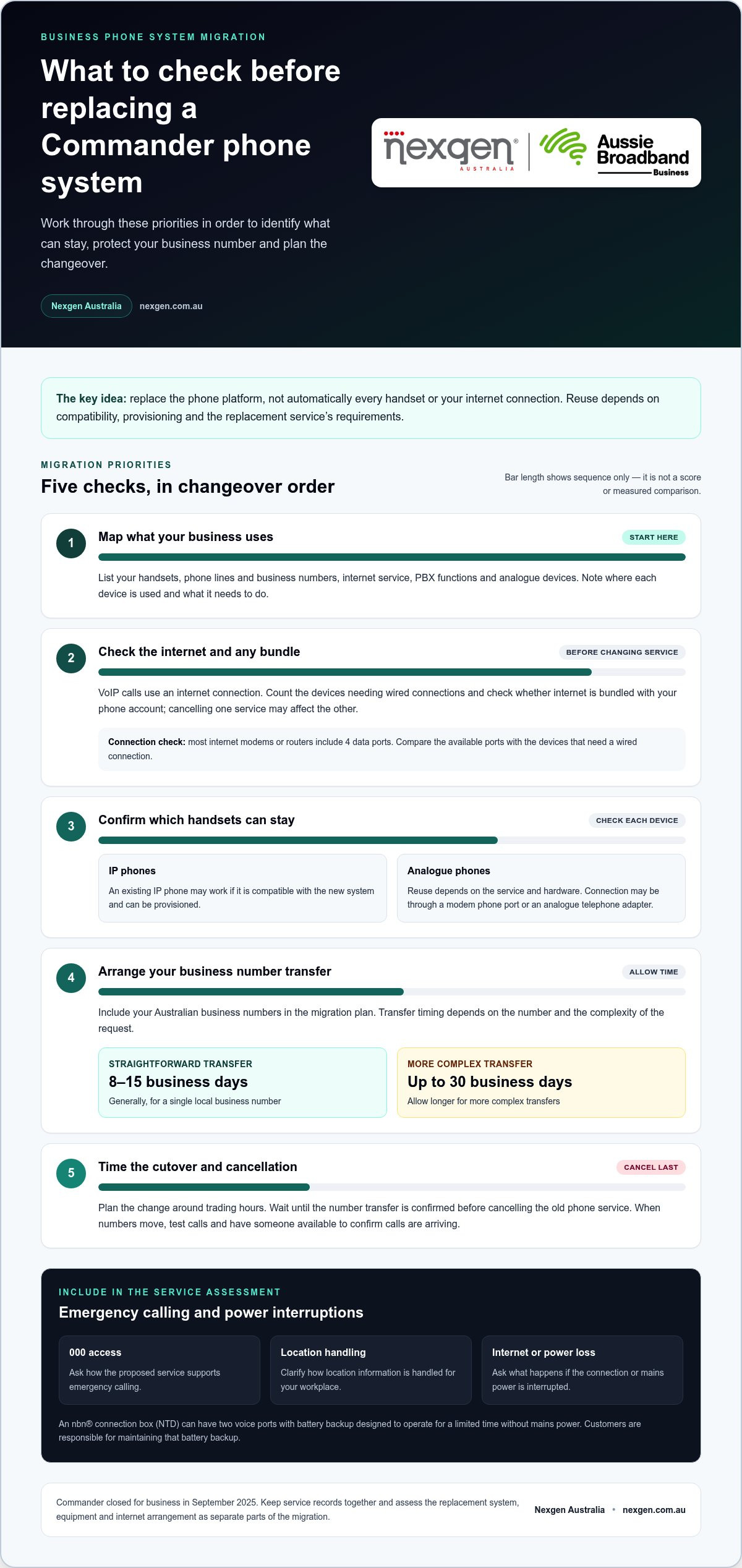
Replacing a Commander phone system in Australia doesn’t mean you have to replace every handset or change your internet connection at the same time. Existing IP phones may work with a new system if they’re compatible and can be provisioned, while business numbers can usually be transferred. Commander closed for business in September 2025, so plan the transition carefully and wait until the number transfer is confirmed before cancelling the old phone service.
It’s reasonable to want a modern system without replacing equipment that still works. The key is to distinguish what must change, such as the phone platform, from what may be reusable, such as compatible IP phones and your internet connection. This guide explains how to assess your handsets and connection, retain your business number during the move, and time cancellation to avoid disrupting calls or accidentally losing internet bundled with your phone service.
Key Takeaways
- Map your current setup first, including handsets, phone lines, internet services and PBX functions, so you can identify what actually needs to change.
- Check whether your internet service is bundled with your phone service before arranging cancellation, as ending one may also disconnect the other.
- Allow for number transfers to take time: a straightforward single local business number generally takes 8 to 15 business days, while more complex transfers can take up to 30 business days.
- Use handset model and provisioning requirements to decide which IP phones can stay, rather than assuming all existing equipment will work with a new system.
- Plan the changeover around your trading hours, test calls when numbers move and make sure someone is available to confirm calls are arriving.
Business Phone handsets and internet connection requirements
Replacing a Commander system doesn’t necessarily mean replacing every handset or changing your internet service. First identify the phone platform, equipment and connection your business uses. Then assess what the replacement system needs to support.
For Australian businesses, replacement options include hosted VoIP or a new PBX, depending on call-handling needs and existing equipment. Commander phone systems were used to manage business calls, including calls through desk phones and business numbers. Australian emergency-calling arrangements should also form part of the service assessment: include 000 access, location handling and what happens if internet or power is interrupted.
Handset and internet requirements
VoIP carries calls over an internet connection, so assess your connection and office network as well as your handsets. Check how many devices need wired connections and whether phones share network capacity with computers and other business equipment.
Most internet modems or routers include 4 data ports. Count the devices requiring a wired connection before deciding whether your current layout is suitable. Also identify the internet service linked to your phone account, since a bundled arrangement affects how you plan a change.
In this context, Commander Phone service is referred to as Business Phone. A Business Line can replace copper PSTN calling, but the right setup depends on the replacement service and hardware. To retain your Australian business numbers, arrange their transfer as part of the migration.
Analogue phone compatibility
An analogue handset may be reusable if the replacement service and hardware support it. Depending on the setup, an analogue phone can connect through a modem phone port or an analogue telephone adapter, which links the handset to a compatible digital service.
Before migrating, list analogue devices by location and purpose. Note, for example, whether reception relies on an analogue desk phone or a phone serves a particular work area. This inventory helps determine which devices need to keep working after the change.
An nbn® connection box, also called an NTD, can have two voice ports with battery backup designed to operate for a limited time without mains power. Customers are responsible for maintaining that battery backup. If your current phone setup uses these ports, include their role when assessing the replacement.
For emergency calling, ask how the proposed service handles 000 access, location information and interruptions to internet or power. These are service requirements to clarify for your workplace, rather than assumptions to make from the handset type alone.
Before choosing equipment, record your internet arrangement, router connections, analogue devices and business numbers. This gives you a practical basis for deciding what can stay and what the replacement system needs to support.
Australian-based customer support
Support planning matters because the system, phone service and equipment can involve different contacts. Commander closed for business in September 2025. Separate questions about an existing account from questions about a replacement system before starting the transition.
Support needs can include billing, faults, configuration or migration planning, and each may involve different teams and account details. Before arranging a change, gather a description of the issue, affected phone numbers, site address and service identifiers from recent records. This gives the support team a clear starting point.
Commander phone system support needs to be considered in light of the company’s closure. Old contact details or saved support processes may no longer reach the right team. Keep relevant invoices, service correspondence and equipment records together, and use the current contact path shown in recent account communications for account-specific matters.
Commander partner support is separate from direct account support. Your business may have used a partner for installation or maintenance, while billing and service faults relate to an account. Record which organisation handled each task and describe the issue clearly. A handset fault, for example, is different from a number-transfer or billing query.
Customer support is most useful when you match the contact to the problem. Prepare a concise handover with the affected site, device or service, what changed and when the issue began. Avoid sending passwords or unnecessary personal information in an initial message. If several staff are affected, nominate one person to coordinate updates and explain the impact clearly.
For remote support, note which devices are affected and whether the problem occurs at one location or across the business. A receptionist unable to receive calls needs a different fault description from one staff member experiencing a handset issue. Record the actions taken and any reference number supplied so the next support conversation starts with useful context.
NEC PBX end of support depends on the specific system and its support arrangements. Identify the NEC model from its equipment label and gather maintenance records before deciding whether to retain or replace it. An older PBX may still operate, but parts, technical assistance and configuration knowledge can affect the support plan. Don’t assume every NEC system has the same end-of-support date.
Compare replacement support processes, including fault reporting, remote diagnosis and escalation, alongside business phone system support options. This helps you assess how support fits your organisation’s requirements.
Cancellation timing and avoiding number loss
Port your Commander business numbers to the new service before cancelling the existing phone service. Australian businesses should wait until the transfer is confirmed, because cancelling early can interrupt calls or put number retention at risk.
To port Commander phone numbers, arrange the transfer through the new provider and provide account details that match the existing service records. A mismatch in the business name, service address or account number can cause the request to be rejected.
Number porting and switching timelines
A straightforward transfer of one local Australian business number generally takes 8 to 15 business days. A more complex transfer, such as a block of numbers or unusual account arrangements, generally takes up to 30 business days.
Use the relevant timelines to plan the switch, rather than setting a cancellation date before the port is complete. Prepare staff and customers for the change while the number transfer progresses. If your business has several sites or number blocks, allow time to coordinate each service and its associated account details.
Number transfer and cutover planning
Plan the cutover around your trading hours. Agree on the transfer date, decide who will test incoming calls, and make sure someone is available when the numbers move. Test calls from outside the business as well as calls between teams, then confirm reception and other key call paths work.
Keep the existing service active until the new provider confirms the transfer. If your phone service is bundled with internet, cancelling it may also cancel the internet connection. Treat phone and internet as separate items in your cancellation plan, even when they appear on one account.
Before submitting a port request, compare the business name, service address and account number with the current provider’s records. Check each digit in the account number and include all numbers to be transferred. If you’re moving a block, list the numbers individually so the request covers the complete range.
Find account numbers on recent bills or service correspondence. Keep relevant portal login details available to the authorised staff member managing the switch, and store them securely. Login access can help locate account information, but don’t send passwords in an ordinary email or include them in a porting request unless a secure process specifically requires it.
Porting fees vary by provider, port type and number quantity, and either the old or new provider may charge them. Check the charges associated with the transfer and account closure before setting a final cancellation date. Keep the port confirmation and cancellation record with your business communications documents.
Compatibility with existing IP phones
Existing Commander desk phones, business numbers and cabling may be reusable, but compatibility with the replacement system determines what can stay. IP phone compatibility varies by provider, plan and handset model, so identify the equipment before planning installation.
You can usually retain your Australian business numbers by transferring them to the new service. Keep your existing internet provider if the service is separate and suitable for the new phone system. Check whether phone and internet appear on a single bundled account.
Reusing existing IP phones
Start with the model number on each IP handset, then compare it with the replacement system’s supported equipment and provisioning requirements. Provisioning is the setup that allows a phone to register with the new service and make calls.
A handset that looks suitable may still need compatible firmware or configuration. Group phones by model, note the locations where they’re used, and plan a test before relying on them for day-to-day calls.
Reusing desk phones, numbers and cabling
Commander desk phones can stay in place only if the new service supports their model and setup. Australian business numbers are usually transferable. Existing cabling can be assessed for condition, connection points and suitability for the planned phone layout.
For example, a reception handset and its network connection may be worth retaining, while an older phone elsewhere may not suit the new system. Inventory your handsets, numbers and cable locations so the installation plan accounts for each item.
Your internet provider doesn’t automatically need to change when you replace your phone system. If the internet service is separate, assess whether it can support the new system and whether the office network has suitable connections for the phones. If phone and internet are bundled, treat them as linked when planning cancellation, because ending the phone service may also cancel internet.
Check your current contract before scheduling the switch. Businesses still within a minimum contract term may face early termination charges from their existing phone provider. Review the contract end date and service terms alongside the transfer plan. Reusing equipment doesn’t remove any contract obligations.
Plan installation around how staff will make and receive calls during the changeover. Migrations can be scheduled around trading hours, and existing numbers can be ported to reduce disruption. Still, plan for possible interruption rather than assuming downtime can be eliminated.
Before confirming the equipment plan, record each handset’s model, location and intended user. Mark the numbers that must remain, identify the internet account linked to the office, and list the cabling used by reception and other key work areas. These details help the replacement team identify reusable equipment and items that need a different setup.
Legacy phone system and PBX replacement in Australia
A hosted VoIP system routes calls through an internet-based service, while an on-premises PBX uses equipment installed at your business. Hosted VoIP moves the phone platform off-site; a PBX keeps call control on equipment at the office.
For an Australian business replacing a legacy telephone system, the choice depends on how the office phone setup works today. Map the current call flow, including reception transfers, shared lines, voicemail, after-hours handling and any analogue devices. For example, a clinic may need calls routed to different teams, while a small office may mainly need direct calling and transfers.
An on-premises PBX can suit a business that wants local control of its phone equipment and has the capacity to manage it. The trade-off is responsibility for the PBX hardware, configuration and ongoing maintenance arrangements. Before replacing it, document the model, extensions, connected equipment and the person or organisation that currently maintains the system.
Hosted VoIP can reduce reliance on a physical PBX at the office, with calls handled through the hosted service and connected devices. It depends on a working internet connection, so assess the office network and consider how staff will communicate during an internet or power outage. A hosted system may also suit a business with staff at different locations, provided its call handling meets their needs.
Use this comparison to guide the decision:
- Existing PBX: Record its functions, condition and maintenance requirements before deciding whether to retain or replace it.
- Hosted VoIP: Assess internet dependence, device compatibility and the call features your staff use each day.
- Either option: Plan how business numbers, extensions and call routing will work after the migration.
Legacy equipment can remain operational without being the best fit for the next stage. Panasonic announced in December 2020 that it would exit the business phone market. For an older Panasonic or other PBX, consider the system’s condition, access to support, availability of replacement parts and reliance on staff knowledge.
Replacing a PBX doesn’t require copying every old setting. Separate essential functions from habits that no longer serve the business. Check, for example, whether each extension still has an active user, whether reception needs the same transfer sequence, and whether voicemail should follow the existing process.
Before choosing a replacement, create a brief requirements record covering current call flows, devices to retain, number arrangements, internet dependencies and maintenance responsibilities. This sets a practical scope for the migration and helps you compare hosted VoIP with an on-premises PBX based on how your Australian business needs its phone system to work.
The main alternatives are hosted VoIP and a replacement on-premises PBX. Choose based on your call-flow needs, internet reliability, device compatibility and whether you want to manage phone equipment locally. Plan how business numbers, extensions and routing will transfer.
Nexgen Australia: Small Business Phone Systems
Nexgen Australia offers Small Business Phone Systems and Small Business VoIP Solutions for businesses planning to replace a Commander system. Its Office Phone Systems and VoIP Phone Systems are options to consider when deciding how handsets, call flows and business numbers should fit into the replacement.
Bring details of your current setup to the conversation: which phones you want to retain, how your team handles calls, and whether your internet is bundled with phone service. This helps shape a practical discussion about a replacement that suits your business communications needs.
If you’re ready to discuss your phone system requirements, contact Nexgen Australia.
Make your next phone system decision with confidence
For Australian businesses replacing a Commander phone system, use the change to define how your team needs to communicate next. Before choosing a system, agree on your priorities: straightforward call handling, flexibility for staff across locations, or a familiar desk-phone setup. Clear priorities keep decisions focused on business needs, not equipment alone.
Prepare a brief for your next discussion. Include the call flows your team relies on, the devices you hope to retain, and any operational constraints that could affect the transition. This gives the conversation a useful starting point and connects the system choice with the way your business works.
Nexgen Australia can discuss business phone system options as you plan the change. Share your priorities and what you want the replacement to achieve, then take the next step with a clearer view of your needs.
Contact Nexgen Australia to discuss your phone system plans and move forward with confidence.
Frequently Asked Questions
Do I have to replace everything at once?
No. You can stage a change by site or business function, depending on how your teams work. If your business has several offices, moving one location first can help identify process gaps before changing the others. For a single office, set a clear scope for reception, staff extensions and shared work areas. Record what’s included in each stage so responsibilities stay clear.
Do I need to understand VoIP, SIP or PBX to organise this?
No. You can organise the project by describing how calls should work, without specifying technical settings. Explain who answers first, where unanswered calls should go, and which staff need to transfer calls. SIP is a technical method for setting up calls, while VoIP carries voice over an internet connection. The migration team can translate your call-flow requirements into system settings.
How long do I have before my legacy system has to go?
There isn’t one retirement date for every installed phone system. A brand’s market exit or a service change doesn’t, by itself, establish when your PBX must be removed. Base the timing on the system model, maintenance arrangements and the effect of faults on daily operations. Keep the model and maintenance records together to support a considered replacement decision.
How long will this take, and how much of it is my job?
The schedule depends on the number of sites, call-flow complexity and equipment changes involved. Your role is to make decisions the project team can’t make for you: approve the call-flow design, confirm staff and extension details, and nominate someone to accept the completed setup. After installation, have staff test routine tasks, such as transferring an external caller or reaching a shared department line.
What does it cost to change?
Ask for costs to be separated into clear categories rather than shown as one unexplained total. The scope may include system setup, installation work, replacement handsets, number transfers and charges linked to an existing contract. Distinguish one-off migration costs from ongoing service charges. This breakdown helps compare options and show whether retaining equipment changes the project scope.
What NBN, internet bandwidth and power backup are needed for a replacement VoIP phone system?
There isn’t one internet speed or backup arrangement that suits every office. Assess the connection during normal busy periods, including simultaneous calls and other work such as file uploads. For power resilience, map every component a call depends on, including the modem, network switches and handsets. Backing up just one device won’t keep the full connection running if another powered component switches off.