


The biggest risk when migrating from an Avaya PBX to a cloud VoIP phone system isn’t replacing the hardware. It’s losing the call workflows your business relies on. If your team depends on established call routing, integrations or familiar ways of handling incoming calls, document those needs before choosing a replacement.
It’s reasonable to be concerned about keeping calls connected during the changeover and understanding which Avaya features can carry across. A smooth migration starts with your business requirements, not a provider’s feature list. Document how calls are handled, which systems connect to your PBX and what staff need to do their jobs.
This guide covers what to assess before moving from Avaya, how to compare cloud phone systems with your current setup and how to plan a practical migration. It also explains how to sequence testing and staff preparation so you can protect call continuity and make informed decisions about features, integrations and ongoing support.
- Start with an inventory of users, numbers, devices and Avaya features to clarify what your replacement needs to support.
- Compare cloud VoIP providers against your actual call workflows, integrations and support needs.
- Confirm which features are supported, which need testing and which may require changes to staff processes.
- Plan the change in stages, with clear owners, agreed decision points and time to prepare users before cutover.
- After launch, check real call handling against your requirements and prioritise any configuration gaps with your provider.
Why migrate from an Avaya PBX to a cloud VoIP phone system?
A cloud VoIP phone system handles business calls through a service hosted by a provider, rather than relying on an on-site PBX to manage calls. An Avaya PBX may still meet your needs, but it’s worth reviewing your setup if support has become difficult, your staff now work across different locations or you’re planning a technology refresh.
The decision should depend on your current system’s condition and your business requirements, not on an assumption that every older PBX must be replaced. Cloud VoIP can change how the system is managed and give staff more ways to handle calls, but it also depends on suitable internet connectivity, compatible devices, the right features and responsive provider support. Before migrating from avaya pbx to cloud voip phone system, check that the option you’re considering can support the call workflows your team relies on.
What changes when an Avaya PBX moves to cloud VoIP?
With an on-site PBX, call management depends on equipment at your premises. A cloud system moves that call management to a provider-hosted service. The provider may manage parts of the hosted platform, while your business still needs to consider internet access, local network readiness, devices, user access and how staff handle calls. Confirm responsibilities and support arrangements with each provider.
For example, an employee might answer calls on a desk phone in the office, then use an approved computer or mobile app when working elsewhere. Before assuming existing Avaya handsets or familiar call settings will carry across, check which devices and functions the new system supports. A Private Branch Exchange (PBX) is a business phone system that manages calls between internal users and external callers.
When is keeping or replacing the Avaya system worth assessing?
Review your Avaya system if you’re unsure how long it can be supported, expect to add users or locations, or need staff to handle calls differently. Consider how important existing call workflows are, too. A working PBX may remain suitable if it meets your needs and can be maintained appropriately. Compare its ongoing suitability with the requirements of a cloud replacement before deciding.
For a broader framework covering features, devices and support, read the Australian small business phone systems buyer guide. It can help you define what your business needs before comparing providers.
Audit your Avaya PBX before choosing a cloud VoIP replacement
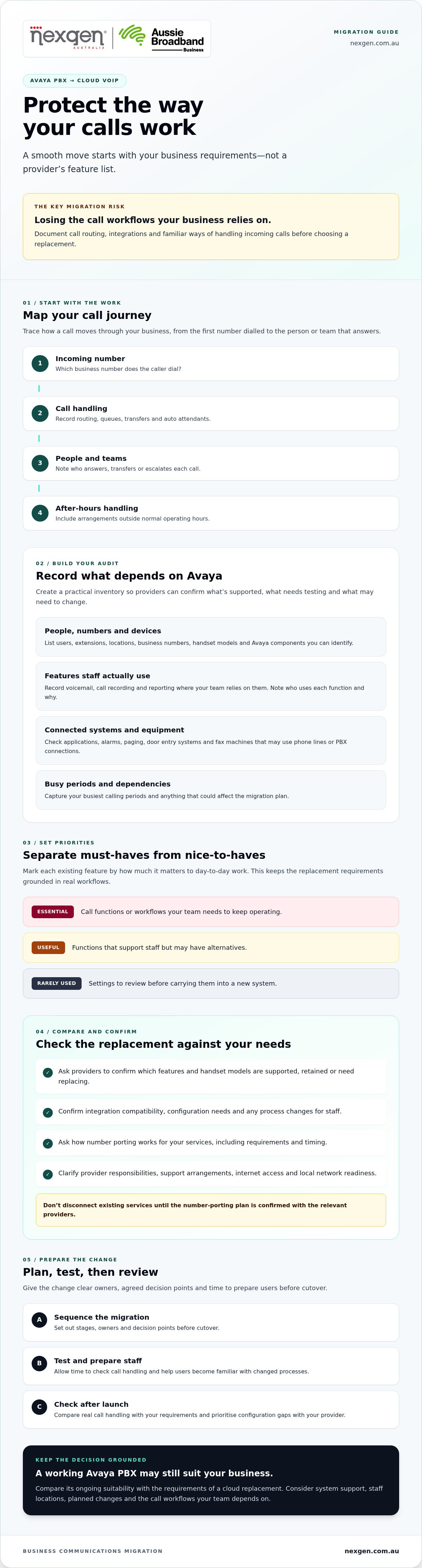
Before comparing providers, document what your Avaya PBX does and what depends on it. A clear inventory helps you separate essential call handling from rarely used features. It also gives prospective providers specific requirements to confirm, instead of leaving assumptions to the migration stage.
Which Avaya features and call workflows should you document?
Trace how calls move through your business, from the first number dialled to the person or team that answers. Include transfers, queues, auto attendants and after-hours handling. The Federal Communications Commission’s explanation of Voice over Internet Protocol (VoIP) offers a general overview of the technology. However, it’s a US resource, not Australian guidance on provider or service requirements.
Record the features staff actively use and mark each as essential, useful or rarely used. This keeps your requirements grounded in day-to-day work, rather than every setting available in the existing system.
- Call handling: Note how calls are answered, transferred, queued and escalated, including arrangements outside normal operating hours.
- Staff functions: Record voicemail, call recording and reporting where your team relies on them. Note who uses each function and why.
- Integrations: List connected applications and equipment, then ask prospective providers to confirm compatibility and any configuration or process changes required.
What should you check about handsets, numbers and connected systems?
Build a device and dependency register. Include users, extensions, locations, business numbers, handset models and any Avaya components you can identify. Don’t assume a handset will work with a new service just because it’s in good condition. Ask providers whether each model can be retained, reconfigured or needs replacing.
Record the numbers your business uses and ask each provider to explain the porting process, requirements and timing for your specific services. Don’t commit to disconnecting existing services until you’ve confirmed the plan with the relevant providers.
Check for equipment that may use phone lines or PBX connections, such as alarms, paging, door entry systems and fax machines. Ask the relevant equipment supplier or a suitably qualified technical contact to review any uncertain dependencies before migration.
Complete the audit with details that will shape the migration plan: your busiest calling periods, who approves changes and who owns each technical or operational question. Flag anything that needs specialist review. This gives providers a clearer picture of your setup and helps your business prepare for migrating from avaya pbx to cloud voip phone system without overlooking a dependency. A provider such as Nexgen Australia can discuss business VoIP and cloud phone options in light of your documented requirements.
Compare cloud VoIP options against your Avaya requirements
Use your Avaya audit to compare providers. Match each business-critical workflow to a documented cloud-system feature or an agreed alternative. Then record what’s confirmed, what needs testing and what could require changes to equipment or staff processes. This helps you compare options based on fit, rather than a feature list or broad reliability claims.
How do you check feature parity without assuming everything transfers?
Ask providers to demonstrate your actual call scenarios. For example, have them show how a caller reaches a queue, waits, transfers to another team member and is handled if nobody answers. Record the result against your requirements. Features with similar names may work differently in practice.
Use a comparison table to keep decisions clear:
| Area | What to compare | Status to record |
|---|---|---|
| Call features | Routing, queues, auto attendants, voicemail and recording | Confirmed, test required or process change |
| Devices | Desk phones, computers and mobile devices | Compatible, provider confirmation required or replacement needed |
| Integrations | Business applications and connected systems | Demonstrated, needs testing or third-party review |
| Administration | Adding users, changing call flows and managing access | Business-managed, provider-managed or shared |
| Support and resilience | Issue escalation, service information and connectivity dependencies | Evidence reviewed and responsibilities agreed |
For resilience, request relevant service documentation and clarify what happens if the provider’s platform or your internet connection is unavailable. Check any stated service commitments, incident communication processes and available continuity options. Don’t treat a general claim of high reliability as evidence that a specific setup will meet your needs.
What should Australian businesses ask cloud VoIP providers?
Get clear answers before selecting a service. Ask how number porting works for your numbers, what the provider needs from you and how emergency calling is supported. Confirm current details and applicable Australian requirements with the provider rather than relying on assumptions.
- Who configures call flows, sets up handsets and prepares user access?
- What testing and staff training are included, and who signs off each stage?
- How are support requests raised, prioritised and escalated?
- How does the service scale as users or locations change, and what affects ongoing licence or service pricing?
For broader selection considerations, see the Australian cloud phone systems guide. The PBX replacement guide also provides a general migration checklist. Use these resources alongside provider-specific answers when assessing migrating from avaya pbx to cloud voip phone system.
Plan the Avaya-to-cloud VoIP migration in clear stages
A staged migration gives your team time to confirm requirements, prepare staff and test call handling before the new system becomes the main way to answer calls. Assign an owner to each stage, agree on approval points with your provider and internal stakeholders, and schedule work around your business’s operating needs.
- Confirm requirements. Finalise your inventory of users, numbers, devices, call flows, integrations and connected equipment. Identify busy calling periods and dependencies that need technical review.
- Select a service. Compare providers against your documented needs. Confirm the proposed features, devices, support arrangements and responsibilities before agreeing to proceed.
- Design call flows. Map how calls should reach teams and staff, including queues, transfers, voicemail and after-hours handling. Have the relevant business owners approve the design.
- Prepare users and equipment. Confirm device setup, user access and training arrangements. Tell staff what is changing, when it is expected to happen and where to raise questions or issues.
- Test, then cut over. Run agreed test calls and resolve or formally accept outstanding issues before moving across. Set a cutover decision point with the provider and keep the agreed contingency plan available.
How should you prepare staff and test the new system?
Explain the practical differences staff will notice, such as how to transfer a call or access voicemail. Test with people who represent different roles and devices, including any approved computer or mobile apps the team plans to use.
Check business numbers, inbound and outbound calls, transfers, voicemail, routing, user access and relevant integrations. Keep a test record noting the scenario, result, unresolved issues, responsible person and agreed next step. A successful test for one user or device doesn’t prove that every workflow is ready.
How can you manage cutover and continuity risks?
Agree on cutover timing, staff communications and escalation contacts with your provider. Confirm number-porting steps, prerequisites and expected timing for your specific services. Porting arrangements vary, so don’t rely on a universal timeframe or disconnect existing services until the relevant providers confirm what should happen.
Before cutover, document what your team and provider will do if a critical call flow, number or device doesn’t work as expected. Agree who can pause or defer the change, who makes that decision and how staff should handle calls while an issue is being resolved. Planning reduces uncertainty, but it can’t guarantee that every migration will avoid interruption.
Careful coordination matters when migrating from avaya pbx to cloud voip phone system. Discuss your cloud phone system requirements with Nexgen Australia as you plan the change.
Manage the change after your cloud VoIP system goes live
Going live is the start of the review, not the end of the project. Compare day-to-day call handling with your original requirements and agreed acceptance checks. This helps you identify whether an issue needs a configuration change, clearer staff guidance or follow-up with the provider.
What should you review after the first weeks of use?
Ask staff to report on the call tasks they perform regularly. Check that essential inbound and outbound calls, transfers, voicemail and routing work as agreed. A system can pass planned tests and still need adjustments once staff use it in their normal routines.
Keep a shared record of support requests, user feedback and configuration gaps. For each item, note its business impact, the person responsible, the provider contact and its status. Review open issues together and agree which fixes need attention first.
- Call handling: Are callers reaching the right people or teams, and are transfers and voicemail working as expected?
- Staff experience: Which tasks are straightforward, and where would clearer instructions or additional configuration help?
- Outstanding issues: What remains unresolved, who owns the next action and when will its status be reviewed?
How can Nexgen Australia help you assess cloud phone options?
Nexgen Australia provides tailored business VoIP and cloud phone systems with setup and deployment support. Deployment can include desk phones, computers and mobile devices. Discuss your requirements and the proposed deployment scope before choosing a provider. Assess Nexgen Australia’s offerings against your needs rather than assuming every Avaya feature or integration will transfer unchanged.
For a broader comparison of small business VoIP options, read the small business VoIP solutions guide. Use it alongside your documented requirements and the answers you receive from prospective providers.
Review access and call routing whenever staff roles or business needs change. Include phone-system onboarding in your process for new starters, and confirm departing staff no longer have access they don’t need. A successful outcome from migrating from avaya pbx to cloud voip phone system depends not only on the changeover, but also on keeping the service aligned with how your business operates.
Make your next phone-system decision with confidence
A successful move from Avaya starts with a clear picture of how your business handles calls. Document the users, numbers, devices and workflows you rely on, then compare cloud VoIP options against those requirements rather than assuming every feature will transfer unchanged.
Plan the change in stages, with clear task owners, staff preparation and agreed testing before cutover. Once the new system is live, review real call handling, resolve configuration gaps and revisit access and routing as your business changes. This practical approach helps you assess whether migrating from avaya pbx to cloud voip phone system is the right fit while keeping continuity and day-to-day needs in view.
Nexgen provides business VoIP and cloud phone systems for Australian businesses, and supplies and integrates Cisco Webex Calling phone systems. Talk to Nexgen about cloud phone options for your business.
Frequently Asked Questions
Can you migrate an Avaya PBX to a cloud VoIP phone system?
Yes, an Avaya PBX can be replaced with a cloud VoIP system, but the right approach depends on your current setup. Before migrating from avaya pbx to cloud voip phone system, document the features, numbers, handsets, integrations and call workflows your team uses. Ask prospective providers to confirm which requirements their service supports, what needs testing and which responsibilities they’ll handle. Don’t assume every setting or connected device will transfer unchanged.
How long does it take to migrate from Avaya PBX to cloud VoIP?
There’s no universal timeframe for an Avaya-to-cloud migration. The schedule can depend on the complexity of your PBX, number porting, integrations, handset requirements, testing and provider availability. Ask shortlisted providers for a plan based on your setup, including dependencies, task owners and decision points. Avoid committing to a cutover date until the provider and relevant parties confirm the required work is ready to proceed.
Will we keep our existing business phone numbers when moving to cloud VoIP?
You may be able to retain your existing business numbers, but porting depends on the provider’s process and the details of your current service. Ask the prospective provider to confirm number eligibility, required information and the sequence for your numbers. Don’t cancel existing services until the provider confirms the appropriate steps. Requirements and timing can vary, so get advice for your specific services before setting a cutover date.
Will existing Avaya phones work with a cloud VoIP system?
Not necessarily. Whether an Avaya handset can be retained depends on its model, configuration and the devices supported by the cloud provider. Share a complete handset inventory and ask which phones can be reused, need reconfiguration or require replacement. Include related equipment such as paging and door-entry systems in your checks. Confirm compatibility with the provider or relevant equipment supplier rather than assuming connected devices will keep working.
How can a business avoid disruption during an Avaya PBX migration?
You can reduce disruption risk with a documented plan, clear responsibilities, tested call flows and an agreed cutover process. Confirm critical numbers, devices, integrations and user access before the change. Test representative inbound and outbound calls, transfers, voicemail and routing, then explain the new process to staff. Agree escalation contacts and a contingency approach with the provider, while recognising that planning can’t guarantee every migration will avoid interruption.
What should we compare when choosing a cloud VoIP provider?
Compare how each provider supports your essential call workflows, devices, integrations, administration and support requirements. Ask them to demonstrate important scenarios and identify any gaps, testing needs or changes to staff processes. For Australian services, confirm current number-porting and emergency-calling details with the provider and relevant authoritative sources. Assess ongoing management and scalability alongside service charges, and clarify who handles configuration, user preparation, issue escalation and support.