


A managed business phone system gives your business a defined way to handle phone-system setup, administration and support. The key question is not just whether the system is hosted in the cloud, but who is responsible for each task.
Cloud hosting and management are different things. A cloud platform provides the calling technology, while a managed service assigns agreed responsibilities to a provider. Clear boundaries help your team know where to direct requests and who is expected to act when calls, users or call flows need attention.
This guide explains what managed phone support can cover, how it compares with cloud hosting and self-management, and what to assess before changing systems. It also outlines practical steps for planning setup, call handling and number porting to help limit disruption for staff and customers. With a clear view of your needs and responsibilities, you can choose an arrangement that suits the way your business works.
Key Takeaways
- A managed business phone system assigns agreed responsibilities to a provider. Cloud hosting alone does not define who administers it.
- Before implementation, map out who handles setup, deployment, user changes and support.
- Compare managed and self-managed options by considering workload, flexibility and support boundaries, while keeping an internal decision-maker involved.
- Review your users, call flows, devices, remote-work needs and internal administration capacity to identify where support would help most.
- Nexgen Australia supplies and integrates tailored business phone solutions, including Cisco Webex Calling across desk phones, computers and mobile devices.
What is a managed business phone system?
A managed business phone system is a phone service where a provider takes responsibility for agreed tasks involved in setting up or supporting the system. These may include configuration, user changes or troubleshooting. The service arrangement should spell out which tasks the provider handles and which remain with your business. “Managed” describes responsibility for the work, not the technology used to make calls.
A business phone system can bring together several components, including handsets, call handling and the underlying platform. Business telephone systems use different technologies and configurations, so define responsibilities for the system you choose rather than relying on assumptions.
Managed describes the agreed service responsibilities; the phone platform describes the technology delivering the calls. VoIP, or Voice over Internet Protocol, carries voice calls over an internet connection. Cloud describes where the phone-system software runs. Your business might administer a cloud phone system itself, use a provider for agreed tasks, or divide responsibilities between the two.
What can a managed phone service cover?
A managed phone service can cover setup, configuration, user changes and support, depending on the service arrangement. Set out who owns each task before implementation so staff know how to get changes made and report issues.
- Initial setup: configuring the phone system around your business requirements.
- User changes: updating access and settings when staff join, leave or change roles.
- Configuration: adjusting call flows, such as where calls go when someone is unavailable.
- Support: investigating issues that fall within the agreed service scope.
For example, adding a staff member might involve assigning a line, setting up a device and updating call routing. Your team and provider can agree who handles each step, including who approves the change and who carries it out.
Managed service, cloud phone system and VoIP: what is the difference?
These terms describe different parts of a phone solution. VoIP is the call technology, cloud is a delivery model, and managed describes who is responsible for agreed tasks. A cloud platform does not by itself assign responsibility for user changes or support. Decide separately which platform suits your business and who will administer it.
For more on cloud delivery, read Nexgen’s cloud phone systems guide. Comparing the platform with the service scope makes it easier to see what your team will manage and where provider support fits.
How does management work across the business phone system lifecycle?
Management can cover several stages, from planning and setup to later changes and reviews. Before implementation, agree who owns each task and distinguish one-off deployment work from ongoing administration. A responsibility map can be as simple as a list of tasks, the person who approves them and the person who completes them.
- Understand needs: identify users, call flows, handsets and remote-work requirements.
- Configure: set up the system around those requirements, including how calls are handled.
- Deploy: make the configured system available to the agreed users and devices.
- Support agreed changes: manage operational updates according to the assigned responsibilities.
- Review fit: check whether the system still suits the business as its needs change.
Documenting responsibilities gives staff a clear route for requests and helps prevent changes from being missed or duplicated.
What happens during setup and deployment?
Begin by mapping how your team works: who needs phone service, how calls should flow, which handsets are needed and how remote staff will connect. Then configure the system to match those requirements and deploy it for the intended users and devices. Make sure the implementation plan identifies who supplies information, approves call-flow decisions and carries out each step.
Nexgen Australia supplies and integrates comprehensive managed business phone systems and handles setup and deployment from start to finish. For any phone system, make the division between implementation and later administration clear from the outset.
What changes after the phone system goes live?
After deployment, staff may change roles, call flows may need adjusting, or access may need to be updated. These changes can affect how calls reach customers, so decide who can request, approve and make updates. A simple change process helps your team act consistently when business needs shift.
For more context on choosing a system for a smaller organisation, read the Nexgen Australia small business phone systems guide. You can also explore Nexgen Australia business phone systems when considering how a phone solution could fit your requirements.
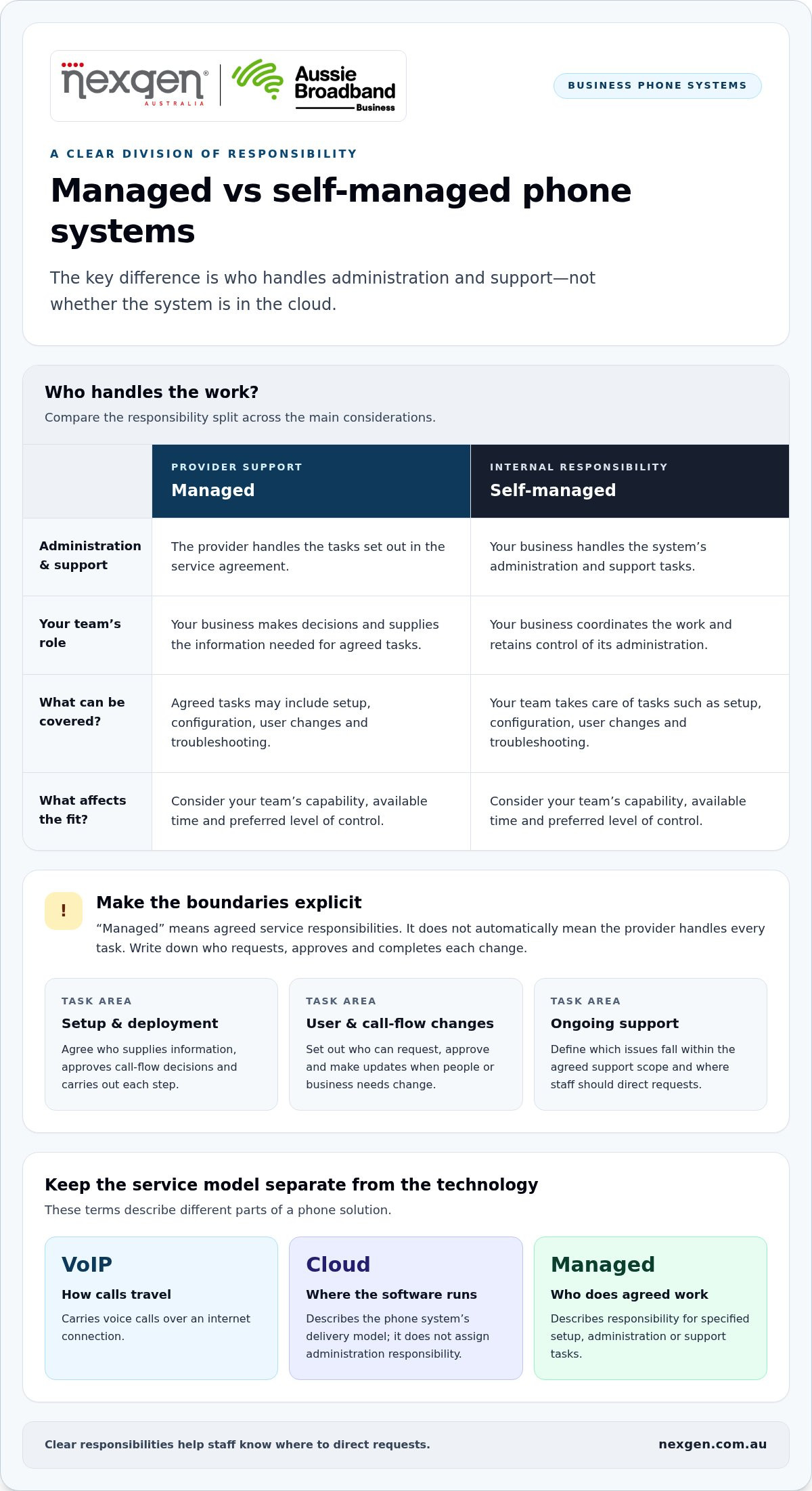
Managed vs self-managed phone systems: what changes for your team?
The main difference is who handles administration and support. In a managed arrangement, the provider takes on tasks defined in the service agreement. With a self-managed system, your business handles those tasks. The better fit depends on your team’s capability, available time and preferred level of control.
| Consideration | Managed support | Self-managed |
|---|---|---|
| Responsibility | The provider handles tasks defined in the service agreement; your business makes decisions and supplies required information. | Your business coordinates administration and takes responsibility for its system setup. |
| Internal workload | Agreed administration can sit with the provider, reducing the tasks your team handles directly. | Your team allocates time and capability to routine changes and issue resolution. |
| Flexibility | Changes follow the provider’s agreed process and scope. | Your team can make changes directly, subject to the system’s options and its own capability. |
| Support boundaries | Support applies to the responsibilities and conditions set out in the agreement. | Your internal team is the main point of responsibility for administration and troubleshooting. |
Managed support can clarify who owns agreed tasks, but your business still needs an internal decision-maker. Someone must approve changes, explain operational requirements and decide how calls should be handled. The service agreement determines the provider’s scope and how much control your team retains.
When can self-management suit a business?
Self-management can suit a business with stable phone requirements, relevant internal capability and enough time for routine administration. Your team can make changes directly, but it also coordinates those changes and resolves issues within its setup. This approach works best when those tasks fit comfortably into existing roles.
When can managed support be useful?
Managed support can suit a business that wants a provider to take responsibility for implementation or agreed phone-system tasks. It can make ownership clearer as users, call flows and remote-work needs change. Before comparing options, list the tasks your team wants handled externally, the tasks it will retain and how staff should submit requests.
How can you assess whether managed phone support fits your business?
Start by reviewing how your team uses its phones and who has the time and capability to administer them. Managed support may suit your business if you want a provider to own specific tasks. The right arrangement depends on your requirements and the responsibilities set out in the service scope.
Use this checklist to clarify what your business needs before comparing service models:
- Users: Who needs a phone service, and how might staffing or roles change?
- Call flows: How should calls reach the right person or team, and what should happen when no one is available?
- Devices: Do staff need desktop handsets, or should they be able to use other supported devices?
- Remote work: How do staff working away from the office need to make and receive business calls?
- Internal capacity: Who can administer the system, coordinate changes and report faults?
- Continuity: Who can make or approve a call-handling change if the usual person is unavailable?
Next, decide which tasks a provider should own and which your team will retain. Record the escalation path, change process and continuity arrangements so requests do not fall between responsibilities.
What should you clarify about service scope?
Define responsibility for initial setup, user changes, fault reporting and ongoing support. Document what work is included, what is excluded, how requests are raised and where issues are escalated. Also clarify support hours and response commitments in the service arrangement rather than making assumptions based on the fact that the system is hosted.
This makes it easier to compare the support being offered, not just the platform. It also tells staff where to direct requests and who is expected to take the next step.
Which phone capabilities should you map first?
Prioritise capabilities that address real communication needs. These may include call routing, voicemail-to-email, desktop handsets and remote-work connectivity. Consider whether flexible call handling or scalable line capacity will support changes in staffing or how your business operates. A feature is useful when it solves a specific need, not simply because it is available.
Cisco Webex Calling is one cloud calling platform option. If you want more context on the underlying technology, read the small business VoIP solutions guide. To explore a phone system shaped around your requirements, read about Nexgen business phone systems.
How Nexgen helps businesses plan and deploy a managed phone system
Choosing a phone platform is only part of the decision. Nexgen supplies and integrates tailored business VoIP and cloud phone systems for Australian businesses. The solution can be planned around your users, call handling and ways of working, then set up and deployed to support those requirements.
What can a tailored Nexgen phone system bring together?
A tailored solution can bring together VoIP calling, cloud phone services, desktop handsets and flexible call handling to suit your requirements. System capabilities can include intelligent call routing, voicemail-to-email and connectivity for staff working remotely. During planning, match these features to the way your team handles calls and agrees who will manage later changes.
Nexgen sets up and deploys Cisco Webex Calling. The platform supports calling across desk phones, computers and mobile devices, giving businesses options for how staff access their business phone service. The right combination depends on your team’s needs, not the number of features available.
For example, a business with staff working in an office and remotely can map where incoming calls should go, which users need a desktop handset and whether voicemail-to-email suits its processes. Those decisions help shape the system configuration and deployment around actual work practices.
What is a practical next step for your business?
Prepare a simple outline of your users, call flows, devices and remote-work requirements. Include expected changes, such as new staff or adjustments to how customer calls are directed. This gives system planning a practical starting point and helps identify which capabilities matter to your organisation.
Separate implementation from ongoing responsibilities. Plan how the system will be configured and deployed, then document which administration and support tasks your business wants a provider to handle and which it will retain. This keeps the technology choice and service scope clear.
Talk to Nexgen about your business phone system to discuss your requirements and plan a tailored solution.
Make your next phone-system decision with confidence
A managed business phone system is defined by clear responsibilities, not simply by choosing cloud-based technology. Before deciding, identify what your team can administer, which tasks you want a provider to handle and how users, call flows, devices and remote-work needs shape the solution.
The right arrangement depends on your business. Managed support can assign agreed tasks to a provider, while self-management can suit a team with the time and capability to run its phone system. In either case, define responsibilities and support boundaries before implementation.
Nexgen supplies and integrates Cisco Webex Calling solutions, including setup and deployment, as well as tailored VoIP and cloud phone systems. Planning around your requirements helps shape a business phone system for the way your team works.
Talk to Nexgen about your business phone system to discuss a tailored solution for your organisation.
Frequently Asked Questions
Is a managed phone system the same as a cloud phone system?
No. “Cloud” describes where the phone-system software runs, while “managed” describes who is responsible for agreed service tasks. Your team can administer a cloud phone system itself, or a provider can handle specified tasks under an agreed arrangement. Consider the platform and the management responsibilities separately.
What does a managed business phone service include?
Inclusions depend on the agreed service scope. Tasks can include initial setup, configuration, user changes and support for specified issues. Adding an employee, for example, might involve assigning a line, arranging a device and updating call routing. Clarify what is included, what your team retains and how to raise requests or report faults.
Can a small business manage its own VoIP phone system?
Yes. A small business can self-manage a VoIP system if it has the capability and time for administration. This can suit a team with stable requirements and someone who can coordinate user updates, call-flow changes and troubleshooting. Consider whether those tasks fit existing roles and operational priorities.
How does a managed phone system support remote teams?
A phone system can support remote work by allowing staff to connect to business calling away from the office, depending on the platform and configuration. Cisco Webex Calling supports calling across desk phones, computers and mobile devices. When planning a remote setup, define who will configure access and manage later changes.