


A copper-dependent office phone can put more than calls at risk. The copper network shutdown office phones rely on may also affect internet access and equipment sharing the same line, so replacing a handset alone may not be enough. In Australia, disconnection happens progressively as the nbn™ network becomes available at individual premises, rather than on one national cut-off date.
If you’re unsure whether your phone lines, PBX or other business equipment depend on copper, you’re not alone. Businesses typically have an 18-month window to move services after their area is declared Ready for Service, but the timing can vary by premises. Planning early gives you more time to protect customer calls and day-to-day operations.
This guide explains how copper network retirement differs from moving a service to the nbn™, what to check beyond your office phones, and how to plan a lower-risk transition. You’ll also learn how VoIP and cloud phone systems can support continuity through features such as call routing and voicemail-to-email.
Key Takeaways
- The copper network shutdown office phones depend on can affect the service or equipment connected to a copper line, not just the handset.
- Review phone bills, service notices and system records to build an inventory of lines, devices and the people responsible for them.
- Include EFTPOS terminals, alarms and other connected equipment in your review. Their connection method matters more than their age or appearance.
- Map call flows, voicemail and after-hours arrangements before changing services, then test the replacement call paths.
- Compare copper-dependent services with VoIP and cloud phone systems to decide which operating model best fits your business.
What does the copper network shutdown mean for Australian office phones?
The impact depends on which phone services and equipment rely on a copper connection. A handset may remain usable, but the line or service carrying its calls could need to change. That’s why the copper network shutdown office phones face is a continuity issue to investigate, not simply a reason to replace desk phones.
For a business phone service, copper network shutdown means the retirement and disconnection of the copper line carrying calls, which may require the service using that line to move to another connection. The physical network, the equipment in your office and the phone number are separate parts of the service. A change to one doesn’t automatically mean the others must be replaced.
Copper lines, traditional landlines and office phone systems
A copper line can connect a business’s phone service to the wider telephone network. In an office system, calls might pass from a handset through a PBX, which manages calls between staff and external callers, before reaching that line. The handset is only the device a person uses. It doesn’t show how calls travel beyond it.
A familiar-looking desk phone or PBX isn’t proof that it depends on copper, and newer-looking equipment isn’t proof that it doesn’t. The connection and service arrangement matter. Identify how each line and system connects rather than judging risk by a device’s age or appearance.
Copper retirement and NBN transition are related, but not identical
In Australia, copper retirement is linked to the rollout of the National Broadband Network (NBN). In fixed-line areas, copper services can be progressively retired as the nbn™ network becomes available at individual premises. It isn’t a single nationwide cut-off, and timing and affected services can vary. The NBN overview explains the network’s background and its role in replacing ageing copper infrastructure.
Moving internet to the NBN doesn’t, by itself, explain what will happen to every phone service. A business may need to review voice and internet separately, especially if its phone system uses a traditional line or other equipment shares that connection. Services can also differ by network type and premises, so use the current notices and service details for each connection when planning.
Start by identifying the connection behind each business number and phone system. That gives you a clearer basis for deciding what needs to change, what can remain, and how to protect incoming and outgoing calls during the transition.
Which office phones and connected services could be affected?
Start with every service or device that makes, receives or transmits information over a phone connection. Potential dependencies include traditional landlines, lines connected to a PBX, and equipment such as EFTPOS terminals, alarms or fax machines. The copper network shutdown office phones issue can’t be assessed from appearance alone. The key question is how each item connects and which service carries its signal.
Assess each connected service individually. Equipment risk depends on its connection and service arrangement, not simply its age or appearance. Use this table as a starting point for an inventory.
| Equipment or service | Possible dependency to investigate | Information to record |
|---|---|---|
| Traditional phone lines | A copper-connected landline service | Phone number, line type, provider and business purpose |
| PBX or PABX | External lines used to connect office calls to the telephone network | System details, connected lines and critical numbers |
| Desk phones | A line or phone system that carries calls, rather than the handset alone | Which system or connection each handset uses |
| EFTPOS terminals, alarms and fax machines | A phone line, or another connection such as a separate data service | Connection method, responsible owner and operational impact |
Legacy PABX, desk phones and copper-connected lines
A legacy PBX may continue to connect staff handsets internally while relying on external phone lines for calls to and from customers. If an external line depends on copper, working internal handsets don’t establish that the external call path is unaffected. Record the PBX make and model if available, its connected line types, and which numbers support functions such as customer enquiries or urgent callbacks.
Don’t assume every PABX or desk phone will stop working. The deciding factor is the service and connection each component relies on.
Alarms, fax machines, EFTPOS and other line-connected equipment
Check each device’s connection details and record how it connects. An EFTPOS terminal might use a different connection from an alarm or fax machine, even if all are located near the same phone socket. Note the device owner, the service or line it uses, and what a disruption could mean for staff, customers or business operations.
For a clearer view of replacement options for your phone system, explore business phone systems from Nexgen Australia.
How can a business tell whether its office phones rely on copper?
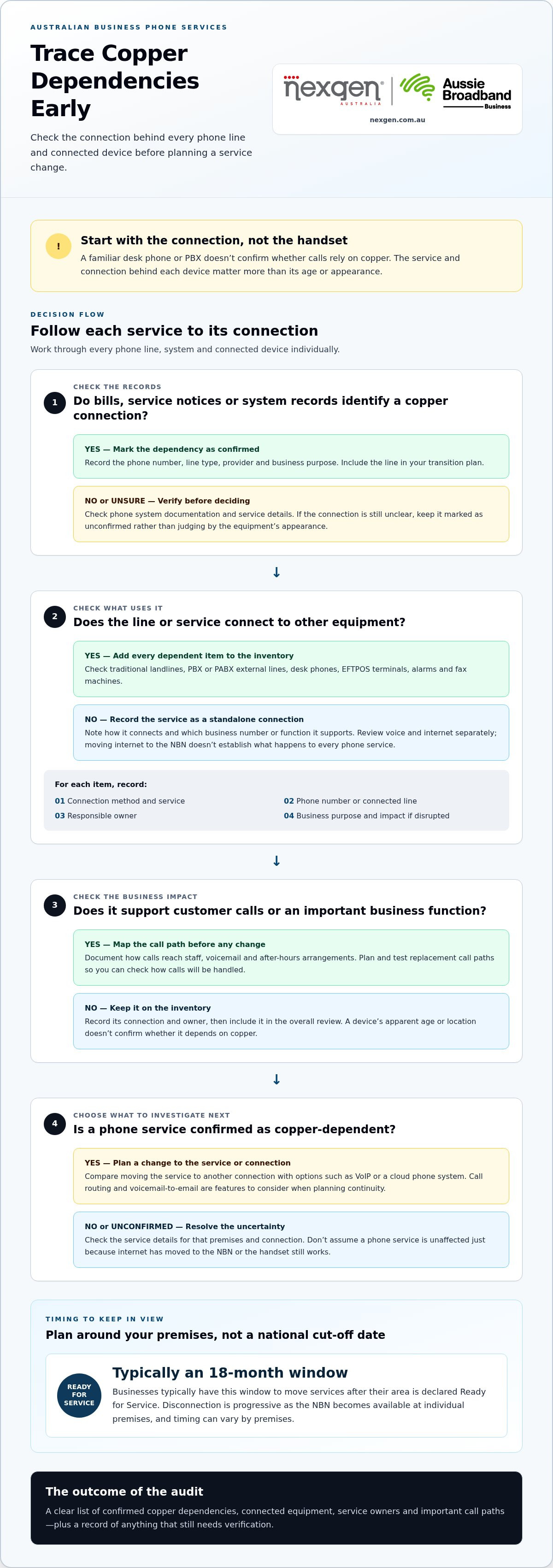
Audit the records and connections behind each service rather than relying on the handset or socket as a clue. Start with service bills, notices and phone system documentation, then match those records to the numbers, equipment and business functions they support. This helps separate confirmed dependencies from assumptions before you make changes.
1. Gather bills, notices and phone system documents. Review recent service bills, written notices, contracts or service descriptions, and any PBX or PABX documentation. Note references to copper, PSTN, traditional lines or other connection types, but don’t treat unfamiliar terminology as confirmation on its own.
2. List every business number and incoming call path. Record each number, the service or line associated with it, and where incoming calls go. For example, note whether a number rings directly at a handset or passes through a phone system before reaching staff.
3. Match lines to systems and devices. Add PBX connections, desk phones and any equipment that may use a phone service. Record what you know about each connection and where that information came from, such as a bill, system document or notice.
4. Identify business-critical uses. Mark numbers used for customer enquiries, after-hours arrangements or essential operational notifications. Record the business owner responsible for each service and the likely impact if it becomes unavailable.
5. Separate confirmed facts from unknowns. Label each inventory item as confirmed, unclear or requiring follow-up. Don’t guess what a line carries based on its location or the age of the equipment. Flag unknown connections before any service is changed or disconnected.
Make the inventory useful for follow-up
Keep the details together in one register. For each entry, capture the phone number, line or service, connected device, phone system, business purpose, responsible owner, supporting document and any unresolved question. This gives your team a practical record to review, rather than a loose collection of bills and equipment notes.
Review notices and resolve unclear dependencies
Compare your inventory with current written service information and notices. If a line’s role or connection type remains unclear, keep it flagged for resolution before making changes. Verify the service at the premises, because transition timing and affected services can vary.
A clear audit also gives you a better starting point for assessing modern office phone systems and planning what needs to carry over. Resolve flagged dependencies before making changes, especially where a number supports customer contact or an essential business process.
What should businesses do before copper-dependent office phone services change?
Prepare in stages: confirm which services depend on copper, plan how calls should work after the change, then test the replacement setup before relying on it. A successful transition protects the way your business communicates, not just the equipment on each desk.
Plan phone continuity around business operations
Start with the calls your team can’t afford to miss. Identify customer-facing numbers, important outbound calls and the people or teams responsible for answering them. Note call-handling needs, such as transferring calls between staff or directing enquiries to another team when the usual contact is unavailable.
Document the current call flow before changing it. Include how calls reach staff, what happens when a call isn’t answered, voicemail arrangements, escalation paths and after-hours handling. This gives you a practical reference for configuring and checking the replacement service.
Then plan the transition around your operational calendar. Consider busy periods, staff availability and any other services that share the connection. There’s no single planning window that suits every business, so use service notices and confirmed details to guide the timing. Assign a named person to each task and record unresolved dependencies.
Check the foundations for a VoIP transition
VoIP carries calls over an internet connection, so assess the business internet service and the network equipment the phone system will use. Consider what your team would do if internet access or power were interrupted. The right arrangements depend on your setup and operational needs, so don’t assume a replacement service will behave exactly like the existing one.
Test the replacement setup before relying on it
Before retiring or disconnecting the old service, test the new call paths in realistic conditions. Make inbound and outbound calls, check voicemail and call routing, and confirm the desk phones or mobile access your staff need are working. Test key business numbers individually, including what happens when the first person doesn’t answer.
Make sure affected staff know how to answer, transfer and return calls, access voicemail and follow the agreed fallback process. Record any problems, assign someone to resolve them, then test the relevant call path again. For broader setup considerations, see guidance on setting up a small business VoIP system.
A planned change gives your team a clearer path from legacy lines to modern telephony. Talk to Nexgen about a business phone system that fits your call-handling needs.
What can replace copper-dependent office phones?
Businesses can move from a copper-dependent phone service to business VoIP or a cloud phone system. The right option depends on how your team handles calls, the equipment you want to keep and the internet connection available at your premises. These options aren’t identical: VoIP describes how calls travel, while a cloud phone system describes where the phone system’s capabilities are hosted.
| Option | How it works | May suit | Key consideration |
|---|---|---|---|
| Traditional copper-dependent service | Calls use a phone service carried over a copper line. | Businesses reviewing an existing setup before its service changes. | It remains dependent on the relevant copper service and its transition arrangements. |
| Business VoIP | Calls travel over an internet connection. The phone system can be set up around the business’s chosen devices and call-handling needs. | Teams looking to replace a line-based service with internet-based calling. | Call quality and availability depend on the internet connection and system design. |
| Cloud phone system | Phone system capabilities are hosted off-site and accessed over an internet connection. | Businesses seeking flexible call handling for staff working across different devices or locations. | Consider internet access, power, user requirements and how the system will support existing workflows. |
Business VoIP and cloud phone systems as alternatives
VoIP lets staff make and receive business calls using an internet connection instead of relying on a traditional copper phone line for the call path. A cloud phone system uses off-site hosted capabilities, which may include call routing and voicemail-to-email, depending on the system and configuration. VoIP and cloud telephony often work together, but the terms describe different aspects of the service.
For more detail on this operating model, look for a guide to cloud phone systems for Australian businesses. As with any internet-based phone setup, factor in the connection and power arrangements at your premises, plus the way your team needs to answer, transfer and return calls.
Choose a transition path that fits your team
Base the decision on your actual phone workflows, not just the number of handsets. A small team that mainly answers calls at one office may have different needs from a business with remote staff, multiple teams or a PBX setup that supports established call flows. Consider whether staff prefer desk phones, computers or mobile devices, and which call-handling arrangements need to carry across.
Nexgen Australia provides tailored business VoIP and cloud phone systems for Australian businesses, including advanced unified communications solutions. If you’re assessing alternatives as part of the copper network shutdown office phones transition, discuss your phone system options with Nexgen Australia and map them to your business’s call-handling needs.
Make your next phone system move with confidence
The copper network shutdown office phones depend on is a prompt to review the whole service, not just the handsets. Check which lines, PBX connections and other devices rely on copper, then document your key numbers, call flows and continuity needs before making a change.
VoIP and cloud phone systems offer alternatives, but the right setup depends on your internet connection, existing workflows and how your team handles calls. Nexgen provides business VoIP and cloud phone systems for Australian businesses, including Cisco Webex Calling phone systems. Depending on your requirements, a setup can support desk phones, computers and mobile devices.
A clear inventory and practical transition plan can help you protect customer calls while moving to a phone system that suits the way your business works.
Frequently Asked Questions
Will the copper network shutdown affect my office phones?
It may affect a phone service or connected equipment that relies on a copper connection, but the impact depends on how each service is delivered. The copper network shutdown office phones issue isn’t always visible from the handset: a desk phone may look the same while its line or PBX connection changes. Start by listing your business numbers, lines, phone system and connected devices, then review current service details before making changes.
When will copper phone lines be switched off in Australia?
There isn’t one date that safely applies to every Australian business phone service. Timing and transition arrangements can depend on the service, location and current network information. Review notices for each service and current information from relevant telecommunications organisations, including nbn where applicable. Avoid planning around a general shutdown date that may not apply to your premises or phone arrangement, and resolve service-specific questions before changing a line.
How can I tell if my office phone uses a copper line?
Start with phone service documents, bills and notices. Record the service type, phone number, PBX connections and devices sharing the line, then mark anything unclear for follow-up. If the documents don’t identify the connection, resolve that uncertainty before disconnecting equipment or changing systems. A handset’s appearance alone can’t tell you whether its call path relies on copper, so base your assessment on service information.
Can a traditional PABX keep working after a copper service changes?
It depends on how the PABX connects to external phone services and what replacement connections it supports. Internal handsets may still work while the connection carrying calls to and from customers needs attention. Record the system’s make and model, connected lines, call flows and essential numbers, then assess the replacement path against your business requirements. Don’t assume every older phone system will behave the same way.
Could the copper shutdown affect alarms, EFTPOS or fax machines?
It could affect equipment that relies on a phone service being changed or withdrawn, but the outcome depends on how each device connects. Include alarms, EFTPOS terminals, fax machines and other line-connected equipment in your inventory. Record each device’s purpose, responsible owner and the operational impact of an interruption. Review the device’s connection requirements before altering the associated service.
Is VoIP a replacement for copper office phone lines?
VoIP carries calls over an internet connection and can be used as an alternative business voice service. A business phone system may also support call handling and voicemail features beyond basic calling. Suitability depends on your internet service, equipment, team workflows and continuity needs. Compare these requirements before planning a change, then test inbound and outbound calls, routing and voicemail before relying on the replacement setup.
Talk to Nexgen about a business phone system that fits your needs.