

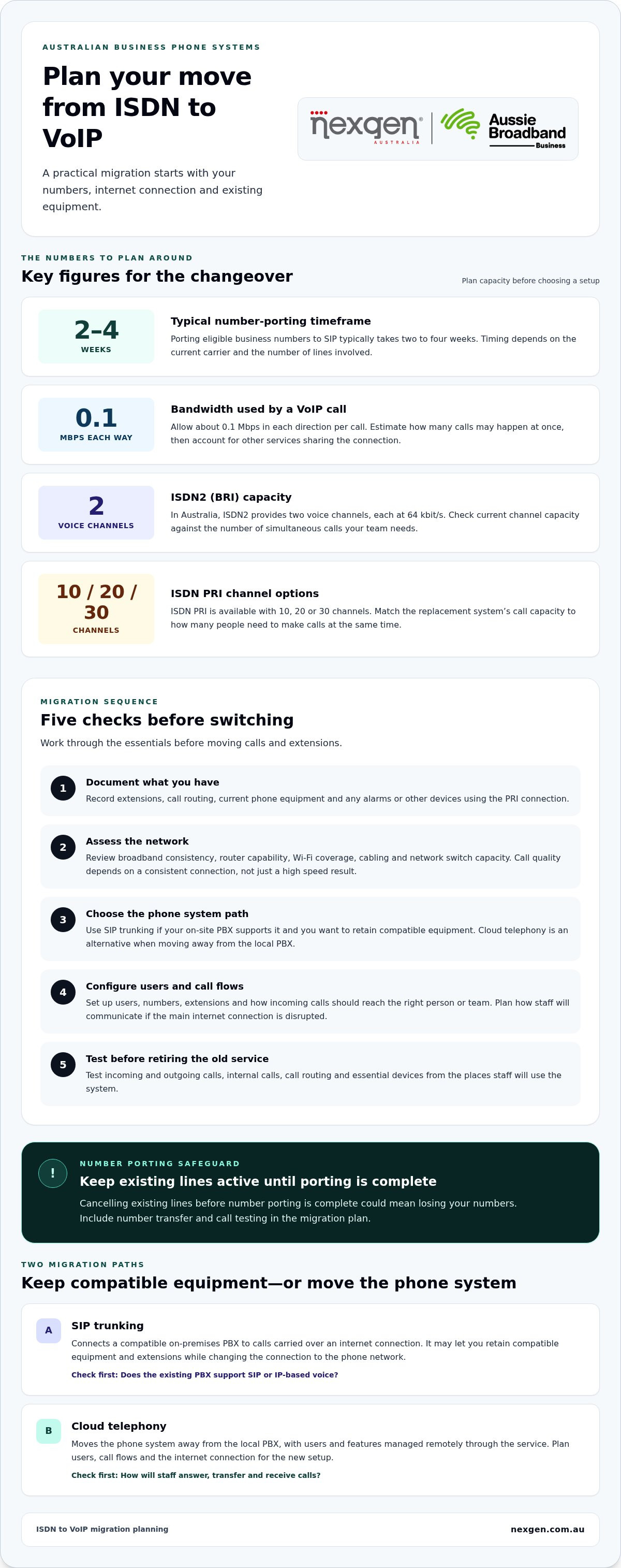
For most Australian businesses, business VoIP is a practical ISDN replacement: calls travel over an internet connection instead of traditional phone lines. Porting eligible business numbers to SIP typically takes two to four weeks, depending on the current carrier and the number of lines involved. The full migration also includes planning, configuring the new phone system and testing calls.
Keeping your numbers and avoiding disruption are central to the decision. Don’t cancel existing lines before number porting is complete, or you could lose numbers. A sound migration plan also accounts for your internet connection, current phone equipment and any devices that rely on ISDN.
This guide explains how VoIP compares with ISDN, which phone system options suit different business needs and what to consider before switching. You’ll also learn how migration works, what affects the timeline and how number porting fits into the changeover.
Key Takeaways
- Compare ISDN, PSTN, DSL and VoIP by how calls are carried, the equipment involved and how easily the system can grow.
- Choose between cloud telephony and SIP trunking based on whether you want to replace your phone system or connect existing compatible equipment.
- Match your replacement system’s call capacity to how many people need to make calls at the same time; ISDN PRI is available with 10, 20 or 30 channels.
- Assess internet connection quality, network equipment and devices that rely on the existing PRI service before planning the changeover.
- Plan number porting and test call routing, incoming and outgoing calls, and essential devices as part of the migration.
ISDN vs VoIP: Which should I choose if I’m picking a new phone system?
For a new Australian business phone system, compare VoIP first if your internet connection can support clear, consistent calls. ISDN and PSTN provide traditional phone services, while DSL provides internet access that can carry VoIP calls.
ISDN, PSTN, DSL and VoIP
ISDN carries voice and data over a digital phone line; in Australia, ISDN2 (BRI) provides two voice channels at 64 kbit/s each. PSTN is an analogue service, usually delivered over copper, and a traditional line generally supports one call at a time. DSL uses a phone line to provide internet access, while VoIP carries calls over an internet connection rather than ISDN or PSTN.
The difference affects hardware and capacity. A business with several PSTN lines may need separate lines for simultaneous calls; VoIP capacity depends on the internet connection and selected service. ISDN may suit equipment built around digital lines, but a new system offers the opportunity to move on from that legacy setup.
| Option | How it carries calls | Key consideration |
|---|---|---|
| ISDN | Digital phone line | Existing equipment and channel capacity |
| PSTN | Analogue phone line | Generally one call per line |
| DSL | Internet access over a phone line | Connection quality for VoIP calls |
| VoIP | Internet connection | Network performance and system choice |
| Mobile or separate voice circuit | Mobile network or dedicated voice service | Coverage, capacity and site needs |
PSTN and ISDN switch-off options
The UK deadline is not an Australian switch-off date. Australian businesses should assess their own services and equipment rather than apply the UK timetable locally. If broadband cannot reliably carry calls, mobile phone services or a separate carrier-provided voice circuit are alternatives. Coverage, call capacity and operating needs determine which option fits.
Keeping existing handsets and PBX equipment
Businesses can keep a PBX and extensions by connecting them to SIP trunking, which carries calls over an internet connection, provided the existing system supports SIP. This differs from replacing the PBX with cloud telephony: compatible on-site hardware stays in place, while the connection to the phone network changes.
To retain handsets, identify their connection type and confirm whether the PBX supports the proposed service. Map existing extensions and call routing to the new setup, then test internal and external calls before retiring the old service. Make your decision based on broadband reliability, equipment compatibility and the capacity your team needs.
Steps for migrating from PRI to cloud telephony
Moving from PRI to cloud telephony means planning the phone system, preparing the internet connection and testing the new setup. First assess the current service and workplace network, then transfer calls and extensions.
Preparing a new business for cloud telephony
A new business can plan cloud telephony around its users, call flows and internet connection from the outset. Unlike a PRI migration, there’s no existing PBX configuration to reproduce, but the business still needs to define how staff answer, transfer and receive calls.
Use this preparation sequence:
- Map users and call flows. List staff, extensions, shared numbers and how incoming calls should reach the right person or team.
- Assess the network. Review broadband consistency, router capability, Wi-Fi coverage, cabling and network switch capacity before choosing a setup.
- Allow for voice traffic. A VoIP call uses about 0.1 Mbps in each direction. Estimate concurrent calls, then account for other digital services sharing the connection.
- Plan fallback access. Identify how staff will communicate if the main internet connection is disrupted, including available mobile connectivity.
- Test the workplace setup. Trial calls from desks and work areas where staff will use the phone system.
Call quality depends on a consistent connection, not simply a high speed result. Packet loss, latency or an inadequate router can disrupt conversations, so assess network performance during normal business use.
SIP trunking and cloud telephony
SIP trunking connects a compatible on-premises PBX to calls carried over an internet connection. Cloud telephony removes the need to run the phone system on that local PBX, with users and features managed remotely through the service.
For a PRI migration, first find out whether the existing PBX supports IP-based voice or SIP trunking. If it does, SIP trunks may let the business retain compatible equipment and extensions while changing its connection to the phone network. If it doesn’t, a cloud phone system offers another path.
Plan the change in practical stages:
- Document existing extensions, call routing and any alarms or other devices using the PRI connection.
- Assess broadband, router, cabling and switch capacity against expected call demand.
- Choose SIP trunking for compatible PBX equipment, or cloud telephony for a hosted system.
- Configure users, numbers and call flows, then test incoming, outgoing and internal calls.
- Move business calling across only after the new setup and dependent devices have been tested.
Cloud telephony replaces ISDN when calls move from PRI to an internet-based phone system. It can also let a business add users and features remotely, without making changes to physical phone equipment each time.
ISDN call quality and simultaneous communications
Assess call quality and resilience as separate parts of your phone-system plan. Capacity describes how many conversations can happen together, while resilience planning defines how the business handles an interruption.
ISDN bandwidth and call quality
ISDN voice channels use a dedicated digital connection, so everyday internet activity does not compete with calls on that connection. With VoIP, voice travels over the business network, making network performance part of the calling experience. A speed test alone won’t show whether calls stay clear when staff are using cloud applications or transferring large files.
Assess call quality when your network is busiest. Listen for delays, broken audio or interruptions, and note whether issues affect particular rooms or users. This can help distinguish a local Wi-Fi problem from a broader connection issue. A wired desk phone and a wireless device may perform differently in the same workplace.
Simultaneous call capacity
Simultaneous capacity is the number of active conversations a service can support at once. Rather than sizing a replacement system by total staff numbers, consider how many people make or receive calls during the same busy period. A team may have many extensions but only a few concurrent customer conversations, while a reservations desk may have much greater overlap.
Review call records alongside staff workflows, including outbound calls, internal transfers and calls placed on hold. Account for peak periods, such as appointment releases or seasonal enquiries. This gives a clearer view of demand than an average day and helps prevent choosing capacity based only on headcount.
Plan resilience around what callers and staff need during an outage. Decide where incoming calls should go if the main calling service is unavailable, and how employees will make essential outbound calls. The fallback options depend on the business’s alternate connections and agreed call routing.
Document the failover steps and assign responsibility for activating or reviewing them. Test the arrangement by simulating a loss of the primary connection, then confirm the destination receives calls and staff can follow the fallback process. Record limitations, such as reduced capacity or changed call handling, so the team knows what to expect.
After testing, review the results with the people who handle calls. Reception may need a different fallback from sales, and a shared number may need a different destination from direct staff calls. Update the plan when call flows or team responsibilities change, so resilience arrangements continue to reflect how the business operates.
Can I keep my phone numbers?
Some existing business numbers may be transferable to a VoIP service, but transferability depends on the number and service. In Australia, number portability depends on the number and service being transferred, so identify each number and its current use before planning the change.
There is no single porting rule that makes every transfer identical. Keep the existing service active until porting is complete, and plan separately for numbers that cannot be transferred.
Porting geographic and non-geographic numbers
Start with a number register listing each geographic and non-geographic number, its current service and the calls it receives. Include direct staff numbers, shared lines and numbers published on invoices, signage or websites. This helps identify numbers that are still in use, even if staff rarely answer them directly.
For each number, record its current destination and intended destination after migration. A geographic number used by an office may need different call handling from a national customer-service number. Matching each number to its purpose helps preserve familiar contact routes and prevents calls landing in the wrong team’s queue.
Porting 1300 and 1800 numbers
List 1300 and 1800 numbers separately from geographic numbers, and document how each one handles incoming calls. For example, a business may direct a published service number to reception during business hours and another team outside those hours. Record the current arrangement so the replacement system can reproduce the intended caller experience.
Include these numbers in the transfer plan alongside the main business number. After the change, call each one from an external phone and confirm it reaches the intended destination. Testing the number itself, rather than relying only on internal extension tests, can uncover routing issues callers might otherwise encounter.
Keeping numbers when switching to VoIP
Check whether existing ISDN numbers can be transferred to a new VoIP service. If a business needs to keep using an affected number, call divert requires the old line to remain active. That differs from porting an eligible number, which transfers it to the new service. Plan for each number according to its transfer path rather than assuming all numbers on one ISDN service work alike.
A VoIP number isn’t tied to a physical location, so it can stay with the business when it moves. Keep an inventory of numbers used by staff, customers and business records, then update published contact details once the new call path is operating.
Number-porting rules and migration testing
For Australian business VoIP, the practical rule is to keep the old service active until an eligible number has transferred. Number-porting options and call-divert arrangements can vary, so check what can be retained before migrating. Plan number handling around these differences rather than treating every transfer the same way.
Before migration, record each number’s call destination and any linked call-handling arrangements. After the change, test external calls to geographic, 1300 and 1800 numbers, then confirm staff can transfer calls as expected. Check that business records and customer-facing contact details still point callers to a working number.
Steps for businesses moving from ISDN to VoIP
Choosing business VoIP as an ISDN replacement changes daily call handling as well as technology. Set clear business requirements first, then use them to guide system selection, staff preparation and the transition to normal operations.
1. Agree on the outcomes. Identify what the new phone system must help staff do. A customer-facing team may prioritise prompt call answering, while a professional services office may need simple transfers between team members. Separate essential requirements from preferences so the decision reflects how people actually work.
2. Map the people who rely on calling. Note which roles handle reception, customer enquiries, internal transfers and outbound calls. Ask team leaders where delays or hand-off problems occur today. This adds useful context beyond a list of extensions and helps shape a replacement around real work patterns.
3. Compare the operating models. SIP trunking keeps a compatible on-site PBX in use, while cloud telephony shifts phone-system management away from that local equipment. Compare each option against your preference for maintaining hardware, managing changes and supporting staff across different work arrangements. Choose based on operating needs, not simply the similarity of the new system to the old one.
5. Prepare staff for changed routines. Give employees practical guidance on the functions they use most, such as transferring a caller or accessing messages. Tailor the guidance to each role rather than sending everyone the same technical instructions. A short desk-side walkthrough can help reception staff build confidence before the new system becomes part of their daily routine.
6. Review how the new setup is working. After the transition, ask team leaders whether calls reach the right people and whether staff can complete common tasks. Record recurring issues and assign someone to follow them up. Use that feedback to refine call handling and internal guidance as the business’s needs change.
A clear decision process helps your business choose a setup that fits its work patterns and responsibilities. Discuss your business phone system options when you’re ready to plan the change.
Nexgen Australia: Small Business Phone Systems
Nexgen Australia provides Small Business Phone Systems and Small Business VoIP Solutions for businesses replacing ISDN. These options suit businesses comparing a cloud phone system with a setup that may retain compatible PBX equipment. The right fit depends on your current hardware, call capacity, internet connection and how your team handles incoming calls.
If you’re planning a change, bring your number list, extension setup and call-routing needs into the discussion. This helps identify the phone system approach that suits your workplace and the key migration tasks. Nexgen Australia also provides Office Phone Systems and VoIP Phone Systems for businesses reviewing their communications.
Contact Nexgen Australia to discuss your business phone system options.
Make your next phone system decision with confidence
Use the change as an opportunity to define what your team needs from business calling, beyond replacing existing equipment. Consider who answers incoming calls, how staff collaborate across locations and which everyday tasks should be simple to manage. Business VoIP can be a practical ISDN replacement when the system fits those priorities and your workplace needs.
Before deciding, agree on the outcomes that matter most to your business. You might prioritise straightforward call handling, room for future staff or a system that supports both office and remote work. Clear priorities make options easier to compare and the decision easier to explain to your team.
Nexgen Australia can help you explore small business phone and VoIP system options in light of your requirements. Discuss your phone system plans with Nexgen Australia and take the next step towards a setup that fits how your business works.
Frequently Asked Questions
How long does it take to move to VoIP?
Number porting to SIP typically takes two to four weeks in Australia, depending on the current carrier and the number of lines involved. The full move also includes preparing the network, configuring users and call flows, and testing connected equipment. If alarms or other devices use PRI, include checks for them in the schedule rather than treating number transfer as the only migration task.
What is SIP trunking and how is it different from ISDN?
SIP trunking connects a compatible phone system to calls over an internet connection. ISDN carries calls over digital phone lines, with capacity tied to the available channels. SIP trunking can let a business retain a compatible on-premises PBX while replacing the ISDN connection. The decision depends on whether the equipment supports SIP and whether the business wants to keep managing its PBX hardware.
What does it cost?
The cost of moving from ISDN to VoIP depends on the phone system model and what your business can retain. Factors include user numbers, required call capacity, handsets, PBX compatibility, internet or router changes, number porting and any connected devices that need replacing. Compare ongoing system charges with one-off migration and equipment needs. A business keeping a compatible PBX may have different setup requirements from one moving to cloud telephony.
What is being switched off?
The switch-off refers to traditional fixed telephone services, including PSTN and ISDN, in the UK. The transition is expected to be completed for most customers by the end of January 2027. That date is UK-specific, not an Australian ISDN deadline. For Australian businesses, the relevant planning question is how their current service and connected equipment will be supported and migrated under local arrangements.
What’s the difference between ISDN and VoIP?
ISDN carries voice over digital phone lines, with simultaneous call capacity set by the service’s channels. VoIP carries calls over an internet connection, so call quality depends on network performance as well as the phone system. When comparing the two, consider peak concurrent calls, connection reliability and whether existing PBX equipment can work with an internet-based service.
How can you move from PRI to cloud telephony?
Start by documenting PRI numbers, extensions, call routing and any connected alarms or devices. Assess the internet connection and network equipment, then map users and call flows into the cloud phone system. Arrange number porting and test internal, incoming and outgoing calls, along with any dependent equipment. Keep existing lines active until porting is complete, and schedule the cutover only after checking the new call paths.
Is ISDN still used today?
Yes, some Australian businesses may still have active ISDN services supporting older phone systems or equipment. The service type matters: BRI provides two voice channels, while PRI options include 10, 20 or 30 channels. A business reviewing its setup should identify whether ISDN supports only staff calls or also devices such as alarms, since those connections may need separate migration planning.
When will ISDN services be switched off in Australia?
The end-of-January 2027 switch-off deadline applies to the UK transition, not Australia. Don’t use it as an Australian cut-off date. For an Australian business, migration planning depends on the service in use, carrier arrangements and equipment connected to the phone lines. Treat any service-specific retirement notice as a prompt to assess replacement options and plan continuity for calls and dependent devices.