


Migrating from Telstra TIPT to Cisco Webex Calling involves planning the change, configuring Webex for your team and testing it before cutover. Run both services in parallel during the transition, then port your business numbers under the ACMA’s Local Number Portability framework.
Moving phone services takes coordination, especially when staff rely on calls every day. A clear migration plan helps maintain business continuity while preparing people for new calling tools. This guide explains how to assess your setup, configure Webex softphones, compare costs, train staff, run services in parallel and plan number porting. It also covers network and user requirements to consider before the transition, so you can make informed decisions and keep the process practical for your business.
Key Takeaways
- Map your calling needs and network capacity before choosing a Webex Calling design, including how many calls may happen at once.
- Plan Webex softphone setup around your organisation’s needs, as authorisation steps may vary.
- Estimate potential savings by comparing your current total costs with the services and features your business needs after migration.
- Use the parallel-running period to test calling and train staff before the final changeover.
- Prepare number-porting details early: requests are submitted during days 5-10 of the migration, while porting runs in the background.
Unified communications design and deployment
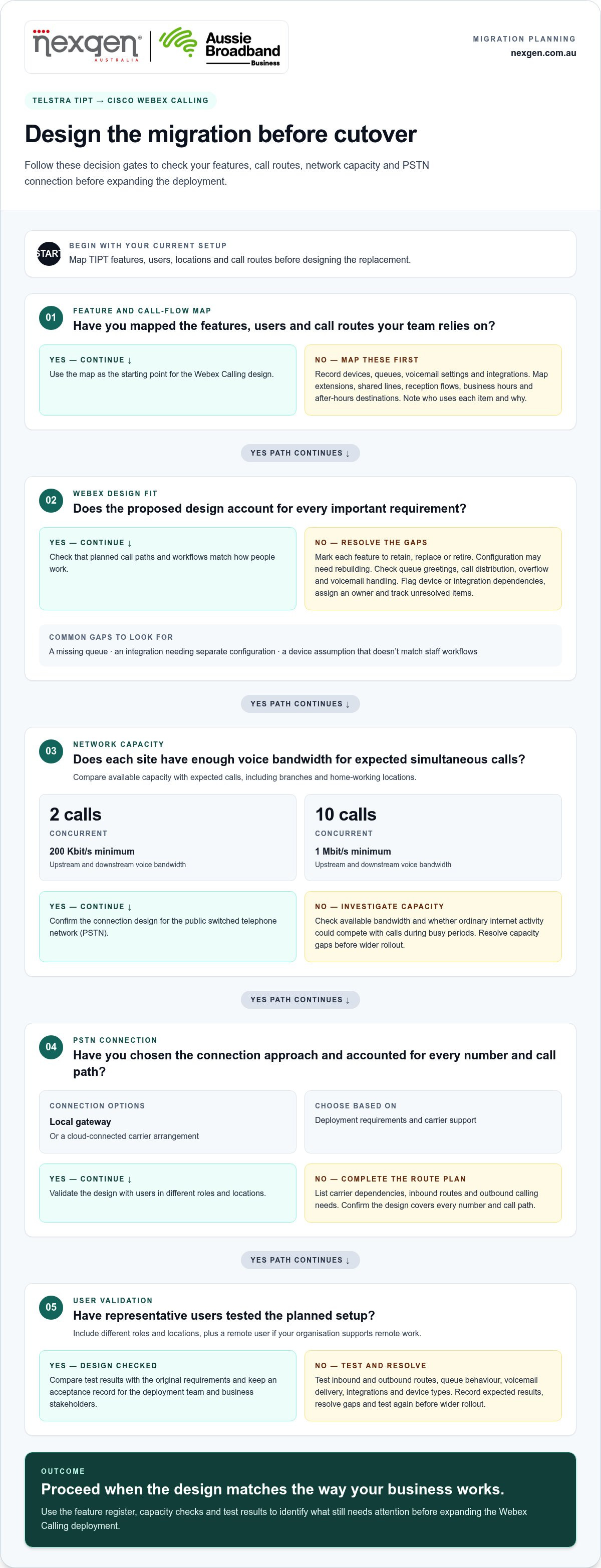
When migrating from Telstra TIPT to Cisco Webex Calling, map your current services before designing the replacement. Plan the call architecture, network capacity and Australian PSTN connection together.
-
Check which TIPT features transfer
Create a feature register covering TIPT devices, call queues, voicemail settings and integrations. For each item, record whether to retain, replace or retire it, who uses it and why. Configuration may need to be rebuilt rather than transferred directly. For example, document a queue’s greeting, call distribution, overflow destination and voicemail handling as separate requirements.
Compare the register with the proposed Webex Calling design. Flag workflows that depend on a particular device or external integration, so the migration plan accounts for them. This review helps distinguish essential business functions from settings that would otherwise carry over simply because they existed in TIPT.
- Map user groups, locations and call routes before configuring accounts. Record extension patterns, shared lines, reception flows, business hours and after-hours destinations. Identify which teams answer external calls and which numbers serve specific functions. For instance, a service team may need a route that differs from the general office line. Businesses migrating from Telstra TIPT to Cisco Webex Calling can use this map to design around real work rather than replicate old settings.
- Measure network capacity against expected simultaneous calls at each site. The guide specifies 200 Kbit/s minimum upstream and downstream voice bandwidth for two concurrent calls. For 10 concurrent calls, it specifies 1 Mbit/s minimum downstream and upstream voice bandwidth. Compare each requirement with available capacity, including branches and home-working locations. Check whether ordinary internet activity could compete with calls during busy periods.
- Choose how the Australian deployment will connect to the public switched telephone network (PSTN). Options include a local gateway or a cloud-connected carrier arrangement, depending on deployment requirements and carrier support. List existing carrier dependencies, inbound routes and outbound calling needs. Confirm the design covers every number and call path, rather than treating PSTN connectivity as an afterthought.
-
Assess migration risks and common issues
Review the feature register, network plan and call map for gaps. Common issues include a queue missing from the design, an integration that needs separate configuration, or a device assumption that does not match how staff work. Test representative call paths and record the expected results. This helps identify whether a fault relates to routing, access or the network.
Assign an owner to each unresolved item and track its status before expanding the deployment. For example, confirm that the team responsible for a CRM integration has completed its work before testing calls that depend on it.
- Validate the design with users in different roles and locations. Test planned inbound and outbound routes, queue behaviour, voicemail delivery, integrations and device types. Include a remote user if your organisation supports working away from the office. Record results against the original requirements and resolve gaps before wider rollout. This provides a practical acceptance record for the deployment team and business stakeholders.
Webex for TIPT softphone setup and use
Set up Webex softphones in a controlled sequence: confirm user access, configure each account, then test everyday calling. Webex for TIPT setup can differ depending on whether your organisation has more or fewer than 100 users, which may affect authorisations.
- Confirm the user group and authorisation path. Count the people who need softphone access and separate them by role or site. Authorisation requirements can vary, so confirm the appropriate setup path before preparing accounts. Keep a record of the people who need access, including staff who work remotely or move between office locations.
- Prepare each user’s account details. Match the user list to the calling design and identify who needs a softphone. Confirm that each person can access the required sign-in details and knows which account to use. For example, a receptionist may need a different call-handling arrangement from a staff member who makes occasional outbound calls.
- Install and sign in on the intended device. Follow the deployment instructions for the Webex softphone and use the assigned business account. Test sign-in on the device the employee will use for work. A successful login on another device does not confirm that their work setup is ready. Record issues by user and device so they can be resolved systematically.
- Check the audio setup before live use. Ask each employee to select the intended microphone and speakers or headset, then place a test call. Confirm they can hear clearly and that their voice reaches the other party. Repeat the check in their usual work location, such as a shared office or home workspace.
- Practise common call tasks with staff. Use short, realistic scenarios to show employees how to answer, place and end calls in Webex. Where relevant to their role, include tasks such as transferring a caller to a colleague or returning a missed business call. Give staff a simple reference guide with the approved steps and support contact.
- Test calling behaviour with a small user group. Select people in different roles and locations before rolling out access more widely. Ask them to make and receive calls, sign out and back in, and report audio or access problems. Compare their results with the planned setup, then address gaps before adding the rest of the team.
- Document the final setup for ongoing support. Keep the user list, device details, sign-in guidance and test outcomes together. Note which authorisation path was used for the organisation’s user group and record any recurring setup issues. A documented process helps an administrator handle future staff changes consistently. For broader planning, explore Cisco Webex Calling phone systems for business calling requirements.
Estimated migration savings
Estimate savings by comparing the full cost of your current Telstra TIPT setup with the proposed Webex Calling design. Do not assume migration will automatically reduce costs. The result depends on which services, devices and support arrangements your business retains, changes or removes.
- Build a current-cost baseline. Gather Telstra TIPT invoices and related records for the same billing period. Separate recurring charges from one-off expenses, and label each item by service, user, number or location. This shows what your business pays today and gives decision-makers a consistent reference for comparing the proposed setup.
- Describe the proposed service scope. List the users, calling functions, devices and integrations required in Webex Calling. Link each item to a business need, such as reception handling external calls or a team using a shared line. This helps you compare equivalent requirements instead of assuming the two systems are identical.
- Compare recurring charges by category. Place current and proposed charges side by side, grouping similar items such as user services, numbers and connectivity. Mark whether each existing cost continues, changes or ends. If a cost moves outside the phone service, include it in the comparison instead of counting it as a saving.
- Separate transition costs from ongoing costs. Record migration work, required equipment changes and the internal time needed to prepare for and support the change. Keep these separate from recurring service charges. This helps you understand both the cost of making the transition and the ongoing cost of the new arrangement.
- Review equipment and service use. Match each current device and service to an actual staff requirement. Identify what remains useful, needs replacing or no longer supports the planned setup. For example, compare the needs of staff who regularly take calls at a desk with those using computer-based calling. Base any reduction on a documented change.
- Make assumptions visible. Use a comparison table with columns for the current item, proposed arrangement, cost type and status. Note why each cost continues, changes or ends. This gives finance and operations teams a shared view of what the estimate includes and makes omissions easier to spot before a decision.
- Test the estimate against actual requirements. Review the comparison with the people responsible for finance, operations and communications. Check that it accounts for the users, call flows, devices and services your business needs. If the proposed total is lower, identify which changes account for the difference. If it is higher, review the scope and assumptions before adjusting essential requirements.
Parallel running and staff training
Run Telstra TIPT and Webex Calling in parallel while testing calls and preparing staff. To minimise downtime, keep existing calling available until you have tested Webex call flows and emergency calling for your setup.
-
Plan the parallel running period
Schedule parallel running and staff training for Day 10-20 of the migration. Define which users, numbers and call flows will be tested on Webex during this period. Keep TIPT available while the team checks inbound and outbound calls, queues and voicemail. Avoid switching off an existing service before the replacement routes have passed their planned tests.
Use a test list that reflects real work. For example, check a customer call to reception, a transfer to a staff member and a call that reaches voicemail. Assign someone to record each result, the test time and any fault. This gives the migration team a clear list of issues to resolve before cutover.
-
Train staff for the change
Prepare role-based training before employees begin using Webex Calling for business calls. Show reception staff how their call-handling tasks work, then let other users practise placing, answering and transferring calls. Use the same devices and headsets employees will use at work, so the training reflects their setup.
Keep training focused on common tasks, not every available setting. Give staff a short guide with sign-in steps, call controls and instructions for reporting problems. For example, ask a user to practise answering a call, transferring it to a colleague and returning to the call if the transfer fails. Collect questions during the parallel period and update the guidance if the same issue recurs.
-
Protect continuity and emergency calling
Document how emergency calling works in the existing TIPT setup and how it will work in Webex Calling. Test the configured emergency-calling process before cutover, including the relevant user locations and devices. Keep the results with the migration record, and make sure staff know the appropriate action if their usual calling service is unavailable.
Do not treat a successful ordinary call as proof that emergency calling is ready. Include emergency-calling checks in the cutover decision alongside inbound and outbound call tests. Assign someone to approve the change, track faults and coordinate a return to the existing service if essential calling fails.
- Set clear cutover criteria. Agree what must work before staff move their everyday calls to Webex. Include tested call flows, user access, devices and emergency-calling checks. Record each unresolved issue with its owner and next action, so the decision is based on operational readiness rather than the calendar alone.
- Confirm the first-day support process. Tell employees where to report a failed sign-in, poor audio or incorrect call route. Ensure the person coordinating the change can distinguish a user setup issue from a wider service problem. Review reports during the transition, and close the parallel period only after required calling tasks have been checked.
Porting Telstra geographic and service numbers
Plan number porting alongside the Webex Calling cutover, and keep a complete record of every number and its destination. In Australia, the ACMA’s Local Number Portability framework provides the basis for porting Telstra-issued numbers.
- Inventory every Telstra number. List geographic numbers, service numbers and the business function attached to each. Note whether a number reaches reception, a call queue, a department or a particular location. Include numbers used on websites, invoices and customer materials. This inventory gives the porting request and Webex configuration a shared reference, helping avoid overlooked numbers.
- Match number records before submitting the request. Compare your number inventory with the Telstra account information and the details for the port request. Check each number carefully, including how it is grouped with other services. A mismatch between submitted details and existing records can delay processing. Keep one approved inventory for everyone coordinating the migration.
- Submit the port request during Day 5-10. The migration plan schedules Telstra number-port requests for Day 5-10, with porting running in the background. Coordinate the request with the planned Webex Calling configuration, so each number has a destination ready. Record submission details and the responsible contact in the migration log. Avoid treating request submission as proof that calls already reach Webex.
- Prepare and test number destinations. Map each geographic or service number to its intended Webex Calling destination before the port completes. For example, a main business number may route to reception, while a service number reaches a particular team. Test the related call flow using available test numbers or routes. Keep the existing service plan aligned with the migration schedule while porting proceeds.
- Verify each number after porting. Call every ported number from an external phone and confirm it reaches the intended destination. Test key business call paths, including reception and any department route. Record the result for each number, then report incorrect routing through the migration support process. Keep the inventory updated so staff have the correct number and destination information.
- Coordinate the port with the wider cutover. Treat number porting as one part of the change, alongside user access, call flows and staff readiness. Use the migration schedule to identify who tracks port status and who tests inbound calls. A clear owner helps the team respond promptly if a number routes differently from the planned Webex configuration.
Discuss your Webex Calling migration and number-porting plan with a communications specialist.
Identify who tracks port status and confirms completion. Keep the port-status record aligned with the approved number inventory, and share changes with the people preparing destinations and validating calls. Adaptive Collaboration integrates modern VoIP telephony services with collaboration platforms. Use that integration to coordinate telephony and collaboration readiness, while keeping the number-to-destination map as the reference for checking cutover. Confirm final routing and staff-facing number information before closing the migration task.
Nexgen Australia: Small Business Phone Systems
Nexgen Australia helps Australian businesses plan phone systems around their teams, calling needs and migration goals. Its Small Business Phone Systems, Small Business VoIP Solutions and Office Phone Systems can suit organisations reviewing how staff handle calls across office and remote work. For businesses moving from TIPT, Nexgen can help scope a suitable business communications setup and explore how VoIP fits their operations.
Bring your user requirements, current call flows and number inventory to a discussion with Nexgen. These details help shape a system around how your staff answer, transfer and route calls, rather than simply reproducing the old setup. You can also discuss whether a VoIP Phone System fits your locations and work practices.
Contact Nexgen Australia to discuss your business phone system requirements.
Make your next phone system decision with confidence
Migrating from Telstra TIPT to Cisco Webex Calling gives your business an opportunity to shape communications around current needs and future plans. Before committing to a design, align the technical approach with how your team works and what callers expect.
If you’re ready to explore the next step, contact Nexgen Australia to discuss your migration. A focused conversation can help you move from planning to a clear direction for your business.
Frequently Asked Questions
What are the Australian number-porting rules and timelines for moving from Telstra TIPT?
In Australia, the ACMA’s Local Number Portability framework provides the basis for porting Telstra-issued numbers. For this migration plan, number-port requests are submitted on Day 5-10, while porting runs in the background. Prepare a matching list of numbers and intended Webex destinations, then test each number’s call route after porting. For example, verify that a customer calling your published main number reaches the correct team.
Which Australian carriers and PSTN connectivity options support Cisco Webex Calling?
The guide describes two PSTN connection options for Webex Calling: a local gateway or a cloud-connected carrier arrangement. The right option depends on deployment requirements and carrier support.
What is Telstra TIPT and how does it compare with Cisco Webex Calling?
Telstra TIPT is the existing phone service being replaced; the guide reviews its devices, call queues, voicemail settings and integrations. Cisco Webex Calling is described as a cloud-based calling solution that can replace on-premises infrastructure. Its configuration may need to be rebuilt rather than transferred directly.
What does Cisco Webex Calling cost in Australia, including licences, PSTN, and support?
Most TIPT customers are estimated to save 40-60% on total costs after migrating. Actual costs depend on the services, devices and support arrangements the business retains, changes or removes.