


A voicemail to email business phone system sends recorded messages to an email inbox, usually as an audio attachment and sometimes with a transcript or link. Staff can listen to and manage messages from a mobile phone, tablet or computer without dialling in to retrieve them.
This makes voicemail easier to access away from the office, but its value depends on how it fits into your business phone system. Messages can go to an individual or shared inbox, while call routing and after-hours settings determine who receives them and what happens next.
This guide explains how voicemail reaches email, how to organise and share messages, and what to consider when using transcripts. It also covers how voicemail to email can work with unified communications, bringing calling, messaging and team workflows together.
Key Takeaways
- Voicemail can arrive in your inbox as an audio attachment, transcript or message link, depending on the system’s settings.
- Access messages from a mobile phone, tablet or computer wherever you can check email.
- Use inbox folders, search and forwarding to organise messages and direct follow-up to the right person.
- Plan how individual and shared inboxes, call routing and after-hours calls should work together.
- Consider how voicemail fits into your wider phone system and unified communications setup.
What is Voicemail to Email?
A voicemail to email business phone system sends a caller’s recorded message to an email inbox, usually as an audio attachment. If the business internet or email service is unavailable, delivery to the inbox is interrupted. Access to the recording through the phone system depends on that system being available.
Voicemail audio attachments
After a caller leaves a message, the phone system can automatically send an email containing the recording. The message arrives as an audio file attachment, which the recipient can open, listen to, download or forward. This gives staff a way to hear the caller’s words without dialling into a voicemail menu.
MP3 and WAV are common voicemail audio formats. MP3 files are generally smaller, while WAV files can take up more space. The format available depends on the system’s settings. When choosing a business phone system with voicemail-to-email, consider how staff will listen to messages and whether they need to save or share recordings.
For example, an office manager could open an MP3 attachment on a laptop, then forward the email to the staff member responsible for the caller. The attachment keeps the original spoken message available, which can help when a name, appointment detail or request needs to be heard directly.
Transcription options
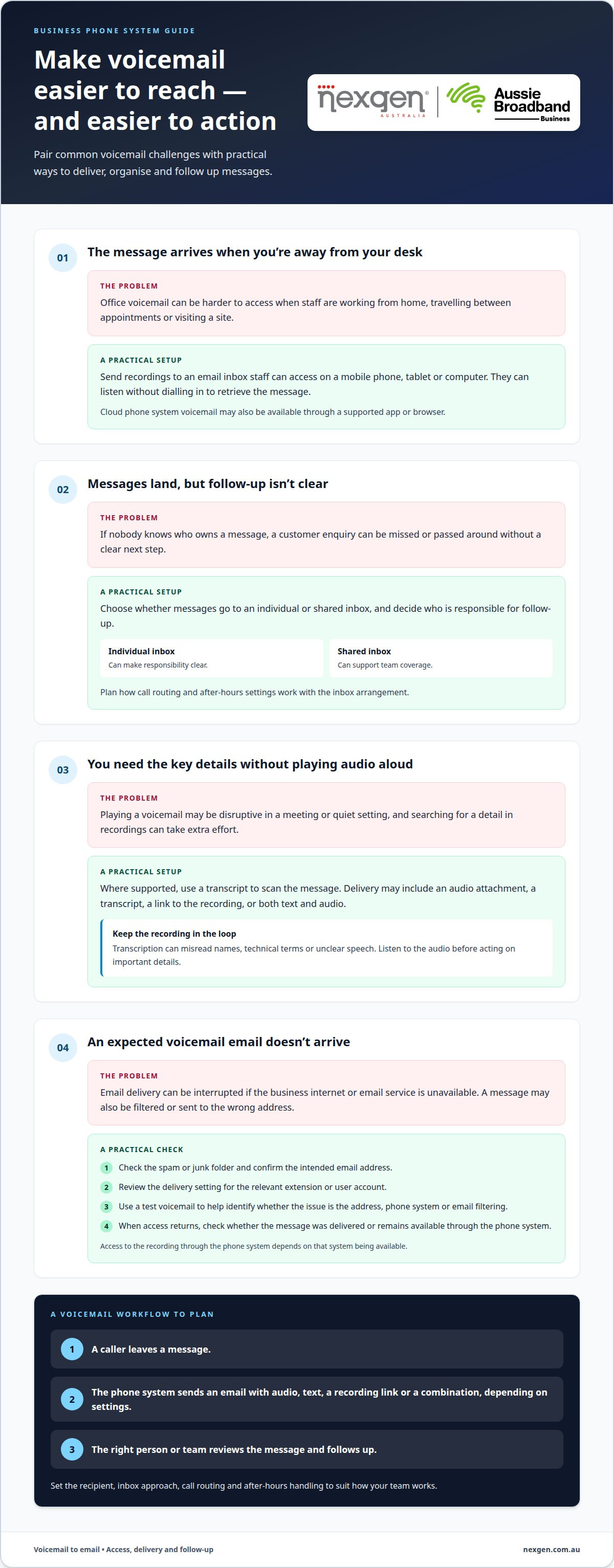
Voicemail transcription converts a spoken message into text. Depending on the delivery settings, an email may include an audio attachment, a transcript or both. Some systems also send a link to the recording, letting staff scan the message before deciding whether to listen, respond or pass it on.
A transcript can help someone review a message in a quiet setting, such as a meeting, where playing audio would be disruptive. It can also make details easier to find in an inbox. However, transcription can misread names, technical terms or unclear speech, so listen to the audio before acting on important details.
Choose a delivery option based on the work involved. A team triaging enquiries may value readable text, while someone handling a detailed request may need the recording too. If the system supports both, the transcript provides a quick scan and the audio preserves the caller’s original message.
Delivery and audio troubleshooting
If an expected voicemail email doesn’t arrive, check the spam or junk folder and confirm the message is going to the intended address. Then review the delivery setting for the relevant extension or user account. A test voicemail can help determine whether the issue is the address, phone system or email filtering.
If the audio is poor, replay the attachment on another device or audio player. Check the device volume and listen to the recording from start to finish. Soft speech, background noise or an interrupted recording can make details hard to hear. Compare it with phone-system playback, if available.
When internet or email access returns, check whether the message was delivered or remains accessible through the phone system. Don’t rely on a transcript alone when details are unclear. A practical setup uses a clear recipient address, a suitable audio format and a defined way to retrieve messages if email delivery is interrupted.
Accessing voicemail on mobile devices and computers
Voicemail-to-email sends messages to an inbox, while visual voicemail keeps them in the phone system. Cloud phone system voicemail can be accessed through the system’s supported app or browser.
For Australian teams, the practical choice depends on where staff work and how they handle each response.
App and browser voicemail access
When a phone system provides app or browser access, staff can review voicemail without opening an email attachment. A mobile app can display messages alongside calling features, while a browser may suit laptop or desktop workflows. Available controls depend on the system.
Consider how staff need to review messages. A receptionist may prefer a desktop list during office hours, while an employee travelling between appointments may use a mobile screen. Check that the chosen access method displays new messages clearly and lets users play them without unnecessary steps.
Accessing office voicemail remotely
Voicemail-to-email lets staff receive office phone messages through an email account they can access away from work. Someone on a site visit, working from home or travelling between Australian offices can listen using a mobile phone, tablet or computer with email access.
This can keep a customer enquiry visible when an employee isn’t at their desk. For example, a tradesperson could review an office voicemail between jobs, then respond or forward it to a colleague. The workflow depends on which inbox receives the message and who is responsible for follow-up.
Flexible voicemail access
Email delivery is useful when staff already manage work through an inbox. Messages can be accessed on different email-enabled devices, rather than only through the phone system. Visual voicemail offers another option: users review messages within the phone system, often through an app or browser.
System capabilities vary. A cloud phone system may combine voicemail and calling in one service, while email delivery places a copy in the recipient’s inbox. Consider whether staff need one central place for messages or easier access through their existing email workflow.
Accessibility also depends on the user and device. A transcript can help someone read a message, while audio playback preserves the caller’s tone and exact wording. If a detail is unclear, listen to the recording rather than relying on the text alone.
For consistent responses, decide who needs access, whether messages should go to individual or shared inboxes, and who follows up. A shared inbox can support team coverage; an individual inbox can make responsibility clear. These choices help mobile and office staff manage messages without splitting them across separate workflows.
How voicemail messages are converted and delivered by email
A caller leaves a message, and the phone system records it before sending an email. The email address linked to the user or extension receives the voicemail, often as an audio attachment.
Australian business phone system prices depend on factors such as users, handsets, features and system type. Voicemail-to-email is part of the wider setup, not a standalone price that applies to every business.
Delivery usually follows a simple sequence. A system setting links voicemail to a recipient’s email address, then sends the recording after the caller finishes. The email may include caller details, the time and date, a transcript or a link to the message.
- Record: The phone system captures the caller’s message when it reaches voicemail.
- Prepare: The system creates an audio file and may generate a transcription.
- Send: The system emails the voicemail to the address assigned to that user or extension.
- Receive: The employee opens the email inbox and listens to the attachment or reads the transcript.
Some systems deliver a message within seconds; the average voicemail delivery time is 30 seconds. A setup can take five minutes, depending on the system and email configuration. The timing can vary if the recipient address is incorrect or the email service delays incoming messages.
Email filtering can affect delivery. A spam filter may move an automated voicemail email out of the inbox, so check junk folders when a message appears to be missing. Email settings, SMTP credentials, SPF records and spam-filter policies can change; regular delivery testing can help identify issues. TLS or SSL encryption can be used when configuring the email server.
To enable the feature, assign an email address to the relevant extension or user account, then choose the preferred delivery options. Send a test voicemail from an internal number and an external number. Confirm it reaches the intended inbox and that the audio attachment opens clearly.
Email delivery can make messages easier to manage across a team. Staff can read a transcript, listen to the recording or forward the email to the colleague responsible for follow-up. For example, a receptionist can send a caller’s message to the right department without asking someone else to dial in and retrieve it.
Delivery settings determine who sees each message. An individual address can direct voicemail to one employee, while a shared inbox makes it visible to a team. Assign a clear owner for follow-up to prevent messages sitting unanswered in a general inbox.
Search, forwarding, archiving and message management
Yes. Voicemail can be directed to individual users or a shared inbox, giving the relevant team access to messages. The recipient setup determines who can review each caller’s message and take responsibility for follow-up.
Caller and message details
A notification email can show the caller’s phone number, the call’s date and time, and the message length. These details help recipients identify who called and when before opening the audio file. For example, an office manager can spot a recent customer enquiry among other inbox messages.
If the email includes a transcript, it can provide a quick preview of the caller’s request. The subject line and message details can also help staff search by caller or date. Transcripts may not capture every word accurately, so listen to the recording if a name or instruction is unclear.
Listening to and sharing messages
Recipients can play a voicemail from the email attachment, download it for later or forward it to a colleague. Forwarding can direct a message to the person handling a specific enquiry, such as sending a supplier call to the accounts team.
For a shared inbox, agree who owns a message before forwarding it again. A clear handover note can explain why the recipient is receiving the voicemail and what action is needed. This helps avoid duplicate callbacks and messages being passed between teams without a response.
Message prioritisation and archiving
Use inbox folders or labels to separate urgent callbacks from routine enquiries. For example, a clinic reception team could create one folder for appointment requests and another for supplier messages. Staff can then prioritise by caller, message time or the request described in the transcript.
Once a voicemail is handled, archive it or save it in the relevant folder. Important recordings are easier to overlook or delete accidentally when left in the inbox’s general flow. A retention policy can define how long saved audio remains available and when older recordings should be removed.
Email notifications can make reviewing messages more practical than dialling into voicemail and listening one recording at a time. Staff can scan caller details, search the inbox and open the message they need. Notifications can also help a team spot new messages, provided alerts are enabled on the devices they use.
For after-hours calls, route voicemail notifications to the person or team responsible for the next business-day response. A shared inbox can suit rotating coverage, while individual delivery can clarify ownership. Set a simple process for urgent messages, routine follow-up and archiving so each recipient knows what to do next.
Business phone system and unified communications features
Voicemail to email works best as part of a connected communication workflow, not as an isolated inbox feature. In a hosted phone system, voicemail can sit alongside call routing, mobile access and transcription, helping staff manage a caller’s message and decide what happens next.
Unified communications brings business tools such as calling and messaging together. The practical benefit is a clearer path from missed call to response: a caller leaves a voicemail, the system sends it to an assigned inbox, and the responsible employee follows up using the available communication tools.
Connect voicemail with call handling
Call routing determines where an incoming call goes, while voicemail settings determine what happens when nobody answers. For example, a clinic might route calls to reception first, then send unanswered calls to an appropriate voicemail inbox. Email delivery makes those messages visible to the person or team responsible for follow-up.
After-hours calls need a clear path too. While an AI receptionist like Oscar can answer incoming business calls around the clock, teams relying on voicemail can direct messages to an individual or shared inbox so the next person on duty can review them. The right arrangement depends on who handles urgent enquiries and how routine messages are managed.
Choose delivery settings around the team
Send voicemail to the staff member responsible, or use a shared inbox when several employees manage the same enquiries. A shared team inbox can support coverage during staff absences; individual delivery can clarify responsibility. Choose the format that fits how the team assigns and tracks follow-up.
Voicemail transcription makes message content quicker to scan, while an audio recording preserves the caller’s spoken words. Don’t rely on transcription alone when acting on a message: staff can listen to the recording if a name, number or instruction needs clarification. This supports quick triage without losing the original audio.
Fit voicemail into a unified workflow
Consider how each feature connects to the next step. A customer leaves a voicemail, an email notification reaches the right recipient, and that employee responds or forwards the message for action. Clear ownership matters more than sending the message to several places.
Before enabling the setup across the business, map a typical call flow, including unanswered and after-hours calls. Test whether each voicemail reaches its intended inbox and whether staff know who responds. This can reveal gaps between call routing, voicemail delivery and the team’s daily workflow.
For Australian businesses reviewing how calling, voicemail and follow-up fit together, explore business communications options that align with the team’s call-handling needs.
Nexgen Australia
Nexgen Australia helps businesses align their phone systems with how staff receive and manage voicemail. If your team needs messages delivered to individual or shared inboxes, or wants voicemail to fit into call routing and remote work, a business phone system can bring these needs together.
The right configuration depends on who handles incoming calls, where staff work and how messages are followed up. Nexgen Australia offers phone system options for small businesses and offices, including VoIP solutions. Discuss your call-handling needs and how your team wants to access voicemail.
Contact Nexgen Australia to discuss a phone system that suits your business.
Set up a clearer path from missed call to follow-up
Start by deciding who owns each voicemail and what should happen after it arrives. That helps shape a voicemail-to-email setup around your team’s workflow, rather than adding another inbox to monitor. Consider how new staff, changing responsibilities or different work locations could affect the process over time.
A voicemail to email business phone system can form part of a broader communications setup. Nexgen Australia offers Small Business Phone Systems, Small Business VoIP Solutions and Office Phone Systems for businesses planning their phone system requirements.
If you’re ready to discuss how your team handles calls and voicemail, contact Nexgen Australia. A clear view of your call flows and follow-up needs is a practical place to start, and can help you shape a system that works for your business.
Frequently Asked Questions
How does voicemail-to-email work on a business phone system?
When a caller leaves a message, the phone system records it and sends it to an assigned email account. The email may contain an audio attachment, transcript or link to the recording. For example, a missed sales call can appear in the salesperson’s inbox, ready to review alongside other customer correspondence. Delivery options depend on the phone system’s configuration.
Which Australian business phone providers offer voicemail-to-email?
Voicemail-to-email availability depends on the provider and phone system. When comparing options, ask providers whether they support it and how it fits with call handling and team communication. Focus on how voicemail fits your workflow, including who receives messages and how staff manage follow-up, rather than treating email delivery as a standalone feature.
Does voicemail-to-email send audio files, transcripts, or both?
Depending on the system’s settings, it can send an audio recording, a written transcript or both. For instance, a manager might scan a transcript between appointments, then play the recording to hear the caller’s tone or clarify a detail. Transcription can misinterpret names, phone numbers or specialist terms, so use the audio to confirm details that affect a callback or customer record.
How do you set up voicemail-to-email on a business phone system?
Set up voicemail delivery by assigning the intended email address to the relevant user or phone extension, then choosing the available message format and recipient. Decide whether each voicemail should go to an individual or shared inbox. Send a test message from an internal and external phone number, then confirm the right recipient can open it and knows who handles the response.
What are the email attachment size limits and supported audio formats?
MP3 and WAV are common audio formats for voicemail attachments. There isn’t one universal attachment limit: the receiving email service and phone system can each impose file-size restrictions. Longer recordings and larger formats may be more likely to exceed an inbox limit. For example, a business can choose a smaller audio format where available, or use a message link if its system provides one.
How secure is voicemail sent to email, and what privacy risks should Australian businesses consider?
Voicemail sent by email inherits the security of the email account and devices used to access it. Consider who can open shared inboxes, whether former staff still have access, and how long recordings should be kept. Limit recipients to people who need the messages, use strong account access controls, and avoid forwarding sensitive recordings to personal email accounts or unrelated recipients.