


The best replacement for your legacy office phone system may not be a like-for-like set of devices. Replacing telstra dot digital office technology phone setup starts with understanding how your business handles calls today, then choosing a system that supports the way your team works next.
If you’re unsure which services, devices and call flows are part of your current setup, you’re not alone. You’ll also need to protect familiar workflows and confirm what will happen to your business numbers before changing providers. Legacy digital office technology is scheduled to stop operating on 30 August 2027, so planning early gives your business time to assess its needs and organise a considered transition with Nexgen Australia.
This guide explains how to document your current setup, compare cloud phone and VoIP options against your actual requirements, and prepare for cutover. It also covers what to confirm about number porting, handset compatibility and implementation support, so staff and customers can stay connected as your business moves to a new phone system.
Key Takeaways
- Start replacing telstra dot digital office technology phone setup by documenting your current services, equipment and calling arrangements.
- Compare on-premise, hosted and cloud phone systems against your needs for administration, hardware, remote access and support.
- List the numbers, call flows and customer-facing workflows that need to continue, then confirm number porting and feature availability with providers.
- Use a staged transition plan with clear owners, testing, staff briefings and cutover checks to help limit disruption.
- Define your requirements before choosing a replacement. Nexgen Australia supplies business VoIP and cloud phone systems, including Cisco Webex Calling.
Replacing telstra dot digital office technology phone setup: start with a clear inventory
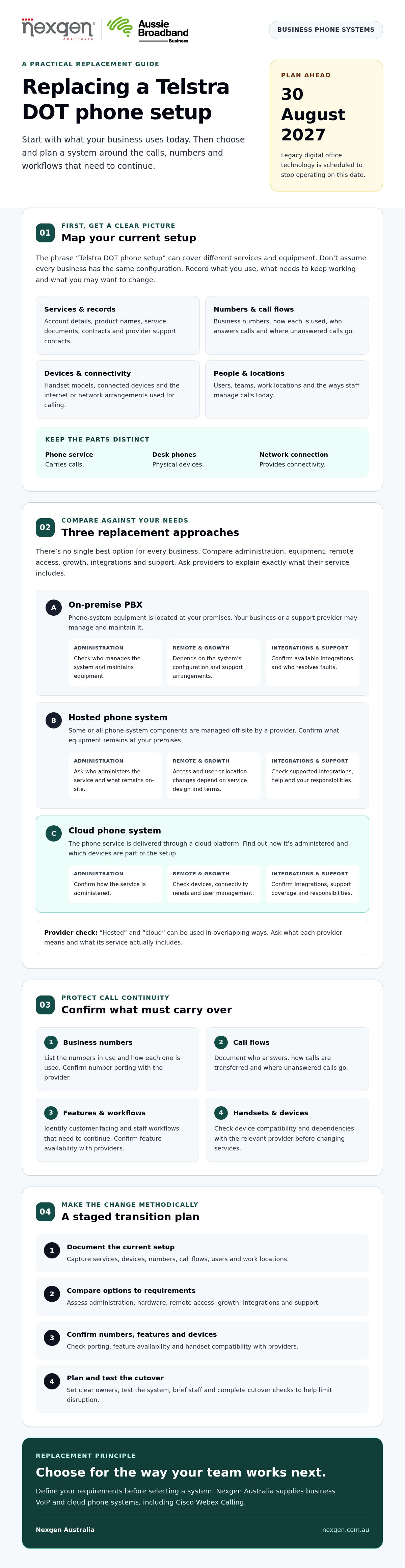
Before comparing providers, map the current setup. The phrase replacing telstra dot digital office technology phone setup can cover different services and equipment, so don’t assume every business has the same configuration. Record what you use now, what needs to keep working and what you may want to change.
Replacing a Telstra DOT phone setup starts with understanding what you have
A phone-system replacement means choosing a business phone service that fits your needs and planning how existing calls, numbers and workflows will be handled. Separate the components before making decisions. The phone service carries calls, desk phones are physical devices, and the network connection provides connectivity. Other devices or staff practices may also affect how calls are answered, transferred or managed. A replacement may not require every part to change, but check compatibility and dependencies with the relevant provider.
Start an inventory of:
- Account details, product names and service documents
- Business phone numbers and how each is used
- Handset models and any other connected devices
- Internet or network arrangements used for calling
- Users, teams and work locations
- Call flows, including who answers calls and where unanswered calls go
- Provider support contacts and any contract or service details
What does a Telstra DOT phone setup include?
Items to check may include the phone service, desk handsets, call-handling settings and associated connectivity. These aren’t universal inclusions, so review your invoices, service documents, device labels and current provider correspondence. Confirm the exact product name, contract terms, support arrangements and any change or migration information directly with the relevant provider.
If you’re considering internet-based calling, Voice over IP (VoIP) technology provides a general explanation of how voice calls can travel over IP networks.
When should a business review its existing phone setup?
Review your setup when staffing, work locations, call volumes or customer service needs change. You may also want to reassess if staff are finding calls difficult to manage or a relied-on workflow needs checking. Verify any limitations with your provider before treating them as a system issue. For broader decision context, consult a guide to small business phone systems.
With an inventory in hand, you can compare replacement options against how your business actually communicates, rather than simply trying to replicate every existing device.
Compare replacement options for a Telstra DOT phone setup
There’s no single best replacement for every business. Compare how each option handles administration, equipment, remote access, growth, integrations and support. Then check the provider’s actual service rather than relying on the label. “Hosted” and “cloud” are sometimes used in overlapping ways, so ask providers to explain what they mean.
| Option | Administration and hardware | Remote access and scalability | Integrations and support |
|---|---|---|---|
| On-premise PBX | Phone-system equipment is located at your premises. Your business or a support provider may be responsible for its management and maintenance. | Remote calling and adding users depend on the system’s configuration and support arrangements. | Check which integrations are available and who maintains the equipment and resolves faults. |
| Hosted phone system | Some or all phone-system components are managed off-site by a provider. Confirm what equipment remains at your premises and who administers the service. | Remote access and changes for new users or locations depend on the service design and provider terms. | Ask which integrations are supported and what help the provider supplies, including what remains your responsibility. |
| Cloud phone system | The phone service is delivered through a cloud platform. Find out how it’s administered and whether desk phones or other devices are part of the setup. | Staff may be able to use the service across locations, but confirm the available devices, connectivity requirements and user-management process. | Check integrations, support coverage and the division of responsibilities between your business and provider. |
How do hosted and cloud phone systems differ from an on-premise PBX?
An on-premise PBX uses phone-system equipment at your workplace. Hosted services place some system components with a provider, while cloud phone systems deliver calling through an online platform. The terms can overlap, so ask providers where the service runs, who manages it and what your business must supply. A Unified Communications as a Service platform is one cloud-delivered approach that can bring communications functions together. Compare maintenance, support, connectivity and device responsibilities rather than assuming one model is always cheaper or easier.
Which replacement criteria matter most to your team?
Match the options to how staff work. Include desk-phone requirements as well as any need to call from computers or mobile devices. Check call routing, voicemail, user administration and integrations against the workflows you recorded when assessing your current setup.
- Must-have: functions your team needs to handle everyday calls.
- Optional: capabilities that could help but aren’t essential.
Use this list to guide provider demonstrations. If you’re assessing internet-based calling, consult a small business VoIP guide for broader context.
Check call continuity, numbers and features before choosing a replacement
Before selecting a new phone system, identify what must keep working for customers and staff. List the business numbers people call, the teams that answer them and what happens when a call is missed or arrives outside business hours. This continuity map gives providers a practical brief and helps you spot gaps before committing to a replacement.
For each number, record who uses it, where it appears publicly and whether another service depends on it. Australian number portability arrangements allow businesses to retain existing numbers when changing providers, but the receiving provider must confirm the process and whether it applies to each number in your situation. Ask about eligibility, required account details, dependencies and timing. Don’t treat a port or cutover date as confirmed until the providers have checked and agreed on the details.
Can you keep your business phone numbers?
Ask your prospective provider to confirm the porting process for every number, including any information or actions required from your current provider. Check that your business details and account information match the service records, and identify any linked services that could be affected. ACMA oversees local number portability under the Telecommunications Numbering Plan 2025. For your specific numbers and circumstances, confirm current requirements with ACMA information or the responsible providers.
Which current phone features need a replacement plan?
Trace each common call path, from the customer’s first call through staff answering, transfer, voicemail or after-hours handling. Include special devices such as alarms or lift phones if they rely on existing lines, and ask the relevant provider or equipment supplier how they’re connected. Mark each requirement as confirmed, needing configuration or requiring a workflow change.
Build a feature inventory around what your business actually uses, rather than assuming every function needs to be carried across unchanged:
- Call handling: queues, routing rules, transfers, greetings and voicemail.
- Customer processes: call recording, if used, and any integrations staff rely on.
- Dependencies: devices or services connected through the existing phone lines.
Ask providers to map each item to a confirmed replacement capability or an agreed alternative. For example, if your main number rings several staff before diverting to voicemail, ask the provider to explain how that call path would work in the proposed system. Record who confirmed each detail and any configuration still to be completed.
This checklist makes replacing telstra dot digital office technology phone setup a continuity decision, not just an equipment change. Resolve questions about numbers, features and devices before settling on a system or scheduling a cutover.
Plan the Telstra DOT replacement in stages to reduce disruption
A staged migration gives your team time to confirm what’s changing, test the new setup and prepare staff before cutover. Assign an owner to each task, record dependencies and decision points, and keep provider and escalation contacts together. This makes it clear who is responsible if an issue needs attention.
- Complete the inventory. Record users, phone numbers, devices, call flows and any services connected to existing lines.
- Set requirements. Confirm which calls, features and staff workflows must continue, and identify what can change.
- Get provider confirmation. Confirm service scope, number arrangements, device compatibility, network requirements, support responsibilities and dependencies. Ask who coordinates the change and how issues will be reported.
- Configure the replacement. Give the chosen provider accurate user lists, call-flow records, voicemail requirements and any agreed integration needs.
- Test before cutover. Check representative calls, devices and workflows against the requirements. Record results and unresolved issues.
- Brief staff. Explain what’s changing, how to use the new setup and who to contact if something doesn’t work as expected.
- Review after cutover. Confirm key calls are reaching the right people, gather staff feedback and follow up outstanding issues with the provider.
What should happen before the phone-system cutover?
Before setting a change window, confirm in writing what the provider will configure and what your business needs to supply. Check number arrangements, hardware, connectivity requirements and responsibilities. Prepare call-flow records, user details and staff instructions, then agree who will coordinate the change, who can approve proceeding and which contacts to use if a problem arises. Ask providers to explain any contingency process. Don’t assume a particular cutover duration or zero downtime.
How should staff test the replacement phone setup?
Use the devices and work locations staff will rely on. Test incoming and outgoing calls to key business numbers, then check routing, transfers, greetings, voicemail and any integrations included in the agreed requirements. Record each result, note unresolved faults and have the nominated owner confirm whether the agreed checks have passed before the planned change proceeds. If a test fails, ask the provider what needs to be resolved and whether the cutover plan should change.
A clear checklist helps make replacing telstra dot digital office technology phone setup a managed business change, with responsibilities and checks visible to everyone involved. Keep the completed checklist and test results accessible to the people coordinating the change, so they can track outstanding actions and review the setup after cutover.
Choose a supported replacement with Nexgen after defining your requirements
Choose a replacement only after documenting the users, call flows, devices, connectivity and support your business needs. That gives you a practical basis for comparing providers and checking whether their proposed system fits day-to-day operations.
Nexgen supplies and integrates business phone systems, VoIP and cloud phone systems for Australian businesses, including Cisco Webex Calling. Its confirmed deployment capabilities include setup across desk phones, computers and mobile devices. Whether a particular option suits your organisation depends on your requirements, so assess your setup and priorities before deciding.
What can Nexgen help assess for a business phone replacement?
A provider discussion can help clarify how a proposed phone system could address your documented requirements. Bring examples of how calls move through your business, which devices staff use and whether people need to make and receive calls across different work locations. Nexgen can discuss a tailored VoIP or cloud phone setup, including Cisco Webex Calling, but confirm the availability and suitability of specific features for your needs.
Be clear about what you need a provider to handle. Ask who is responsible for configuration, testing, staff guidance, change coordination and support after the change. Confirm number-porting arrangements, device compatibility and any feature replacements directly with the provider. Don’t assume a new system will automatically reproduce every current workflow or that number transfer, timing or uninterrupted service is guaranteed.
What should you prepare before speaking with a provider?
A concise brief makes the conversation more specific and helps you compare proposals on the same basis. Include:
- Current service and account details, plus business numbers and relevant provider contacts
- User and handset counts, devices, work locations and connectivity arrangements
- Documented call flows and essential features, such as routing or voicemail
- Remote-work needs, integrations and any equipment that may rely on phone lines
- Questions about configuration, testing, staff instructions, responsibilities and post-change support
Ask the provider to identify assumptions, dependencies and unresolved checks in its proposal. For example, if existing handsets are important to your team, request confirmation of compatibility rather than assuming they’ll work with the proposed service.
With this preparation, replacing telstra dot digital office technology phone setup becomes a requirements-led decision rather than a like-for-like equipment swap. Use your documented requirements to assess whether a proposed system and its support arrangements suit your business.
Make your phone-system change with a clear plan
Replacing telstra dot digital office technology phone setup is easier to assess when you start with business requirements, not a list of existing equipment. Document your users, devices, numbers, call flows and support needs, then compare replacement options against those priorities.
Before committing, confirm number arrangements, device compatibility and feature requirements with the relevant providers. A staged plan with assigned owners, agreed responsibilities and practical testing helps your team prepare for the change and identify questions that need answers before cutover.
Nexgen supplies and integrates business VoIP and cloud phone systems, including Cisco Webex Calling. Nexgen also provides Webex Calling setup and deployment across desk phones, computers and mobile devices. The right fit depends on your setup, so bring your requirements and ask how configuration, testing, staff guidance and ongoing support will be handled.
Talk to Nexgen about the right phone system for your business. With a clear picture of what your organisation needs, you can take the next step with greater confidence.
Frequently Asked Questions
Can I replace a Telstra DOT phone setup with VoIP?
Yes, a VoIP system may suit your business, but check the current DOT services, handsets, connectivity and call requirements before choosing one. When replacing telstra dot digital office technology phone setup, ask providers to map existing call flows and features to confirmed capabilities or explain where workflows may need to change. Confirm number-transfer arrangements, responsibilities and device dependencies directly with the providers before agreeing to a migration plan.
Can I keep my business phone number when replacing a Telstra DOT setup?
You may be able to retain your business number, but the provider must confirm eligibility and the transfer process for each number. Share your current account and number details, and identify any services linked to those numbers. Ask what information or actions are required, which provider is responsible for each step, and what timing applies. Don’t set a cutover date or assume every number can move unchanged until these details are confirmed.
What should I check before replacing a Telstra DOT phone system?
Document your business numbers, users, handsets and call flows, including how calls are routed and where unanswered calls go. Record voicemail, greetings, integrations and any devices that may rely on phone lines. Then ask prospective providers to confirm connectivity requirements, support responsibilities and how essential features will be delivered. This inventory helps you compare proposals against how your business handles calls and identify dependencies before committing.
Will existing desk phones work with a replacement phone system?
It depends on the handset models, their configuration and the replacement provider’s supported equipment. Record each model number and provide the list to the provider for confirmation, preferably in writing. Ask whether setup changes are needed and who is responsible for them. If a handset can’t be reused, clarify what alternatives are available and what they require before deciding. A network connection alone doesn’t confirm compatibility with a new phone system.
How do I reduce disruption when moving from Telstra DOT to another phone setup?
Plan the change in stages. Document current call handling, confirm number arrangements, configure the replacement, test key call paths and devices, then brief staff before cutover. Assign an owner to each task and agree how issues will be escalated. Ask providers to confirm the change window, their responsibilities and any contingency process. Don’t assume the change will be completed within a particular timeframe or that uninterrupted service is guaranteed.
Who can help replace a Telstra DOT business phone setup in Australia?
Look for a business communications provider that can assess your current setup, discuss required call flows and explain who handles implementation tasks. Nexgen supplies and integrates business VoIP and cloud phone systems, including Cisco Webex Calling. Share your current services, numbers, devices and must-have features so the provider can discuss suitability. Confirm configuration, testing and support responsibilities before choosing a proposed replacement for your business.