


The NBN connection alone won’t keep your business phones working. A successful PBX to NBN migration in Australia also depends on choosing a voice service that suits your PBX and connected equipment. Start by documenting your current setup, then match each service and device to a suitable migration path.
Check more than the phone system itself. Fax machines, EFTPOS terminals, alarms and lift phones may rely on separate connections. Moving to the NBN doesn’t automatically provide a compatible business voice service.
This guide explains how to compare connection options, plan testing and manage cutover so your business can protect essential calls and functions during the transition.
Key Takeaways
- Begin your pbx nbn migration australia planning with an inventory of PBX lines, trunks, numbers and connected devices.
- Separate the NBN connection from the voice service so you can identify how calls will reach your PBX.
- Compare retaining a compatible PBX, using an interim connection or moving to a cloud phone system.
- Assign clear owners for migration decisions, connectivity, phone-system testing and staff updates.
- After cutover, test call handling and essential connected services against your inventory.
Why a PBX-to-NBN migration in Australia needs a service inventory
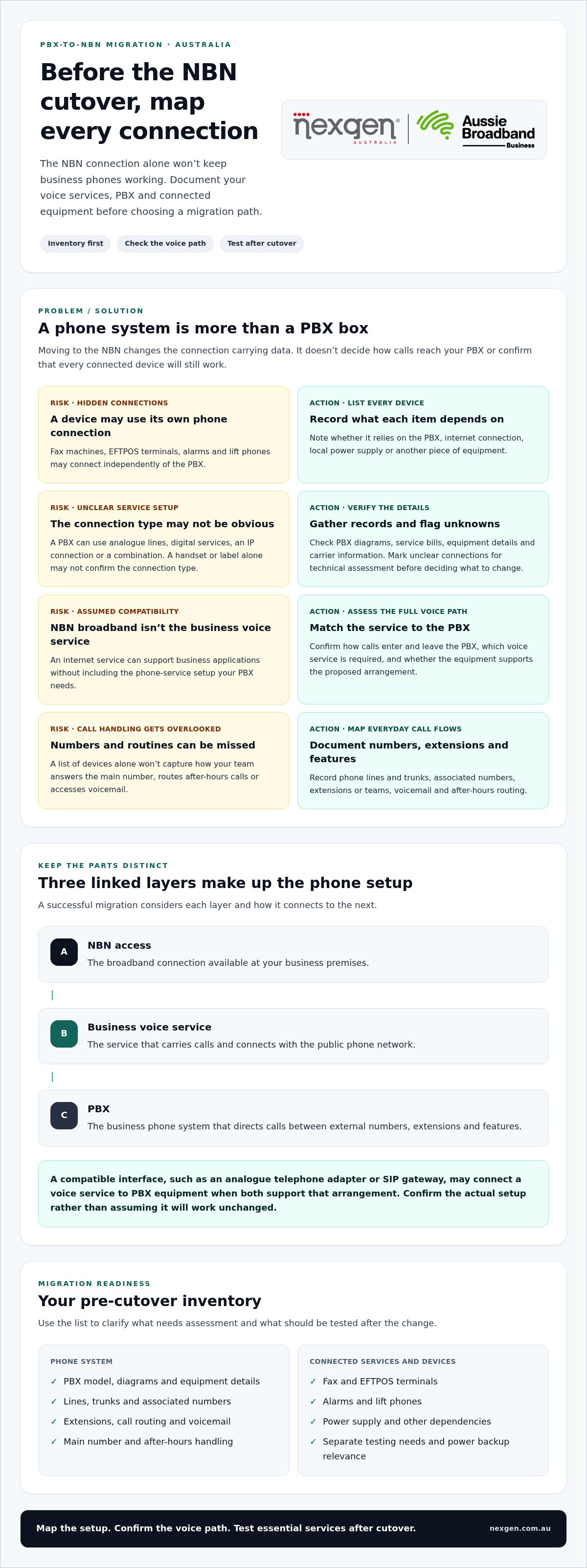
A service inventory helps you see what relies on existing phone connections before changing them. Moving to the NBN changes the connection carrying data, but it doesn’t determine how your business voice service will work. Your PBX may still suit your needs, but its lines, trunks and connected equipment need to be understood before you choose a migration path.
A PBX-to-NBN migration is the process of moving the connection and voice services that support a business phone system to an NBN-compatible arrangement, without assuming the PBX itself must be replaced. A PBX may use analogue lines, digital services, an IP connection or a combination. The actual configuration at each site matters more than the system’s age or appearance.
The National Broadband Network (NBN) provides Australia’s underlying broadband access infrastructure. Your business must separately consider how calls enter and leave the PBX, and whether each service and device can operate on the proposed arrangement. Treat the phone system as connected services, not just a single piece of equipment.
Record handsets and extensions, business numbers, call flows, voicemail and after-hours routing. Then list every device that uses a telephone connection. A fax machine, EFTPOS terminal, alarm or lift phone may connect independently of the PBX, even if staff assume it’s part of the same system.
Which business services should go on the migration checklist?
List every phone line and trunk, the numbers associated with it, and the extensions or teams it serves. Document how the main number is answered, where calls go when the office is closed, and how staff access voicemail. Include line-connected equipment such as fax, EFTPOS, alarms and lift phones so each item can be assessed before the change.
Record what each device depends on: the PBX, internet connection, local power supply or another piece of equipment. If an alarm or other device relies on several connected components, note that chain. This helps you identify what needs separate testing and whether power backup is relevant to keeping it operating during an outage.
How can you tell what your existing PBX connects to?
Gather PBX diagrams, service bills, equipment details and available carrier information. Ask the person responsible for the phone system to document how calls enter and leave, including which lines or trunks connect to the PBX and what handles voicemail and call routing. Bills can also reveal services that aren’t obvious from the equipment in the office.
Where you can, classify each connection as analogue, digital or IP-based. An analogue line carries voice over a traditional phone connection; a digital service or IP connection uses a different interface. Don’t assume the connection type from a handset or label alone. Mark unclear items for technical assessment before making decisions, rather than treating an unknown connection as unaffected.
How the NBN connection and business voice service work with a PBX
Your PBX, NBN access and business voice service are separate parts of the phone setup. They work together, but connecting a site to the NBN doesn’t define how calls will reach the PBX or which business numbers and call functions the arrangement will support.
NBN broadband provides the data connection; a business voice service carries calls over a suitable connection and links them to your PBX. The PBX then manages functions such as extensions and call routing. With a traditional system, the voice service may connect through a compatible interface, such as an analogue telephone adapter or SIP gateway. These devices translate between the service and the PBX’s connection type when the equipment and service support that arrangement.
This distinction matters when planning a PBX-to-NBN migration in Australia. An internet service can support business applications without including the phone service configuration your PBX needs. The Australian Government’s National Broadband Network information provides background on the network. Your voice path needs a separate assessment.
Think of the arrangement as three linked layers:
- NBN access: the broadband connection available at the business premises.
- Voice service: the service that carries calls and connects with the public phone network.
- PBX: the business phone system that directs calls between external numbers, extensions and features.
The right pathway depends on the PBX model and interfaces, current voice services, call capacity and features your team relies on. Keeping familiar handsets may be possible in some configurations, but that doesn’t prove every PBX, line or function will work unchanged. Confirm how the components connect before settling on a design.
What changes when a traditional phone connection is replaced?
The route a call takes can change even if employees keep using their desk handsets. Analogue connections carry voice over a traditional phone line; digital services use a digital connection; IP-based services carry voice as data across a network. A migration may require a compatible service or interface between the new voice path and existing PBX equipment. Don’t assume compatibility from the connection type alone. Legacy service availability and retirement timing can vary, so use current information for your premises when planning the change.
What determines whether a PBX can remain in service?
Assess the PBX’s available interfaces, the voice services it can support, its call capacity and the functions your business needs. Check whether call routing, voicemail, alarms or other essential functions rely on separate services or equipment connected to legacy lines. A technically workable connection doesn’t automatically make retaining the system the best long-term choice. Compare the effort of keeping it with the flexibility and management needs of your business.
If you’re weighing a retained PBX against a new voice setup, Nexgen’s business phone system options include VoIP and cloud phone systems to consider as part of your comparison.
Compare PBX-to-NBN migration paths before choosing a voice setup
There isn’t one migration path that suits every business. You can retain a compatible PBX, use an interim connection while preparing a longer-term change, or move to a cloud phone system. Compare each option against the calls and features your team needs, the equipment you want to keep and how your business operates.
The right PBX-to-NBN migration path depends on verified compatibility, service continuity needs, existing equipment and how much flexibility your business requires. Technical suitability needs to be established for your premises and services before you commit. Use the comparison below as a starting point, not a guarantee that a particular setup will work at every site.
Compatible PBX retention
Continuity: Can preserve familiar call handling if the voice path and PBX are compatible. Existing equipment: Keeps the on-premise system and potentially some handsets. Management: Your business continues managing the PBX. Future flexibility: Depends on the system’s supportability, capacity and ability to meet changing needs.
Interim connection
Continuity: Can provide a bridge while a longer-term voice setup is prepared, subject to service and equipment compatibility. Existing equipment: May allow the current PBX to remain in use temporarily. Management: May involve coordinating temporary and future arrangements. Future flexibility: Useful as a transition stage, but it doesn’t settle the long-term system choice.
Cloud phone migration
Continuity: Calls move to a cloud phone service, with cutover and testing planned around business requirements. Existing equipment: Removes the need for traditional on-premise PBX hardware, though handset requirements still need consideration. Management: The phone system is delivered as a cloud service. Future flexibility: Can suit changing user or call-handling needs, depending on the system selected.
When might keeping the existing PBX make sense?
Retaining the PBX may be worth considering if its interfaces can connect to a supported voice path and it can handle the calls and features you need. Staff familiarity and investment in existing handsets may also matter. Neither guarantees a smooth or worthwhile migration. Confirm compatibility, capacity and ongoing supportability, then weigh those findings against the system’s expected role in your business.
When should a business consider a cloud phone system?
For pbx nbn migration australia planning, compare the three paths using your service inventory and required call functions. Then confirm the technical suitability of the chosen arrangement before setting a cutover plan.
Plan the PBX-to-NBN migration: a practical sequence for your business
A controlled migration moves from discovery to testing, cutover and review, with clear owners at each stage. Agree on who makes decisions, who manages each technical component and how staff can report a problem. A checklist and named contacts help keep the work coordinated without assuming a particular cutover time or downtime outcome.
Assign responsibility before scheduling the change:
- Phone system owner: documents call flows, extensions, voicemail and required features.
- Connectivity owner: coordinates the NBN connection and related network arrangements.
- Migration decision-maker: approves the voice path and resolves business trade-offs.
- Staff communications owner: explains what is changing and shares the issue-reporting process.
One person can hold more than one role in a small business, but each responsibility needs a clear owner. Confirm who will configure the PBX or new voice service, who will test it, and which contacts handle faults or escalation under the agreed service arrangements.
What should happen before the cutover?
Before cutover, compare the service inventory with the agreed voice path. Confirm which numbers, lines, trunks, extensions and connected devices are included, who is responsible for each configuration, and how issues will be escalated. Plan the change around business operations, avoiding periods when missed calls would create particular difficulty. Tell staff what will change, when it is scheduled and where to report call problems.
Test the proposed setup before relying on it for normal business calls. Use a test plan that covers:
- Inbound calls to the main business number and outbound calls to external numbers.
- Calls between extensions, transfers and essential call routes.
- Voicemail access, message handling and after-hours routing.
- Business-critical devices or services identified during discovery.
Record the expected result for each test and who will confirm it. Agree on a fallback approach before the change begins, based on the services and support arrangements in place. Document who can authorise that fallback and who to contact if a test fails. Don’t assume an old service can be restored or kept active unless that arrangement has been confirmed.
What should you test after migration?
After cutover, test calls in both directions. Call the main business number from outside the organisation, then place an outbound call and confirm the correct number and call handling. Check internal extensions, transfers, voicemail, after-hours routing and the connected devices on your inventory. Ask staff in different roles to verify the functions they use rather than relying on a single successful test.
Keep an issue log with the affected number or function, the person responsible and the resolution status. Re-test each item after it’s addressed. Treat the migration as complete only when critical call paths and identified services have been checked, and outstanding issues have an agreed owner and next step.
Nexgen provides business VoIP and cloud phone systems for businesses planning a change to their phone setup. Learn about Nexgen’s phone system options.
How Nexgen can support a business phone transition connected to NBN
Once you’ve identified the services that need to move and compared the available voice paths, match your phone-system choice to how your organisation handles calls. Nexgen Australia provides business VoIP, cloud phone systems and advanced unified communications deployments. These options can support businesses reviewing their phone arrangements as part of an NBN migration, with the system approach shaped around the organisation’s needs.
Bring your PBX inventory, service details and migration priorities into the discussion. This gives the phone-system design a practical starting point: which business numbers matter, how calls should reach different teams, which handsets employees use and whether you intend to retain existing PBX equipment. The right technical arrangement depends on the equipment, services and requirements at your premises, so don’t assume a particular outcome before those details are assessed.
What can a modern business phone system provide?
A business phone system can be designed around how your team answers, transfers and routes calls. Nexgen Australia’s tailored VoIP solutions include flexible call handling and scalable line capacity, helping businesses plan for current and changing calling needs. Desktop handsets can remain part of the setup, alongside other ways of handling calls where they suit the selected system.
A cloud phone system is another option, particularly if your existing PBX isn’t suitable to retain or you want to move away from traditional on-premise PBX hardware. Nexgen Australia deploys cloud phone systems that remove the need for that hardware. Modern cloud calling deployments support calling across desk phones, computers and mobile devices, giving businesses options for different work patterns. The right fit depends on the roles, call flows and devices your organisation needs to support.
As you compare options, focus on practical requirements rather than choosing a system simply because it’s newer. Consider who needs to answer the main number, how calls should reach staff working in different locations, and whether your expected line capacity may change. The Australian small business phone systems guide can provide a useful companion as you assess those requirements.
What is a sensible next step for your organisation?
Bring together the PBX inventory, current service details, required call features and migration priorities. Include the functions staff rely on, such as transfers, voicemail and after-hours call handling. A clear set of requirements helps frame whether to retain compatible equipment, transition to VoIP or consider a cloud phone system.
Nexgen Australia is an Australian business communications provider offering tailored VoIP solutions, cloud phone systems and advanced software-based calling options. For businesses assessing pbx nbn migration australia options, these offerings provide pathways to consider without presuming one system suits every organisation.
Talk to Nexgen Australia about your business phone system.
Turn your migration plan into a confident next step
Turn your findings into a clear brief: what your phone system must keep doing, which services need attention and what you want your communications to support in future. That gives your business a sound basis for deciding whether to retain existing equipment or move to a different phone setup.
A well-planned pbx nbn migration australia project is more than a connection change. It’s a chance to align your calling arrangements with how your team works, using verified requirements rather than assumptions. Nexgen works with Australian businesses on tailored business VoIP and cloud phone system deployments, including Cisco Webex Calling across desk phones, computers and mobile devices.
Bring your PBX inventory and priorities into a conversation about a suitable path for your organisation. Discuss your business phone transition with Nexgen and plan a phone system around your needs.
Frequently Asked Questions
Can an existing PBX work with an NBN connection?
Yes, an existing PBX may work with an NBN-based voice arrangement if its interfaces and required functions suit the proposed service. The PBX model alone isn’t enough to establish compatibility. Compare the system’s equipment details with the connection and voice service being considered, then test representative call functions. Treat compatibility as a site-specific technical question, not an assumption based on the equipment’s age or appearance.
Does moving to the NBN automatically replace a business phone system?
No. Moving a business’s internet connection to the NBN doesn’t itself replace its PBX or select a new phone system. The business still needs to decide how voice calls will be provided and connected. Keep those decisions visible in project approvals and service orders so the team doesn’t mistake an internet connection change for a complete phone-system migration or overlook a separate voice-service change.
What happens to business phone numbers during a PBX-to-NBN migration?
Business numbers may be retained or transferred as part of a new voice arrangement, depending on the services and porting arrangements involved. Confirm which numbers are associated with which services, including direct numbers used by staff, and coordinate the transfer with the relevant service contacts. Don’t cancel an existing number service until the planned transfer status and timing are understood, as premature cancellation could complicate the change.
Can a business keep its existing desk phones after migrating?
Possibly, but handset reuse depends on the phone model and the PBX or phone service it needs to connect to. A handset that looks like a standard desk phone may rely on a particular system or configuration. Record the make and model, identify any special functions staff use, and include representative handsets in testing. If phones aren’t retained, plan how replacement devices will be set up and issued to users.
How can a business reduce phone disruption during an NBN migration?
Reduce risk by planning the change for a period that suits call volumes, agreeing who can make decisions and testing key call paths before relying on the new arrangement. Prepare a fallback process only after confirming the services needed to use it will remain available. Give staff a clear contact for reporting faults, and keep a list of business-critical numbers handy so problems can be triaged quickly.
What equipment and services should a business check before migrating a PBX?
Check the PBX, its power supply, network equipment and any devices that depend on phone connections. Include items beyond staff handsets, such as fax machines, EFTPOS terminals, alarm systems and lift phones. Some equipment may have its own connection or rely on another device to operate. Record its purpose, connection point and responsible person, then include critical items in the migration test plan.
Is a cloud phone system the only alternative to a traditional PBX?
No. A business might retain a technically suitable PBX using a compatible voice path, or use an interim arrangement while deciding on a longer-term system. A cloud phone system is another option, particularly if the organisation wants to move away from on-premise PBX hardware. For pbx nbn migration australia decisions, compare these approaches against call requirements, equipment, supportability and future operating needs rather than assuming one path fits every business.