


What if the biggest risk to your office phone system isn’t the handset, but the connection and setup behind it? If legacy copper lines are dropping out or the NBN transition has left you unsure what comes next, choosing an office VoIP phone system can feel like another technical decision to untangle.
Your business needs more than internet-based calling. It needs voice quality suited to your connection, features that fit the way your team works and safeguards for calls and accounts. A well-planned system can also help remote and hybrid staff use business calling without being tied to one desk.
This 2026 checklist explains what to look for in an office VoIP setup for an Australian business, from NBN and network readiness to call handling, security and continuity planning. You’ll learn which features matter, what to ask about equipment compatibility and how to assess whether your connection can support calls. We’ll also explain common telecoms terms in plain English, so you can compare options and plan a practical move from legacy phone services.
Key Takeaways
- Understand how an office VoIP phone system uses the internet for business calls and can reduce reliance on on-site PBX hardware.
- Identify call-handling features that can help callers reach the right person and keep your team organised.
- Assess your NBN connection and office network before moving calls online, so you can plan for reliable voice quality.
- Compare providers using practical criteria, including support arrangements, security and contract terms.
- See how Nexgen Australia’s managed phone systems and Cisco Webex Calling can support a move from legacy phone services to cloud communications.
What is an Office VoIP Phone System and Why Does Your Business Need One?
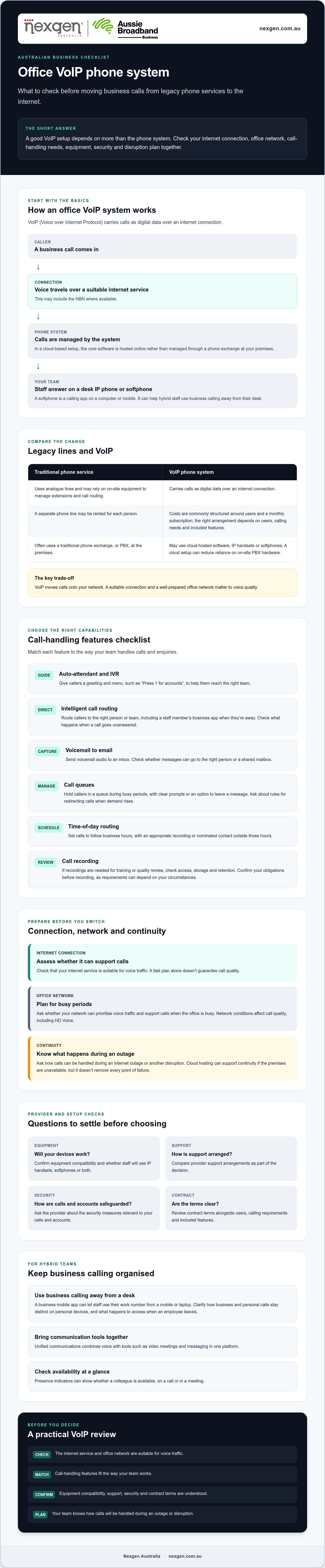
An office VoIP phone system lets your team make and receive business calls over an internet connection instead of traditional copper phone lines. VoIP, or Voice over Internet Protocol, carries voice as digital data across a network. For a foundational overview, see What is VoIP?
In a cloud-based setup, the system’s core software is hosted online rather than managed through a phone exchange, or PBX, at your premises. Staff can use desk IP phones or softphones, which are calling apps on a computer or mobile. This flexibility can help hybrid teams answer calls using business numbers when they’re away from the office.
How VoIP differs from traditional landlines
Traditional phone services use analogue lines and often rely on on-site equipment to manage extensions and call routing. VoIP carries calls as digital data over your internet connection. As Australia moves away from legacy copper services, businesses should plan for communications that work over a suitable internet service, including the NBN where available.
Costs are commonly structured around users and a monthly subscription, rather than renting a separate phone line for each person. The right arrangement depends on your users, calling requirements and included features. Hardware needs can also change: a cloud system may use IP handsets or softphones instead of a traditional PBX and its associated equipment. You can still choose desk phones for staff who need a fixed workplace handset.
The shift to cloud-based communication in 2026
Cloud hosting moves core phone-system management away from equipment in your office. This can support continuity if your premises are unavailable, provided the service has suitable resilience and staff can connect from another location. Ask a provider how calls can be handled during an internet outage or another disruption. Cloud hosting alone doesn’t remove every point of failure.
Unified communications brings voice together with tools such as video meetings and messaging in one platform. For a hybrid team, that can make it easier to switch between communication methods without relying on separate, disconnected systems.
VoIP can also support HD Voice, which is designed to make speech sound clearer than standard phone audio. Call quality still depends on the connection and network conditions, so a fast plan alone isn’t a guarantee. Before choosing a system, check whether your office network can prioritise voice traffic and support calls during busy periods. This is a core consideration when assessing an office voip phone system.
Essential Features Checklist: What Your VoIP System Must Include
A professional office VoIP phone system should do more than connect calls. The right features can help your team manage enquiries, respond promptly and keep communication organised, whether staff are at their desks or working remotely.
Use this checklist to compare what each system can do and how the features fit your day-to-day workflows:
- Auto-attendant and IVR: Give callers a clear greeting and menu, such as “Press 1 for accounts”, so they can reach the right team without a receptionist transferring every call.
- Intelligent call routing: Route calls to the right person or team, including a staff member’s business app when they’re away from the office. Confirm how unanswered calls are handled so enquiries don’t simply disappear.
- Voicemail to email: Send voicemail audio to an inbox so staff can review messages when they’re away from their desk. Check whether messages can be directed to the right person or a shared mailbox.
- Call queues: Place callers in a queue during busy periods, with clear prompts or an option to leave a message. Ask whether you can set rules, such as routing calls to another team when demand rises.
- Time-of-day routing: Set calls to follow your operating hours, directing callers to an appropriate recording or nominated contact outside business hours.
- Call recording: If you need recordings for training or quality review, check how access, storage and retention are managed. Confirm your obligations before recording calls, as requirements can depend on your circumstances.
Support collaboration across locations
A business mobile app can let staff use their work number from a mobile or laptop. Before enabling it on personal devices, clarify how business and personal calls are kept distinct, and what happens to access if an employee leaves. Presence indicators can show whether a colleague is available, already on a call or in a meeting, helping staff direct enquiries without repeated transfers.
If your team uses a customer relationship management (CRM) platform, ask whether the phone system integrates with tools such as Salesforce or HubSpot. An integration may display relevant customer details when a call arrives, but the available functions vary by provider and setup.
For another perspective on choosing the right VoIP provider, Forbes provides a guide to VoIP apps. For Australian business use, also check that an option supports your required call handling, integrations and support arrangements. If you’re considering a managed transition to cloud calling, explore Nexgen’s business phone systems.
Infrastructure and NBN Readiness: Preparing Your Office for VoIP
An office VoIP phone system depends on the internet connection and local network supporting it. A high-speed NBN plan helps, but call quality can still suffer if the connection is congested, the router is poorly configured or Wi-Fi coverage is unreliable. The move away from legacy copper services makes planning for an NBN-ready VoIP system an important part of business continuity.
Bandwidth and network stability
Plan for the number of calls your team may make at the same time, not just the total number of staff. Ask your VoIP provider for its current bandwidth recommendation per concurrent call, then allow for other internet use such as cloud backups, video meetings and large downloads. Requirements vary by service and setup, so treat any general estimate as a starting point rather than a guarantee.
Raw download speed isn’t the only measure that matters. Latency, often checked as “ping”, is the time it takes data to travel across the network. High or inconsistent latency can delay speech, while jitter means voice packets arrive unevenly, making conversation sound choppy. Ask for your connection to be assessed under normal office conditions, including busy periods.
Quality of Service (QoS) settings on a compatible router can prioritise voice traffic over less time-sensitive activity, such as file downloads. This can help manage network congestion, but it won’t fix an unstable connection or insufficient capacity. For additional resilience, ask whether a 4G or 5G failover option is suitable. If configured, it may keep calls connected during an NBN outage or maintenance, subject to mobile coverage and available capacity.
Replacing legacy copper lines and PABX
A wall-mounted PABX, limited extensions or frequent faults may be signs that your existing setup is due for review. Before replacing it, document your current numbers, call flows, handsets and any integrations your staff rely on. A provider can then confirm which parts can transfer and what needs to change.
Businesses can usually request to port existing numbers to a VoIP service, but timing and requirements depend on the numbers and providers involved. Don’t cancel existing services until the port is confirmed and the new system has been tested. Plan the cutover with your provider, check inbound and outbound calls, and agree on how staff will handle any disruption.
For a broader overview of selection and planning considerations, read the small business phone systems buyer guide. A managed migration can help coordinate the move from legacy equipment while keeping your business numbers and call requirements in view.
Choosing the Right VoIP Provider: A Practical Selection Checklist
Your provider affects more than the monthly bill. Support, security, network arrangements and everyday system management all influence how reliably your office VoIP phone system serves staff and callers. Compare providers against your business needs and ask for clear answers before you commit.
Check reliability, security and support
Look for clear technical support arrangements. Ask who you’ll contact if calls stop working, how issues are escalated and what support hours apply. If a provider describes itself as “Tier 1”, ask what that means in practice: which carrier relationships support calls, who manages faults and how service issues are handled. The label alone doesn’t tell you how the service will perform for your business.
Review security controls, too. Ask whether voice traffic and account data are encrypted, and whether multi-factor authentication (MFA) is available for administrator accounts. MFA adds a verification step beyond a password, helping reduce the risk of unauthorised access and toll fraud.
Request the service level agreement (SLA) in writing. If you’re considering a 99.9% uptime target, check how uptime is measured, which services it covers, what exclusions apply and what happens if the target isn’t met. A percentage without clear terms can be difficult to use when comparing providers.
Test usability, flexibility and onboarding
Ask for a demonstration of the management portal. Can an office manager change business hours, update a greeting or adjust call routing without specialist help? A clear interface can make routine changes easier, but confirm which tasks your team can perform and which require provider assistance.
Find out how user numbers can change as your business grows or seasonal staffing shifts. Ask how users are added or removed, whether changes take effect immediately and how they’re reflected in your agreement. Don’t assume that “scalable” means every change is instant or included.
Before signing, establish what onboarding and training involve. A practical handover should help staff understand how to make and receive calls, use mobile or desktop apps, access voicemail and transfer callers. Also ask for a written breakdown of inclusions, optional features, number porting, equipment, contract length and any charges that may apply. This makes it easier to compare the full arrangement, not just the headline offer.
Use the same questions with each provider so you can compare support, security, flexibility and contract terms consistently. For a managed business phone system and guidance on moving to cloud calling, talk to Nexgen about your VoIP requirements.
Modernising Your Workplace with Nexgen and Cisco Webex Calling
Moving from a legacy phone system to an office VoIP phone system involves more than changing how calls connect. You’ll need to consider existing numbers, call flows, staff requirements and the internet connection that will support the service. A managed approach can bring these decisions together and make the transition easier to plan.
Nexgen Australia is an Australian telecommunications provider specialising in cloud phone systems and VoIP. The company provides tailored communications setups for small and medium-sized businesses. The aim is to match the system to the way your team works, rather than leave you to navigate technical choices alone.
Cloud calling for business communications
Modern cloud calling provides a platform for handling business calls without relying on a traditional on-site PBX to run the phone service. The right configuration depends on your requirements, including how staff answer calls, which devices they use and what features your business needs.
If you want to use desk phones, confirm which handsets are compatible with the proposed setup and what configuration they require. If your staff work across locations, discuss how they’ll access business calling away from their desks. Also confirm any integrations you depend on before making a decision. Don’t assume a preferred CRM or workplace tool will connect in the way you need without checking compatibility and functionality.
Plan a managed transition
Before proceeding, ask who will coordinate the transition, what’s included in the setup and how staff will be guided through any changes. These details help you understand the support available and what your team will need to manage.
A sound migration plan should account for details that affect daily operations, such as current business numbers, call routing, user access and the readiness of your internet connection. Agree on how the new system will be tested and when the changeover will happen. This helps your team understand what to expect and gives you a chance to raise issues before the old arrangement is retired.
As your business changes, review whether your phone setup still fits your staffing, call-handling and collaboration needs. A provider relationship should support informed adjustments over time, with any changes and their terms clearly explained.
To discuss a managed cloud phone system for your enterprise, talk to Nexgen Australia about an office VoIP phone system for your business.
Make your next phone system decision with confidence
A reliable office VoIP phone system starts with the right foundations: an internet connection suited to voice, call-handling features that fit your workflows and security measures for accounts and conversations. Choosing a provider also means looking beyond the feature list to support, service terms and a clear plan for moving from legacy equipment.
Nexgen helps Australian businesses modernise communications with managed phone systems and Cisco Webex Calling. Its cloud and VoIP solutions can be tailored to your team’s call handling, devices and working arrangements. That gives you a provider to discuss system requirements and plan a practical transition.
Ready to assess your options? Talk to Nexgen about an office VoIP phone system for your business.
Frequently Asked Questions
How much does an office VoIP phone system cost in Australia?
There’s no single price for an office VoIP phone system because costs depend on the provider, number of users, included calling features and equipment. Ask for a written breakdown of recurring charges and any one-off costs, such as handset supply, setup or number porting. Check whether calls, mobile apps, voicemail and call-handling features are included, and clarify how charges change if you add or remove users.
Can I keep my existing business phone numbers when switching to VoIP?
In many cases, you can request to transfer existing business numbers to a VoIP provider through a process called number porting. The provider will need to confirm that your numbers are eligible and explain what information is required. Don’t cancel your current phone service before the port is complete. Agree on a cutover plan and test inbound and outbound calls on the new system before relying on it.
Do I need a special internet connection for a VoIP phone system?
You don’t necessarily need a dedicated internet connection, but your service and office network must support clear, consistent calls. Check upload and download capacity for the number of calls your team may make at once, alongside other internet use. Latency, jitter, Wi-Fi coverage and network congestion can also affect call quality. Ask your provider to assess your connection and router configuration before deployment.
What happens to my office phones if the internet goes down?
If the internet connection fails, desk phones using that connection may lose access to the VoIP service until it’s restored. Ask your provider what continuity options are available, such as routing calls to mobiles or using a configured 4G or 5G backup connection. These options depend on the system, setup and mobile coverage. Include internet outages in your continuity plan and make sure staff know how calls will be handled.
Is a VoIP phone system secure for confidential business calls?
A VoIP system can include security measures, but protection depends on the provider’s platform and how your business configures and manages it. Ask whether calls and account data are encrypted, whether administrator accounts support multi-factor authentication, and how user access is controlled. Use strong, unique passwords and remove access when staff leave. If your business handles sensitive information, discuss your security requirements with the provider before choosing a system.
What is the difference between a cloud phone system and a VoIP system?
VoIP describes how voice calls travel as digital data over an internet connection. A cloud phone system describes where the phone system’s software and management functions are hosted. Many cloud phone systems use VoIP, so the terms are related but don’t mean exactly the same thing. When comparing options, ask whether the service is cloud-hosted, what connection it uses for calls and which features are included.
Do I need new desk phones to use a VoIP system?
Not always. Some existing phones may work with a VoIP service, but compatibility depends on the handset, configuration and provider. Other options include compatible IP desk phones or softphone apps on computers and mobiles. Before switching, ask the provider to check your current equipment and identify what can be reused. This helps you plan the setup and avoid assuming that every legacy handset will work with the new system.
How long does it take to set up a new office VoIP system?
Setup time varies with the size and requirements of your business, network readiness, number porting, equipment and system configuration. A straightforward setup may involve fewer steps than a migration with multiple numbers, call flows or existing equipment to assess. Ask the provider for a project timeline that identifies dependencies, testing and the planned changeover. Confirm when staff training will happen and how the provider will manage any transition issues.