


A fast NBN plan doesn’t automatically mean clear business calls. The quality of an nbn voip business phone setup depends on the whole call path: your internet connection, office network, phone platform and what happens if part of the system stops working.
NBN provides internet access; VoIP is the phone service that uses that connection to make and receive calls. They work together, but they’re not the same thing. Before a rollout, assess how your connection performs alongside everyday business use and what your team needs from its phone system.
This checklist covers connection and network readiness, call demand, devices, remote work and continuity planning for internet or power interruptions. It helps you look beyond the speed advertised on your plan and identify what your business needs for dependable calls.
Key Takeaways
- Map how calls travel from your NBN connection through the office network and phone platform to each staff member.
- Use an nbn voip business phone checklist to assess connection type, network setup and expected simultaneous calls before rollout.
- Consider how peak-time internet use could affect calls, and identify the equipment and users that need to stay connected.
- Plan for internet and power interruptions by identifying critical calls, preparing contingencies and testing them.
- Match your phone setup to your team’s call-handling needs, preferred devices and work locations.
What does an NBN VoIP business phone setup include?
VoIP carries business voice calls over an internet connection. An nbn voip business phone setup combines the NBN connection, office network, phone platform and devices staff use to make and answer calls. Each has a different role, so a suitable internet plan alone doesn’t make a complete phone system.
The NBN supplies network access to your premises. A separate VoIP phone service provides the business calling functions, such as receiving calls and connecting them to the right person or device. The National Broadband Network (NBN) uses different connection technologies across Australia, but the distinction remains: the internet connection carries the service, while the phone platform manages calls.
A typical setup includes:
- NBN connection: The internet service linking your premises to the wider network.
- Office network: The router, switches and Wi-Fi connecting phones and computers to the internet.
- Phone platform: The service that manages call routing and other business calling functions.
- User devices: Desk phones, computers or mobile devices staff use to communicate.
How is an NBN connection different from a VoIP phone service?
They’re related, but they aren’t the same service. Your NBN connection provides internet access; it doesn’t automatically give your team a business phone system. A VoIP platform uses the connection to manage calls, including directing them to staff or devices according to your setup. Treating these as separate layers makes it easier to identify where an issue may sit if the internet works but business calling doesn’t.
Which devices can staff use for business VoIP calls?
Depending on the platform and configuration, staff may use desk phones, computers or mobile devices. Reception staff might prefer a physical handset, while colleagues working remotely may need to make and receive business calls from a computer or mobile device. Choose devices to suit how people work, rather than assuming every employee needs the same one.
For example, an Australian small business might have reception staff answering calls on desk phones while colleagues handle calls from computers or mobile devices away from the office. Nexgen Australia supplies and integrates cloud-hosted phone systems for use across desk phones, computers and mobile devices. This lets a business plan for different endpoints within one phone platform, with the configuration shaped around the team’s needs.
How NBN carries business VoIP calls from caller to staff member
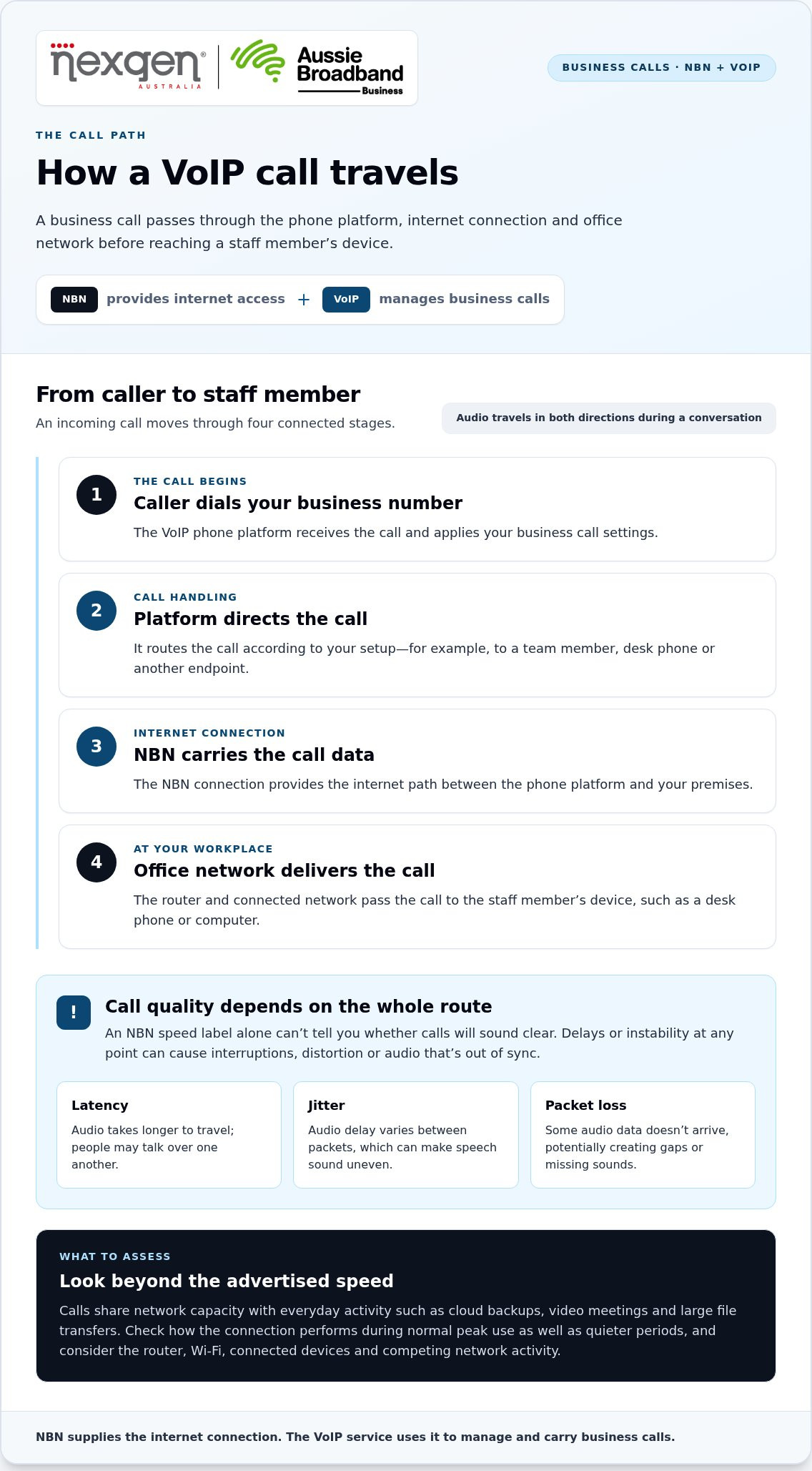
A business VoIP call passes through several connected points. The NBN connection provides the internet path, while the phone platform and office network help get the call to the right staff member. An NBN speed label alone can’t tell you whether calls will sound clear.
For an incoming business call, the journey usually works like this:
- The caller dials your business number. The VoIP phone platform receives the call and applies your business call settings.
- The platform directs the call. It routes the call according to your setup, for example to a team member, desk phone or other endpoint.
- The call travels over the internet. The NBN connection carries the call data between the phone platform and your premises.
- Your office network delivers it. The router and connected network pass the call to the staff member’s device, such as a desk phone or computer.
Audio travels in both directions during a conversation. If any part of the route is delayed or unstable, people may hear interruptions, distortion or audio that’s out of sync. In short: NBN provides the internet connection; the VoIP service uses it to manage and carry business calls.
Why can a fast NBN plan still have call-quality issues?
A fast plan describes potential connection speed, not necessarily how the connection performs during a busy workday. Calls share network capacity with other activity, such as cloud backups, video meetings and large file transfers. Congestion or inconsistent performance can affect voice quality, even if a speed test looks healthy when the office is quiet. Check performance during normal peak use as well as at quieter times.
Three terms can help describe common symptoms:
- Latency is the time audio takes to travel. High delay can make people talk over one another.
- Jitter means the delay varies between packets of audio, which can make speech sound uneven.
- Packet loss occurs when some audio data doesn’t arrive, potentially creating gaps or missing sounds.
These problems can have different causes, so upgrading to a faster plan won’t necessarily resolve every call issue. Assess the complete route, including the office network and how the connection performs under everyday demand.
What role do routers and office networks play?
Your router and local network sit between the NBN connection and staff devices. Wi-Fi coverage, network equipment and competing activity can all affect calls inside the workplace. For example, a call over congested Wi-Fi may behave differently from one using a wired desk phone. Network prioritisation can give voice traffic preference, but whether it’s suitable depends on the equipment and configuration.
When assessing an nbn voip business phone setup, consider where calls are answered, how staff connect and what else uses the network at busy times. Nexgen’s business VoIP phone systems can be tailored around calling needs, desk phones and remote work.
NBN VoIP business phone checklist: assess your connection before rollout
Before rollout, assess how your internet connection performs alongside the way your team works. Record likely call demand, applications in use, devices and work locations, then review performance during a representative busy period. A speed test taken when the office is quiet may not show what happens when calls, video meetings and file transfers overlap.
Check connection performance and expected call demand
Start by estimating demand. Note how many people may be on calls at the same time, including remote staff, and what else your connection carries during busy periods. A small practice, for example, may have reception calls overlapping with cloud applications and video meetings. Base your assessment on these real patterns, rather than a guess about bandwidth.
- Call demand: Record how many staff may call simultaneously, including during peak periods.
- Other internet use: List applications used during calls, such as video meetings, cloud services, file uploads or backups.
- Performance over time: Check download and upload performance, consistency and latency during normal work hours, not only when the office is quiet.
- Service requirements: Compare observed conditions with the current technical requirements published for the VoIP platform you plan to use. Requirements vary, so don’t rely on a universal speed threshold.
Keep a brief record of test times and what the team was doing. If performance changes during busy periods, that context can help identify whether the concern relates to the connection, capacity or network configuration.
Check office equipment, Wi-Fi and user locations
Map the devices and places from which staff will make and receive business calls. Include office-based and remote workers, as well as people who move between locations. This can reveal practical dependencies before installation, such as weak Wi-Fi coverage or a desk phone that could use a wired connection.
- Devices: List planned desk phones, computers and mobile devices, noting who will use each type.
- Connection method: Record which devices rely on Wi-Fi and where a wired network connection is available.
- Work locations: Note the office areas and remote locations where staff need to call.
- Network equipment: Document the router and general network layout, including known coverage or performance concerns.
- Competing activity: Identify other network use that could coincide with calls, such as large uploads or video meetings.
VoIP readiness means assessing the connection, office network, devices and real-world usage together. A practical checklist gives your business a clearer basis for planning before calls move to a new system.
Plan for NBN outages, power interruptions and business call continuity
VoIP calls rely on working internet connectivity and powered equipment. A backup for one part of the setup won’t necessarily keep calls working if another part is unavailable. Plan separately for the NBN connection, power at your premises, the phone platform and the devices staff use.
Use this sequence to build a practical continuity plan:
- Identify priority calls. List the business numbers customers use, the teams that answer them and calls that need prompt attention.
- Decide how calls should be handled. Set out what staff should do if the office loses internet access or power. Depending on your system and requirements, options may include redirecting calls or using mobile call handling.
- Map the dependencies. Identify which equipment needs power, which devices need an internet connection and whether staff can work from another location. A battery backup may support selected equipment during a power interruption, but it won’t restore an unavailable NBN service or phone platform.
- Assign responsibilities. Decide who will identify the disruption, communicate with staff and put the agreed call-handling arrangements into action.
- Test and review the plan. Practise the steps, confirm staff know what to do and update the plan when phone settings, equipment or work arrangements change.
What should a business decide before an interruption?
Start with the calls that matter most to customers and daily operations. For example, your business might arrange an alternative way to answer its main enquiry number, while less urgent calls can be returned once service resumes. Choose contingencies that suit your phone setup and team, and clarify who can activate them. Alternate connectivity or mobile call handling may help in some circumstances, but each has its own service, device and power requirements.
How can teams make a continuity plan usable?
Keep the plan short enough for staff to follow under pressure. Record contact and escalation steps, who makes call-handling changes, and how employees will receive updates if normal communication tools are affected. Test the process instead of assuming it works. Include emergency calling in the review: VoIP emergency-call arrangements and limitations can depend on the service and circumstances. Use current ACMA information to understand the relevant arrangements, and don’t assume an internet or mobile backup guarantees access to emergency services.
A continuity plan should account for separate failure points. An NBN interruption can affect the connection; a power failure can stop local equipment; a phone-platform issue may affect call management; and a handset or device problem can leave an individual staff member unable to answer. For an nbn voip business phone setup, document what remains available in each scenario and the next action for your team.
Nexgen’s business phone systems bring together call handling, devices and connectivity to suit your team’s requirements.
Choose an NBN VoIP business phone setup that fits your team
The right phone setup reflects how your team handles calls, where staff work and what your connection can support. Use your readiness findings to define practical requirements rather than choosing a system based only on speed or features. A single-office reception team has different needs from a business with staff working across multiple locations.
Match phone-system capabilities to everyday work
Start with the calls your team handles each day. Consider how incoming calls should reach staff, whether employees need desk phones and how the system should accommodate changes in team size or call demand. Features such as call routing and voicemail-to-email are most useful when they address a real workflow need.
For remote staff, consider whether they need to make and receive business calls using desk phones, computers or mobile devices. Choose the combination that suits employees’ roles and working arrangements, and ensure the proposed setup reflects how the team will use those devices.
| Team profile | Requirements to consider |
|---|---|
| Basic calling needs | Everyday calling, suitable devices for staff and straightforward handling of incoming enquiries. |
| Growing team | Flexible call handling, desk phone integration and capacity that can accommodate changing staffing or call demand. |
| Distributed team | Calling across office and remote locations, with appropriate access from desk phones, computers or mobile devices. |
What to prepare for a business phone-system discussion
Bring operational details, not just a preferred handset or plan speed. Note expected simultaneous calls, device preferences, connection observations from representative work periods and the applications used alongside calls. Describe how customers reach your business, who answers, where staff work and what should happen if connectivity or power is interrupted. This helps shape requirements around actual workflows.
If your team is comparing options, the guide VoIP Solutions for Small Business Australia: The 2026 Guide offers a broader starting point. Use it alongside your readiness notes to clarify which capabilities matter most.
An nbn voip business phone setup should bring the phone platform, devices and call handling together around your team’s work. Nexgen provides tailored VoIP and cloud phone systems for small and growing businesses, including flexible call handling, desk phone integration and scalable line capacity.
Make your phone setup ready for what’s next
Your business phone requirements may change as your team, customer expectations and work arrangements evolve. Review your setup when those needs shift, rather than waiting for call-handling problems to reveal a gap.
A well-planned nbn voip business phone setup gives you a practical foundation to adapt. Keep a simple record of what’s working and what needs attention, so future changes can be guided by your team’s experience.
With a clear view of your priorities, you can make phone-system decisions with greater confidence and keep your business prepared for changing needs. Talk to Nexgen about the right phone system for your business.
Frequently Asked Questions
Is NBN suitable for a business VoIP phone system?
Yes, NBN can be suitable, but assess the service at your premises alongside the requirements of your chosen phone platform. Before making the system your team’s main calling method, arrange test calls using the devices and scenarios staff will rely on, such as answering an inbound call and transferring it to a colleague. Record differences between devices or office locations. This can reveal practical issues a general connection check may miss.
How much NBN bandwidth does a business VoIP phone need?
There’s no single bandwidth figure that applies to every business. Use the phone platform’s current technical guidance and relate it to your planned call setup. In particular, distinguish the number of staff accounts from the number of calls likely to be active at once. This gives you a more useful basis for planning capacity than sizing the service by headcount alone.
Can a business keep using its existing phones with VoIP over NBN?
Some existing phones may suit a new system, but compatibility and supported functions can differ by model. For each handset, establish whether it can be retained, which functions will work, or whether another device is more suitable. This helps you plan replacements and avoid assuming a phone will behave exactly as it did with the previous system.
Does a business need a separate VoIP service with NBN?
Yes. The NBN connection and business phone service perform different roles. As part of a changeover, include number transfer and cutover timing in your plan. Decide who will coordinate the transition, how staff will know when to use the new system, and how incoming calls will be handled during the change. Clear ownership helps reduce confusion for employees and customers.
Will NBN VoIP phones work during a power outage?
Not automatically. A phone may stop working if its device or the network equipment it relies on loses power. Keep a charged mobile phone available for essential communications, and make sure staff know where to find the disruption procedure if office systems are unavailable. Treat emergency calling separately: arrangements and limitations depend on the service and circumstances. Use current ACMA information, and don’t assume a backup guarantees access to emergency services.
How can I check whether my NBN connection is ready for VoIP?
Use a short acceptance plan before the system becomes your team’s main calling method. Test the main inbound number, outbound calls, transfers and other important tasks on the intended devices. Have staff try the process from their usual work locations, then record issues and who will resolve them. For an nbn voip business phone rollout, this practical sign-off confirms the setup works for real tasks, not just a test connection.