


You may not need to replace every handset to move your business phone system onto the NBN. NBN-compatible business phone systems commonly use VoIP, including cloud phone systems and IP-enabled on-premise PBX systems. Some traditional phones can also connect through an analogue telephone adapter.
It’s understandable to want clear answers before changing a system your team relies on. The right setup depends on your existing equipment, connection and how many calls happen at once. Standard-quality VoIP uses around 100 kbps per simultaneous call, while the demands of video meetings and cloud applications also affect the internet plan your business needs.
This guide explains which phone systems work with the NBN in Australia, what to consider when estimating bandwidth, and how internet plan costs vary with speed and business requirements. It also covers the practical benefits of switching, from supporting staff in different locations to simplifying call management and adding phone features.
Key Takeaways
- Cloud VoIP, IP-enabled PBX systems and compatible desk phones can work over the NBN; some older handsets may need an adapter or replacement.
- Allow around 100 kbps per simultaneous standard-quality VoIP call, and factor in video meetings and other internet use when assessing your connection.
- Switching can make it easier to support calls across different locations and add phone lines or features as your business changes.
- Plan for equipment and network setup, and consider whether older fax machines, alarms or EFTPOS equipment need attention during the move.
- Understand how emergency calling and number portability apply to your new service before transitioning your main business number.
How much internet bandwidth do I need for VoIP on NBN?
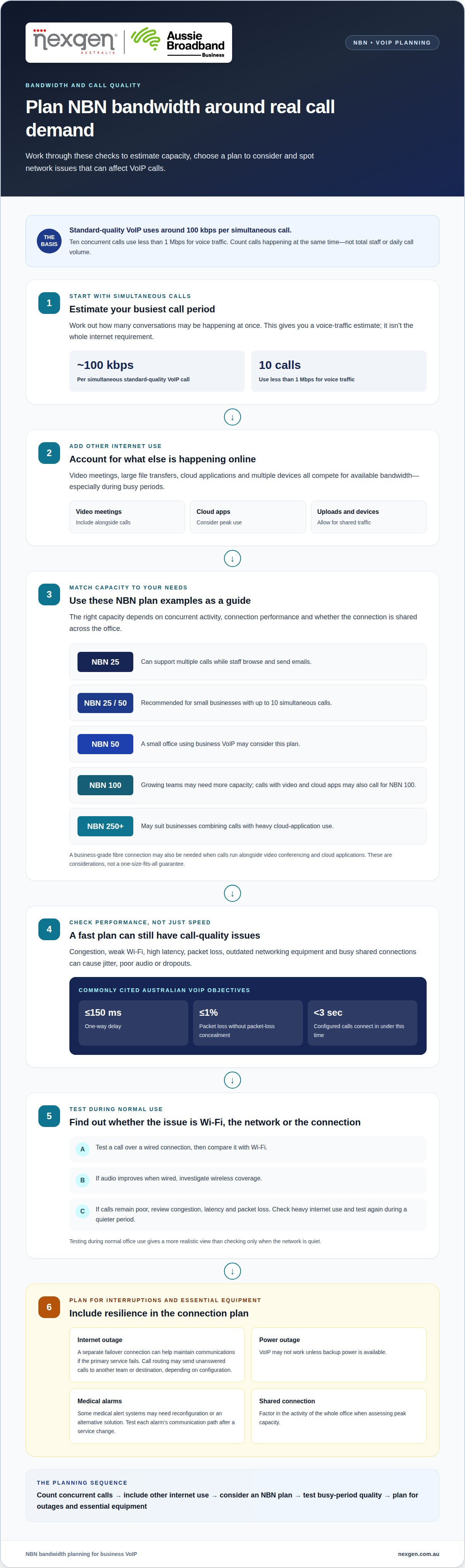
Standard-quality VoIP uses around 100 kbps for each simultaneous call. Ten concurrent calls therefore use less than 1 Mbps for voice traffic, leaving other capacity for email, browsing and cloud applications. The internet connection also needs stable performance, not simply a high advertised download speed.
An NBN 25 connection can support multiple calls while staff browse and send emails. NBN 25 or NBN 50 plans are recommended for small businesses with up to 10 simultaneous calls. A small office using business VoIP may consider NBN 50, while growing teams may need NBN 100. Businesses combining calls with heavy cloud-app use may consider NBN 250+.
Video meetings, large file transfers and multiple devices compete for available bandwidth. A business using video conferencing and cloud applications alongside calls may need NBN 100 or business-grade fibre. The right capacity depends on concurrent activity, connection performance and whether the connection is shared across the whole office.
Speed alone doesn’t guarantee clear calls. Congestion, weak Wi-Fi, high latency, packet loss, outdated networking equipment and busy shared connections can cause jitter, poor audio or dropouts. A commonly cited Australian VoIP objective is no more than 150 ms one-way delay and no more than 1% packet loss without packet-loss concealment. Configured calls should connect in under 3 seconds.
- Estimate concurrent calls: count calls happening at the same time, not total staff or daily call volume.
- Include other traffic: account for video meetings, cloud applications and large uploads during peak periods.
- Test the busy period: compare call quality during normal office use, not only when the network is quiet.
Call queues and auto-attendants organise incoming calls, but they don’t remove the need for sufficient internet capacity. A queue can hold callers while staff finish conversations, and an auto-attendant can direct callers to the right team. Calls still depend on the connection and on staff being available to answer them.
Internet outages can disconnect desk phones and softphones. A separate failover connection can help maintain communications if the primary service fails. Depending on the phone system’s configuration, call routing can also send unanswered calls to another team or destination. VoIP may not work during a power outage unless backup power is available.
To troubleshoot call quality, test a call over a wired connection and compare it with Wi-Fi. If audio improves, investigate wireless coverage. If calls remain poor, review congestion, latency and packet loss. Check whether other devices are using the internet heavily, then test again during a quieter period. This can help distinguish local network issues from problems with the NBN connection or VoIP service.
Which phone systems are compatible with the NBN in Australia?
VoIP or SIP phone systems can operate over an NBN internet connection, including cloud systems and IP-enabled on-premise PBX systems. To choose a suitable option, identify the NBN connection available at your Australian business address, then match the phone system to your handsets, call patterns and internet setup.
Phones, IP phones and softphone apps
IP phones connect to a modem or router, while softphone apps let staff call from a computer or mobile device. Both use VoIP to carry calls over the internet. Existing corded and cordless telephones may also work when connected through a VoIP-enabled modem or an analogue telephone adapter. An adapter can help retain compatible handsets, but it won’t make every phone system suitable. Match each device to the phone service and setup it requires.
Remote and hybrid staff can use desk phones, laptop softphones, mobile apps or web-based calling platforms. For example, a receptionist might use an IP handset in the office while a staff member calls through a softphone from another location. This gives employees options while keeping calls within the same business communications setup.
Existing landline service compatibility
A traditional phone service connected through a copper line differs from an NBN phone service, which commonly uses VoIP. Standard phones can connect through a VoIP-capable modem or a UNI-V port on an FTTP connection. The port is available only with FTTP, so businesses with FTTN, FTTC or HFC shouldn’t assume a wall-phone connection will work the same way.
An IP-enabled on-premise PBX or PABX may be able to use VoIP services over an internet connection, depending on system compatibility. Older systems may need an adapter, reconfiguration or replacement. Fax machines may also require special settings or an alternative service. These distinctions matter when planning a transition, particularly if the existing phone line supports equipment beyond everyday voice calls.
Equipment, setup and network configuration
Hosted PBX systems use an internet connection to make and receive calls through a hosted phone platform. An IP handset can connect to the modem or router, or staff can call from a computer using a softphone. A non-IP-enabled handset may need an analogue telephone adapter. The right equipment depends on the phones you already have and how staff need to make calls.
Before moving services, map the existing phone lines, handsets and PBX connections. Identify which devices can connect directly, which need adapters and which need an alternative. The setup may need to be adapted to suit the phone system and NBN service. These details help shape a setup that supports office handsets and staff calling from laptops or mobile devices.
Checking availability and choosing a system
Check NBN availability at the business address and identify the connection type, such as FTTP, FTTN, FTTC or HFC. Then compare the connection with the phone system’s requirements and the number of concurrent calls. Choose a system to suit the connection, existing equipment and the way staff handle calls, rather than basing the decision on handset type alone.
Existing business numbers can usually be ported to an NBN service, subject to provider availability. Porting is generally free or costs A$25-A$50 as a one-off. Businesses can often keep an existing landline number, but number transfer timing and service continuity need to be considered together. Running the new service alongside the current system before porting the main number can help maintain access during the transition.
Ask the phone system manufacturer or supplier to confirm whether a particular model supports the intended NBN phone service. A system that works with one connection or provider may need different equipment or configuration with another. Reviewing the address, connection type, phone hardware and number-porting plan together gives the business a clearer basis for choosing a suitable system.
Business benefits of switching to an NBN phone system
An NBN phone system can bring internet and business calling together over one connection. For an Australian office, this can reduce reliance on separate copper phone lines and give staff more flexibility in handling calls. The practical benefit depends on existing equipment, the internet setup and the business’s communication needs.
One connection can carry calls alongside email, web access and cloud applications. This can simplify the communications setup, but it also means the router and internet service support several business functions. A retailer, for example, might use the connection for customer calls, online orders and staff email. Planning for these demands helps the phone service fit into everyday operations.
VoIP calls, particularly international calls, can cost less than calls made through traditional phone lines. The difference depends on the service plan and calling patterns, such as how often your team contacts overseas customers. Reviewing local, mobile and international call activity gives you a more useful basis for comparing current call costs with a new service.
Staff can make and receive calls from different locations using a desk phone, mobile app, laptop softphone or web-based calling platform. For example, a team member working from home can handle business calls over a stable internet connection instead of relying on an office handset. This supports remote and hybrid work while keeping business communications accessible across locations.
Adding lines or features is generally simpler and cheaper with an NBN-ready phone system than with a traditional system. A growing business can add capacity or change call management without extending copper wiring for every change. Lines and features still need to suit the system and service, but the setup can adapt as business requirements shift.
Many NBN-ready systems can integrate with customer relationship management (CRM) systems and collaboration platforms. A CRM integration connects phone activity with customer records, while a collaboration platform can bring calling into other workplace communications. For example, a sales team may benefit from accessing calls and customer information through its everyday tools, reducing the need to switch between applications.
Switching doesn’t mean every existing device must be replaced. Compatible handsets can remain in use through suitable connections or adapters, while older equipment may need replacement or reconfiguration. A business that relies on a traditional PBX should factor its existing setup into the transition. This helps avoid replacing equipment that can still function and identifies devices that need attention.
- Review call patterns: identify local, mobile and international calls to compare calling needs.
- Map staff locations: consider which employees need desk phones, apps or laptop calling.
- List connected tools: include CRM platforms, collaboration software and other devices using the office router.
These considerations show how an NBN phone system can support day-to-day work and where equipment or connectivity changes may be needed. A clear view of existing calls, devices and business tools helps you weigh the benefits against your current arrangement.
What equipment, setup steps and network configuration are needed for NBN business VoIP
NBN business VoIP needs an active internet connection, a compatible router and suitable calling equipment. Depending on the setup, this may include IP desk phones, computers running softphone applications, an analogue telephone adapter or an IP-enabled PBX. The chosen system determines how calls connect and which network settings are required.
A hosted PBX uses an internet connection to make and receive calls through a hosted phone platform. IP phones connect to the router, while softphones use a computer’s internet connection. Existing analogue handsets can connect to a VoIP service through an analogue telephone adapter. An IP-enabled on-premise PBX can also work with NBN VoIP if it sends and receives digital data.
Network configuration helps voice traffic move reliably between devices and the phone service. A static IP address can simplify firewall configuration, remote access, SIP registration and troubleshooting. SIP carries call setup information, while RTP carries call audio. The provider’s documented settings determine the required ports, so firewall rules should match the service configuration.
A commonly used RTP range is UDP ports 10000-20000. SIP signalling may use a port other than UDP 5060, so don’t assume one default setting applies to every VoIP service. Apply the port ranges and protocols specified for the service, and avoid opening broad firewall access without a clear requirement.
For a structured transition, plan the installation around the existing network and phone equipment:
- Document the setup: record the NBN connection, router, PBX, handsets and any analogue adapters.
- Map the call path: identify how each handset or softphone reaches the hosted PBX or on-premise system.
- Configure the network: apply the service’s SIP and RTP settings to the router and firewall.
- Test each device: make and receive calls from desk phones and softphones, then check audio in both directions.
Test during normal office network activity, not only when the connection is idle. For example, place a call while staff use cloud applications and check that the audio remains clear. If calls fail to register, check SIP settings and the device connection. If calls connect without audio, review RTP port settings and firewall rules. These checks can help distinguish a handset issue from a network configuration problem.
Static IP addressing can make some business VoIP configurations and remote access easier to manage, but it doesn’t replace correct firewall rules or testing. Record approved settings, device locations and any changes made during setup. This provides a clear reference for future troubleshooting, handset changes or network updates.
What Australian rules apply to business phone systems, emergency calls and number portability?
Australian businesses moving to NBN phone services need to plan for emergency calling, number portability and the copper network transition. According to the Australian Communications and Media Authority (ACMA), a carriage service provider supplying an emergency telephone service must provide access to 000. Existing business numbers can usually be ported, and relevant FTTN and FTTC addresses have a mandatory switch starting on 1 July 2027.
Emergency calls and business continuity
Access to 000 is a key consideration when selecting and configuring a business phone service. The ACMA requirement applies to a carriage service provider supplying an emergency telephone service. Keep this in mind when reviewing how employees place emergency calls from desk phones, softphones or other connected devices.
VoIP calls depend on an internet connection and may not work during a power outage unless backup power is available. This matters if staff rely on desk phones to reach emergency services. Include the modem, router and phone equipment in continuity planning, and understand what happens to calls if power or internet access is lost.
Medical alert systems and emergency call buttons also need attention during a phone transition. Some medical alert systems may need reconfiguration or an alternative solution for NBN telephone services. Include each alert device in the transition plan and test its communication path after the service changes.
Keeping and porting an existing business number
Number portability lets a business move its existing phone number to a new telephone service. Existing business numbers can usually be ported to an NBN service, subject to provider availability. This can help customers continue calling a familiar number after the phone system changes.
Plan number porting around the service transition. Businesses are advised to run the new phone system in parallel for a few days before porting the main number. During that period, staff can test incoming and outgoing calls, confirm call routing and keep the current service available. For example, reception can check that callers reach the right department before the established number moves.
Record the number being transferred, its current service and the planned porting sequence. Include numbers used in published contact details, customer communications or equipment. This gives the business a reference when coordinating the new service and clarifies which number staff should use during the changeover.
Relevant copper network transition dates
According to nbn, the mandatory switch for relevant FTTN and FTTC addresses in Australia starts on 1 July 2027. Copper switch-offs for relevant addresses begin in January 2028. Businesses in areas where the NBN has been rolled out need to transition within the timeframe given for their area.
Connection type and address matter when planning a phone migration. Identify whether the premises use FTTN or FTTC, then account for the applicable timeframe alongside number porting and equipment changes. A staged plan can align service testing, staff communications and number transfer with the network change.
For help matching a phone system to your business requirements, explore business VoIP phone systems.
Nexgen Australia
Nexgen Australia helps Australian businesses choose phone systems to suit their NBN connection, existing equipment and calling needs. If you’re deciding whether to keep compatible handsets, move to VoIP or replace an older PBX, Nexgen can help you understand the options and plan a suitable transition.
Nexgen’s Small Business Phone Systems, Office Phone Systems and VoIP Phone Systems support different business setups. The right fit depends on how your team handles calls, where staff work and which existing devices need to remain in use.
For practical guidance on your business phone system options, contact Nexgen Australia.
Plan your next communications move
Your next phone system should support how your business works now and the changes you expect ahead. Before choosing NBN-compatible business phone systems, bring together the people who manage customer calls, workplace technology and business continuity. Their priorities can help shape a setup that fits daily operations rather than simply replacing old equipment with new.
Treat the transition as an operational decision, not just a technical one. Consider how staff will use the system, who will manage changes and how the business will handle future growth. A clear view of those responsibilities makes it easier to move forward with purpose.
Nexgen Australia can help you consider suitable business phone system options for your organisation. Contact Nexgen Australia to discuss your options and identify a system that suits your business.
Frequently Asked Questions
Do I need a business-grade NBN plan or will a residential plan work for VoIP?
A residential plan can suit some small businesses, while business-grade connectivity may be a better fit when support and continuity matter more. Consider what happens if the internet stops working during trading hours and whether your team needs a backup connection. A business that relies on customer calls may weigh those risks differently from a small office with limited calling needs.
Do I need to replace my existing phones when switching to an NBN phone system?
Not always. Before replacing handsets, consider their age, condition and role in the business, including whether staff rely on them for shared lines or reception duties. A phone may work technically but still lack functions your team needs in the new system. Use the transition to decide which devices are worth retaining and which could be replaced as part of a broader communications refresh.
What are the costs of NBN-compatible business phone systems in Australia?
Costs depend on the system and the equipment and services your business needs. For a useful comparison, separate recurring service charges from one-off items such as handsets, adapters or installation. Also consider whether your existing PBX can be retained and whether connected equipment needs changes. This helps compare proposals on the same basis instead of focusing on a single advertised monthly amount.
How do hosted PBX, on-premises PBX and SIP trunking compare for Australian businesses?
A hosted PBX places the phone platform with a service provider, while an on-premises PBX keeps the system equipment at your workplace. SIP trunking connects a compatible PBX to VoIP calling, so it can suit a business that intends to retain its existing system. The decision often comes down to where you want the system managed and whether the current PBX suits your operational needs.
Can I keep my existing business number when changing phone systems?
Usually, yes. Keeping the number can help customers continue using familiar contact details, but plan the transfer around operational needs. For example, update internal call handling and staff instructions alongside the port, so employees know where calls will arrive and how to respond. This is especially useful for published numbers used by customers, suppliers or other business contacts.