


A call should reach the person best placed to handle it, not bounce around the office. Intelligent call routing for a small business directs incoming calls according to rules such as caller needs, staff availability and business hours. It can send unanswered calls to voicemail or another destination, helping your team manage calls when staff are busy or away.
Choosing a system isn’t just about adding features. You’ll want routing that fits how your team works, gives callers a straightforward experience and handles calls consistently during and outside business hours. The setup should also be manageable as your business changes.
This guide explains how call routing works, when tailored routing can help and how to compare software and pricing. It covers features that affect system fit and cost, including business-hours schedules, call queues, mobile routing and integrations, so you can make a practical decision for your Australian business.
Key Takeaways
- Match calls to the right team member using practical rules such as time of day, caller location and staff skills.
- Use routing to reduce unnecessary transfers and give callers a clearer path to help.
- Plan separate routes for business hours, after-hours periods, weekends and public holidays.
- Compare software by its routing options, integrations, reliability features and how easily it can adapt as your business changes.
- Assess pricing by looking at what is included and which features your team will actually use, rather than choosing on cost alone.
What is call routing?
Call routing uses preset rules to connect an incoming caller with a person, department or voicemail destination. Rules can take account of the time, location, staff skills and availability.
Time-based and geographic routing
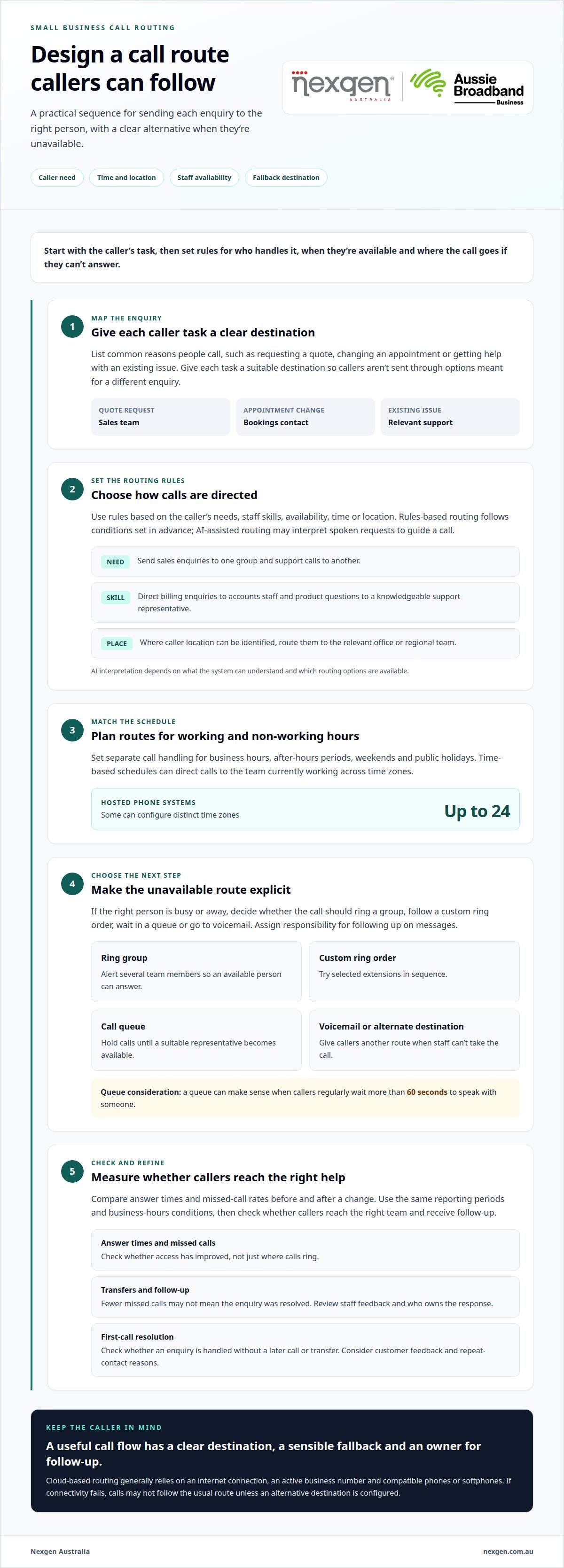
Time-based and geographic routing sends calls to different destinations according to the time or location associated with a call. For an Australian business serving customers across time zones, schedules can direct calls to the team currently working. Some hosted phone systems can configure up to 24 distinct time zones.
Location-based rules can send calls to a relevant office or regional team when the phone system can identify the caller’s location. For example, a business serving customers across several regions could direct callers to the team responsible for their area. Clear rules help callers reach the right department without repeatedly explaining where they are.
Rules-based and AI-assisted routing
Rules-based routing follows conditions set in advance, while AI-assisted routing can use caller intent to guide a call. A simple rule might send sales enquiries to one group and support calls to another. The business defines the choices and destinations, making the route predictable when staff roles are clear.
Skills-based representative matching
Skills-based routing directs callers to a representative with relevant knowledge or responsibility. A business could route billing enquiries to accounts staff and product questions to a knowledgeable support representative. This matching works best when staff skills and responsibilities are accurately reflected in the routing rules.
This approach can reduce avoidable transfers, especially when callers need help with an existing issue. It also has limits: if the right person is unavailable, the system needs another destination, such as a queue or voicemail. Routing cannot replace staff knowledge or resolve a complex enquiry on its own.
Call queues and business-hours routing
A call queue holds incoming calls until a suitable representative becomes available, rather than sending every caller to one person. During business hours, routing rules can ring available staff or place callers in a queue. A queue can make sense when callers regularly wait more than 60 seconds to speak with someone.
Cloud-based routing generally relies on an internet connection, an active business number and compatible phones or softphones. If connectivity fails, calls may not follow the usual route unless an alternative destination is configured. For remote staff, a softphone app can keep the business number associated with the worker rather than the office. Account for this dependency, staff availability and clear fallback destinations when designing the call flow.
Customer experience and call-handling efficiency
Good call handling helps customers reach a useful next step without unnecessary effort. Reviewing where calls stall can show whether your routing rules deliver the experience your business intends.
Customer journeys and missed-call management
A customer journey is the sequence of contacts someone has with your business, from an initial enquiry through service and follow-up. Map common tasks, such as requesting a quote, changing an appointment or getting help with an existing issue. Each task needs a clear destination and an alternative when the usual contact is unavailable.
Ring groups and custom ring orders affect how callers reach available staff. A ring group can alert several team members, while a custom order tries selected extensions in sequence. Choose an arrangement that reflects staff responsibilities and availability. If the first person is often occupied, a group or alternate destination may work better than repeatedly ringing one extension.
Keep each route understandable. Customers seeking help with an existing service should not have to navigate options intended for new sales enquiries. Reviewing routine tasks with the staff who handle them can reveal confusing menu choices, repeated transfers or unclear follow-up responsibilities.
Measuring answer times and missed calls
Measure routing performance by comparing answer times and missed-call rates before and after a change. Use the same reporting periods and business-hours conditions, then consider whether callers reach the right team and receive follow-up. This shows whether the change improved access, rather than merely changing where calls ring.
Review call reports alongside staff feedback. If fewer calls are missed but callers are transferred more often, the route may have improved initial answering without resolving the underlying enquiry. A longer queue, by contrast, may be acceptable if callers reach the right person and receive clear information while waiting.
First-call resolution is another useful measure. It indicates whether an enquiry is handled without a later call or transfer. Pair it with customer feedback and the reasons for repeat contact. An increase in repeat enquiries may point to unclear ownership, incomplete answers or a call path that sends customers to the wrong team.
Use the findings to adjust one part of the call flow at a time. For example, change the destination for a recurring enquiry, then review the same measures again. This makes it easier to see which change helped and where customers still encounter friction.
Business-hours, after-hours, weekend and holiday call handling
A phone system can automatically change call destinations to match your business schedule. A clear schedule sets expectations for callers and gives each incoming call a defined route.
Business-hours and after-hours routing
Business-hours routing directs calls to staff or a queue while your team is available; after-hours routing uses a separate destination. For example, a business open Monday to Friday, 8:30 am-5:30 pm AEST can send calls to its team during those hours, then direct callers to voicemail or an on-call contact afterwards.
A practical setup can combine time-of-day rules, a digital receptionist and a basic queue. The after-hours route might send voicemail notifications to email, or direct urgent enquiries to designated on-call staff. For teams under 10 staff, a simple after-hours message and hunt group cover most scenarios.
Make the greeting specific. State the business name, when callers can expect the team to answer and what they can do next. For example, callers might leave a message for the next business day or follow the stated route for urgent matters. Avoid promising a response time unless your business can meet it.
Weekend and holiday call handling
Weekend routing sets a separate call path for days when the usual business-hours team is unavailable. A business might direct Saturday calls to voicemail, while one with weekend staff could route calls to that team. The right arrangement depends on who is available and which enquiries need attention.
Public holidays can have their own schedule instead of using the standard weekday route. Many cloud phone systems let businesses set public-holiday schedules separately from ordinary business hours. This helps prevent callers from hearing a weekday greeting when the office is closed for a holiday.
Before a weekend or public holiday, make sure the recorded message matches the active route. If callers are sent to voicemail, explain that they can leave their details. If a designated on-call contact handles urgent enquiries, direct callers there clearly. These details reduce confusion and help staff manage follow-up when normal hours resume.
Review the schedule when opening hours, staff availability or holiday arrangements change. A weekday schedule should reflect the relevant time zone, while weekend and holiday rules should match the actual service pattern. Test each route to confirm that the greeting, queue and fallback destination align with the calendar.
Choosing call routing software
Choose software that fits your call patterns, staff skills and business-hours coverage. The right features should solve specific call-handling problems without making the caller’s journey harder.
Look for clear routing rules, queues, reporting, useful integrations and a workable fallback if internet connectivity drops. These features help your team direct incoming calls and manage exceptions.
Choosing an intelligent call routing provider
A suitable provider can translate your call flows into routing rules that match how your business operates. That matters because software alone cannot decide which department owns an enquiry or what should happen when staff are unavailable.
Start with real call examples: a new sales enquiry, an existing customer issue and a call outside business hours. A provider should explain how each would be routed, where unanswered calls would go and how your team could update destinations when responsibilities change.
Consider how the system will fit your existing phone setup and working arrangements. A team with remote staff, for example, may need calls directed to business-number softphone apps, while an office-based team may use desk phones. Clear support for configuration and changes helps keep routing rules aligned with how your organisation works.
Features of a call routing system
Call routing software should let you define destinations, schedules and fallback routes in clear terms. For example, it could direct a support call to a queue, then use an alternative destination if the queue cannot answer. Check that the call flow can be adjusted as your departments and staff skills change.
Useful features to compare include:
- Call queues and ring groups: Hold callers or ring selected agents, with a clear route for unanswered calls.
- Business-hours schedules: Apply separate routing rules for open hours, after-hours periods and public holidays.
- Internet failover: Cloud phone systems typically offer options to redirect inbound calls to a mobile or alternative destination if the internet connection drops.
- CRM integration: Caller identity, purchase history and unresolved-issue information can help inform routing decisions.
- Reporting: Real-time monitoring can show queue activity and help supervisors assess performance and adjust routes.
Some systems use natural language processing, or NLP, so callers can state why they’re calling instead of selecting a numbered menu option. This may suit businesses with distinct enquiry types, but a simple menu or direct routing can be easier for callers when the team handles a small range of requests.
Assess each feature against a real need, not a product checklist. CRM-based matching, for example, has little value if customer records are incomplete, while complex menus may add friction when a receptionist can handle calls directly. A practical choice connects each function to a defined caller need and staff responsibility.
Call routing software comparisons and pricing
Compare call routing software by how it handles incoming calls, what the price includes and how well it fits your call flows. A clear comparison separates essential functions from advanced tools your team may not need.
Start by checking how each option meets three practical needs: who receives a call, what happens when nobody answers and how calls are handled outside business hours. A small professional office, for example, may need a greeting, a ring group and voicemail. A business with separate sales and support teams may need queues, skills-based routing and customer information from a CRM.
Pricing depends on the system’s scope and what the proposed service includes. Compare quotes by checking the charging basis and identifying separate costs for users, calling, numbers, handsets, setup, integrations or support. These components affect the total differently, so compare like with like rather than choosing by the headline figure alone.
Ask for the full cost structure based on the same timeframe and user requirements. For example, compare the cost of adding a staff member, changing a call flow or enabling an integration. A lower initial price may not reflect the ongoing cost of features your team relies on. Equally, advanced functions add little value if callers only need a direct route and voicemail.
Use this comparison checklist to assess each option:
- Routing flexibility: Can you combine time-based rules, queues, ring groups and voicemail destinations?
- Caller experience: Can callers reach the right team without navigating unnecessary menu choices?
- Staff fit: Can the system direct enquiries by department, availability or representative skills?
- Business continuity: Can incoming calls be redirected to another destination if internet connectivity drops?
- Visibility: Can managers review answers, missed calls, queue activity and transfers?
- Growth and change: Can users, destinations and routing rules be adjusted as the business changes?
For an apples-to-apples comparison, use the same team size, call scenarios and required features for every proposal. Include an example from a busy period and one from after hours. Then compare the routes each system provides, along with its reporting and cost components.
The best fit is the option that handles your real call patterns without unnecessary complexity. A basic rules-based system may suit a team with predictable enquiries; a more advanced platform may be relevant when caller intent, CRM context or specialist skills shape the route. Match the price to those needs, not the longest feature list.
Nexgen Australia: Small Business Phone Systems
Nexgen Australia provides Small Business Phone Systems and tailored Small Business VoIP Solutions for businesses reviewing how they handle calls. These options can help when your current setup makes it difficult to direct calls across staff, departments or business hours.
A phone system provides the foundation for arranging call flows around your team’s needs. Consider where callers need to go, how staff answer calls and what should happen when someone is unavailable. This gives you a practical starting point for discussing suitable routing options without adding features your business doesn’t need.
If you’re assessing a new phone system or refining how calls reach your team, contact Nexgen Australia to discuss your business requirements.
Set your call-handling priorities
Before changing your phone setup, identify when customers struggle to reach the right person. Note which calls need a specialist, where callers commonly get transferred and what should happen when the usual contact is unavailable. These priorities help keep a new call flow focused on real business needs.
Choosing intelligent call routing for a small business works best when the system supports clear responsibilities rather than adding complexity. Start with the caller experience you want, then consider which routing rules and software features support it. As your team or services change, revisit the call flow so it continues to reflect how your business operates.
If you’re ready to plan a phone setup around the way your team handles calls, contact Nexgen Australia today. A clear conversation about your requirements can help you identify a practical direction for your business communications.
Frequently Asked Questions
Does intelligent call routing require artificial intelligence?
No. A business can route calls using straightforward rules without artificial intelligence. AI may be useful when callers describe varied or complex needs that fixed menu choices cannot easily capture. The decision depends on how predictable your enquiries are and whether your team can define clear destinations. Start with the simplest approach that meets callers’ needs, then assess whether additional interpretation would solve a real problem.
Can a small business start with simple routing and expand it later?
Yes. A business can begin with a few clear call paths, then adjust them as its team and enquiry types change. For example, it might initially direct all calls to a general team, then separate sales and service routes when those responsibilities become distinct. Keeping the call flow understandable from the start makes future changes easier to assess and explain to staff.
Who should be responsible for maintaining call routing rules?
Assign responsibility to someone who understands both the customer journey and staff responsibilities, such as an operations or office manager. That person can coordinate changes when roles, opening arrangements or enquiry ownership shift. Staff should also know how to report routing problems, such as calls reaching the wrong team. Clear ownership helps prevent outdated rules from going unnoticed.
What should a business do when an enquiry does not fit its usual call paths?
Provide a clear alternative route for callers whose needs do not match the usual options. Depending on how the business handles enquiries, this could be a general team, receptionist or voicemail. Review these calls periodically to see whether a recurring request needs its own route. This prevents unusual enquiries from being stranded and helps the call flow reflect what customers actually ask.
What are the best intelligent call routing systems for small businesses in Australia?
Look for a system that can use caller intent, representative skills and caller history to match calls, with clear fallback routes when staff are unavailable. Basic rules-based routing may suit a simpler setup.