


A longer phone menu won’t fix calls reaching the wrong team. If callers have to guess which option to choose, they may give up before reaching someone who can help. For Australian businesses researching intelligent call routing australia, start by identifying what callers need and setting clear rules for where each call should go.
Routing options and IVR terminology can sound technical, but the basic ideas are straightforward. IVR, or interactive voice response, is the automated menu callers hear when they phone your business. Intelligent routing applies rules such as the caller’s selection, the time of day or team availability to direct calls. The aim is to make the journey clear and give callers a path to the right person or team.
This guide explains how to plan a call flow around your business needs, configure practical routing rules and review how the system performs. It also covers what to test, from menu choices and team availability to what happens when a call can’t be answered.
Key Takeaways
- Intelligent call routing uses business rules to direct incoming calls, offering more control than simple call forwarding.
- Plan your call flow around real caller needs: identify common call reasons, choose destinations, set fallback rules and test the paths.
- Compare sequential, simultaneous and menu-led routing to find a pattern that suits your callers and staff workflow.
- For intelligent call routing australia, keep configuration practical: document the rules, test each route and publish changes only after checking them.
- Review routing when your team or business hours change, and use available caller feedback and call records to guide improvements.
What intelligent call routing means for Australian businesses
Intelligent call routing uses rules to direct incoming calls according to the caller’s needs and your business priorities. Rules can use the number a caller selects, the time of the call or the team responsible for an enquiry. The aim is to guide each caller from the first ring to an appropriate person or team instead of sending every call to the same destination.
That’s different from simple call forwarding, which redirects calls from one number to another. For example, a small accountancy practice might forward its main number to the office manager’s mobile. A routed call flow could instead send callers asking about a new service to the sales team and existing clients with support questions to the staff responsible for client enquiries. The destination depends on the reason for the call, not just a fixed forwarding instruction.
Here, “intelligent” means the system follows defined rules. It doesn’t necessarily mean artificial intelligence is interpreting conversations or making decisions. Some call systems use an Automatic Call Distributor (ACD) to direct incoming calls to members of a team according to configured handling rules. Before adding complexity, decide what the rules need to achieve for your callers and staff.
How call routing differs from an IVR or auto attendant
Call routing is the set of rules that determines a call’s next destination. An IVR, or auto attendant, is the menu a caller can use to select a reason, such as sales or service. The caller’s menu choice can then trigger a routing rule. The menu collects the choice; routing acts on it. They work together, but they aren’t interchangeable terms.
When a business may benefit from routing calls
Routing can help organise calls when different enquiries need different people or teams. A growing Australian business might separate sales questions, service requests and general enquiries. Callers can choose the relevant option, while the business defines what happens if that team can’t answer.
- Separate responsibilities: direct sales enquiries and service questions to the people assigned to handle them.
- Support hybrid teams: set rules around which staff or teams receive calls, including when people work across different locations.
- Keep the journey understandable: use caller choices that reflect familiar reasons for calling, rather than internal team names or unnecessary menu branches.
A clear journey matters for small and medium-sized businesses because callers may not know who does what internally. A straightforward choice lets them explain what they need without having to identify a particular employee. Keep the options relevant, use plain language and provide a sensible route for callers who aren’t sure which one fits. Routing won’t remove every call-handling challenge, but it gives your team consistent rules to follow.
Plan an intelligent call routing flow around caller needs
A call flow is the path a call follows from the moment it’s answered to its destination. Planning that path before configuring your phone system makes the caller journey easier to follow and gives staff consistent instructions. For intelligent call routing australia, begin with how people contact your business, not with every option the system offers.
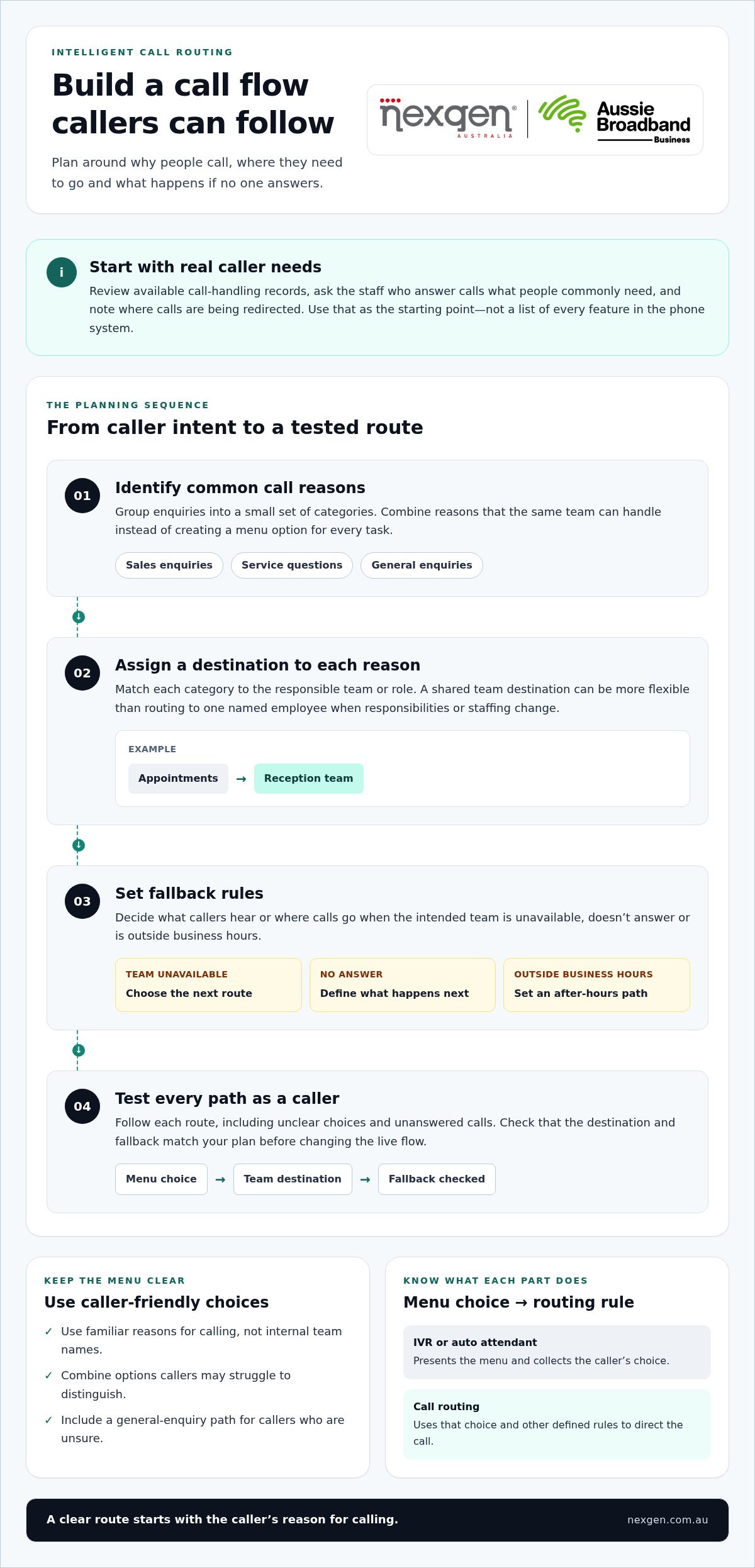
Review available call-handling records, ask the staff who answer the phone what callers commonly need, and note where calls are currently being redirected. This gives you a practical starting point. Then plan the flow in four steps:
- Identify call reasons. Group common enquiries into a small set of categories. Combine reasons that the same team can handle instead of creating a separate menu option for every task.
- Assign destinations. Match each category to a responsible team or role. A shared team destination is often more flexible than naming one employee, especially if responsibilities or staffing change.
- Set fallback rules. Decide what callers should hear or where calls should go if the intended destination is unavailable, unanswered or outside business hours.
- Test the flow. Follow each route as a caller would, including unclear choices and unanswered calls. Check that the destination and fallback match your plan.
Map caller intent to the right team
Use wording callers recognise, not internal department names. A medical practice, for example, might group calls into appointments, billing and general enquiries, then direct each option to the relevant role or team. Keep the menu focused: if callers can’t easily distinguish two options, consider combining them. This makes the route easier to understand and simpler for staff to maintain.
A basic flowchart can make the plan easier to discuss before anyone changes system settings. Start with the incoming call, show each caller choice, connect it to a team destination, then mark what happens if that team can’t answer. Include an “unsure” or general-enquiry path if callers may not know which option applies.
Example flow: Incoming call → caller selects “Appointments” → reception team → if unavailable, follow the business’s chosen fallback. Draw each option and fallback as a separate branch so gaps are visible before configuration.
Set business hours, fallback and escalation rules
Write down how calls should be handled during and outside your stated business hours. If your business operates across locations, specify which location’s hours apply to each number or team. Decide what callers should experience if a team is busy or no one answers, such as another suitable destination or a clear recorded message.
Keep the plan focused on the behaviour your business needs: which calls go where, when the rules apply and what happens if a destination is unavailable. Nexgen Australia supplies and integrates business VoIP and cloud phone systems, including business phone system solutions that can be set up around your call-handling needs.
Compare common call routing patterns and their trade-offs
Common routing patterns describe different ways calls can be directed. The right fit depends on who needs to answer, how your team works and how much choice callers need. Compare the options below against your actual call-handling needs and the features available in your phone system.
| Pattern | Caller experience | Staff workflow | May suit |
|---|---|---|---|
| Sequential | The call tries destinations in a set order. The caller waits while each destination is tried. | Creates a clear sequence of responsibility, such as a team phone followed by a nominated role. | Small teams with a preferred first contact and a defined backup. |
| Simultaneous | Multiple destinations are alerted at once, where the platform supports this. | More than one person can respond, but staff need to understand who takes ownership when several can answer. | Teams where several staff share responsibility for the same type of enquiry. |
| Menu-led | The caller selects a reason for calling, then the selection directs the call to a relevant destination. | Separates call types before they reach staff, but the menu needs to stay concise and easy to follow. | Businesses handling distinct enquiry types, such as sales, service and general enquiries. |
Sequential and simultaneous call distribution
With sequential distribution, destinations are tried in a defined order. This clarifies the expected hand-off, but later destinations may only be reached after earlier ones don’t answer. Simultaneous distribution alerts several destinations together, which can suit shared responsibilities. It may also interrupt multiple staff and leave ownership unclear unless the team agrees how to handle an answered call.
Think about the day-to-day workflow, not just the route itself. If a receptionist should screen calls before they reach another role, a defined sequence may reflect that responsibility. If a small service team shares incoming calls, simultaneous alerting may suit its workflow. Neither approach guarantees that a call will be answered; it defines how the system directs it.
Menu-led, time-based and overflow approaches
Menu-led routing lets callers choose a direction. Time-based routing applies different rules at different times, while overflow redirects a call when its initial destination can’t take it. Together, these approaches can help you account for caller intent, operating hours and team availability in a call flow.
Keep the caller journey proportionate. Each additional branch asks callers to make another decision and creates another rule for staff to maintain. For businesses exploring intelligent call routing australia, compare each proposed option against a real call reason: if it doesn’t change the destination or improve clarity, it may not need its own branch.
Configure and test call routing step by step
Once the caller journey is clear, turn it into written rules before changing settings. A simple sequence keeps planning separate from configuration: document the logic, set up destinations, test every route, then publish the changes. Build intelligent call routing australia around clear instructions your staff can maintain, rather than assumptions about how a particular phone system works.
Prepare routing rules before changing the phone system
Record each call reason, its destination, how it should be handled during and outside business hours, and the fallback if the destination can’t answer. Confirm who owns each team destination and who will maintain the flow as responsibilities change. If you’re planning a new telephony deployment, Nexgen Australia provides broader platform setup context to help structure your communications.
Use the written flow as the business requirement when configuring the system. This keeps the focus on the caller journey and gives the person making the changes a clear reference. For comprehensive deployments, Nexgen Australia handles setup and configuration of the phone system from start to finish.
For example, a business handling sales and service calls could plan this simple journey:
- Caller selects Sales: route to the sales team during stated business hours.
- Caller selects Service: route to the service team during stated business hours.
- Either team is unavailable: follow the documented fallback, such as directing the caller to another agreed destination or a recorded message.
- Outside business hours: play a message that explains the business is closed and sets out the available next step.
Use this checklist to confirm the plan is complete before configuration:
- Are caller choices clear and limited to genuine call reasons?
- Does every choice have a responsible team or role as its destination?
- Are business hours and the out-of-hours treatment documented?
- Is there a defined fallback for an unavailable destination?
- Have you listed test cases for each choice, destination and fallback?
Test the caller journey before and after launch
Test each route as a caller, not just by reviewing the settings screen. Select every menu option, check that it reaches the intended destination, and test the out-of-hours and unavailable-destination paths. Listen for unclear prompts, dead ends or steps that don’t help callers choose. Retest after material changes to teams, operating hours or routing rules.
Nexgen Australia helps businesses set up and deploy business phone systems, including systems used across desk phones, computers and mobile devices.
Keep intelligent call routing useful as your business changes
Call routing needs occasional review to stay aligned with your business. A new team structure, changed responsibilities or updated business hours can leave an old route pointing callers to the wrong place. Assign an internal owner to review the rules when changes happen and periodically, rather than waiting for callers or staff to flag a problem.
Review rules without making the caller journey harder
Check whether every menu option still maps to a current business responsibility. Remove branches that no longer serve a clear purpose, and revise prompts that callers or staff regularly misunderstand. Base changes on practical evidence, not on adding options simply because the phone system allows them.
Where your platform makes them available, caller feedback and call-handling records can help identify issues. Look for recurring comments about confusing choices, calls reaching the wrong team, or destinations that are often unavailable. These signals don’t automatically point to one solution, but they can show which part of the journey deserves a closer look.
- Check the destinations: confirm each team or role still handles the enquiry assigned to it.
- Check the caller’s words: make menu prompts plain and familiar, especially if callers misinterpret an option.
- Check what happens next: review fallback paths and business-hours messages after changes to responsibilities or opening hours.
- Name an owner: make one role responsible for recording changes, coordinating reviews and arranging tests.
Keep a brief record of each change and why it was made. That gives the next person reviewing the flow useful context and helps prevent old branches or assumptions from returning. A simple review is especially useful for intelligent call routing australia, where business hours, teams and caller needs can vary across locations and operating arrangements.
Where Nexgen and Webex Calling fit
Nexgen supplies and integrates business VoIP and cloud phone systems, including Cisco Webex Calling, and handles setup and deployment across desk phones, computers and mobile devices. Webex Calling is one platform option for businesses considering cloud-based calling. Start with your caller journey and business requirements, then translate the plan into the relevant platform settings.
For broader platform context, explore Cisco Webex Calling for Australian businesses. If you’re assessing the wider phone-system fit for a smaller organisation, the guide to Australian small business phone systems can help frame that decision.
Once you know which teams need to receive calls, what callers should hear and how the system should handle unavailable destinations, you have a practical basis for choosing and configuring a solution. Talk to Nexgen about your business phone system.
Make your next call-flow decision count
Your call flow should support the way your business works now, while leaving room to adjust as your needs change. Treat routing as an operational decision with a clear purpose and an owner, not a menu that grows every time a new edge case appears.
If you’re considering intelligent call routing australia, use your documented call-handling needs to shape the next conversation about your phone system. A clear brief keeps the discussion focused on the caller experience and how your team works.
When you’re ready to explore your options, talk to Nexgen about your business phone system.
Frequently Asked Questions
What is intelligent call routing?
Intelligent call routing applies business-defined rules to direct calls to suitable destinations. The useful question isn’t whether a system is labelled “intelligent”, but whether its rules reflect real operational needs. If you have more than one public number, record which number each rule applies to and who owns it. That helps prevent a change to one call path from unintentionally affecting another.
How does intelligent call routing work for a small business?
Can intelligent call routing send calls to different teams?
Yes, a phone system can direct calls to different teams when configured for that purpose. A business might send procurement enquiries to operations and payment questions to accounts. Consider whether each team needs a shared destination or a direct number of its own. The choice depends on how teams divide responsibility and how callers typically reach them.
Is an IVR the same as intelligent call routing?
No. An IVR is a caller-facing tool, while routing is part of how the phone system handles calls. A menu isn’t always necessary: a business may use a default destination or apply a rule without asking callers to choose from options. That can be a better fit when most calls have the same purpose. Make the experience suit the enquiry rather than adding a menu by default.
Can a cloud phone system route calls outside business hours?
A cloud phone system can be configured to handle calls differently outside business hours. When planning this, consider more than the regular weekly schedule. Temporary closures, public holidays and seasonal changes can affect what callers should hear or where a call should go. Include those exceptions in the operating plan and make sure the schedule reflects them.
How do I test whether my call routing is working as intended?
Keep a brief test record showing the route you expected, what happened and any follow-up needed. Where available, compare this with call-handling records and feedback from the staff receiving calls. This can help distinguish a configuration issue from a prompt that callers find unclear. After a change, note what was updated and the date, so the next review has useful context rather than relying on memory.