

A phone system that only works in the office can make hybrid teams harder to reach. A hybrid workplace phone system combines traditional telephony with internet-based calling, so staff can handle business calls on desk phones, computers or mobile devices. Calls can follow employees across devices, while routing rules direct callers to the right person or voicemail.
Choosing a system means weighing more than the monthly service charge. The number of users and devices, required calling features and existing equipment all affect the overall cost and how well the setup fits your business.
This guide explains how hybrid calling works, how calls move between devices and what affects cloud phone system costs in Australia. It also covers routing, queues and continuity, helping you compare practical options and identify what a modern business phone system needs to support your team.
Key Takeaways
- Use auto attendants, call queues and routing rules to direct callers consistently, even when staff are working across different locations.
- Assess network readiness and call quality alongside phone features to understand what your business needs for reliable internet-based calls.
- Match desk phones, computers and mobile devices to how your team works, with calling options that support staff moving between devices.
- Compare cloud and hybrid setups by considering existing equipment, user needs and the practical demands of moving to VoIP.
- Look beyond recurring charges when assessing costs, including devices, features, call volumes and the value of using existing infrastructure.
Auto attendants, call queues and call routing
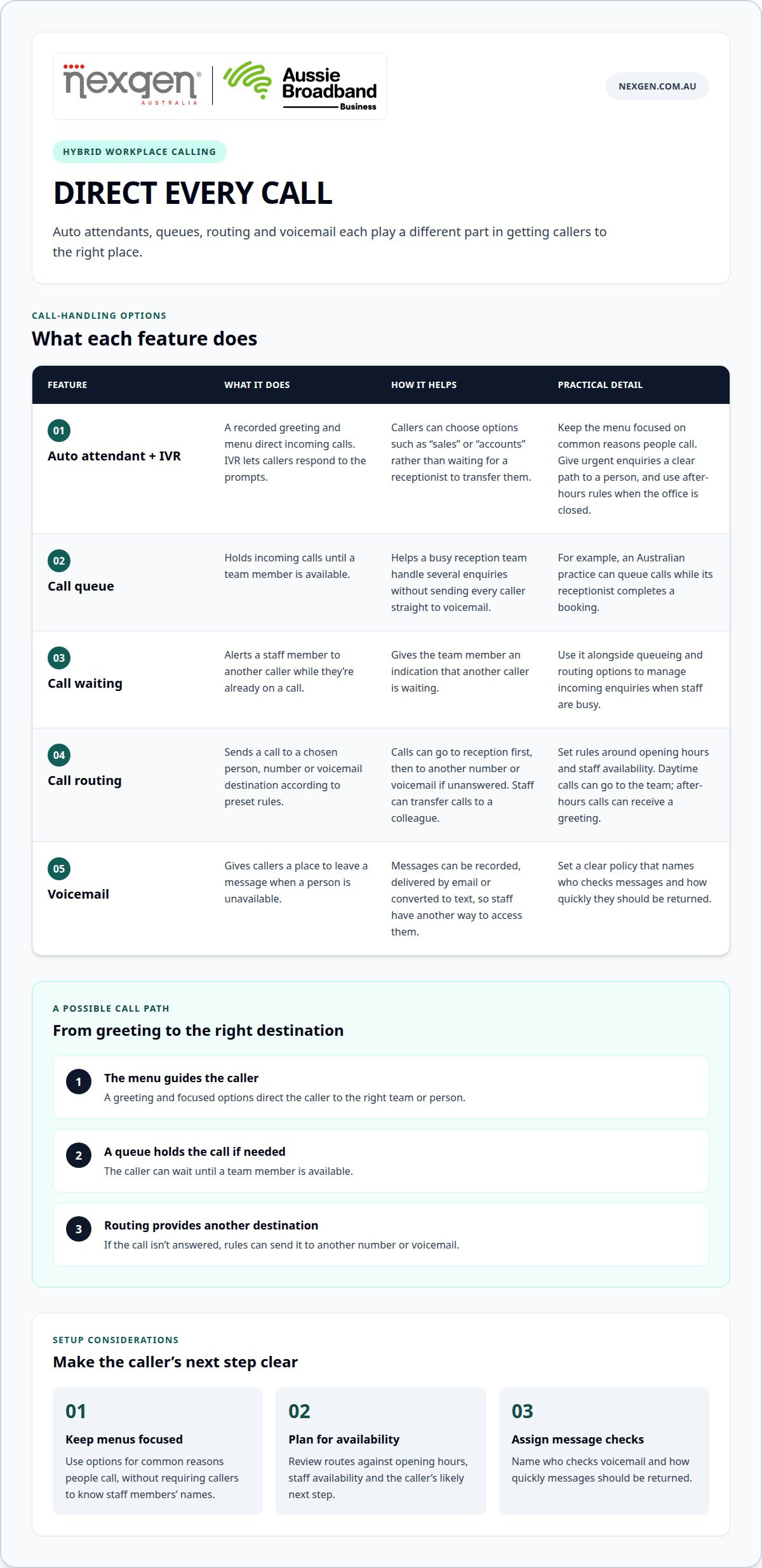
An auto attendant, a call queue and a routing rule each manage a different part of an incoming call. Together, they can direct callers to the right person, including when staff are working remotely.
Auto attendants and IVR
An auto attendant uses a recorded greeting and menu options to direct incoming calls. Interactive voice response (IVR) lets callers respond to those prompts. For example, callers can select “sales” or “accounts” instead of waiting for a receptionist to transfer them. Custom greetings and after-hours rules keep instructions consistent when the office is closed.
Keep the menu focused on common reasons people call. Give callers with urgent enquiries a clear path to a person, while directing general enquiries to another option. Clear prompts help callers choose the right destination without needing to know staff members’ names.
Queues, call waiting and voicemail
A call queue holds incoming calls until a team member is available; call waiting alerts staff to another caller while they’re already on a call. These features help a busy reception team handle several enquiries without sending every caller straight to voicemail. For example, an Australian practice can queue calls while its receptionist completes a booking.
If the receptionist is busy, routing can send a caller to another number or voicemail. Voicemail can be recorded, delivered by email or converted to text, giving staff another way to access messages. Set a clear policy naming who checks messages and how quickly they should be returned.
Routing calls to remote teams
Call routing sends incoming calls to a chosen person, number or voicemail destination according to preset rules. For a remote team, calls might go to a receptionist first, then to another number or voicemail if unanswered. Staff can also transfer calls to a colleague better placed to help.
Routing rules can reflect opening hours and staff availability. For example, a business can use an after-hours greeting outside operating hours and route daytime calls to the team. This gives callers a consistent path, even when the person answering isn’t at a desk or using a traditional phone.
Review each route against the caller’s likely next step. A sales enquiry may need a team member, while a general request may suit voicemail. A hybrid workplace phone system can combine these destinations to manage hand-offs between office-based and remote staff.
What Is a Modern Business Phone System?
A modern business phone system connects calls with staff, business records and workplace devices through a managed communications platform. Network performance, privacy practices and continuity planning all shape how it works for your organisation.
In Australia, the Privacy Act 1988 and Australian Privacy Principles apply to organisations covered by the Act when they handle personal information. State and territory laws can also regulate recording private conversations. The OAIC explains privacy and workplace monitoring considerations; businesses should account for the laws that apply to their operations and tell callers when recording is used.
Network readiness and call quality
Network readiness means the internet connection and local network can carry voice traffic reliably alongside other business activity. Congestion, unstable connections or competing applications can interrupt customer conversations.
Review call quality and network use during busy periods. If staff hear broken audio during video meetings, for example, check whether calls and meetings are competing for the same connection. A small test in the office and at remote locations can reveal where performance differs.
Consider how staff connect: a wired office computer, office Wi-Fi and a home connection can perform differently. Identify where calls are most affected, then address the network issue instead of treating every poor call as a handset fault.
Call continuity and backup answering
Call continuity uses rerouting, backup answering and failover rules to keep a business reachable during an office disruption. It matters when a local outage or unavailable receptionist could otherwise leave callers without an answer.
A cloud-hosted system can redirect incoming calls to another number, a backup team or a recorded announcement. For example, if an office becomes inaccessible, a business could route its main number to an alternate answering point.
Plan for internet and power problems separately. Battery backups may support local equipment during a power interruption, while alternate routing can help when the office connection is unavailable. A written continuity plan should name where calls will go and who is responsible for changing the route.
Quality metrics and system integrations
Call quality metrics show how callers experience a phone system, while integrations connect call activity with business records. Reviewing missed calls, average answer time, abandoned calls and queue performance helps managers identify specific service bottlenecks.
A rise in abandoned calls during a busy period, for instance, may indicate that callers are waiting too long. An integration with customer or patient records can log calls and display caller details when a call arrives. If your team uses Microsoft tools, map the call-handling workflow to the relevant business record.
Use these measures to guide practical changes, such as adjusting queue routing or staff coverage during known busy periods. Compare the same measures over time to assess each change against the original call-handling pattern.
Recording calls for staff review
Call recording captures conversations for purposes such as staff training, upskilling and reviewing existing protocols. It can give managers specific examples to coach staff or assess how a process works in real customer interactions.
Set the recording policy before enabling the feature. Identify which calls are recorded, who can access them, how long they are retained and whether callers need notification. Limit access to people with a clear business reason, and use recordings to review agreed service practices, not as a substitute for direct coaching.
A manager might review a recorded customer call with an employee to discuss how an enquiry was handled. Clear retention and access rules also help the organisation manage recordings consistently across office-based and remote staff.
Business calling across desk phones, computers and mobile devices
A cloud-based phone system can let staff answer work calls on desk phones, computers and mobile devices using one business number. This helps employees stay reachable as they move between the office and other work locations. A cloud dashboard can also transfer an active call between devices, such as moving it from a desk phone to a mobile before leaving the workplace.
Choose devices to suit each role and its usual tasks. A receptionist handling frequent calls may prefer a desk phone, while a remote employee may use a computer softphone. A mobile app may suit staff travelling between appointments. Setting up a softphone application typically takes minutes, but users still need a compatible device, an internet connection and secure account access.
Keep business and personal calls distinct by assigning staff a business number and setting clear calling practices. For example, an employee can call customers through a work app instead of sharing a personal mobile number. Explain which calls should use the business service, how colleagues transfer calls and what to do when a caller needs another team member.
Number porting transfers an existing business number to a new phone service. Before migration, list each number and record its purpose, current destination and forwarding rules. Map every number to its new user or call route. Test incoming and outgoing calls, caller ID and voicemail on each device before staff rely on the new setup.
Plan the change around business hours and the people who answer calls. A national business with a central reception team and remote staff, for example, can document how calls should reach each role during migration. Give employees a clear reference for signing in, making work calls and transferring callers. This reduces avoidable confusion as teams move to the new service.
Mobile-app users may call from different locations throughout the working day. Keep their emergency location information up to date, and include this task in staff onboarding and device changes. This keeps location details aligned with where employees work, rather than leaving them set to an earlier office or home address.
Cloud-based VoIP and hybrid employee devices
To set up calling for office and remote staff, first map users, devices, existing phone connections and call paths. Then match those requirements to VoIP, available internet capacity and any traditional equipment you plan to retain.
Combining traditional systems with VoIP
A hybrid phone system combines traditional telephony with Voice over Internet Protocol (VoIP), which carries calls over an internet connection. This lets a business upgrade its communications infrastructure while introducing cloud features at a pace that suits its operations.
For example, a business can retain ISDN line connections while adding VoIP features for remote staff. This can support a gradual transition instead of replacing every part of the existing system at once. Before deciding how calls should move between connections, map which numbers, teams and devices use each one.
Internet requirements for VoIP
VoIP uses an internet connection to carry voice, so network capacity and stability affect call quality. Each active VoIP call uses approximately 100 Kbps of bandwidth in both directions.
Plan for concurrent calls, not just the average number of staff. A business with several team members calling during the same busy period, for example, needs capacity for those calls alongside its other internet use. Check office and remote connections separately because performance can differ. A suitable connection helps reduce disruption from congestion or an unstable network.
Cloud PBX for hybrid work
A cloud PBX hosts phone system functions online, giving office and remote users a shared business communications platform. It can support hybrid work by applying consistent call handling for employees in different locations.
Cloud PBX can add new users in minutes, rather than requiring weeks of procurement and installation. A business can give a new employee a user account and calling access without relying solely on a physical office phone. For organisations sourcing distributed talent through platforms like Nexxo Recruiting, this streamlined provisioning ensures new team members are ready to handle customer calls right away. Consider how staff sign in, which devices they use and how the system handles calls when someone is unavailable.
Setting up calls for office and remote staff
Setting up a hybrid phone service means matching each employee’s calling needs with the right device, connection and call route. Start by listing users, their work locations, existing numbers and whether they need a desk phone, computer or mobile calling.
Next, plan how existing infrastructure will connect with VoIP, then test calls from the office and remote locations. Keep emergency location information current because mobile-app users may not call from a fixed location. A telecommunications specialist can tailor advice to your business requirements, including its network, equipment and working arrangements.
Cloud phone system costs and total cost of ownership
A cloud phone system’s cost depends on more than its recurring service charge. Compare the total cost of ownership over the same period for each option, including users, devices, calling features, implementation and retained equipment. This gives you a broader view than comparing monthly charges alone.
Start by mapping your current setup and the changes a cloud service would require. A business retaining some traditional equipment during a gradual transition has different cost considerations from one moving all staff to cloud calling. Existing contracts, number migration, network work and retained hardware can all affect the overall cost.
Use the same categories for each option to make the comparison meaningful:
- Users and features: account for each staff member and functions such as call routing, voicemail and queues.
- Devices: include desk phones and computers or mobile devices used for work calling.
- Existing equipment: identify what remains in service, requires maintenance or needs replacement.
- Transition work: consider number migration, user setup, staff familiarisation and changes to call settings.
- Connectivity and administration: include network adjustments and the time needed to manage users and system changes.
These categories show why businesses with similar headcounts can have different total costs. One organisation, for example, may reuse compatible handsets, while another needs new devices for employees working away from the office. A staged migration can spread changes over time, but may also require managing traditional and cloud arrangements in parallel during the transition.
Consider how system administration fits existing workflows. Central management of users and call routing may reduce separate manual tasks, while forwarding rules can maintain call handling when staff work remotely. Include a saving only if you can identify the task, equipment or process it replaces. This keeps comparisons grounded in actual operating costs.
Separate initial expenses from ongoing charges, then compare each option over the same planning period. Account for likely changes to staffing, devices and call handling rather than assuming the current arrangement will stay fixed. The key is to compare the full operating picture, not just the headline service charge.
To assess cloud calling against your existing setup, discuss a cloud phone system for your business and the requirements that shape its total cost.
Nexgen Australia: Small Business Phone Systems
Nexgen Australia provides Small Business Phone Systems and Small Business VoIP Solutions for businesses managing calls across office and remote settings. If your current setup makes it difficult to manage users, devices or call routing, an Office Phone System or VoIP Phone System may better suit how your staff work.
When comparing options, consider your existing equipment, how employees answer calls and what callers experience when staff are unavailable. These details help shape a system that supports daily business communication and future workplace changes.
Contact Nexgen Australia to discuss a phone system for your business, or visit nexgen.com.au.
Plan a phone system that can grow with your workplace
Your communications needs will shift as roles, work locations and customer expectations change. Treat a hybrid workplace phone system as part of your operating plan, not a one-off technology purchase. Assign someone to review how the setup supports staff and callers as the business evolves, and make future changes according to clear priorities.
A useful next step is to outline what your team needs from its calls, devices and daily administration. This gives you a practical basis for discussing options and deciding what matters most to your organisation. Nexgen Australia can help you find a suitable fit for your business communications.
Start a conversation with Nexgen Australia about your workplace phone requirements. A considered plan can help your team move forward with greater clarity and confidence.
Frequently Asked Questions
Can I keep my existing business phone numbers when switching to cloud PBX?
Yes, you can generally keep business numbers by including number porting when moving to cloud PBX. First, list each number and its purpose, such as reception, sales or a direct staff line. Then map each number to its new user or call destination. Test incoming calls, outgoing caller ID and linked services before treating the new system as fully operational.
What is a hybrid phone system and how does it work?
A hybrid phone system combines traditional telephony with Voice over Internet Protocol (VoIP). It can retain existing infrastructure while adding internet-based calling and cloud features. For example, a business might keep traditional line connections for some office functions while remote employees use VoIP. This can support a gradual transition instead of requiring every phone and connection to change at once.
What is a cloud PBX system?
A cloud PBX is a business phone exchange hosted online rather than managed solely through equipment on your premises. Staff access its calling functions using supported devices and an internet connection. Managing users and call settings centrally can help when employees join, change roles or work away from the office. Available functions depend on the system selected.
Who needs cloud PBX and VoIP?
Cloud PBX and VoIP can suit organisations with employees working across offices, home locations or client sites. They can also help when a business wants to add users without installing a separate phone line for each person. For example, a growing professional services firm could give office and remote staff access to the same business calling environment, with devices chosen to suit their roles.
What is a hybrid workplace phone system?
A hybrid workplace phone system supports business calls across traditional phone infrastructure and internet-based services, with staff working in different locations. It can combine office equipment with VoIP access for employees elsewhere. For example, a receptionist may use a desk phone while a colleague handles calls on a computer. The design depends on existing equipment, staff needs and call flows.
What features should a hybrid workplace phone system have?
Prioritise features that match how your team handles customer calls. These may include auto attendants, call queues, transfers, voicemail access and routing for remote staff. If managers review customer interactions, define call recording access and retention rules. For teams using different devices, check that employees can use the same business number and transfer calls between approved devices.
Which business phone systems support hybrid teams in Australia?
Cloud phone systems, VoIP phone systems and hybrid setups combining traditional connections with VoIP can support Australian teams working across locations. The right fit depends on existing infrastructure, staff devices and how calls need to flow. Nexgen Australia offers Small Business Phone Systems, Small Business VoIP Solutions and cloud calling options for businesses comparing hybrid calling arrangements.
How do cloud VoIP, hosted PBX and on-premises phone systems compare?
Cloud VoIP carries calls over the internet, while hosted PBX describes phone exchange functions delivered through an externally hosted platform. On-premises systems use equipment located at the business. Cloud and hosted options can support staff away from the office, while an on-premises setup may suit businesses retaining existing equipment. Compare administration, connectivity, devices, call features and migration needs against your working arrangements.