


A reliable move from landlines to VoIP is a planned business migration, not simply a phone swap. To switch from landline to VoIP business calling without losing numbers or disrupting customer calls, start by identifying what your current setup relies on and how your team handles calls each day.
It’s understandable to have concerns about number continuity, internet performance, staff readiness and older equipment. Before making changes, check whether devices such as EFTPOS terminals, alarms or fax machines use your phone lines. If you’re keeping an existing number, don’t cancel the current service first. Number porting is coordinated as part of the move, so confirm the transfer and changeover requirements before ending the old service.
This guide sets out a practical migration plan for Australian businesses. You’ll learn how to assess your existing phone services, prepare your internet connection and equipment, map users and call flows, and move across in a controlled way. With the right preparation, you can protect day-to-day call handling while choosing a VoIP arrangement that suits your operations and future needs.
Key Takeaways
- Map your users, numbers, handsets and call flows before choosing a migration approach.
- Compare keeping a compatible phone system with SIP trunking, moving to cloud calling or transitioning in stages.
- Plan how to switch from landline to VoIP business calling while protecting number continuity and day-to-day call handling.
- Assess internet suitability against your connection and the number of people likely to call at once.
- Shape the transition around your existing equipment, call patterns and remote-work needs, with a setup that can adapt as your business changes.
Switching from a business landline to VoIP: what changes?
VoIP carries business calls over an internet connection instead of traditional landline voice services. The move can affect more than the connection itself: your phone system, business numbers, handsets and call flows may all need attention.
VoIP sends voice calls over an internet connection; traditional landline calling uses a dedicated telephone service. That’s the key difference, but the equipment behind your current service determines what needs to change. For a broader overview of the technology, see Voice over IP (VoIP) technology.
A basic landline service might connect a phone directly to a wall socket, with calls managed through the service and handset. A larger setup may include a legacy PBX, or private phone system, connected to external phone lines. The PBX can manage extensions, transfers and other call routing. Moving to VoIP may mean replacing that system, adapting it to connect to VoIP, or changing how calls are managed.
Which parts of your current phone setup need replacing?
Start by recording what staff actually use. Include desk phones, PBX hardware, phone lines and any services that manage incoming numbers and call routing. Note which teams share lines, how calls reach different staff, and whether particular handsets need to be retained. A handset that works with a landline system may not be compatible with a new VoIP setup.
Also identify devices that use a phone line but aren’t part of everyday calling. Alarms, lifts, fax machines and other connected equipment may rely on the existing service. Ask the relevant device supplier about compatibility before changing the line, so an overlooked connection doesn’t affect an important business function.
What changes for staff and customers after moving to VoIP?
For staff, making and receiving a call can still feel familiar. Depending on the system, they may use desk phones, computers or mobile devices. The main practical change is how calls connect and how the system is managed, rather than the basic act of answering or placing a call.
Call handling can be configured around your business hours and team responsibilities. For example, calls to a main number might ring a reception desk during opening hours, then follow a different route when the office is closed. You can also plan how staff transfer calls or direct enquiries to the right people. These details matter to customers: a new system should support the way your business answers calls, not leave callers unsure where to go.
Before choosing an approach, write down the call paths staff and customers rely on, including what happens when a person is unavailable. This gives you a clear basis for planning the transition. For more context on features and system choices, see the small business phone systems guide.
Prepare your business VoIP migration before changing services
A smoother migration starts with a clear picture of how your business communicates today. Before changing your phone service, bring together the people responsible for phones, internet and business-critical equipment. This helps uncover dependencies early and gives you time to plan around them.
Use this readiness checklist to record the details that will shape your migration:
- Users: List staff who make or receive calls, their roles and where they work.
- Numbers: Record each business number, its purpose, who uses it and where calls currently go.
- Handsets and devices: Note desk phones, headsets, computers and other equipment staff expect to use.
- Call flows: Map how calls reach teams, transfer between staff or are handled when someone is unavailable.
- Operating hours: Identify busy periods and times when an interruption would have the greatest impact.
- Connected equipment: Flag alarms, lifts, fax machines and other devices that may rely on existing phone services.
Recording existing call flows gives the implementation team a practical reference for configuring and testing how calls should reach the right people. It can also reveal exceptions, such as a number that rings a particular team only during certain hours.
How do you assess internet and equipment readiness?
Inventory your business internet connection, network equipment and each location where staff answer calls, including remote work sites. List the desk phones, headsets and computers people expect to keep using. Assess call quality and capacity against the number of calls likely to happen at the same time. Consider when calls overlap and what other business activity shares the connection, rather than relying on a generic speed figure.
Internet suitability depends on the connection and how your team uses it. Check the network at each relevant location and note any known reliability concerns before planning the changeover. If staff use different devices or work from different sites, include those arrangements in the assessment. For solution context, explore the VoIP solutions for small business guide.
How should you plan number porting and call continuity?
List every number alongside its purpose, responsible staff member and current routing. Porting requirements and timing depend on the service and number details, so confirm them before setting a cutover date. Keep existing services active until the porting and changeover requirements are confirmed. Cancelling too early can put number continuity at risk.
Choose a transition window that avoids your busiest periods where possible. Decide who will test incoming and outgoing calls, how staff will report issues and what they should do if a call-handling problem arises. These decisions make continuity part of the migration plan rather than an assumption. Nexgen Australia can help map your requirements to a tailored VoIP or cloud phone deployment through Nexgen business VoIP solutions.
Compare business VoIP migration approaches and their trade-offs
There is no single best way to move business calls to VoIP. The right approach depends on your existing phone system, equipment compatibility, call-handling requirements and how you want the system managed. You may be able to retain a suitable PBX, move to cloud calling or transition in stages, depending on those factors.
Compare the approaches against your business requirements:
- Retain a compatible PBX with SIP trunking: May preserve existing equipment, but depends on technical compatibility and leaves the business reliant on on-site system management.
- Move to cloud calling: Moves phone-system management to a cloud platform and can support calling across desk phones, computers and mobile devices. It requires a suitable internet connection and a planned change to call handling.
- Transition in stages: Can break a larger migration into manageable parts, but requires careful coordination between old and new arrangements while both are in use.
These are planning options, not guarantees of compatibility or uninterrupted service. Assess the equipment, services and call flows involved before settling on a model.
When might you retain an existing PBX?
Keeping a PBX may suit a business that has a reason to preserve its existing phone system and equipment. SIP trunking can connect a compatible PBX to VoIP services, but the system needs a technical assessment first. Check compatibility, support arrangements and how much you will continue to rely on equipment at your premises. If the PBX is difficult to maintain or no longer fits how staff work, retaining it may extend complexity rather than simplify the migration.
When might a cloud phone system suit your business?
Cloud calling may suit a business that wants its team to use desk phones, computers or mobile devices, including across different work locations. Call management can be centralised, and the system can be configured to suit changing needs. Consider how this model fits your operating requirements, internet access and staff processes. Nexgen Australia supplies and integrates enterprise-grade cloud phone systems, providing a tailored option rather than a universal fit for every organisation.
When is a staged transition worth considering?
A staged move can make sense when different teams, sites or phone-system components have distinct requirements. For example, a business might plan one location or group at a time, allowing the new call flows and user setup to be checked before moving the next part. The trade-off is temporary complexity: staff may need to work across old and new arrangements, and number transfers or technical dependencies can affect sequencing. Define what each stage includes and how it will be tested.
For a deeper comparison of hosted and on-site architectures, the cloud phone systems guide can help clarify which management model aligns with your needs. Choose based on the system you have, the way your team handles calls and the level of change your business can manage when you decide to switch from landline to voip business.
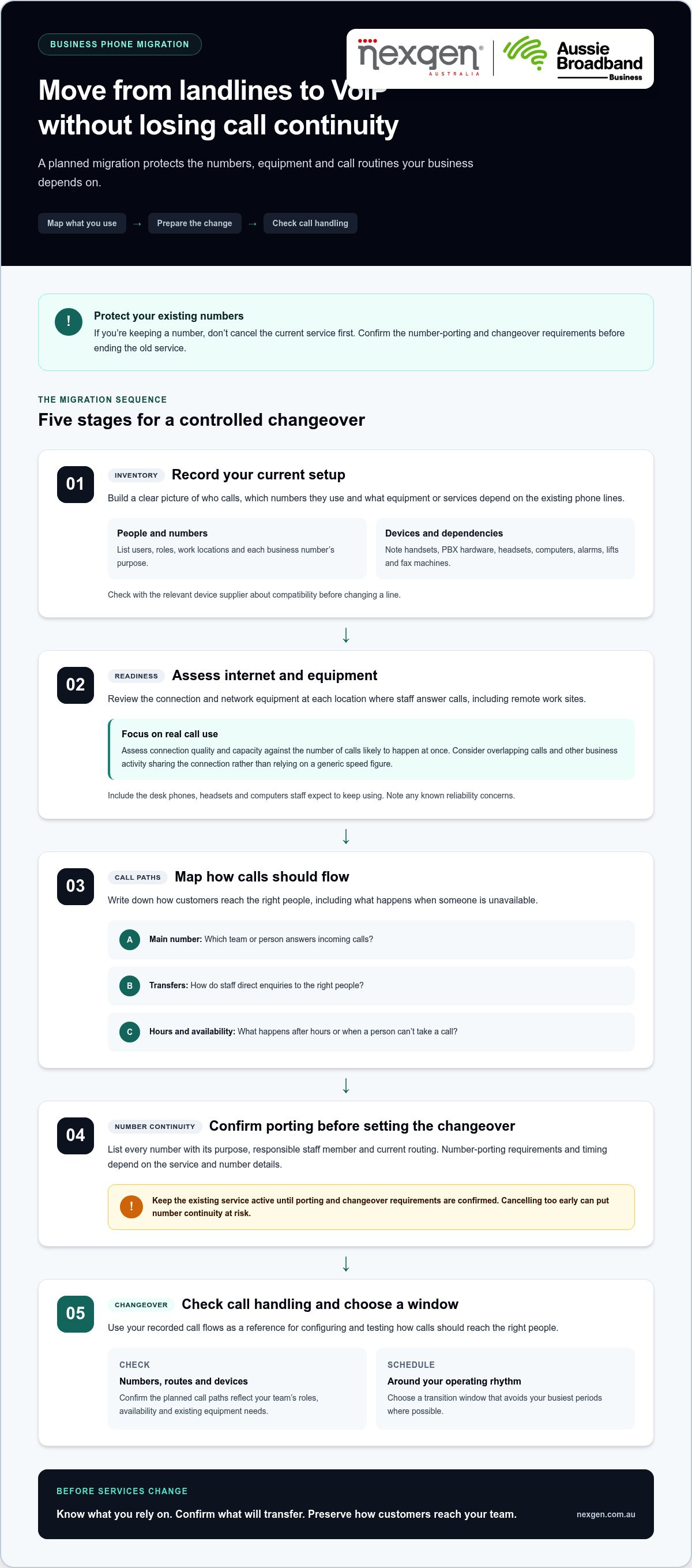
How to switch business landlines to VoIP step by step
A reliable transition follows a clear sequence: define what the system must do, configure the replacement, test it with staff, then coordinate the changeover. Keep existing services active until number-porting and cutover requirements are confirmed.
- 1. Document requirements. Confirm which users need calling, which business numbers must be retained, what equipment staff will use and which connected devices depend on existing services. Record business-critical periods so you can plan testing and cutover around operations.
- 2. Design call flows. Map how calls should move from the main number to teams or individuals, including transfers, queues, voicemail and after-hours handling. Agree on who answers each type of call and what happens when they’re unavailable.
- 3. Prepare the network. Review the business internet connection and network equipment against expected simultaneous calling. Include each office and remote location where staff will take calls, and address known network concerns before configuration.
- 4. Configure the service. Set up users, numbers, call routing and devices to match the agreed design. Where staff use different devices, confirm each person can access the intended handset, computer or mobile calling setup.
- 5. Test before cutover. Check the new system against real business scenarios, not just a single test call. Record results, assign unresolved issues and agree on who can approve the changeover.
- 6. Coordinate the cutover and review. Confirm porting status and dependencies before changing or ceasing existing arrangements. Update staff, keep a record of issues and check call quality and routing after the transition.
A successful cutover means calls, routing and user readiness have all been tested against the way your business needs to operate. Testing reduces avoidable surprises, but it can’t rule out every issue in advance. Set clear responsibilities and fallback arrangements, such as an agreed alternative way for staff to handle urgent calls if a problem arises.
What should you test before the VoIP cutover?
Test incoming and outgoing calls, each business number, caller identification and the agreed routes to teams or individuals. Check voicemail, after-hours handling, call queues and transfers if they’re part of the setup. Ask representative staff to test their intended handsets, computers or mobile devices from relevant work locations. Record any failed or unclear result and resolve it before proceeding.
What should happen on migration day and afterwards?
Assign a coordinator to track the change, share updates and keep an issue log. Confirm number-porting status and service dependencies before changing existing arrangements. After the cutover, ask staff to report call-quality or routing problems, then check affected users and call paths so configuration issues can be addressed.
Nexgen plans and deploys business VoIP around your team’s call flows and operating needs. Plan your VoIP migration with Nexgen.
Move to business VoIP with a migration plan built around your team
A practical migration plan reflects how your business works, not just the phone equipment it owns. Team size affects user setup, existing hardware influences what can be retained, and call patterns help shape capacity and call handling. Remote and hybrid work also matter: staff need an arrangement that supports where they actually answer calls.
Before planning the change, prepare a short migration brief. It gives your communications partner a clear view of the current setup and helps distinguish must-have requirements from changes that can wait.
What should you include in a business VoIP migration brief?
Record team size, business numbers, current equipment, operating hours and call-handling requirements. Add remote-work needs, expected growth, and any systems or devices that need assessment. Then separate essential launch requirements, such as the main number reaching the right team, from optional features that could be introduced later. This keeps the initial scope focused on day-to-day continuity.
- Team and locations: Note who needs a phone service, where they work and whether they move between sites.
- Numbers and call patterns: Describe the role of each number, busy periods and how calls are answered, transferred or escalated.
- Equipment and dependencies: List handsets and other connected devices, including anything that needs a compatibility assessment.
- Priorities: Mark what must work from the first day and what can be scheduled for a later stage.
This brief helps keep decisions grounded in business needs. A small office with a shared reception number may prioritise simple, predictable routing. A team with staff working across locations may need calling access and call handling that account for those different work settings. The right design follows the actual use case.
How can Nexgen help plan and deploy business VoIP?
Nexgen tailors VoIP and cloud phone deployments for Australian small and medium-sized businesses. Planning can account for call handling, desktop handset integration, team requirements and remote-work connectivity, with setup and deployment across desk phones, computers and mobile devices. This brings the service design and the way staff will use it into the same migration plan.
For businesses seeking cloud calling across devices, Nexgen also supplies and integrates Cisco Webex Calling phone systems. Choose a system based on your current setup and operating requirements, rather than assuming one model suits every organisation.
A clear brief is a useful starting point for choosing a migration approach. If you’re preparing to move your business calling to VoIP, Nexgen can shape a deployment around the people, equipment and call flows your business relies on.
Talk to Nexgen about your business phone system.
Set your business up for its next stage of calling
Plan your move to VoIP around how your team works, rather than simply replacing old equipment. A migration is also an opportunity to account for changes such as new staff, different work locations or evolving call-handling needs.
Nexgen provides tailored cloud phone deployments for Australian businesses, including Cisco Webex Calling and setup across desk phones, computers and mobile devices. The system should match your requirements and the way your team handles calls now and as your business changes.
Start with the calling needs your team relies on most, then use them to guide the migration plan. A clear set of requirements helps you make considered choices and prepare for the change.
Talk to Nexgen about switching your business to VoIP.
Frequently Asked Questions
Can my business keep its phone number when switching from a landline to VoIP?
In many cases, yes, but transfer eligibility depends on the number and service. Before you switch, check where each number appears, including your website, email signatures, invoices, directory listings and customer records. This gives you a practical update list for after the transfer. If several numbers serve different teams or purposes, label them clearly so each can be checked against its intended destination.
Do I need an NBN connection to use VoIP for business?
No. VoIP is a way to make calls, while NBN is one option for accessing the internet in Australia. A business may use another suitable internet service, depending on what is available and appropriate for its premises. If your business has more than one site, it may have different connection types at each location. Map where calls will be made and received so the phone arrangement accounts for each workplace.
Will my existing business phones work with VoIP?
Possibly, but the connection type and role of each device matter. Sort your equipment into categories, such as phones connected directly to a wall socket, network-connected desk phones, headsets and handsets linked to a PBX. Record labels or model details where available, and note which devices are shared or assigned to particular roles. This makes it easier to identify what staff expect to retain and what needs closer review.
How long does it take to switch a business landline to VoIP?
There isn’t one timeframe that applies to every business. To get a useful estimate, prepare a project brief covering the number of users, locations, phone numbers and any equipment that needs assessment. Also identify who can approve call-flow decisions and which business periods are unsuitable for change. These details help scope the work into assessment, configuration, testing and changeover activities without relying on a generic estimate.
Can my business use VoIP during an internet outage?
Calls that depend on the affected internet connection may not be available during an outage. Decide in advance how customers and staff should communicate if that happens, including which alternative contact channel is appropriate for your business. For example, you might direct customers to an established mobile number or publish an update through a channel they already use. Document who can activate the plan and how staff will receive the instruction.
Should I keep my existing PBX or move to a cloud phone system?
Compare the ongoing work each option creates, not just the initial change. Consider who will manage phone-system administration, how dependent your business is on equipment at its premises, and whether your team expects to change locations or grow. A written comparison of those responsibilities can help decision-makers weigh operational fit alongside technical suitability. The choice should reflect how your organisation wants to manage business calling over time.