


A successful Webex Calling phone system setup starts with deciding how calls should flow, before anyone changes the settings. If your Australian business is moving from a traditional phone system, map who answers, where calls go and what happens when staff are unavailable. That gives you a practical plan for the changeover.
Missed calls, number transfers and staff learning a new way of working are common concerns. Make them easier to manage by documenting your call requirements, users, devices and internet readiness. Then use those decisions to shape a setup that fits how your business operates.
This guide covers the main steps, from planning call flows and connecting to the public phone network to configuring users and testing before launch. You’ll also learn how to plan a staged rollout across desk phones, computers and mobile devices.
Key Takeaways
- Map how customers and staff reach the right person, including what happens when someone is unavailable.
- Document user, number, device and call-handling requirements separately so each decision has a clear owner.
- Build the Webex Calling phone system around agreed business needs, rather than configuring settings without a call plan.
- Test representative call journeys on the intended devices and brief staff before expanding the rollout.
- Nexgen Australia handles Webex Calling setup and deployment across desk phones, computers and mobile devices.
What a Webex Calling phone system includes before you set it up
A Webex Calling phone system is a cloud-based business phone service for making and receiving calls. Instead of relying solely on a traditional phone system installed at your workplace, it brings together the users, business numbers and devices your organisation plans to use. The final configuration depends on your business requirements and the Webex Calling options selected for deployment.
Webex is a broader communications platform. Webex Calling refers specifically to its business calling service. The Webex Wikipedia page provides general background on the platform and identifies Webex Calling as one of its products. When planning a phone system, distinguish the calling service from other Webex tools. Don’t assume every Webex capability is automatically part of your calling arrangement.
Think of setup as a series of connected decisions. Users are the people who need calling access. Business numbers are the contact points callers use. Devices are how staff make and answer calls. Call handling determines where calls go. For example, a receptionist may manage a shared business number, while a remote staff member may handle work calls from a computer or mobile device. Start with your call requirements, then decide how these pieces should fit together.
That’s why deployment planning should begin with call handling, not account creation. Write down how customers reach your business, who should answer and what should happen if they’re unavailable. A clear call plan helps distinguish basic user needs from routing and configuration decisions.
How the phone system relates to your team’s devices
Webex Calling can connect business communications across desk phones, computers and mobile devices. The right mix depends on what staff do, where they work and how they handle calls. A front-desk role may suit a desk phone, while a remote employee may rely more on a computer or mobile device. Map device needs by role and include them in the deployment plan.
When a Webex Calling setup needs more planning
Multi-team or multi-site operations, or a workforce that changes over time, call for careful discovery. List which teams answer each number, where calls should go and who owns each decision. Adding a user is one requirement; deciding how a customer call moves between teams is a separate call-flow decision. For platform-fit considerations, refer to Cisco Webex Calling: Right for Your Business in 2026?
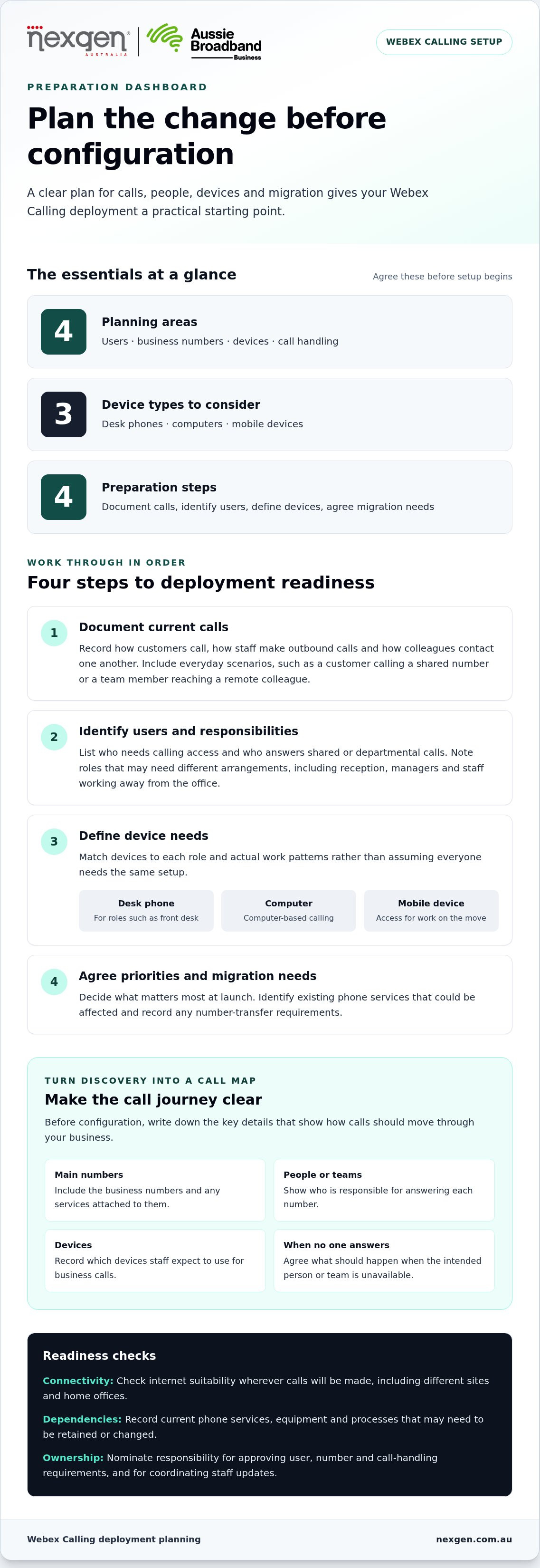
Before configuration, turn your discovery notes into a simple call map. Include the main numbers, the people or teams responsible for answering, the devices they’ll use and what should happen when a call isn’t answered. This gives the deployment team a practical starting point and helps staff understand how the system supports their work.
How to prepare your business for a Webex Calling deployment
Prepare for a Webex Calling deployment by documenting current calls, identifying users, selecting devices for each role and agreeing on business priorities. Doing this before configuration starts gives the deployment team a clear brief and brings potential dependencies to light.
Work through these steps in order:
- Document current calls. Note how customers call your business, how staff make outbound calls and how colleagues contact each other. Include everyday scenarios, such as a customer calling a shared number or a team member contacting a remote colleague.
- Identify users and responsibilities. List who needs calling access and who answers shared or departmental calls. Include roles that may need different arrangements, such as reception, managers and staff working away from the office.
- Define device needs. Record whether each role needs a desk phone, computer-based calling or access from a mobile device. Base the choice on actual work patterns rather than assuming everyone needs the same setup.
- Agree priorities and migration needs. Decide what matters most at launch, identify existing phone services that could be affected and record any number-transfer requirements.
Deployment readiness means agreeing on users, call needs, devices and migration requirements before configuration begins. These decisions give the setup a practical foundation and help your team share a clear understanding of the change.
Document users, numbers and everyday call needs
Create a user and role list that shows who needs calling access and who is responsible for shared numbers. Record existing business numbers, the services attached to them and any phone-system dependencies, such as equipment or processes that rely on the current service. This inventory helps you identify what needs to be retained or changed.
For number porting, use guidance from authoritative sources such as the Australian Communications and Media Authority (ACMA) to understand numbering arrangements and transfer requirements. Keep a record of the numbers involved and how they fit into your migration plan. At this stage, capture the essential call scenarios rather than designing detailed routing rules.
Prepare devices, connectivity and decision-makers
Nominate someone to approve user, number and call-handling requirements, and someone to coordinate staff updates. For broader context on cloud communications, Cloud phone systems: a guide for Australian businesses can help frame the planning discussion. Nexgen’s Webex Calling setup and deployment brings these requirements together across desk phones, computers and mobile devices.
How to plan users, numbers and Webex Calling configuration
Once your business requirements are agreed, an administrator-led plan can translate them into a workable Webex Calling setup. The administrator coordinates configuration, while business owners and team leads confirm how staff use the phones and how callers should be handled. This keeps technical decisions grounded in everyday operations.
Configuration turns documented users and call needs into an agreed phone-system setup. Use a decision register to make responsibilities clear before settings are changed. For example, a team lead can confirm who answers a shared number, while the administrator records the requirement for implementation.
| Planning area | Decision to document | Suggested owner |
|---|---|---|
| User | Who needs calling access, their role and any shared-call responsibilities | Team lead confirms requirements; administrator coordinates setup |
| Number | Which existing or new business number serves each team or published contact point | Business owner or operations lead confirms business use; administrator records it |
| Device | Whether each role is planned to use a desk phone, computer or mobile device | Team lead identifies work needs; administrator checks setup requirements |
| Call handling | Where key calls should go and what outcome the business expects if they aren’t answered | Relevant team lead defines the workflow; administrator documents the configuration requirement |
Use the register as a responsibility guide, not as a replacement for current product documentation. Cisco’s Webex documentation covers Control Hub administration, licence dependencies, device support and number procedures. These details can vary with the selected configuration, so treat setup instructions as specific to your planned environment rather than universal.
Organise users and device requirements
Group users by role or calling needs where that makes decisions easier to manage. A remote sales team and staff who answer a shared business number may need different arrangements, even if both make outbound calls. Record whether each group is expected to use desk phones, computers or mobile devices. Use current Cisco documentation to understand how the planned devices and features fit the selected configuration.
Plan number handling and call flows
List the business numbers callers currently use and note whether each serves a team, a location or a published contact point. At a planning level, describe the intended call journey, such as which team should receive calls to a service number and who decides what happens next. Keep detailed routing design for the configuration stage. For broader solution context, the VoIP Solutions for Small Business Australia: The 2026 Guide covers related considerations.
Before implementation, review the register with decision-makers and resolve gaps, such as an unassigned number or a call journey without a clear owner. The agreed record gives the administrator a consistent reference for configuration and testing.
How to test and roll out your Webex Calling phone system
Test the agreed setup with representative users before expanding it across the business. A controlled rollout helps uncover configuration or usage issues early, assign them to an owner and address them before more staff rely on the system. Testing reduces uncertainty, but it cannot guarantee a disruption-free changeover.
Use this sequence to manage the change:
- Validate the setup. Check that users, devices, numbers and agreed call-handling requirements are reflected in the configuration.
- Test key scenarios. Make and receive calls across the intended user and device groups, including the business call journeys identified during planning.
- Brief the staff involved. Explain what is changing, how staff will make and answer calls, and where they can find approved guidance.
- Review and expand. Resolve priority issues, then extend the rollout to the next group after the agreed checks are complete.
Keep a simple issue log throughout the rollout. Record what happened, who owns the follow-up, the impact on staff or callers, and whether the issue is open or resolved. This makes decisions visible and helps avoid investigating the same problem repeatedly.
Test the calls your business relies on
Test inbound and outbound calls on the intended devices with representative user groups. Check that call handling matches the business requirements and record the actual result. If a test fails, note the steps to reproduce the issue, its impact and who is responsible for follow-up. Resolve important issues before adding more users.
| Test scenario | Expected behaviour | Result | Follow-up owner |
|---|---|---|---|
| Inbound call to a business number | Reaches the agreed person or team | Pass, issue found or not tested | Name or role |
| Outbound call from a user | Connects using the intended device | Pass, issue found or not tested | Name or role |
| Call across remote team devices | Matches the planned user and device setup | Pass, issue found or not tested | Name or role |
| Agreed business call journey | Follows the documented call-handling requirement | Pass, issue found or not tested | Name or role |
For number transfers, build the changeover plan around the timing and service dependencies of your specific migration. A general porting timeframe may not apply to your numbers or rollout.
Brief staff and manage the change
Tell staff what’s changing, which devices they’ll use and where to find approved setup guidance. Give them a clear internal contact for reporting access, calling or device issues. Schedule communications and rollout activity around business operations, with room to respond to issues rather than relying on a fixed deployment duration.
Nexgen handles Webex Calling setup and rollout across desk phones, computers and mobile devices. See how Nexgen can support your Webex Calling deployment.
How Nexgen can help deploy a Webex Calling phone system
Nexgen provides Webex Calling solutions and handles setup and deployment for Australian businesses. The process starts with understanding how your team communicates, then using your documented users, devices and call requirements to guide the deployment. This connects configuration decisions to the way your business handles calls.
For remote and hybrid teams, the planned environment can include desk phones, computers and mobile devices. Your team’s roles and everyday work patterns help determine which devices are relevant. Nexgen uses that information alongside your call requirements to plan a Webex Calling phone system for your business.
What to bring to a deployment discussion
A concise brief helps focus the discussion. Gather the information you already have and flag any decisions that still need an owner. You don’t need to resolve every technical detail before getting started.
- A list of users or roles, including who handles shared or team calls.
- Your current business numbers and any services or processes that rely on them.
- A summary of key call-handling needs, including where important calls should go and what should happen if they aren’t answered.
- The devices staff expect to use, whether desk phones, computers or mobile devices.
- Your business priorities, key stakeholders and any timing constraints that could affect planning.
For example, a remote team may use computers or mobile devices, while another role may be organised around a desk phone. Recording those differences clarifies the intended setup without assuming every user needs the same arrangement. If some call requirements are still being discussed, mark them as open decisions.
Choose a clear next step with Nexgen
Before moving forward, review what’s ready and what still needs a decision. Make sure user requirements have an owner, business numbers and dependencies are recorded, device expectations are clear, and key call journeys are documented. This gives everyone a shared view of the work ahead.
Nexgen handles Webex Calling setup and deployment, using your business requirements to shape the planned environment across desk phones, computers and mobile devices. Your requirements and migration considerations will inform the deployment plan.
To discuss your requirements, contact Nexgen about Webex Calling deployment for your business.
Turn your call plan into a confident next step
Your phone system should support how your business works now and leave room for future changes. Keep your agreed requirements as a reference as decisions evolve, and make sure the people responsible for calls understand the intended setup. That gives you a clear basis for moving ahead with a Webex Calling phone system.
Ready to plan your setup? Talk to Nexgen about a Webex Calling phone system for your business.
Frequently Asked Questions
How long can it take to port an existing business number?
Number porting can take from a few days to a few weeks, depending on the transfer. The Australian Communications and Media Authority (ACMA) oversees numbering arrangements, but the timing of a particular migration depends on its details. Build flexibility into your changeover plan and don’t schedule the old service to end until transfer arrangements and dependencies have been addressed.
Can a business move from an older phone system in stages?
A staged migration may be possible. Cisco supports hybrid deployments that combine Webex Calling with existing on-premises Cisco Unified Communications Manager infrastructure. This can provide a path for transitioning some users or call requirements before others, but the design depends on the existing environment. Map which parts of the current system need to remain in place and assess the proposed approach before implementation.
Does every Webex Calling user need the same licence?
Don’t assume every user has identical licence requirements. Licensing can depend on the planned Webex Calling configuration and what each user needs to do. Match user roles to requirements and refer to current Cisco documentation for relevant plans and feature dependencies. This helps you avoid planning around an entitlement that doesn’t apply to the intended setup.