


The provider with the longest feature list may not be the right fit for your business. Hosted VoIP services can look similar on paper, but setup, number migration, support and call handling shape how the system works for your team.
A hosted voip providers australia comparison is most useful when it starts with your day-to-day needs. Consider the features your team uses, how calls should be handled, which devices staff need and how the system should support growth. Compare what each service includes, who is responsible for setup and how the transition from your current phone system will be managed.
This guide explains how to compare hosted VoIP options using practical business criteria. You’ll learn what to assess across service delivery, support, integrations and pricing, plus which migration details to resolve before switching. The aim is to help you choose a system that fits your requirements now and can accommodate change.
Key Takeaways
- Distinguish the hosted VoIP model from how each provider delivers and manages its service.
- Compare provider types by deployment support, service responsibilities and platform choice.
- Use a hosted voip providers australia comparison scorecard to assess features, devices, integrations, migration, support and pricing structure consistently.
- Plan number handling and call continuity as part of the switch, not as an afterthought.
- Assess Nexgen Australia’s business VoIP and cloud phone systems, including enterprise cloud calling deployments, against your team’s requirements.
What hosted VoIP means for Australian businesses comparing providers
Hosted VoIP is a business phone service that carries calls over an internet connection, with the provider hosting the platform that manages calling features. Unlike an on-premises PBX, hosted VoIP doesn’t rely on the business to house and administer the phone-system equipment. Your business still needs suitable internet connectivity and compatible devices.
Providers can differ in their setup responsibilities, included features, device options and support arrangements. A useful hosted voip providers australia comparison looks beyond the technology label to assess how the service fits your team’s work patterns and how the change from your current system will be handled.
Start with three practical questions: can staff take calls in the office and remotely, can the system support your call flows, and are responsibilities for setup and ongoing management clear? Your internet connection and devices are part of the overall setup, so assess them alongside the phone service.
How a hosted VoIP phone system works
Staff make and receive calls using connected devices such as desk phones, computers or mobile devices. The provider-hosted platform manages calling functions, while your business uses its internet connection and compatible devices to access the service. Features and responsibilities vary between services. For a technical foundation, see this explanation of Voice over Internet Protocol (VoIP).
For example, a staff member in the office might answer a customer call on a desk phone, while a colleague working remotely takes calls on a connected device. The right arrangement depends on how your business configures call handling and which devices the service supports.
Hosted VoIP, cloud phone systems and PBX: what differs?
Hosted VoIP and cloud phone system are related terms commonly used for business calling services managed on a provider-hosted platform. The labels don’t define exactly what a service includes. VoIP describes voice calls carried over internet networks, while cloud telephony refers to phone services delivered through cloud infrastructure. Unified communications may combine calling with other communication tools, but it isn’t an exact synonym for VoIP.
With a traditional on-premises PBX, phone-system equipment and much of its administration are kept at the business. With hosted VoIP, the provider’s platform manages calls, while your business still relies on suitable connectivity and devices. Compare service delivery, operational fit and migration planning, not just the terms used to describe the system.
Which hosted VoIP provider model suits your Australian business?
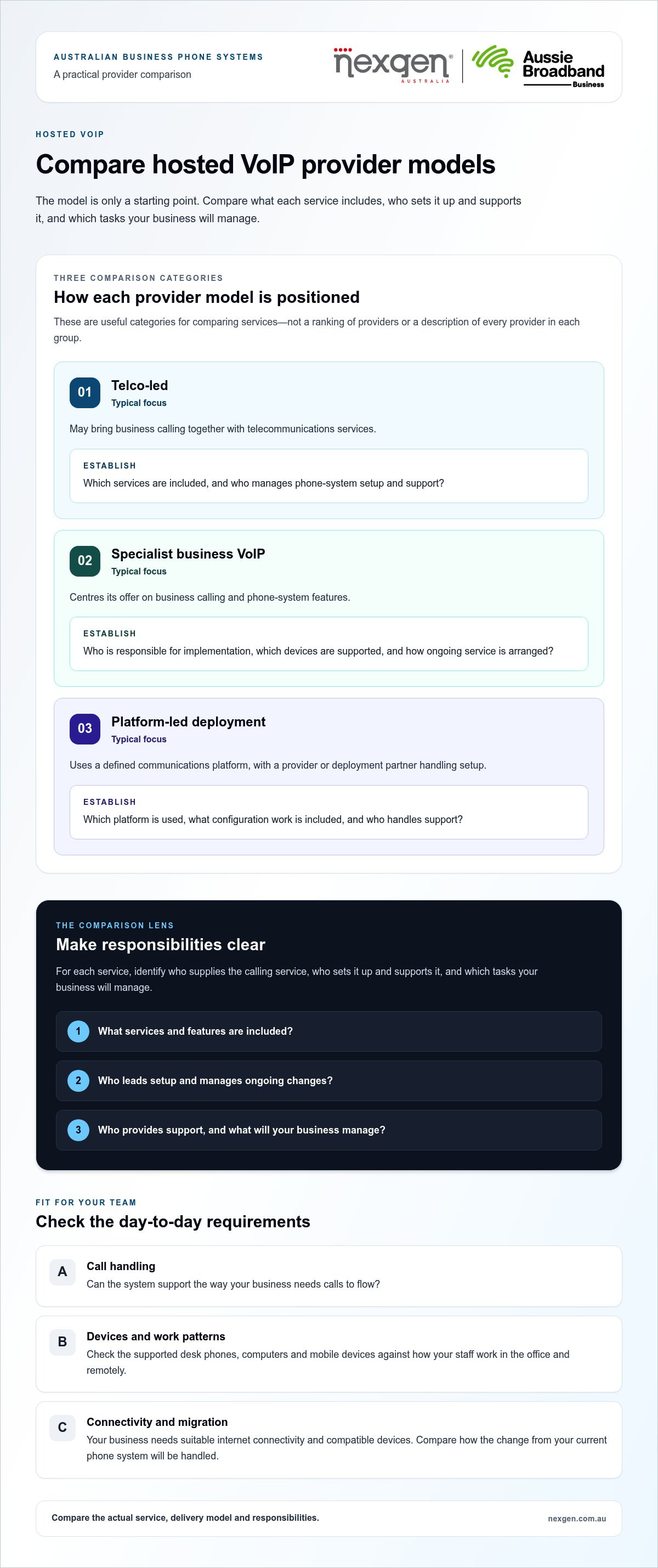
The right model depends on how much help you need with implementation, how you want the service managed and whether you have a preferred calling platform. Telco-led, specialist business VoIP and platform-led deployments are useful categories for comparing services, not a ranking of providers. Look at the actual service description to understand what each one includes.
For a useful hosted voip providers australia comparison, identify who supplies the calling service, who sets it up and supports it, and which tasks your business will manage.
| Provider model | Typical focus | What to establish |
|---|---|---|
| Telco-led | May bring business calling together with telecommunications services. | Clarify which services are included and who manages phone-system setup and support. |
| Specialist business VoIP | Centres its offer on business calling and phone-system features. | Assess implementation responsibilities, supported devices and ongoing service arrangements. |
| Platform-led deployment | Uses a defined communications platform, with a provider or deployment partner handling setup. | Establish the platform, configuration work, support roles and capabilities that depend on setup. |
These are comparison categories, not claims about every provider in each group. Assess the specific features, support arrangements and inclusions of the service you’re considering.
What to compare beyond the monthly service description
Compare the call-handling features your team will use, handset options, computer and mobile access, integrations, administration tools and capacity to add users or lines. Separate standard inclusions from optional features, and distinguish what a platform can do from what is configured in your service. Establish who leads setup, manages changes and provides ongoing support. Nexgen delivers Cisco Webex Calling deployments across desk phones, computers and mobile devices.
Match provider capabilities to your team’s work
A desk-based office may prioritise handset integration and straightforward call handling. A hybrid team may need staff to use desk phones, computers or mobile devices, depending on their roles. A growing business may need to add users or lines and manage call settings as its requirements change. Compare these needs with the service and delivery model on offer.
If you’re assessing a platform-led deployment, Nexgen’s business VoIP and cloud phone systems are one option to consider, including Cisco Webex Calling setup and deployment.
Hosted VoIP providers compared: use this scorecard to assess fit
A useful hosted voip providers australia comparison weighs how a service fits your business, not how many features appear on a list. Use this scorecard to record details from service descriptions and proposals. If an important detail is unclear, treat it as a question to resolve before making a decision.
| What to compare | Nexgen Australia | Other providers |
|---|---|---|
| Service model | Business VoIP and cloud phone systems, including Cisco Webex Calling deployments. | Record how the service is delivered and managed. |
| Features | Capabilities include call handling, intelligent call routing and voicemail-to-email. | Record confirmed inclusions and optional features. |
| Devices | Webex Calling deployment across desk phones, computers and mobile devices. | List supported devices and any configuration requirements. |
| Integrations | Compare the proposed service with your required integrations. | Record documented, product-specific integrations. |
| Migration | Record the proposed migration steps and responsibilities. | Record porting coordination, sequencing and continuity arrangements. |
| Support and delivery | Nexgen handles setup and deployment for Cisco Webex Calling solutions. | Record the stated setup, support and service-management details. |
| Pricing structure | Compare the proposed service scope and inclusions. | Note what’s included, optional and charged on an ongoing basis. |
This scorecard summarises Nexgen’s capabilities and provides a consistent way to compare service scope. Features and responsibilities can vary by product or configuration.
How to compare call features, integrations and devices
Start with the call flows your team uses. Compare whether call routing, auto attendants, voicemail-to-email and call recording are included, optional or dependent on configuration. Check that any CRM integrations or collaboration tools match your business requirements. Record supported desk phones, computers and mobile devices separately rather than assuming every device works with every service.
How to assess support, service delivery and value
Compare who configures the system, assists with deployment and manages later changes. Note the support channels and service commitments described for each option. To assess value, compare the full service scope, including user or line charges, calling inclusions, optional features, devices, setup and contract conditions. The best fit is the service that meets your essential needs with clear responsibilities, not simply the one with the longest feature list.
To explore a tailored business VoIP or cloud phone system, compare Nexgen’s business phone systems with your requirements.
Will switching hosted VoIP providers disrupt calls or risk your numbers?
A provider change can affect call handling during the transition, so plan number porting, system configuration and continuity together. Keeping your number may be possible, but the process and conditions depend on the number and services involved. Read the ACMA’s current guidance on keeping your phone number and follow the selected provider’s porting process. Plan the change before disconnecting existing services, as cancelling early may complicate the transfer.
Migration planning is part of comparing hosted VoIP services, not an administrative task to leave until the last minute. Establish who coordinates the port, configures call flows, prepares users and explains what happens if a step takes longer than planned. No transition plan can guarantee uninterrupted service, so agree on responsibilities and fallback arrangements before setting the changeover date.
Questions to resolve before a hosted VoIP migration
Start with an inventory of every number, user, device and call flow, including reception queues, voicemail and calls that need to reach staff remotely. Note business-critical operating periods so the changeover plan accounts for when calls matter most.
Then establish responsibilities for the change. Identify who prepares the new configuration, coordinates porting, guides user readiness and communicates key milestones. Review the migration process for dependencies, sequencing, expected timing and contingency options. Porting timelines can depend on the type and complexity of the service, so avoid relying on a generic estimate.
A practical sequence for a controlled transition
- Document the current setup. Record numbers, call routes, greetings, devices and important operating requirements.
- Agree on the target configuration. Map how calls should be handled in the replacement system and identify who will configure each part.
- Coordinate the port and communications. Follow the porting process, confirm responsibilities and tell staff what will change and when.
- Test before relying on the new service. Check incoming and outgoing calls, key call routes, voicemail and the devices your team uses. Agree on what to do if a call flow or porting step doesn’t go as planned.
- Retire old arrangements only when appropriate. Follow the migration plan and avoid cancelling existing services before the port and agreed checks are complete.
A written transition plan gives your team a shared sequence to follow, while a fallback plan clarifies what to do if the changeover doesn’t go as expected. To discuss a business VoIP or cloud phone system deployment with migration planning in view, talk to Nexgen about your phone system.
How Nexgen fits into an Australian hosted VoIP comparison
Nexgen is one provider to assess against your business requirements. It delivers tailored business VoIP and cloud phone systems for small and medium-sized businesses, including Cisco Webex Calling deployments. The right fit depends on your call-handling needs, devices, team setup and the implementation support you’re looking for.
For a hosted voip providers australia comparison, consider both the platform and the provider’s role in putting the system in place. Nexgen handles Cisco Webex Calling setup and deployment, with calling across desk phones, computers and mobile devices. This may suit a team that wants different device options or needs a phone system configured around its call flows.
When Nexgen’s VoIP and Webex Calling services may be relevant
Nexgen’s business VoIP and cloud phone systems include flexible call handling, intelligent call routing, voicemail-to-email and scalable line capacity. These capabilities can help direct incoming calls and make messages accessible to staff who aren’t at their desks.
Cisco Webex Calling is deployed across desk phones, computers and mobile devices. That range may suit a business where some staff prefer a desk handset while others need to make and receive calls from a computer or mobile device. The appropriate setup depends on how your team works and how the system is configured.
What to prepare before discussing your phone system
A brief outline of your current setup and priorities will make a discussion more useful. Gather details such as:
- Users and locations: how many people need access, where they work and any planned team changes.
- Current phone setup: existing numbers, handsets and the services your business relies on.
- Calling workflows: how calls reach reception or teams, and how unanswered calls and voicemail are handled.
- Devices: whether staff need desk phones, computers, mobile devices or a mix.
- Required capabilities: call routing, voicemail-to-email, line capacity and any integrations your business needs.
These details help you compare a proposed system with the way your business operates, rather than choosing on feature count alone. They also give Nexgen a clearer picture of your implementation and device requirements.
If Nexgen’s business VoIP, cloud phone systems or Cisco Webex Calling deployment aligns with your requirements, discuss your setup and priorities with the team.
Choose a phone system that’s ready for what’s next
The right provider is the one that fits your team’s calling needs, devices and growth plans. Look beyond feature lists to compare how each service is delivered, what support is included and who takes responsibility for setup. A clear migration plan also helps you manage number porting and call continuity before making a change.
A practical hosted voip providers australia comparison gives you a consistent way to weigh those factors. Nexgen offers tailored business VoIP and cloud phone systems, plus setup and deployment for Cisco Webex Calling. Let your requirements guide the decision, rather than relying on headline claims alone.
Before choosing, bring together your current phone setup, call workflows, device needs and essential features. This gives you a sound basis for comparing options and discussing how a system could fit your business.
Talk to Nexgen about a hosted VoIP system for your business. Share your priorities to discuss a phone system that fits the way your team works.
Frequently Asked Questions
Can I keep my business phone number when switching hosted VoIP providers?
Keeping your business number may be possible, but the process and conditions depend on the number and services involved. Read the Australian Communications and Media Authority’s (ACMA) current guidance on keeping your phone number and follow the chosen provider’s porting requirements. Have your number details ready and establish who coordinates the port and what information is needed. Plan around business-critical calls before disconnecting existing services. A transfer or timeframe isn’t guaranteed for every situation.
What is the difference between hosted VoIP and a cloud phone system?
Hosted VoIP delivers business calls over the internet through a phone system managed by a provider. “Cloud phone system” is often used to describe a similar service, but packages and included functions vary. Both differ from an on-premises PBX, where equipment and administration are kept at the business. Compare the service scope, features and responsibilities rather than relying on labels alone.
How should an Australian business compare hosted VoIP providers?
Compare each service model, calling features, supported devices, integrations, deployment responsibilities, support and migration arrangements. Match these details to your team’s call workflows and operating needs. Include pricing structure, noting what’s included and what may be optional. A consistent hosted voip providers australia comparison scorecard helps distinguish meaningful differences in service scope from features your business may not need.
Is hosted VoIP reliable for a small business?
Reliability depends on the complete service, including the hosted platform, your internet connection, system configuration and continuity arrangements. No single uptime claim applies to every provider or setup. Compare stated service commitments, support arrangements and fallback options against the calls your business needs to keep handling.
How much does hosted VoIP cost for an Australian business?
Hosted VoIP costs vary with users, service scope, devices, features, integrations and implementation needs. For a fair comparison, review proposals with a similar scope and identify what the subscription includes, which features or services are optional, and what ongoing charges may apply. Compare the full service description, not just the headline subscription figure, to understand what your business would receive.
What happens to business calls if the internet connection fails?
An internet disruption can affect internet-based calling, but the impact and available alternatives depend on the provider’s system and configuration. Compare documented continuity options, such as supported alternate devices or call-routing arrangements, rather than assuming they’re available on every service. Identify the call flows your business relies on, agree on a fallback plan and test it before you need it during an outage.