


Could moving your business calls to the cloud make everyday communications simpler without forcing your team to change how it works? That’s the question behind cisco webex calling australia, especially for businesses weighing up an existing phone system, Webex meetings and messaging, and the devices staff use to answer calls. Webex Calling provides cloud-based business telephony, with deployment across desk phones, computers and mobile devices.
A good fit depends on more than a feature list. Your call flows, team workflows, current communications and the devices people use all matter. This guide explains Webex Calling’s role in a business, the capabilities to consider and how to assess whether cloud calling suits your Australian operation. It also covers what to prepare before planning a deployment, so your decisions stay grounded in your business needs.
Key Takeaways
- Assess cisco webex calling australia against the calls your team handles and the way staff work, not just a feature list.
- Map who needs a desk phone, computer or mobile device so the setup reflects how people make and receive business calls.
- Compare cloud calling, an on-premises PBX and hosted VoIP by weighing hardware responsibilities, control, flexibility and support needs.
- Before planning a change, document users, call flows, existing numbers, devices and essential business requirements.
- Nexgen Australia supplies and integrates Cisco Webex Calling, and handles setup and deployment for Australian businesses.
What is Cisco Webex Calling in Australia & what does it do?
Webex Calling is Cisco’s cloud-based business calling service. It lets an organisation manage business voice communications through a cloud phone system, with staff able to use supported desk phones, computers or mobile devices. For Australian businesses, cisco webex calling australia is an option to consider when choosing a phone system that supports different work locations and device preferences.
Webex Calling handles business voice calls, such as calls to and from customers, suppliers and colleagues. It’s designed for organisational calling needs, rather than as a consumer home phone plan. To assess the fit, look at how your business receives and routes calls, how staff work and what you need from a phone system.
How does Webex Calling relate to the wider Webex platform?
Webex Calling sits within the wider Webex by Cisco range of collaboration products. Calling, online meetings and messaging serve related but different purposes. A general overview of Webex by Cisco can help explain how the platform has developed and how its products relate.
For example, a team member might call a customer, then join an online meeting with colleagues or message them about follow-up work. These tools can complement one another, but meetings and messaging are separate from the core task of business calling. When assessing a phone system, start with your calling requirements and identify any collaboration tools your team also needs.
Which businesses should consider a cloud calling platform?
Cloud calling may suit a business whose staff handle work calls across different devices or locations. A growing team may need to adjust phone access as roles change. A business with people moving between an office, client sites and home may value choosing between a desk phone, computer or mobile device for calls.
That doesn’t make cloud calling an automatic fit. Consider the calls your team handles, how customers reach you and whether existing processes rely on particular phones or call flows. A small office with a straightforward setup and a larger organisation with more involved calling needs should both assess the system against their requirements.
Start with the business problem, not the platform label. Are calls missed when staff are away from their desks? Does your team need a consistent way to handle calls across work locations? Are you planning to replace or update an existing business phone system? Clear answers help you decide whether a cloud calling service is worth assessing.
This guide is for Australian business owners and decision-makers weighing up a phone system change. It focuses on Webex Calling’s role in business communications and how to assess its practical fit for your team.
Which Cisco Webex Calling features matter in everyday business use?
The most useful features are those that help your team answer, direct and follow up on business calls. Rather than starting with a long feature list, map real tasks: who answers your main number, what happens when they’re unavailable, and which devices staff use. This helps you define what the phone system needs to do.
Cloud calling lets a business make and receive voice calls through a cloud-based phone service, rather than relying on a phone system hosted at its premises. For cisco webex calling australia, focus on how the service will support your call handling, devices and collaboration needs.
How could Webex Calling support a team’s daily call handling?
Picture a customer calling your main business number. The call needs to reach the right person or team, and callers need a clear next step if nobody answers. Mapping that journey shows which call-handling options matter to your business.
- Routing: Decide where calls should go, such as to a person or the team that handles enquiries.
- Auto attendants: Consider whether callers need menu options to reach the right area.
- Voicemail: Set out what should happen when a call can’t be answered and how staff should manage messages.
Keep the call flow proportionate to the work. A small team may need a straightforward path, while a business with distinct enquiry types may need more structure. Write down the intended caller experience, including what happens when a person is busy or unavailable, before deciding how to configure the system.
What should businesses know about devices and collaboration?
Choose devices to suit the work, rather than letting the device dictate the workflow. Desk phones can suit staff who regularly answer calls at a fixed workstation. Computers may suit people who work at a desk and prefer handling calls alongside digital tools. Mobile devices can help staff who need to handle work calls while moving between locations.
Nexgen’s Webex Calling deployments can include desk phones, computers and mobile devices. Choose the mix around staff roles and working patterns. For example, reception staff may prefer a desk phone, while a staff member who works away from a desk may prefer a computer or mobile device.
Calling can sit alongside other collaboration needs. List the tools your team uses and the tasks they need to support, then include those requirements in the solution design. Don’t assume that meetings, messaging or integrations are necessary just because they’re available in the wider collaboration environment.
Link each feature to a job: answering a shared number, directing an enquiry, taking a message or handling a call away from a desk. Nexgen supplies and integrates Cisco Webex Calling and handles setup and deployment. Learn more about Cisco Webex Calling for business.
How does Webex Calling compare with other business phone system approaches?
Webex Calling is one cloud-based option, but it’s not the only way to run business calls. The main differences are who manages the phone system, what equipment your business maintains and how much flexibility you need. “Hosted VoIP” can overlap with cloud calling, so providers may use these terms differently. Compare the service design and responsibilities, rather than relying on the label alone.
| Consideration | Cloud calling, such as Webex Calling | Traditional on-premises PBX | Other hosted VoIP |
|---|---|---|---|
| Control | Calling is delivered as a cloud service. Control and administration depend on the service arrangement. | The business has its phone system equipment on-site and may have more direct control over it. | Control varies by provider, service and configuration. |
| Hardware responsibilities | The business doesn’t host the phone system itself on-site. Desk phones may still be part of the setup. | The business is responsible for on-site system hardware and its ongoing lifecycle. | The provider hosts the calling service. The business may still need compatible devices and network access. |
| Device flexibility | Can support a mix of desk phones, computers and mobile devices, depending on the setup. | Device options depend on the PBX and compatible equipment. | Options depend on the provider’s service and supported devices. |
| Scaling and support | Changes and support depend on the service plan and provider arrangement. | Changes may involve managing on-site equipment and its capacity. | Scaling and support responsibilities are set by the provider’s offer. |
These are broad distinctions, not guarantees about every product. Integrations, features, support responsibilities and costs depend on the solution design. When comparing options, establish what the provider manages, what your team administers and what equipment or services remain your responsibility.
When might a cloud calling model suit an Australian business?
Cloud calling may suit a business with staff spread across locations or people who prefer different devices for work calls. A small business moving from a single office might want staff to handle calls while working between the office and client sites. A multi-site organisation could assess whether a shared approach better fits its teams. A related cloud phone systems guide can help you explore this model further.
What trade-offs should you assess before choosing Webex Calling?
Consider how calling depends on your internet connection, which devices staff need, whether required integrations fit the design and who will handle day-to-day administration. Also plan how you’ll manage existing phone arrangements during a change. A small business phone systems buying guide can help you organise these priorities before comparing options.
Comparison takeaway: Choose based on your priorities: responsibility for on-site equipment, a provider-managed service, device choice or the level of administration your team wants to handle. For cisco webex calling australia, assess the proposed design against those priorities rather than assuming cloud calling suits every business.
What should you plan before deploying Webex Calling in Australia?
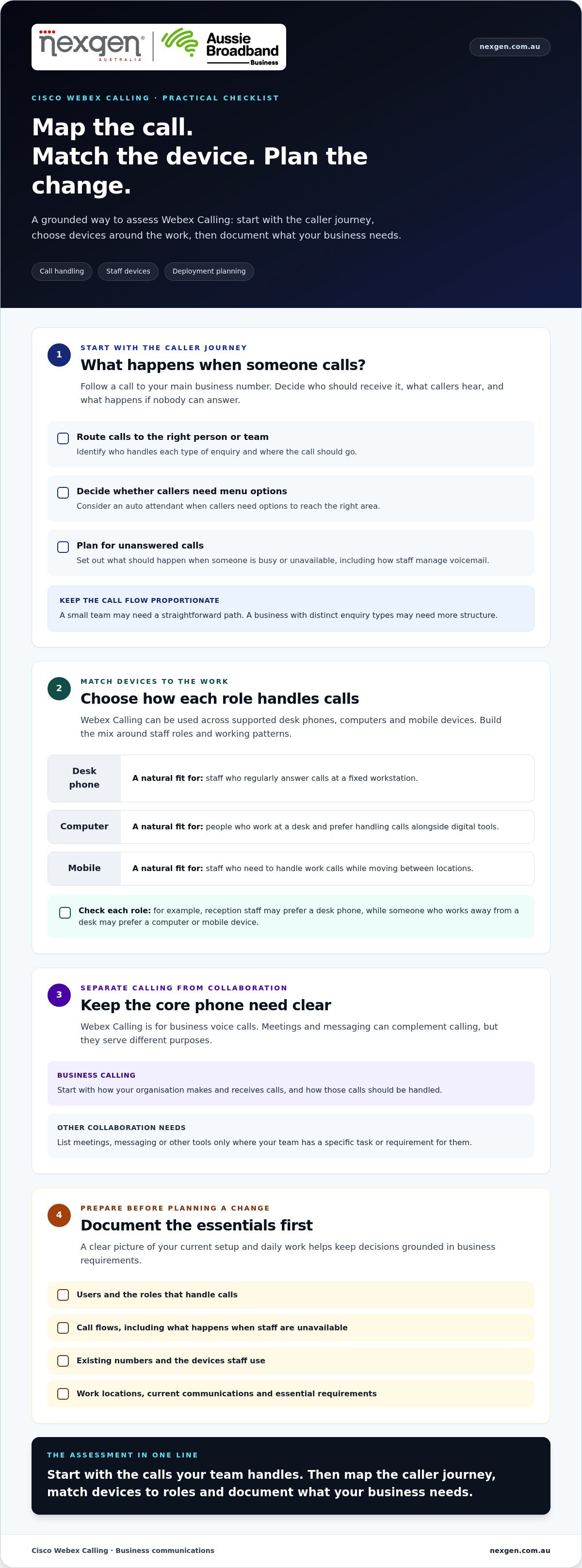
A Webex Calling project is easier to plan when you document how your business handles calls before discussing the technical setup. Start with users, call flows, current numbers, devices and essential requirements. Then plan for connectivity, number transition and continuity as part of the project.
- Map users and locations. Record who needs calling access, their roles and where they work. Note shared phones or numbers, staff who move between locations, and teams with specific call-handling responsibilities.
- Document call flows. Trace what happens when someone calls your main number, a team or an individual. Include busy periods, unanswered calls, voicemail and important hand-offs. Mark the steps that are essential to serving customers.
- List current numbers and services. Record the numbers your business uses and how each one is used, including local and national numbers where relevant. Include the numbers you need to retain in the transition plan.
- Inventory devices and dependencies. List the desk phones, computers and mobile devices staff need for calling. Note any existing phone-system connections or business processes that depend on calls, such as reception, customer enquiries or internal coordination.
- Plan for connectivity and continuity. Identify the internet connections used at each location and decide what your team should do if connectivity or calling is disrupted. Treat this as a planning requirement, not a promise of uninterrupted service.
- Prioritise requirements. Separate must-haves from optional features. Include supported devices, integrations, number arrangements and emergency-calling requirements in the deployment plan.
What information should you gather before a Webex Calling project?
Bring together a practical inventory: user roles, work locations, call patterns, existing numbers, preferred devices and business processes tied to calling. Assign an owner to each requirement so questions have a clear point of contact. Label each item as essential, optional or still to be resolved. This gives the deployment discussion a clear scope without treating every available feature as necessary.
How can a business reduce disruption during a phone-system change?
Plan the change with a named business owner and input from the people who manage calls day to day. Agree on what must be tested, who will take part and what needs to be ready before the change proceeds. Tell staff what they need to know and where to raise issues. A small business VoIP guide can also help you compare broader implementation approaches.
Use readiness checkpoints to review call flows, devices, numbers and user understanding before moving ahead. The sequence and timing depend on your business and service design, so build the plan around your own requirements.
Nexgen supplies and integrates Cisco Webex Calling phone systems for Australian businesses, including setup and deployment.
How can Nexgen help your business assess and deploy Cisco Webex Calling?
Once you’ve identified what your team needs from a phone system, the next step is to turn those requirements into a practical deployment plan. Nexgen supplies and integrates Cisco Webex Calling phone systems for Australian businesses, and handles setup and deployment across desk phones, computers and mobile devices.
What can Nexgen contribute to a Webex Calling deployment?
Nexgen helps put the selected Webex Calling solution in place. Deployment planning connects the intended setup with your users, preferred devices and call-handling requirements, so the system reflects how your business needs to make and receive calls. The device mix can include desk phones, computers and mobile devices, based on your requirements.
This keeps the focus on business calling, rather than selecting features simply because they’re available. Your call flows, staff roles and current phone arrangements help shape the deployment. For cisco webex calling australia, a clear view of those needs gives the discussion a useful starting point.
What should you bring to an initial Webex Calling discussion?
A short preparation list can help keep the conversation specific. Bring the details you already have and flag anything that needs further investigation.
- User numbers and roles: Note who needs calling access and whether staff have different responsibilities.
- Existing phone arrangements: List current numbers, devices and any services or business processes that rely on your phone system.
- Device preferences: Identify where staff expect to make and receive calls, and whether they need desk phones, computers, mobile devices or a mix.
- Key call workflows: Describe how calls reach your business, who handles them and what should happen when a call can’t be answered.
- Transition concerns: Highlight important numbers, busy periods, connectivity considerations and disruption your team needs to plan around.
Separate essential requirements from optional ideas. A critical customer call flow belongs on the must-have list, while an integration or extra feature can be recorded as something to explore. This keeps the discussion grounded in day-to-day operations and clarifies what needs to be included in the solution design.
You don’t need every technical detail settled before starting. A clear picture of your users, devices and calling priorities is enough to begin a focused discussion about fit, setup and deployment.
Read more about Cisco Webex Calling requirements and deployment with Nexgen.
Make your next phone system decision with confidence
The next step isn’t choosing features for their own sake. Decide what your business needs calls to do, which parts of your current setup must carry forward and what a practical change would look like for your team. Those priorities keep the conversation focused on fit.
For cisco webex calling australia, a clear brief gives you a stronger starting point for assessing the proposed setup. Nexgen can connect your business requirements with a Webex Calling deployment, keeping the discussion centred on your users, workflows and transition priorities.
Talk to Nexgen about Cisco Webex Calling for your business.
Frequently Asked Questions
Is Cisco Webex Calling available to Australian businesses?
Yes. Nexgen supplies and integrates Cisco Webex Calling phone systems for Australian businesses, and handles setup and deployment. Assess the proposed configuration against your users, devices and business requirements.
Can a business keep its existing phone numbers when moving to Webex Calling?
In many cases, yes. Australian businesses can generally transfer eligible existing numbers to a new provider through Local Number Portability, or LNP. The Australian Communications and Media Authority (ACMA) explains the process. Include the numbers you need to retain in your transition plan and establish the transfer process before the changeover.
Does Webex Calling require desk phones?
No. Desk phones aren’t the only way to use Webex Calling. A business deployment can include computers and mobile devices, allowing a team to choose devices that suit different roles. For example, reception staff might prefer a desk phone, while someone who regularly works away from a desk may prefer another supported device.
What happens to Webex Calling if the internet connection is interrupted?
Calls using an affected internet connection may be disrupted because Webex Calling is a cloud-based calling service. What users can do next depends on the other connections, devices and continuity arrangements available to the business. A mobile device may have a separate connection, but calls won’t necessarily switch over automatically. Include connectivity interruptions in your plan and test the agreed approach.
How much does Cisco Webex Calling cost for an Australian business?
There isn’t one fixed price for every Australian business. Costs depend on the provider’s plan and service arrangement, along with factors such as the number of users, selected features, devices and required integrations. Compare proposals against your user requirements and review the full costs in Australian dollars, including any ongoing charges.
Can Webex Calling work with a business’s existing phone system?
It may be possible, depending on the existing system, proposed design and services involved. Document your current setup, important numbers and connected business processes so they can be considered in the deployment plan. Nexgen integrates Cisco Webex Calling phone systems for businesses.