

What if a headset’s acoustic protection label gives your team less assurance than you think? When comparing small business call centre phone system features, it’s easy to focus on one specification. But assessing acoustic shock risk means looking at the headset, phone system and the way calls are handled together.
Choosing equipment is only part of managing the risk. You also need to understand what a protection claim means, how the headset works with your calling setup and what staff should do if they experience an unexpected loud sound.
This guide explains how acoustic shock is described, what to review in headset and phone-system documentation, and how workplace practices fit into the picture. It also separates product claims from mandatory requirements and advisory guidance, so you can compare equipment without treating a feature label as proof of protection.
Key Takeaways
- Separate a reported acoustic event from a medical diagnosis. Treat unexpected loud headset audio as a reason to assess what happened.
- Review headset protections alongside phone-system settings, work practices and incident response. Call recordings and analytics aren’t proof of acoustic protection.
- Compare protection claims using product documentation, compatibility information and supporting evidence, not a feature label alone.
- Use a documented review process: map how staff use equipment, assess the evidence, record decisions and revisit them when something changes.
- Nexgen Australia can help plan business VoIP, cloud phone systems and reliable small business call centre phone system features around your call-centre workflows. Headset claims and workplace safety need separate assessments.
What acoustic shock protection means for call centre headsets
Acoustic shock is a term used for symptoms a person reports after an unexpected, startling sound reaches them through a headset. It describes an experience, not a medical diagnosis or proof of a particular injury. For a small business call centre, a report is a reason to review the audio pathway and workplace response rather than assume one headset feature settles the question.
What does acoustic shock mean in a headset context?
A headset acoustic event might be a sudden burst of loud or unusual sound during a call. A user may report ear discomfort or ringing, but reports vary and need to be understood in context. General discomfort or listening fatigue can have other causes, so don’t label either as acoustic shock based on a description alone. Acoustic Shock on Wikipedia outlines the term and reported symptoms. This article offers general information, not a medical assessment. A health professional is the right person to assess an individual’s symptoms.
Why call centre work deserves a practical assessment
Call centre staff may wear headsets repeatedly and handle calls throughout a shift. That makes it sensible to consider how audio is delivered, without assuming every worker or setup faces the same level of risk. A reported event is a prompt to record what happened and review the circumstances, not to jump to conclusions about the cause.
Assess the full listening path. The headset produces sound, while the connected phone system or calling application affects how calls are received and managed. The call environment and workplace procedures also shape how staff use equipment and respond to unexpected sound. These factors are related but not interchangeable: a phone-system feature cannot establish what a headset limits, and a headset claim doesn’t explain how calls are configured or incidents are handled.
- Headset: Record the make and model, connection type and protection features described in the documentation.
- Phone system: Note the calling platform, user settings and how the headset connects to it.
- Call environment: Consider where calls are taken, how background sound affects listening and whether staff adjust volume to hear callers.
- Workplace procedures: Clarify how staff report a sudden sound, who records the details and how the equipment is reviewed afterwards.
These checks help separate product evidence from day-to-day practice. If a worker reports a sharp sound during a call, for example, record the time, device, connection and circumstances, then follow the organisation’s reporting process. Don’t promise that any device, setting or procedure eliminates risk. The small business call centre phone system features you assess should support a considered setup, while headset suitability and workplace safety need their own evidence-based review.
How headset, phone-system and workplace controls fit together
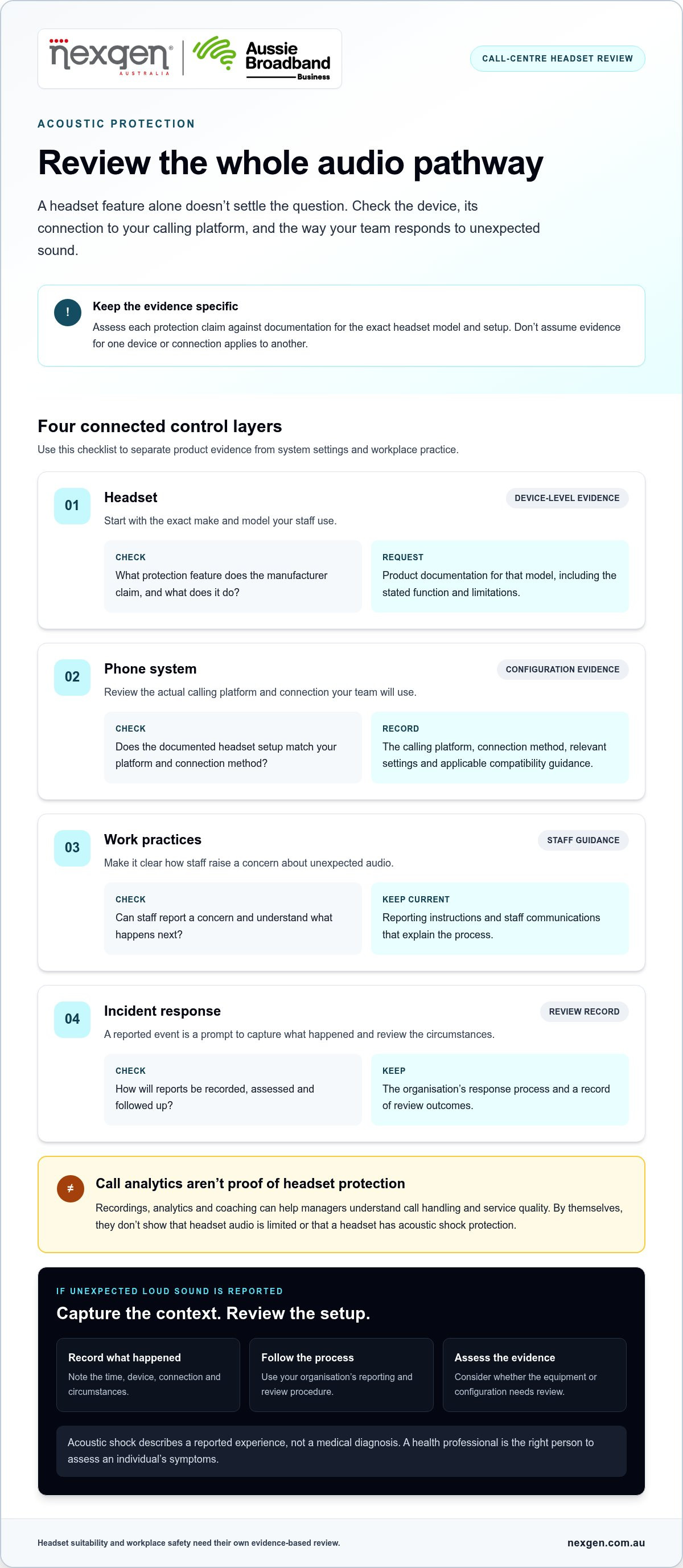
Assess acoustic protection across connected layers, rather than inferring it from one setting or software feature. Check what the headset manufacturer documents, how the headset works with your calling platform, and how staff report and respond to unexpected audio. Keep evidence for each protection claim with your procurement or review records.
What to assess in the headset and connected call system
Start with the exact headset make and model. Find out what each stated protection feature does, how it works and which documents support the claim. Then assess the headset with the phone platform and connection method your team will actually use. Compatibility can vary between setups, so don’t assume evidence for one combination applies to another.
Keep the layers distinct:
- Device-level features: Request the manufacturer’s documentation for each acoustic protection claim, including its stated function and limitations.
- System configuration: Record the calling platform, connection method and relevant settings. Use compatibility information or written guidance that covers that specific combination.
- Work practices: Give staff a clear way to raise concerns about unexpected audio and explain who will review them.
- Incident response: Set out how the business will capture the circumstances, assess the report and decide whether equipment or configuration needs review.
Call recordings, analytics and coaching can help managers understand call handling and service quality. They don’t, by themselves, show that headset audio is limited or that a headset has acoustic shock protection. Don’t treat a general platform capability as evidence of a specific headset safeguard.
| Control layer | Question to assess | Evidence to request |
|---|---|---|
| Headset | What protection does the manufacturer claim? | Product documentation for the exact model, including stated function and limitations. |
| Phone system | Does the documented headset setup match your call platform and connection? | Compatibility information and relevant configuration guidance. |
| Work practices | Can staff report a concern and know what happens next? | Current reporting instructions and staff communications. |
| Incident response | How will reports be recorded and reviewed? | The organisation’s process and a record of review outcomes. |
What workplace procedures add to device checks
A practical internal process gives workers a clear way to report an unexpected sound, identifies who receives the report and records details for follow-up. Staff feedback and incident reviews may reveal recurring equipment, connection or workflow concerns that prompt a reassessment. These steps support decision-making but don’t replace formal workplace obligations.
For Australian businesses, verify legal duties and mandatory standards against current primary sources, including Safe Work Australia guidance and the relevant state or territory regulator. An internal checklist alone doesn’t establish compliance. When comparing small business call centre phone system features, distinguish operational functions from verified protection evidence. Nexgen can help plan the phone-system side through business VoIP and cloud phone systems, while headset claims and workplace safety need their own evidence-based assessment.
How to compare acoustic shock protection claims before buying
Compare the evidence behind each claim, not just the wording on a product page. Check what the manufacturer says a feature does, whether the documentation applies to your exact model and setup, and whether separate evidence or an Australian workplace requirement supports the claim. A manufacturer-stated feature is useful information, but it isn’t automatically independent verification or proof of compliance.
What evidence should buyers look for?
Start with current manufacturer instructions and technical documentation. Look for a clear description of the claimed protection, how it operates and any limitations. Broad phrases such as “hearing protection” or “shock safe” need supporting detail. If the wording doesn’t explain the feature, don’t treat it as a defined performance claim. Keep copies of the documents you relied on so the basis for your decision is clear.
Use this comparison framework when reviewing products:
| Area to compare | What to assess | Evidence to request |
|---|---|---|
| Product documentation | Does the manufacturer explain the protection feature and its limits? | Current instructions or technical documents for the exact model. |
| Compatibility | Does the information cover your intended phone, computer or mobile device and connection? | Manufacturer compatibility guidance for the specific combination. |
| Controls | Which controls belong to the headset, and which are configured elsewhere? | Documentation identifying where each setting operates and what it controls. |
| Support | Can you find help for configuration, troubleshooting and product changes? | Published support material and applicable manufacturer guidance. |
| Evidence and requirements | Is a claim manufacturer-stated, independently supported or linked to a workplace requirement? | Relevant test evidence or current Australian primary-source guidance. |
These categories aren’t interchangeable. A product brochure records what the manufacturer claims. Independent test evidence may provide a separate basis for assessing performance. Workplace requirements are a different matter: check current primary sources, such as Safe Work Australia and the relevant state or territory regulator, before treating a standard or rule as mandatory. Don’t infer a legal obligation from marketing language.
How to compare fit with a small-business phone system
Assess compatibility against the devices staff will actually use, including desk phones, computers and mobile devices. A setup that works for one user role may not suit another. Match the proposed equipment to call volume, call-handling tasks and support arrangements, but don’t treat operational fit as a safety guarantee. Call routing, for example, affects how calls reach staff; it doesn’t verify a headset’s protection claim.
For broader planning, compare the relevant small business phone systems in Australia considerations alongside headset evidence. Features such as call routing and device access help shape day-to-day workflows, while headset claims require product-specific documentation. Assess each on its own merits before deciding how it fits your business.
A practical process for reviewing call centre headset protections
A repeatable review helps your business make considered equipment decisions and keep the supporting information together. Map how staff work, check each headset and connection, review the evidence, document the outcome and revisit it when something changes. Involve headset users and the person responsible for workplace health and safety, where your business has one.
A five-step headset assessment for a small business
Use this sequence to keep the review focused on your actual equipment and call arrangements. Don’t rely on a general product description or an assumed compliance threshold.
- Map use. Record staff roles, call tasks, headset models, connection methods and the desk phones, computers or mobile devices in use. Note which phone platform supports each arrangement.
- Check equipment. List the exact headset make and model for each setup. Gather current manufacturer instructions and product documents, and note differences between user groups or connection configurations.
- Review evidence. Match each protection claim to its supporting documentation. Record unclear wording, limitations and questions that need resolution. Verify relevant legal responsibilities or mandatory standards against current Australian primary sources, including Safe Work Australia and the relevant state or territory regulator.
- Document decisions. Note what was reviewed, what the business decided and why. Include reported concerns and follow-up actions without turning the record into a medical assessment or a claim of compliance.
- Set a review prompt. Identify changes that should trigger another review, such as different equipment, software, call workflows or team arrangements. Make clear who will coordinate it.
A simple record can capture the essentials without inventing pass marks or claiming that a setup is compliant:
- Review date and owner: who completed or coordinated the review.
- Users and tasks: roles, call activities and work arrangements covered.
- Equipment and connection: headset model, phone platform, device and connection method.
- Evidence reviewed: document name, version or date, and the claim it supports.
- Questions and decisions: unresolved points, decision rationale and relevant participants.
- Reports and follow-up: issue summary, action owner and review prompt.
When to review the assessment again
Revisit the record if a headset, phone platform, software setting, workflow or team arrangement changes. Staff feedback and reported events can also prompt a review. Invite users to describe what they experienced and involve the appropriate workplace safety personnel. Don’t use an internal review to diagnose symptoms or provide legal advice.
Staff may take calls through different devices and workflows, so include those arrangements in the equipment assessment. Reviewing your VoIP solutions for small businesses can help clarify which platforms and call setups are involved. Nexgen can help plan business VoIP and cloud phone systems as part of that setup. Talk to Nexgen about your business phone system requirements, while keeping headset evidence and workplace safety review distinct.
How Nexgen fits into a safer, well-planned call centre setup
A well-planned call centre needs a phone system suited to its call workflows, alongside a separate, evidence-based review of headset protection. Nexgen supports Australian small and medium-sized businesses with tailored business VoIP and cloud phone systems, including Cisco Webex Calling. Phone-system planning can help clarify how calls are handled and which devices staff use, but it doesn’t verify headset protection or replace workplace safety advice.
Where phone-system planning supports the assessment
Nexgen deploys Cisco Webex Calling across desk phones, computers and mobile devices. Map how different roles handle calls, such as whether staff take calls at a desk, on a computer or remotely on a mobile device. Include those arrangements in your wider assessment so headset documentation and compatibility information can be considered against the actual setup.
Teams can consider call handling and system requirements alongside their headset assessment. Flexible call handling and intelligent routing help shape how calls reach staff, while desk-phone integration and remote connectivity relate to how people work. These are phone-system considerations, not evidence that a particular headset has acoustic protection. Keep product claims tied to the headset manufacturer’s documentation and assess workplace safety questions separately.
If your team is considering Cisco Webex Calling, Nexgen’s guide to Cisco Webex Calling for Australian businesses can help you understand the phone-system option in the context of your organisation’s requirements.
A sensible next step for Australian small businesses
Keep the decision process clear: verify headset claims against current product documentation, record the controls and configurations you reviewed, and match the phone system to your call workflows. If the setup changes or staff raise concerns, revisit the relevant records and involve appropriate workplace safety personnel. Check legal responsibilities and mandatory standards against current Australian primary sources.
The right small business call centre phone system features depend on how your team handles calls, which devices it uses and how the system supports its work. Nexgen can help plan business VoIP, cloud phone systems and Cisco Webex Calling around those operational needs. This supports phone-system planning, not headset safety certification or a guarantee against acoustic shock.
Talk to Nexgen about the right phone system for your business and discuss the call workflows your system needs to support.
Keep your call-centre setup ready to change
Turn your review into a brief for the next equipment or system decision. Record the capabilities your team needs, the information you expect product documentation to provide and who will make the final decision. This gives future procurement a clear starting point and keeps the focus on evidence, not just feature lists.
As your operation evolves, revisit whether your small business call centre phone system features still match the way your team works. A planned review helps make changes more considered and easier to manage.
For help planning your business phone system, talk to Nexgen about the right phone system for your business. A clear plan gives your team a practical starting point for the next change.
Frequently Asked Questions
What is acoustic shock from a call centre headset?
A single sharp sound doesn’t, by itself, establish that someone has acoustic shock. The term describes an experience, while the cause and any health effects need separate consideration. If an event occurs, record what the worker heard and what they experienced afterwards. Don’t ask colleagues to diagnose the event or treat a brief sound as proof that a particular device has failed.
Are call centre employers required to provide acoustic shock protection?
Australian workplace safety law requires businesses to manage risks to workers, but that doesn’t necessarily prescribe one specific headset feature for every call centre. Model WHS laws are implemented by each state and territory, so applicable requirements can depend on jurisdiction and circumstances. Check current guidance from the relevant regulator and obtain qualified advice if you need an interpretation for your business. This is general information, not legal advice.
Can a headset prevent acoustic shock?
No headset should be treated as a guarantee that acoustic shock cannot occur. A protection feature may address a particular type of sound or operating condition, rather than every possible cause of unexpected noise. Assess the scope of the claim, not just the label. If a worker reports an event despite a claimed safeguard, review the setup rather than dismissing the report.
How should a small business assess headset acoustic shock protection claims?
Compare like with like. If two headsets make similar claims, check whether they refer to the same sound conditions and whether the supporting evidence uses comparable methods. Record what each claim covers, any stated exclusions and what remains unclear. This helps you assess small business call centre phone system features alongside headset evidence without treating general product language as independent proof or a legal determination.
Do call centre headsets need to be compatible with the phone system?
Yes. Before issuing headsets across a team, trial the intended model with each type of endpoint and connection in use. Confirm that staff can hear and speak clearly during a normal call, and test any call controls the team relies on. A successful trial on one computer or desk phone doesn’t automatically show that another device or connection will behave the same way.
What should staff do if they experience a sudden loud sound through a headset?
Staff should pause the call if needed and remove the headset if continuing to use it feels uncomfortable or unsafe. They should then follow the workplace reporting process and seek medical advice if they have symptoms or concerns. Avoid reconnecting the same setup until the business has considered whether it needs review. Keep the headset and connection details available so the event can be investigated accurately.