


The strictest call filter can be the one that costs your business a genuine enquiry. Unwanted calls interrupt staff and pull attention away from customers, but blocking every unknown number could also keep new customers, suppliers or colleagues from getting through. The right anti-spam call filtering settings for business office lines reduce disruption without treating every unfamiliar caller as a threat.
For Australian businesses using shared office numbers, consumer phone instructions rarely explain how a change might affect the whole team. Screening, filtering, blocking and routing each handle calls differently. Choosing the right approach starts with understanding your call patterns and how your office manages incoming enquiries.
This guide explains those options in plain English and shows how to apply them proportionately. You’ll learn how to record the problem, make a measured change, test normal call handling and review the results. The aim is a calmer call flow, not a barrier between your business and the people trying to reach it.
Key Takeaways
- Understand how screening, filtering, blocking and routing differ, and why shared office lines need a team-wide approach.
- Compare device-level controls with phone-system settings, bearing in mind that available options vary by platform.
- Choose anti-spam call filtering settings for business office lines around your call patterns, including new enquiries and contacts your team already knows.
- Record the issue and its impact before changing settings, then test call handling and review the results.
- Consider whether a tailored VoIP or cloud phone system could help manage call flows across your office team.
What anti-spam call filtering means for business office lines
Call filtering manages unwanted calls before or during delivery to staff. On a business office line, the aim is to reduce interruptions while keeping customers, suppliers and colleagues able to reach the right person. The anti-spam call filtering settings for business office lines that make sense depend on how calls enter your business and who needs to answer them.
An office number often serves more than one person. A shared reception line may handle enquiries for the whole business, while direct numbers connect callers to specific staff. A setting applied to one employee’s mobile may affect only that device; a rule applied to a shared line can change how calls are handled for a team.
Unknown numbers aren’t automatically spam. A prospective customer calling for the first time may be unfamiliar, and some genuine callers may withhold their number. Treating every unrecognised number as unwanted can reduce interruptions, but it can also create a barrier to legitimate contact.
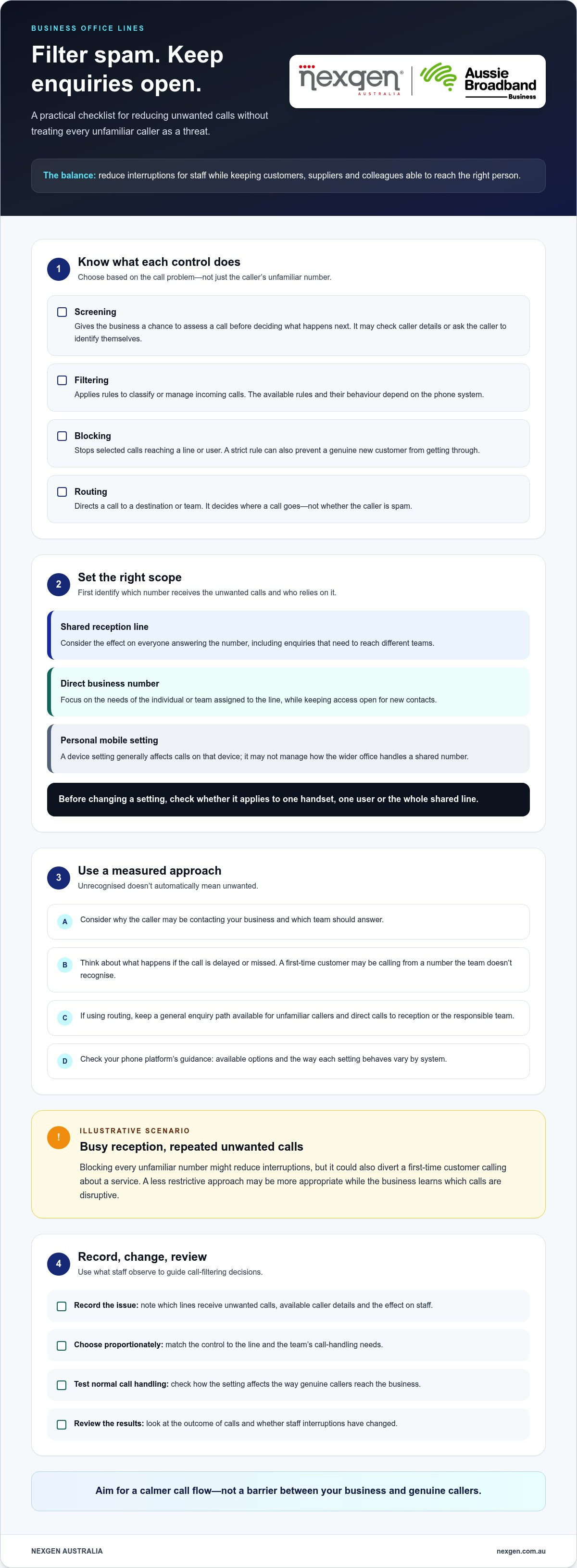
In brief: screening checks or challenges a caller, filtering applies rules to manage calls, blocking stops selected calls reaching a line or user, and routing directs calls to the right destination.
How spam filtering differs from screening and blocking
Screening gives the business a chance to assess a call before deciding what happens next. This might involve checking caller details or asking the caller to identify themselves. Filtering applies rules to classify or manage incoming calls, while blocking prevents selected calls from reaching the intended line or user. The exact behaviour depends on the phone system and its settings.
Call routing is about where a call goes, not whether it is spam. For example, a business might direct calls to reception or another team member. Robocalls are one type of unwanted automated call; the Robocall overview describes common forms and approaches to mitigation.
Why business office lines need a careful balance
A setting that works on a personal mobile may not suit an office. Staff share responsibility for incoming calls, and a call that one person doesn’t recognise may be a valuable enquiry for the business. Consider the caller’s likely purpose, which team should answer and what happens if a call is delayed or missed.
Illustrative scenario: A small office receives repeated unwanted calls on its reception line during busy periods. Staff spend time checking calls instead of helping customers. Blocking every unfamiliar number might reduce those interruptions, but it could also divert a first-time customer calling about a service. A less restrictive approach may be more appropriate while the business learns which calls are disruptive.
- Shared reception line: Consider the impact on everyone answering the number and on enquiries that need to reach different teams.
- Direct business number: Focus on the needs of the individual or team assigned to that line, while preserving access for new contacts.
- Personal mobile settings: These usually affect calls on that device, so they may not manage how the wider office handles calls.
Start by identifying which lines receive unwanted calls and how staff currently handle them. Note the caller details available, the effect on staff and the outcome of each call. That context helps you choose proportionate controls without assuming that an unfamiliar caller is a spammer.
Which anti-spam filtering controls can a business phone system use?
Businesses can manage unwanted calls at the device level, through the office phone system, or with a combination of both. The right control depends on where calls enter the business and whether a setting should affect one person or a shared line. Options and their behaviour vary by platform, so check how your own system handles each control before making changes.
Device settings versus office phone-system settings
Consumer devices may offer options to screen, silence or filter calls from unknown numbers. Apple Support is one example of guidance for settings on a personal device, not a guide to configuring a shared business line. Device controls can also change between software versions, so use instructions that match the phone involved.
A handset setting generally affects calls on that device. Shared office numbers are usually managed through the phone system, where changes can be considered in the context of the team’s call handling. This distinction matters if reception, sales and other staff answer the same number. For Australian businesses, use guidance for the specific phone platform and its current version rather than relying on general consumer instructions.
Using call routing alongside filtering
Number-based rules may be one way a system manages calls, but their availability and behaviour depend on the platform. Routing serves a different purpose: it directs a call to a destination or team without deciding whether the caller is spam. Screening checks or challenges a caller; routing determines where the call goes.
For example, a business could keep a general enquiry path available for unfamiliar callers, then direct calls to reception or the team responsible for the enquiry. This can preserve a route to the business without treating an unknown number as a threat. The routing options depend on how the phone system is set up.
Nexgen Australia’s business VoIP and cloud phone system solutions include intelligent call routing, with tailored setup for office teams using desk phones, computers and mobile devices. Planning how calls move through the business can help keep enquiries directed to the right team. If your current call flow is difficult to manage, consider how business VoIP and cloud phone systems could support a more considered approach through a consultation or as you talk to Nexgen Australia.
Before changing a setting, map which lines it affects and who answers them. Then decide whether the issue calls for a device-level control, a system-wide rule or a clearer route for legitimate enquiries. This keeps the response aligned with the disruption you’re addressing and reduces the chance of changing call handling more broadly than intended.
How to choose filtering settings without blocking genuine callers
Choose settings based on the disruption you can document and the calls your business needs to receive. Start with the least restrictive option that addresses the problem, then review whether it reduces interruptions without creating missed enquiries.
Think about how callers use each line. New customers may be calling for the first time, suppliers may use different numbers, and existing customers may call from a work or personal phone. A setting that suits a staff member’s direct line may be too restrictive for a shared reception number.
When to use a lighter or stricter filtering approach
A lighter approach is generally better when first-time calls are commercially important or the source of unwanted calls isn’t clear. Consider tighter controls only when call records show a recurring, disruptive pattern and the team understands which calls could be affected. No setting should be treated as a way to eliminate spam or guarantee every genuine call gets through.
- Permissive: Allows most calls through, which lowers the chance of interrupting genuine callers but may leave staff handling more unwanted calls.
- Balanced: Applies limited controls to a specific, documented problem while keeping a path open for callers who aren’t recognised.
- Restrictive: Limits more calls and may reduce interruptions, but carries a higher risk of diverting or missing legitimate enquiries.
These are practical approaches, not fixed settings available on every system. The right choice depends on what your platform supports and how your team handles incoming calls.
Safeguards for customer enquiries and shared lines
Before applying a rule, distinguish the callers it may affect. An unknown number may be visible but not saved in a contact list; an unfamiliar number may be recognised by the system but not by the staff member answering; a withheld number doesn’t display caller identification. Those categories aren’t interchangeable, and a legitimate caller can fall into any of them.
Keep an alternative route for people who don’t pass an initial screen. Depending on your call flow, another team member might answer, or the caller might be able to leave a message for follow-up. Avoid making one unsuccessful screen the end of the customer’s path to your business.
Different teams may need different handling. Reception might need to accept a broad mix of calls, while a sales team may prioritise new enquiries and a support team may need a reliable route for existing customers. Set rules with those roles in mind rather than applying one blanket approach across every line.
After a change, ask staff what they’re seeing and compare missed-call records with the original problem. Look for signs that legitimate callers are being diverted, such as new enquiries reporting difficulty reaching the office. If that happens, ease the restriction or adjust the call path. Review anti-spam call filtering settings for business office lines as part of normal call-handling practice, not as a one-off switch.
How to configure and test anti-spam settings on an office line
Configure call controls in a measured sequence: record the problem, check the affected lines, make one conservative change, then test and review the result. This makes it easier to identify what changed if call handling is disrupted. Controls and menu steps depend on your phone system, so follow instructions for your current platform and version rather than assuming settings are universal.
Prepare the line and select a proportionate setting
Before making changes, note which numbers receive unwanted calls, which teams depend on them, and what business impact the calls are causing. Record useful details such as the time, caller information shown, call outcome and staff impact. Save the current configuration so you can restore it if needed. Then identify the smallest adjustment that addresses the issue, rather than applying a broad restriction across every office line.
- Document the pattern. Note the affected numbers, the types of calls causing disruption, when they occur and how staff currently handle them. Include any impact on customer service or daily work.
- Map the call flow. Identify who answers each number and where calls go if the first person is unavailable. A shared reception line may need a different approach from a direct line used by one team.
- Check the existing setup. Review the phone system’s administrator controls and record current settings before changing anything. Confirm which system and version are in use, then consult its current guidance for platform-specific instructions.
- Make one limited change. Choose a conservative adjustment that targets the issue you observed. Avoid changing multiple rules at once, as that makes it harder to tell which change affected call delivery.
- Test before wider use. Use internal calls and suitable known external numbers to check that calls reach the expected line or team. Test relevant paths, such as reception and direct numbers, without assuming that one successful test covers every call type.
Test, monitor and refine the call handling
After the initial tests, monitor call logs, voicemail and staff feedback for signs that genuine calls are being diverted or missed. Ask the teams who answer the affected lines whether call volumes and caller types have changed. Keep the previous configuration available so you can reverse the adjustment promptly if the impact is unacceptable.
If a business-critical enquiry is blocked or repeatedly sent to the wrong place, restore the previous settings first. Review what happened, then consider a narrower change or a different call path before testing again. Don’t leave a disruptive rule in place while waiting to collect more evidence.
A written record of each adjustment makes future reviews clearer: note what changed, which lines were affected and what staff observed afterwards. This gives your business a practical basis for refining anti-spam call filtering settings for business office lines without relying on guesswork. For help reviewing office call flows and planning a tailored VoIP or cloud phone system, talk to Nexgen about your business phone system.
When a cloud or VoIP phone system can improve office call management
A broader phone-system review can make sense when unwanted calls affect several lines or teams, or when staff handle calls differently across reception, direct numbers and remote work setups. In these cases, the issue may be the overall call flow, not a single handset setting. Reviewing how calls reach and move through the business can help clarify what needs to change.
Signs your current office-line setup needs a broader review
Look for patterns across the business. If reception is interrupted repeatedly, direct callers report inconsistent experiences, or remote staff handle calls differently from office-based colleagues, individual device settings may not address the underlying problem. These signs point to a need to review call management and how calls move through the business.
Separate what you want the phone system to do from what you expect a filter to do. For example, a business might need clearer paths for reception, sales and support, alongside a proportionate way to manage unwanted calls. Call routing organises where calls go; filtering controls manage calls according to system rules. They solve different problems and should be assessed separately.
Plan a business phone system around reliable call handling
Start with the business’s call-handling requirements: which teams need to answer, how reception transfers enquiries, and how staff using desk phones, computers or mobile devices fit into the call flow. Then consider how a phone system can support those requirements. A cloud or VoIP system should be assessed against the features and configuration your business needs, including how it manages incoming calls.
Nexgen Australia provides tailored business VoIP and cloud phone systems, with setup and deployment shaped around business call handling. This gives your business a way to plan how calls should reach the team across desk phones, computers and mobile devices.
For Australian businesses comparing requirements, the Small Business Phone Systems Australia: 2026 Buyer Guide can help frame the wider system decision. If cloud delivery is a key consideration, Cloud phone systems: a guide for Australian businesses is a relevant next read. The two guides address system choice and cloud phone systems.
If recurring call disruption suggests your current setup needs more than a handset-level adjustment, talk to Nexgen Australia about planning a business VoIP or cloud phone system around your call flows and team needs.
Make call handling part of your customer experience
Use your next review to connect phone settings with the way customers find and contact your business. Check that the numbers shown on your website, email signatures and other customer-facing materials lead to lines your team monitors. Clear ownership of those contact points can help prevent a well-intended filter change from creating confusion elsewhere.
As your team, services or working arrangements change, revisit whether your anti-spam call filtering settings for business office lines still fit the way people reach you. Treat the settings as part of the broader customer experience, with clear responsibility for keeping call handling aligned with business needs.
Nexgen can help you plan a phone system around your business call flows. Talk to Nexgen about the right phone system for your business, and take the next step towards more considered call handling.
Frequently Asked Questions
Can anti-spam filtering block legitimate business calls?
Yes. A rule can misclassify a genuine call, and the practical impact depends on where that call is sent. Give staff a simple way to flag callers who say they couldn’t reach the intended team. Record whether the call was rejected, diverted or left a message; that distinction can help you work out whether the issue lies with the filter rule or the next step in the call path.
How do I stop spam calls on a business office line?
First, identify whether the disruption involves repeated nuisance calls, silent calls or calls reaching the wrong team, as each may call for a different response. Keep customer-facing numbers focused on the teams intended to answer them, rather than publishing staff direct numbers by default. The right anti-spam call filtering settings for business office lines depend on your phone system and the call handling you want to maintain.
What is the difference between call filtering and call blocking?
Filtering applies rules to manage incoming calls, while blocking stops selected calls from reaching a line or user. The difference matters when you’re reviewing how a call was handled: depending on the system, a filtered call may be directed to another destination, while a blocked call may not reach the intended user. Check the call outcome and setting description in your platform before deciding what a rule does.
Should a business silence calls from unknown numbers?
Not by default. Caller ID can vary between calls, even when the person is a known customer or supplier, so a number that looks unfamiliar doesn’t establish the caller’s intent. Consider whether staff can return a call using the details provided in a voicemail or existing customer record. That gives your team another way to respond without relying solely on whether the incoming number is recognised.
Do iPhone spam call settings apply to business office phone lines?
Not directly. iPhone settings govern calls handled by the supported device, while office calls may be managed by a separate phone platform. If business calls are delivered to an employee’s iPhone, there may be two points to consider: how the office system directs the call and how the handset handles it. Identify which number the caller dialled and where the call was processed before changing either setting.
Are there Australian rules about filtering unwanted business calls?
Australian requirements depend on the type and purpose of the call. The Australian Communications and Media Authority’s telemarketing guidance explains relevant rules, while the Do Not Call Register provides information about registering numbers to limit most unsolicited telemarketing calls. These resources don’t replace advice about your specific circumstances. Check current official guidance before relying on a particular interpretation; this answer isn’t legal advice.