


After-hours calls need a clear destination, not just a voicemail box. Effective after-hours call routing strategies for urgent customer enquiries use time-based rules to direct callers to the right place, such as an on-call specialist, support team or voicemail. The right setup separates urgent issues from routine messages and tells callers what to expect.
It’s reasonable to want urgent customers to reach someone without keeping your whole team on call. Routing can send calls to different people or destinations based on business hours, enquiry type and staff availability. Costs depend on your phone system and whether you add live answering coverage.
This article explains how routing works, where to direct different after-hours calls and what affects the cost. It also covers how call queues and specialist agents can help manage enquiries without sending every caller down the same path.
Key Takeaways
- Set clear after-hours rules so urgent calls reach the right person and routine enquiries can wait for follow-up.
- Pair call forwarding with voicemail options to capture messages without routing every caller to a live staff member.
- Build separate schedules for weekdays, weekends and holidays, then direct calls to the appropriate team or location.
- Assess the costs by separating phone-system routing features from any additional live answering coverage.
- Use queues and specialist agents to manage caller demand and direct technical issues to people with relevant skills.
1. What is Call Centre Routing?
Call centre routing directs incoming calls according to rules such as the time, caller’s choice or staff availability. During business hours, calls may go to reception or a dedicated contact centre. After closing, time-based routing can send callers to voicemail, forward calls to an on-call person, or offer separate paths for urgent and routine enquiries.
Voicemail and call forwarding can work together. For example, a caller who reaches a closed accounting practice could hear an after-hours message, then leave a routine enquiry for next-day follow-up. Voicemail-to-email sends the message to an inbox, allowing staff to review it without providing live coverage. A callback promise, such as a response within 24 hours, should match the team’s actual capacity.
Privacy and telecommunications rules are relevant when a business records calls or handles caller information. Routing directs a call; recording captures it. Keep these functions distinct, tell callers clearly when recording is used, and manage access to recordings carefully. Make sure your process reflects the information your business collects and how it uses it.
An IVR menu lets callers choose an option, such as pressing 1 for urgent support or 2 for a routine enquiry. A short menu can direct urgent callers to an available contact or support team. Voicemail-to-SMS can alert a nominated staff member when a message arrives, so they can assess it and decide whether follow-up is needed.
Set response targets around the enquiry’s urgency and the coverage your team can sustain. Define who acknowledges urgent calls, who owns follow-up and what happens if the first contact doesn’t answer. A stated callback within 24 hours is useful only if the team can meet that commitment. Routine messages can instead receive a clear next-business-day follow-up expectation.
To establish and test the process, first define business hours, call categories and responsible staff. Then configure call forwarding, voicemail destinations and caller options. Test each path from an outside phone, including calls made after closing. Check the greeting, destination and escalation route, and retest after staff responsibilities or schedules change.
Some callers need practical information rather than live assistance. An after-hours message can explain when the business reopens, how to leave a message and where urgent enquiries should go. If callers can’t leave voicemail, give them another clear next step. During an incident, limiting switchboard calls can also help avoid overwhelming the system.
2. Routing calls to departments, individuals, or alternate offices
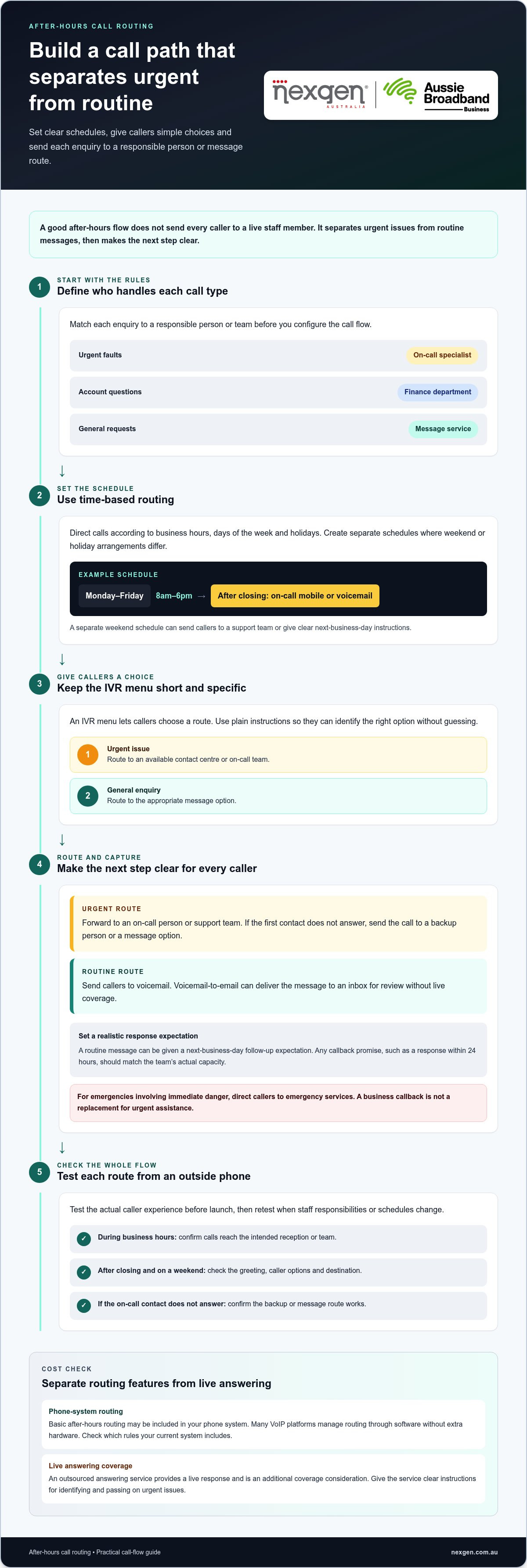
Route after-hours calls according to the caller’s needs, your schedule and who can respond. Effective after-hours call routing strategies for urgent customer enquiries start by matching each call type to a responsible person or team. Direct urgent faults to an on-call specialist, account questions to the finance department, and general requests to a message service. Define who owns each call type before building the call flow.
Time-based routing directs calls according to business hours, days of the week or holidays. For example, a business open Monday to Friday, 8am to 6pm, could direct daytime calls to reception and after-hours calls to an on-call mobile. A separate weekend schedule can send callers to a support team or give them clear instructions for the next business day.
For urgent enquiries, use a short IVR menu to distinguish emergencies from routine requests. A caller could press 1 for an urgent issue and 2 for a general enquiry. Send the urgent option to an available contact centre or on-call team, and the other option to an appropriate message route. Keep menu choices specific, so callers can identify the right path without guessing.
Common strategies include forwarding calls to a mobile, using an on-call roster or routing enquiries to a support team. Businesses with offices in different time zones can direct calls to the team currently within business hours. For complex issues, the receiving team can transfer callers to the department with the relevant expertise.
An in-house roster gives your business direct control over staff availability and escalation. An outsourced answering service provides a live response, but needs clear instructions to identify and pass on urgent issues. Compare call types, required specialist knowledge, roster capacity and handover process. The right arrangement can handle the expected enquiries and follow the agreed escalation path.
Plan what happens if the first contact doesn’t answer. Route the call to a backup person or a message option that explains the next step. For emergencies involving immediate danger, direct callers to emergency services rather than implying a business callback can replace urgent assistance. NSW Health advises updating local telephony systems with after-hours advice, call cascades, forwarding arrangements, IVR and caller enquiry options.
Before launch, test each route from an outside phone. Call during business hours, after closing and on a weekend, then simulate an unanswered on-call contact. Confirm the intended team or alternate office receives the call, and check that messages explain what callers should do. Review the flow whenever staff responsibilities or operating schedules change.
3. Does After-Hours Routing Cost Extra?
Basic after-hours routing doesn’t always require a separate service fee. Smarter call routing is a built-in feature of many VoIP platforms and is managed through software, without extra hardware. The key cost question is whether your current phone system includes the rules you need, or whether you’re adding live answering coverage. Assess these separately.
Start by mapping your weekly schedule. For example, set weekday routing from 8:30am to 5:30pm, then direct calls outside those hours to voicemail or an on-call contact. Add Saturday trading hours separately, such as 9am to 12pm, and decide where calls go after Saturday closing. Routing rules can apply automatically once their schedules are configured.
Keep holiday schedules separate from ordinary weekends. A public holiday might use a recorded closure message, while a peak-season period could direct callers to a dedicated support team. Review dates and destinations before each change, then test calls during the affected period. Accurate schedules help callers reach the right option and support a better customer experience.
Live answering is a separate cost from software-based routing. Traditional answering services commonly cost A$200 to A$500 monthly, while after-hours AI answering systems can cost A$60 monthly. These figures describe answering services, not the price of a phone system or its routing features. The cost depends on the type of coverage and service being used.
Callback requests can be a practical alternative to live after-hours coverage for non-urgent enquiries. Let callers leave a message or request a callback, and clearly state when your team will respond. For example, a business could return routine enquiries on its next business day and route urgent calls separately. Only publish a callback timeframe your team can consistently meet.
An online click-to-call option can collect a customer’s preferred callback time before connecting them to your phone system. Keep available slots aligned with staff schedules, and offer an after-hours request for the next open period. This separates a request for contact from an urgent live call and gives the caller a clear next step.
To estimate the full cost, list each component separately: included routing features, any additional answering coverage, and staff time for callbacks. Then compare weekday, weekend and holiday requirements. A business needing only scheduled voicemail has a different setup from one requiring live overnight responses. This breakdown helps you match coverage to actual call needs instead of treating every after-hours enquiry as urgent.
4. Call queueing and virtual queues
A call queue holds incoming calls until an available agent can answer. It can distribute callers to the next available person or a selected team, rather than ringing one busy line repeatedly. For an Australian business handling urgent enquiries, separate queues can distinguish technical faults from account questions. Software Advice research found that 67% of customers hang up if they can’t get answers immediately.
A queue helps only when someone is available to take calls. During staffed periods, callers can hear their position or an estimated wait, if the system provides that information. A virtual queue offers another option: callers request a callback instead of remaining on hold. The system arranges a return call, helping preserve the customer experience without keeping callers connected.
After hours, avoid placing callers in a queue that nobody monitors. Route an urgent issue to an on-call specialist, while a routine enquiry can receive a callback option for the next business day. If the specialist is already handling a call, the routing plan needs a clear alternative, such as another qualified contact or a message route.
Consider a dental practice receiving an emergency call after closing. If the dentist’s first contact comes 15 to 45 minutes later, the caller needs clear expectations during that interval. A queue message can explain what happens next, while a virtual callback request can record the caller’s details for follow-up. For urgent health concerns, the message should direct callers to appropriate emergency assistance, not imply a queue replaces it.
Keep queue messages short and useful. Say that the call has been routed, explain whether callers can wait or request a callback, and offer an alternative for urgent issues. Avoid repeating a menu callers have already navigated. Someone who chooses “technical support” should hear relevant instructions, not a general message about every department.
Review queue performance using measures such as call abandonment, speed of answer and first-call resolution. These show whether callers leave before connecting, how quickly agents answer and whether the first conversation resolves the enquiry. Compare results by time of day and call type. If urgent calls wait longer than routine ones, adjust routing priorities or staffing rather than lengthening every queue message.
Test the caller experience from an external phone during a busy period and after closing. Confirm that the queue reaches staffed agents, callback requests are recorded and unanswered urgent calls follow the escalation path. Clearly distinguish live queues from callback requests so callers understand what will happen and your team can manage demand.
5. Routing after-hours technical issues to specialist agents
Technical calls need agents with the ability to diagnose the issue, not simply take a message. One example describes a business where 90% of after-hours calls concern technical issues. Routing those callers directly to technical support can reduce transfers and help the right person gather useful details. The figure is an example, not a universal pattern, so classify your own call types before changing routes.
Start by defining which faults need immediate attention. A system outage affecting multiple staff may need an on-call response, while one user’s setup question could wait until business hours. Give callers plain-language choices, such as “service unavailable” or “help with one device”. This helps agents prioritise by impact without treating every technical question as an emergency.
Match each call category to an agent’s skills and responsibilities. A network specialist may handle connectivity failures, while an application support agent deals with access issues. If a caller selects the wrong option, give the first agent a clear transfer path and enough context to avoid making the customer repeat the problem.
Set an escalation path for unanswered calls. For example, route an urgent fault to the primary on-call agent, then to a backup specialist if the first person doesn’t answer. Voicemail can capture the caller’s details if neither responds, but the greeting must explain what happens next. Test every route from an external phone, including the backup path.
Use a short intake prompt to collect information the specialist can act on. Ask which service is affected, when the problem started and whether other users are affected. For a small business experiencing a phone outage, these details can help the agent distinguish an individual handset issue from a wider service interruption.
Specialist routing also needs clear limits. A caller reporting immediate danger should be directed to emergency services, not left waiting for a technical agent. For non-emergency faults, explain whether the call will reach live support, a callback queue or voicemail. This sets expectations and helps the agent focus on issues that need their expertise.
Review the route using actual call outcomes. Track which options callers choose, how often calls reach the intended agents, and where transfers or failed escalations occur. If routine queries regularly reach the on-call specialist, refine the menu or add a self-service message. If urgent issues land in general voicemail, make the urgent option clearer and retest the full path.
Nexgen Australia: Small Business Phone Systems
Nexgen Australia provides Small Business Phone Systems for businesses reviewing how to handle calls after hours. Start with your call types, operating schedule and escalation process, then match them to suitable routing arrangements.
If your team needs to direct urgent calls to the right staff while keeping routine enquiries organised, a Small Business Phone System or Small Business VoIP Solution can support your communications needs. Consider how your current process handles unanswered calls, specialist support and changes to weekday or holiday schedules.
Contact Nexgen Australia to discuss a phone system for your business and how it can support your call-handling requirements.
Make your after-hours call plan work in practice
Turn your routing plan into a clear operating process. Assign responsibility for each urgent call type, decide what happens when the first contact is unavailable, and give callers an accurate message. Review the process whenever your team, services or opening hours change.
Choosing after-hours call routing strategies for urgent customer enquiries also means matching the call flow to the phone system your team uses. Nexgen Australia provides Small Business Phone Systems, Small Business VoIP Solutions and Office Phone Systems for business communications. Discuss how your current setup handles after-hours calls and where a different configuration could fit.
Contact Nexgen Australia to discuss call routing and take the next step towards a phone setup that reflects how your business works.
Frequently Asked Questions
What is Call Center Routing?
Call centre routing is the set of rules that directs incoming calls through a business phone system. Unlike a staff member manually transferring a call after answering, the system can send callers to the right team first, then apply overflow rules if that team is unavailable. Reviewing these rules can reveal unnecessary transfers and unclear caller options.
Does After-Hours Routing Cost Extra?
It can, depending on what your current phone arrangement includes and what additional coverage you need. To assess the cost, compare the functions already available with any extra services or staff time required. Consider whether the business needs simple message capture, live answering or specialist support. This gives you a more useful basis for budgeting than treating all after-hours options as one cost.
How many rings before after-hours voicemail should pick up?
Avoid a timeout shorter than 2-3 rings or longer than 8-10 rings. Set the answer point so callers have time to hear the business greeting, but don’t leave a long, silent wait before voicemail begins. Test from a mobile phone on an ordinary connection, as ring duration can feel different from an internal handset. Adjust the setting if callers regularly hang up first.
Can I change the routing setup seasonally?
Yes. For a seasonal change, document the temporary opening hours, call destinations and message wording before updating the system. Set a reminder to restore the usual setup when the period ends. For example, a business running a seasonal service campaign can direct enquiries to the staff assigned to it, then return calls to its regular teams afterwards. Test both the temporary route and its reversion.
Does smarter routing require extra hardware?
Usually, no. Call-routing rules are a software function on many VoIP platforms, so the routing logic itself doesn’t require additional hardware. Review how your existing phone system handles incoming calls and whether its settings match the required call flow. The equipment staff use to answer calls is a separate consideration from the rules that direct them.
Will customers feel frustrated if their call isn’t answered live?
Some callers may prefer a live conversation, but a useful message can make an unanswered call easier to manage. Tell callers what information to leave, how the business will use it and what to do if the matter is urgent. Avoid vague wording or an estimated wait your staff can’t meet. A clear next step helps callers decide whether to leave a message.
What counts as an urgent customer enquiry after hours?
Urgency depends on the consequences of waiting, not simply on the caller’s preference. For example, a fault that prevents a business from opening the next morning may need prompt attention, while a request for a copy of an old invoice can usually wait. Set examples relevant to your operations, and explain what callers should do if their situation falls outside those categories.
How should businesses prioritise and triage after-hours calls?
Use a consistent assessment that considers impact, time sensitivity and the caller’s immediate need. Ask what has stopped working, who is affected and when action is required. Record the answers consistently so the next staff member can understand the situation without starting again. Review completed enquiries to check whether the assigned priority matched the action and outcome.