


What happens if your internet backup is working but customers still can’t reach your team? 4g failover backup for business voip during internet outage can provide an alternate connection for calls, but the mobile network, router and phone system all need to work together. A backup connection can support VoIP, but it doesn’t guarantee every call will continue without interruption.
Automatic 4G failover can switch internet traffic to a mobile network when your main connection drops. Whether your business calls remain available depends on how the switch affects desk phones, cloud calling and incoming call handling. Power matters too: the router and other essential equipment need electricity to operate.
This article explains what 4G failover can and can’t protect, how it compares with call forwarding and phone apps, and which parts of your setup to assess. You’ll also find practical steps for testing your backup plan and making informed decisions about keeping customer service available during an outage.
Key Takeaways
- Understand what can happen to desk phones and cloud calling when your main internet connection drops.
- Compare 4g failover backup for business voip during internet outage with 5G, a second fixed-line connection and call routing.
- Identify the network and phone-system dependencies that affect how calls are handled during a disruption.
- Use a practical checklist to test your backup arrangements and keep your continuity plan up to date.
- See how phone-system design and call handling fit into a broader business continuity plan.
What happens to business VoIP during an internet outage?
VoIP uses an internet connection to carry voice calls. If your primary connection fails and there’s no working backup path, calls on devices at that site may be interrupted. A 4G failover backup for business VoIP during an internet outage gives network traffic another route through a mobile connection. Whether calls stay available depends on how the phone platform, network, devices and settings work together.
Why an internet outage can affect VoIP calls
VoIP converts speech into data and sends it across a network. This Voice over IP (VoIP) overview explains the basic principle. In a business setup, a desk phone or calling app needs a connection to the phone platform to place and receive calls.
A fault with the office internet is different from an issue with the phone platform or an individual handset. If the office connection fails, devices there may lose access even while a cloud phone platform remains available. If the platform itself is unavailable, changing the office’s internet route may not fix the problem. A faulty or unpowered handset can also remain offline despite a working connection.
The impact depends on the fault and your call settings. Staff may be unable to make outbound calls from affected devices. Inbound callers might hear ringing without reaching the team, be redirected elsewhere or experience another outcome determined by the phone system. Features that rely on the connection, such as call routing or voicemail access, may also be affected.
What 4G failover is designed to do
For example, if the main internet connection drops during business hours, a configured 4G backup may let the router redirect traffic. Connected phones can then try to reconnect to the cloud phone platform. Staff might experience a short interruption, and an active call may not survive the switch. If the mobile connection is unavailable or the phones aren’t set up to use the alternate route, calls may remain disrupted.
Failover restores an alternate network path, not every phone-system dependency. The mobile signal and data connection need to be usable, devices need power, and the phone service must be reachable through the new route. A power outage can stop the router, switches or desk phones unless suitable backup power is in place. These dependencies mean 4G can support VoIP continuity, but can’t guarantee every call or feature will keep working.
How 4G failover backup works with a business VoIP system
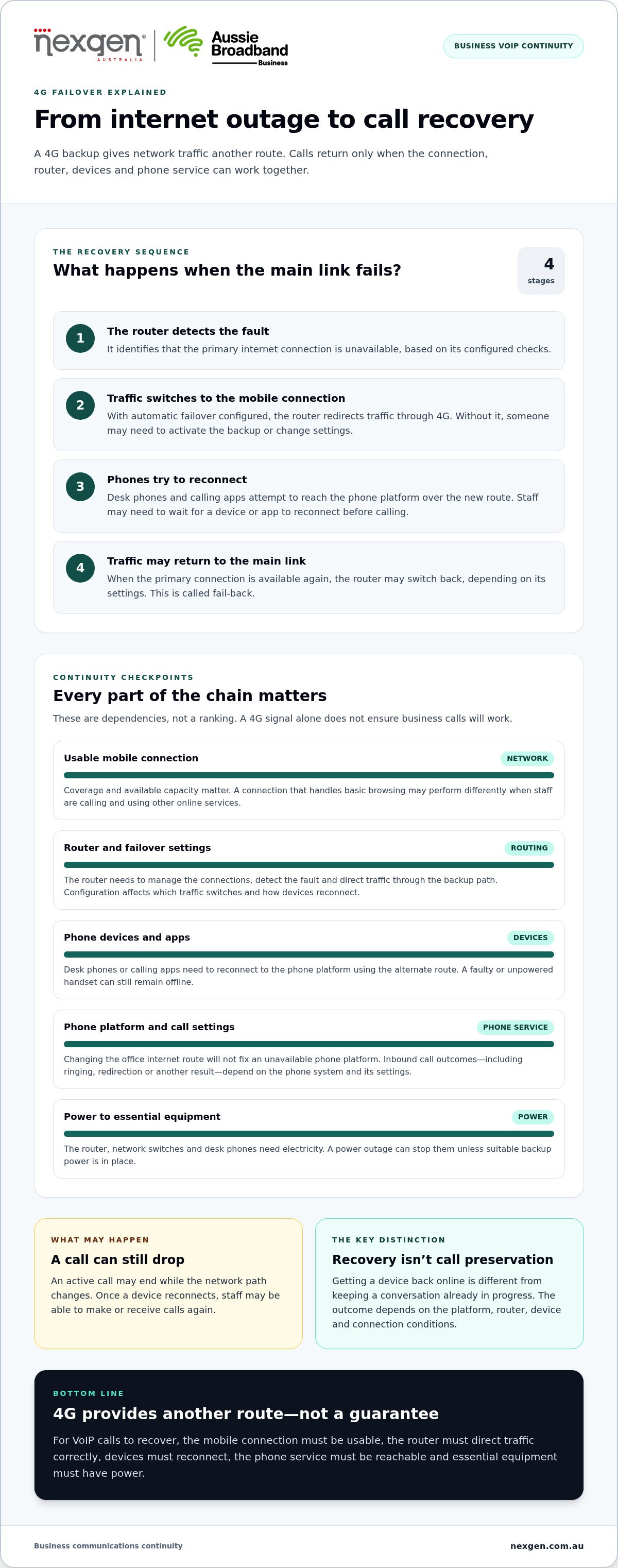
4g failover backup for business voip during internet outage depends on a chain of connected components, not just a mobile signal. A router must detect that the primary connection is unavailable and direct traffic through the mobile connection. Phones or calling apps then need to reach the business phone platform using that alternate route. The equipment and settings determine whether this happens automatically or requires someone to intervene.
The components in a 4G VoIP failover setup
A typical setup includes a primary internet connection, a router that can manage multiple connections, a 4G mobile connection and a business phone system. The mobile connection may use equipment built into the router or a separate modem. These are possible arrangements rather than a universal design. The right layout depends on the network and devices in use.
Coverage and available capacity matter. A mobile connection that works for basic browsing may perform differently when several staff members are making calls and using other online services. Router configuration also affects which traffic moves to the backup path and how devices reconnect. For a broader continuity framework, Business Continuity Planning from Ready.gov outlines planning considerations. Australian businesses should apply the guidance to their own operating context.
From connection failure to VoIP service recovery
The process generally follows these steps, although the exact behaviour depends on the router and phone-system configuration:
- Detect the fault. The router identifies that the primary internet connection is unavailable, based on its configured checks.
- Switch the network path. If automatic failover is configured, the router directs traffic through the mobile connection. Otherwise, someone may need to activate the backup connection or change settings.
- Reconnect services. A desk phone or calling app attempts to reach the cloud phone platform using the new path. Staff may need to wait for the device or app to reconnect before placing or receiving calls.
- Return to the primary connection. Once the main link is available, the router may switch traffic back, depending on its settings. This is known as fail-back.
What switching means for active calls
An active call may drop while the network path changes. Once a device reconnects to the phone platform, staff may be able to make or receive calls again. That’s different from preserving a conversation already in progress. The outcome depends on the phone platform, router behaviour, device and connection conditions.
For example, someone using a desk phone might need to wait for it to reconnect before making another call. A colleague using a calling app may have a different experience, depending on the device’s connection and settings. Plan for these differences instead of assuming failover will keep every call going.
Nexgen Australia helps businesses plan tailored VoIP and cloud phone systems, including versatile deployments across desk phones, computers and mobile devices. Explore business phone system planning as part of a wider continuity approach.
Compare 4G failover with other VoIP backup approaches
4G is one way to create an alternate internet path for business VoIP. The right option depends on where calls need to work, the mobile signal at your premises and how much of your operation relies on internet-based services. Compare what each approach can support and what it depends on before choosing what belongs in your continuity plan.
- 4G backup: Provides an alternate mobile internet path for phones and other connected services. It relies on usable mobile coverage, suitable equipment and power. It can support more than voice, but mobile-network issues or limited backup capacity may affect what your team can do.
- 5G backup: Uses a mobile connection as an alternative path where 5G coverage and compatible equipment are available. It may suit a business seeking a newer mobile-network option, but availability depends on the site. It still relies on mobile service and power.
- A second fixed-line connection: Adds another fixed internet path for network traffic. It may provide an alternative if the primary link fails, but both connections could share infrastructure or another point of failure. The design matters as much as having a second line.
- Phone-platform call routing: Redirects incoming calls according to the phone system’s configuration, such as to another destination. It can help manage inbound calls if the office connection is down, but it doesn’t restore internet access for desk phones or other online services.
When 4G backup may suit a business
4G may suit a business that wants an alternate connection for cloud-based voice and essential online services, particularly when staff need to keep working from the office during a fixed-line disruption. Start by checking mobile signal at the premises rather than assuming coverage will be suitable. The backup connection also needs to support expected demand from calls and other applications.
If your business depends heavily on inbound calls, decide what callers should experience when the office connection fails and whether your plan can provide that outcome. A team focused on receiving calls may prioritise call routing or staff using mobile calling apps. A team that relies on several online tools may need broader network backup. Either way, assess the complete phone-system design.
Where 4G failover has limits
A mobile backup can be affected by a mobile-network outage, weak signal, competing demand or a power failure affecting the router and connected equipment. A second fixed connection also needs scrutiny: if both links rely on shared infrastructure, one fault could affect both. Consider whether the backup uses a genuinely different path and which failures it is intended to cover.
Internet failover and phone-platform continuity solve different problems. 4G provides an alternate route for network traffic; call routing can direct inbound calls elsewhere, depending on the phone system’s setup. If your priority is helping customers reach the right team, assess call handling alongside connectivity. That way, 4g failover backup for business voip during internet outage is considered against your operational priorities, not treated as a complete solution by itself.
How to assess and test 4G backup for business VoIP
A backup connection is useful only if it supports the calls and work your team needs to continue. Map the important phone functions, decide what should happen during an outage, then test the setup in a controlled way. Record the results, assign responsibility for follow-up and review the plan when your phone system, network or team changes.
Questions to answer before choosing a setup
Start by identifying the people and phone functions that matter most. Consider which teams need to make or receive calls, which business numbers customers use, and whether call routing, voicemail or other cloud phone features are continuity priorities. Then assess the primary connection, mobile signal at the site, router capabilities and the power needed to keep network equipment running.
- Which teams, business numbers and call functions are the priority during an outage?
- Which devices need to work, including desk phones, computers and mobile devices?
- Is the backup connection’s signal usable at the premises, and can it support expected demand?
- Which equipment needs power, and what happens if mains power is interrupted?
- Who manages network and phone-system settings, and who will guide staff during a disruption?
Your answers define what the 4g failover backup for business voip during internet outage needs to achieve. They also show whether the priority is keeping office devices online, directing inbound calls elsewhere or supporting both. Don’t treat “the internet is back” as the only measure of success.
Test failover without assuming calls will be unaffected
Plan a controlled test with the people responsible for the network and phone system. Choose a suitable time, tell affected staff and agree how to stop the test if it disrupts essential work. Check actual call behaviour, not just whether a router indicates that it has switched connections.
- Record the starting state. Confirm which connection is active and note the devices and call functions being tested.
- Simulate loss of the primary link. Follow the agreed procedure with the responsible person present. Don’t assume every router is configured to switch automatically.
- Check both call directions. Place an outbound call and call the business number from an external phone. Confirm what staff and the caller experience, including any configured call routing.
- Test relevant devices. Check the desk phones, computers and mobile devices staff may rely on. Record reconnection delays, failed calls or features that behave differently.
- Check recovery and document results. Restore the primary link according to the test plan, then confirm which connection is in use and whether calls work as intended.
Document the test date, outcomes, unresolved issues, escalation steps and the person responsible for each action. Set a review schedule that reflects how often your systems change and how important phone continuity is to operations. Repeat the test after significant changes, and update staff instructions when the process changes.
For help aligning phone-system design and call handling with your continuity priorities, talk to Nexgen about planning your business phone system.
Plan business phone continuity with Nexgen
A phone continuity plan is easier to use when it reflects how your organisation operates. Decide who makes decisions during a disruption, how staff receive updates and which business processes depend on phone access. These responsibilities sit alongside the technical design and help your team respond consistently when normal operations are affected.
Connect backup planning to the phone system
Review how your phone system supports the way your team works. Changes to team roles, call volumes, office arrangements or device use can affect whether the existing setup still fits. Include these changes in phone-system planning so continuity arrangements keep pace with your business.
Nexgen Australia helps small and medium-sized businesses plan tailored VoIP and cloud phone systems around their communication requirements. This planning can consider how the phone system fits into your broader operational arrangements, without treating a backup internet connection as a complete continuity plan.
Choose a practical next step for your business
Record how your team uses its phone system and which operational changes may affect those needs. Note who owns phone-system decisions, who communicates with staff during a disruption and how updates to the setup will be reflected in internal procedures. This gives your business a useful foundation for planning and review.
With those requirements documented, Nexgen Australia can support a discussion about business phone-system fit and deployment planning. A clear brief keeps the conversation focused on your organisation’s communication needs and how the phone system should support the way your team works.
Set your phone continuity priorities
Decide what a manageable interruption would look like for your business. Should callers reach a colleague elsewhere, leave a message or try again later? Agreeing on the experience you want makes it easier to weigh connectivity options against the needs of customers and staff.
Use that priority to guide phone-system decisions. The right questions may differ between a business that depends on immediate inbound enquiries and one where staff can return calls later. A clear brief also gives your team a practical basis for reviewing how 4g failover backup for business voip during internet outage fits into the wider communications plan.
Nexgen can help you consider your phone-system requirements and deployment priorities. Discuss your business phone system with Nexgen to take a practical next step towards a plan that suits the way your team works.
Frequently Asked Questions
Will 4G failover keep VoIP calls working during an internet outage?
It can support VoIP calls if the phone service and devices can use the backup path, but it doesn’t guarantee that calls will continue uninterrupted. Decide what callers should experience if a call can’t reach staff, such as being directed to a fallback destination or hearing a message. Tell reception staff how to handle enquiries during a disruption so your plan works for callers as well as employees.
Does 4G failover switch automatically for a business VoIP system?
It can switch automatically when the router and connection are configured for failover. Staff should still know how to recognise an outage and who manages escalation. Document a simple status-check process, including which router indicator or management view the responsible person uses and who to notify if the backup path isn’t available. This avoids uncertainty without asking every employee to troubleshoot network equipment.
Can an active VoIP call drop when the connection switches to 4G?
Yes. The change can interrupt a call already in progress. For customer-facing teams, agree on a simple recovery procedure: note the caller’s number or case reference where appropriate, reconnect using an approved device and return the call if the conversation ends unexpectedly. Include this guidance in staff instructions, particularly for calls involving bookings or time-sensitive service requests.
What equipment is needed for 4G failover with VoIP?
The exact arrangement varies, so start with an inventory rather than buying a particular device. List the primary modem or network termination equipment, router, mobile connection, any switches or wireless access points, and the phones or computers staff use. This shows which devices sit between the mobile link and the phone service, helping the person planning the setup identify connection and power dependencies.
Is 4G or 5G better as backup internet for business VoIP?
Check the mobile signal and equipment fit where the backup router will operate, then compare them with your business’s calling and data needs. A mobile service that works elsewhere may not perform the same way inside your office. Assess the connection under representative working conditions and check that your equipment supports the selected mobile network, rather than choosing by generation label alone.
How should a business test VoIP failover before an outage?
Agree who will observe each part of the test. One person can monitor network status while staff check the business number and calling devices. Record what happened, when users could place calls again, any effects on callers and who will resolve faults. Share the findings with affected staff, assign follow-up actions and keep the record with your continuity procedures so future reviews can track what has changed.